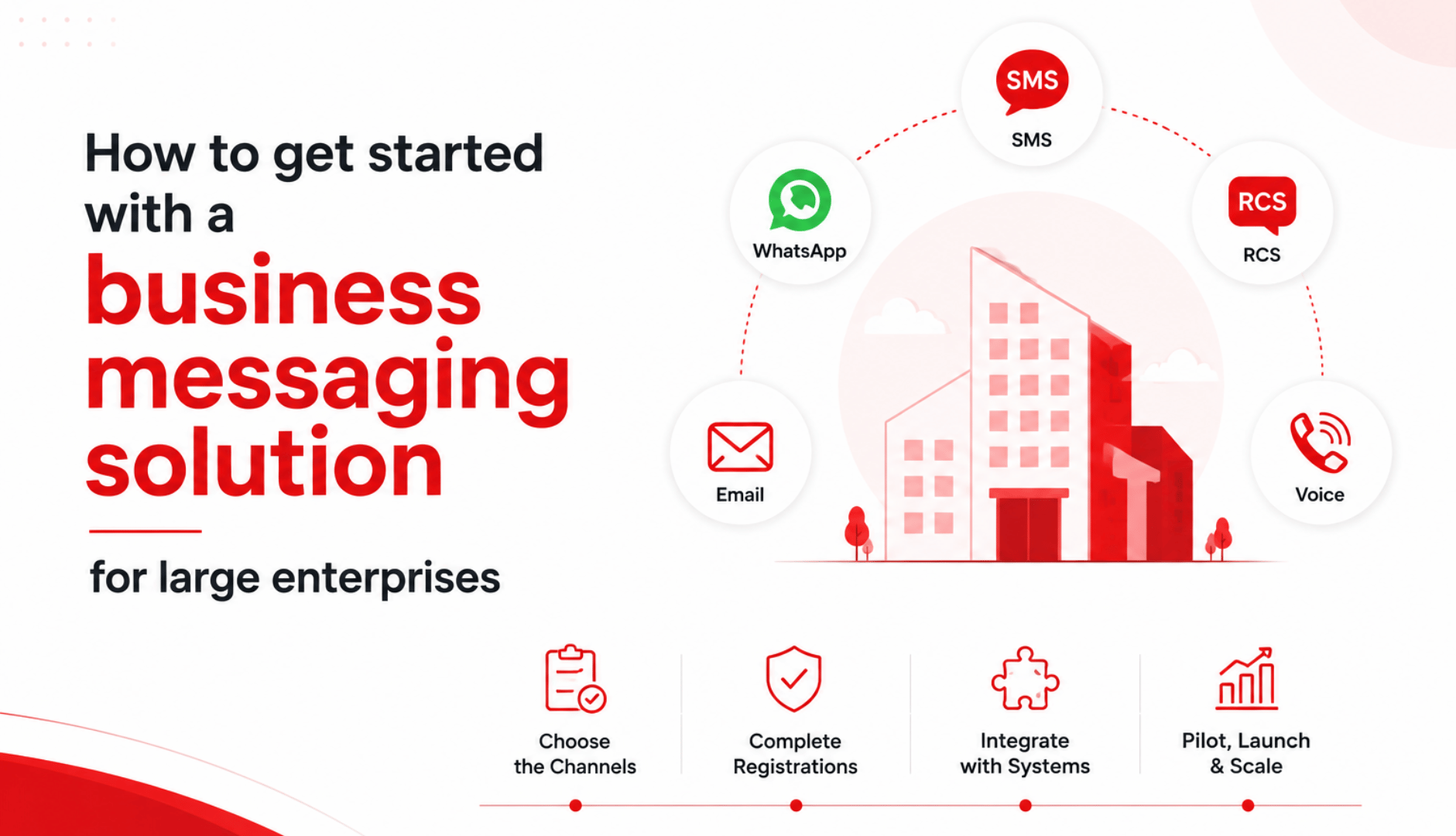


To get started with enterprise business messaging, pick the channels your customers actually use (SMS, WhatsApp, RCS, email, voice), choose a CPaaS provider that runs all of them from one platform, complete the registrations your region requires (DLT for SMS in India, Meta verification for WhatsApp Business API, an RCS agent for RCS), connect the platform to your CRM or CDP over API, then pilot one high-volume journey before scaling.
Most enterprises send their first live campaign within two to four weeks. The registrations and compliance sign-offs not the technology are usually what set that timeline.
What Is Enterprise Business Messaging?
At an enterprise, business messaging is the infrastructure you use to send and receive high volumes of customer messages across several channels and tie them into your existing systems.
It is application-to-person (A2P) communication: order updates, OTPs, payment reminders, appointment confirmations, service alerts and two-way support, sent programmatically from your CRM, core banking system or e-commerce backend rather than typed by an agent.
The channels that matter for most large organisations:
- SMS: near-universal reach, no app or internet needed, and open rates around 98%. Best for OTPs, alerts and anything that must arrive. See how bulk SMS and transactional SMS differ.
- WhatsApp Business API: rich, two-way conversations with media, buttons and in-chat flows (booking, KYC, catalogue browsing). Requires customer opt-in and pre-approved templates for notifications. It is not the same as the free app; here is the difference between the WhatsApp Business app and the API.
- RCS (Rich Communication Services): branded, verified messaging inside the native Android messages app, with logos, carousels and buttons, and automatic fallback to SMS when RCS is unavailable. Start with what RCS messaging is and how RCS compares to SMS.
- Email: long-form updates, statements and receipts.
- Voice and voicebots: reminders, verification and IVR-style flows where a call still works better than text.
A single platform that runs all of these is a CPaaS (Communications Platform as a Service). Buying one platform instead of stitching together separate SMS, WhatsApp and email vendors is the decision most enterprises make first, because it gives you one control plane, one integration and one compliance surface.
What makes enterprise setup different from a small-business rollout
A small business can install the WhatsApp Business app and start texting the same afternoon. An enterprise cannot, and shouldn't try to, because the requirements are different in kind, not just in scale:
- Volume and reliability. You are sending millions of messages a month, so deliverability, retries, rate limits and fallback routing matter more than any single feature.
- Integration. Messages have to fire automatically from your CRM, CDP, core banking system or order-management system not from a person clicking send.
- Compliance and audit. In regulated sectors you need stored, verifiable consent, opt-out handling, audit logs and data-residency controls to satisfy DLT, the DPDP Act, GDPR and internal risk teams.
- Governance. Multiple teams, permissions, approval workflows and security review (SSO, access controls) come into play before anything goes live.
- Procurement. SLAs, uptime commitments and named support are part of the decision, not an afterthought.
If your setup plan reads like an SMB tutorial, it is missing the parts that actually determine an enterprise go-live date.
Before you start: five things to decide
Getting the setup right is mostly about deciding these before you talk to any vendor.
- Use cases and volume. List the journeys you want to automate (OTPs, delivery updates, collections, onboarding) and estimate monthly message volume per channel. Volume drives pricing, number type and infrastructure.
- Channels. Match channels to your audience. In India, SMS and WhatsApp cover almost everyone; RCS is worth adding for Android-heavy, brand-led journeys. For a global base, weight toward WhatsApp and email.
- Build vs buy. Building directly on carrier and Meta APIs gives control but means you own registration, deliverability, retries and compliance. Buying a CPaaS gets you live faster and offloads that operational load. Most enterprises buy.
- Region and compliance. Where do your customers live? India means DLT registration and the DPDP Act; the EU means GDPR; the US means TCPA and 10DLC. This shapes consent handling and paperwork.
- Systems to connect. Identify the CRM, CDP, ERP or core system that will trigger messages, and whether you have API resources in-house or need the vendor to help.
How to Get Started with an Enterprise Business Messaging Solution
1. Map journeys and pick channels
Start with two or three high-volume, high-value journeys rather than "all of messaging." An OTP flow, a delivery-status flow and an abandoned-cart or payment-reminder flow are common first choices. For each, decide the primary channel and a fallback — for example, RCS with SMS fallback, or WhatsApp with SMS fallback.
2. Choose a provider
Shortlist CPaaS providers that support every channel you need natively, hold the right carrier and platform partnerships (a Google RCS partner and a Meta Business Solution Provider, at minimum), and can show enterprise references in your sector. Evaluate deliverability, uptime commitments, support model, and how consent and compliance are handled. A checklist is further down.
3. Register and verify
This is the step that decides your go-live date, so start it early.
- SMS in India: register your business as a Principal Entity on the DLT (Distributed Ledger Technology) platforms operated by the telecom operators under TRAI's rules. You register sender IDs (headers) and content templates, which are approved before you can send. Your provider usually manages the submissions. Configure your channel from the SMS product side once registration clears.
- WhatsApp Business API: set up the WhatsApp Business API through a provider, verify your business in Meta Business Manager, set a display name, then get message templates approved. See the WhatsApp product overview.
- RCS: register an RCS Business Messaging agent through an authorised partner and complete Google's brand verification so your messages show a verified sender name and logo.
4. Set up consent and compliance
Capture and store explicit opt-in for each contact, with a record of when and how consent was given, and honour opt-out (STOP) requests automatically. Under India's DPDP Act 2023 you also need a clear purpose for the data and a way to service data-principal requests — this DPDP and TRAI compliance checklist walks through it. A good platform builds consent management, opt-out and audit logs in, so this is a configuration step rather than a custom project.
5. Integrate with your stack
Connect the platform to the system that will trigger messages CRM, CDP, ERP or a custom backend over REST APIs or pre-built connectors. This is what turns messaging from a manual broadcast tool into automated, event-driven communication: a shipment marks "dispatched" and the update fires on its own. Confirm you can pass dynamic data into templates and receive delivery receipts and replies back into your systems.
6. Pilot, then scale
Run one journey to a limited audience first. Track delivery rate, read and response rate, and the business outcome that journey exists for — fewer support calls, more completed payments, lower cost per booking. Once the numbers hold, roll the same pattern out to more journeys and turn on cross-channel fallback so a failed RCS or WhatsApp message downgrades to SMS without anyone intervening.
How long does it take to go live?
For a single channel with a provider that handles registration, two to four weeks is typical. WhatsApp business verification and DLT template approvals are the usual long poles; the platform integration itself often takes days. A full omnichannel rollout across SMS, WhatsApp, RCS and email, integrated deeply with core systems, is more commonly a six-to-twelve-week programme depending on your internal IT timelines.
SMS vs WhatsApp vs RCS vs email: which channel for what
Channel | Reach | Best for | Needs opt-in? | Setup gate |
|---|---|---|---|---|
SMS | Every mobile phone, no internet | OTPs, alerts, must-deliver messages | Yes (A2P) | DLT registration (India) |
WhatsApp Business API | Large, especially India | Two-way support, rich flows, conversational commerce | Yes | Meta verification, template approval |
RCS | Android messages app | Branded, verified, media-rich promotions and updates | Recommended | RCS agent + Google brand verification |
Universal | Statements, receipts, long-form updates | Yes (marketing) | Domain authentication (SPF/DKIM) |
Most enterprises use several of these together and let the platform route each message to the channel most likely to reach and convert that specific customer, with SMS as the reliable fallback. If you are weighing them, the WhatsApp product, RCS product, email and voice pages break down each one.
Compliance you cannot skip
- India: DLT registration for SMS sender IDs and templates under TRAI, plus the Digital Personal Data Protection (DPDP) Act 2023 for consent, purpose limitation and data-principal rights. For WhatsApp specifically, follow WhatsApp API compliance.
- European Union: GDPR — lawful basis for processing, explicit consent for marketing, and the right to erasure.
- United States: TCPA for consent and time-of-day rules, and 10DLC registration for application-to-person SMS.
The common thread across all three is consent: hold a verifiable opt-in before you message someone, make opting out effortless, and keep the audit trail. Enterprises in banking, insurance and healthcare should confirm their provider can meet sector-specific norms and data-residency requirements.
How to Choose the Best Enterprise Business Messaging Provider
- Runs every channel you need from one platform, not resold point tools.
- Holds the right partnerships (Meta Business Solution Provider, Google RCS partner, direct carrier connections).
- Publishes deliverability and uptime commitments and can show them.
- Handles DLT, Meta and RCS registrations for you.
- Has built-in consent management, opt-out and audit logging for DPDP and GDPR.
- Offers APIs and connectors for your CRM, CDP or ERP, plus delivery receipts and inbound replies.
- Supports automatic cross-channel fallback.
- Provides named enterprise references in your industry and a real onboarding and support team.
As a reference point, Helo.ai (formerly VivaConnect) runs SMS, WhatsApp Business API, RCS, email and voice from one CPaaS platform, is a Google RCS partner and a WhatsApp Business API provider, and handles more than 200 million WhatsApp messages a month for enterprises across banking, financial services, insurance, retail and e-commerce, with DLT, DPDP and GDPR controls built in. Aditya Birla Capital reports cutting cost per appointment by 65% or more using WhatsApp Flows to let customers book housing-loan appointments inside the chat.
Common mistakes that slow enterprises down
- Leaving DLT, Meta or RCS registration until after the platform is chosen, then losing weeks to approvals.
- Buying separate vendors per channel and inheriting three integrations and three compliance surfaces.
- Skipping the pilot and launching every journey at once, so a deliverability or template problem hits at full volume.
- Treating consent as a checkbox instead of a stored, auditable record — the first thing a regulator or a Meta review asks for.
- Ignoring fallback, so a message that fails on WhatsApp or RCS simply never arrives.
Frequently asked questions
What is the difference between a business messaging platform and a CPaaS?
A business messaging platform sends and manages messages, often on one or two channels. A CPaaS (Communications Platform as a Service) exposes messaging, voice and other channels as APIs you embed in your own applications, so messages trigger automatically from your systems. Most enterprise platforms today are CPaaS.
Which business messaging provider is best for a large enterprise in India?
Look for a provider that is both a Meta WhatsApp Business API partner and a Google RCS partner, runs all channels from one platform, and handles DLT and DPDP compliance for you. Helo.ai, Gupshup, Kaleyra and Twilio are commonly evaluated; the right fit depends on your channel mix, volume and sector. This CPaaS providers guide compares the options.
Do I need WhatsApp Business API or the WhatsApp Business app?
The app is for small businesses and single users. Large enterprises need the WhatsApp Business API, which supports high volume, automation, multiple agents and CRM integration. Here is the full app vs API comparison.
How much does enterprise business messaging cost?
Pricing is per message and varies by channel, country and volume, with enterprise discounts at scale. WhatsApp is priced per conversation, SMS per message, and RCS and email have their own rates. See current WhatsApp API pricing, and get a per-channel quote against your estimated monthly volume rather than a single headline price.
Is RCS worth adding if I already use SMS and WhatsApp?
For Android-heavy audiences and brand-led journeys, yes. RCS gives verified branding, logos and interactive content inside the default messages app, and falls back to SMS automatically when RCS is unavailable, so you lose nothing by adding it.
How do I make sure messages actually get delivered?
Register correctly (DLT, verified WhatsApp sender, RCS agent), keep templates compliant, maintain clean opt-in lists, and use a provider with direct carrier connections and fallback routing. Deliverability is mostly a function of registration and list hygiene, not the tool itself. If messages stall, this covers why WhatsApp messages are not delivered.

.jpeg&w=96&q=75)