



Your emails are collecting dust. SMS open rates are as high as 98%
90% of texts are read within 3 minutes. Meanwhile, your last email blast? Probably sitting unopened between a spam folder and a forgotten newsletter. Businesses generate an average of $71 for every $1 spent on SMS marketing. If you're not sending bulk SMS yet, you're not just leaving money on the table — you're handing it to your competitors. Here's how to start
But here's the thing: sending bulk text messages in 2026 isn't as simple as typing a message and hitting "send to all." There are compliance rules, registration requirements, carrier regulations, and best practices that can mean the difference between your message landing on someone's phone… or disappearing into the void.
In this guide, I'm going to walk you through everything you need to know about how to send bulk SMS from picking the right platform and registering your number, to writing messages that actually convert and staying on the right side of the law. Whether you're exploring bulk SMS marketing for the first time or trying to improve your existing mass texting game, this is your one-stop resource.
Let's dive in.
What Is Bulk SMS (And Why Does It Still Dominate in 2026)?
Bulk SMS also called mass texting or bulk text messaging is the practice of sending a single text message to a large group of recipients simultaneously. Bulk SMS marketing is the distribution of specific messages to a large number of predetermined recipients simultaneously, and it is used to promote a product or service or connect with customers.
Think of it as a megaphone for your phone. Instead of texting one person at a time, you broadcast your message to hundreds, thousands, or even millions of people in one shot.
And the numbers back it up. SMS messages boast an impressive 98% open rate, with 90% of recipients opening these messages within 3 minutes of receipt. Compare that to email marketing's average 20% open rate, and you'll understand why SMS remains king of direct communication.
In 2026, successful SMS marketing isn't about spamming everyone with promotions; it's about permission, personalization, and timing. The businesses winning right now are the ones treating SMS like a conversation — not a billboard.
Bulk SMS vs. Group Texting — What's the Difference?
This trips up a lot of beginners, so let me clear the air.
Group texting is what you do from your personal phone — you add 10 friends to a group chat and send a message. Everyone sees everyone else's replies, and there's usually a cap of around 20–30 recipients depending on your carrier and device.
Bulk SMS is entirely different. You're sending one message to hundreds or thousands of individual recipients, and each person receives it as a private, one-on-one message. They can't see other recipients, and their replies come back to you privately. A defining feature of this form of mass communication is that businesses can use text message marketing software or mobile applications. They could also integrate an SMS API with their website or system to send and receive text messages.
In short: group texting is for your friend group. Bulk SMS is for your business.
How Does Bulk SMS Sending Actually Work?
Before we jump into the how-to, let's understand the engine under the hood. Knowing how the technology works helps you make smarter decisions about platforms, pricing, and deliverability.
Understanding SMS Gateways and SMS APIs
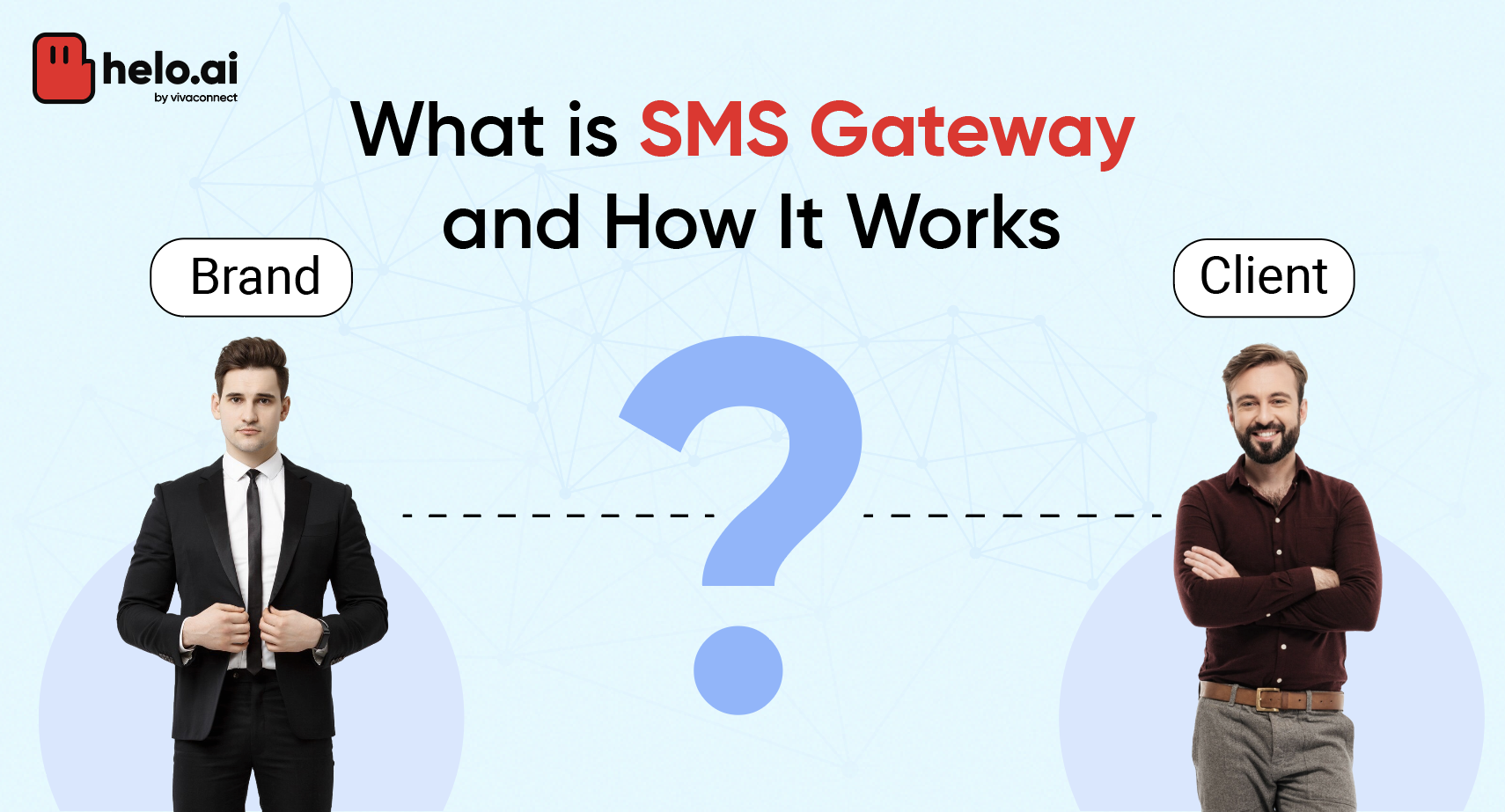
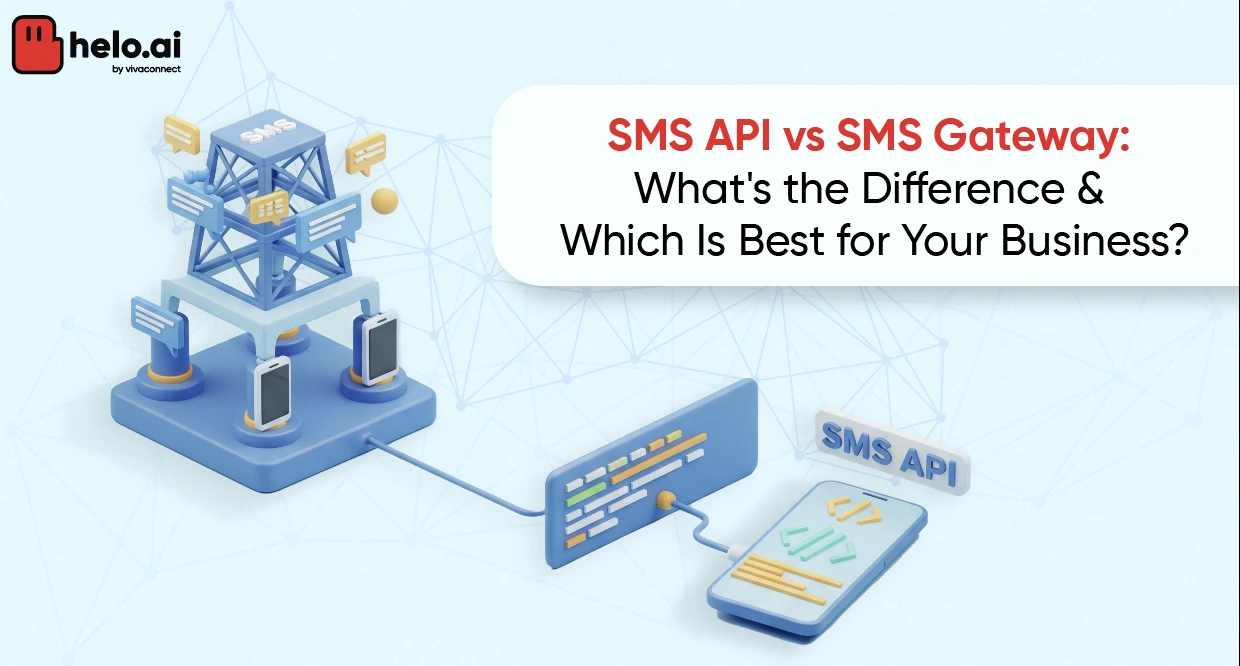
An SMS gateway is the bridge between your computer (or software) and the mobile network. When you hit "send" on a bulk SMS platform, your message travels through this gateway, which translates it into a format that mobile carriers can deliver to the recipient's phone.
An SMS API (Application Programming Interface) takes this further. It allows developers to integrate bulk SMS capabilities directly into their own software, CRM, or website. So instead of logging into a separate platform, your system can automatically trigger messages based on events — like a customer placing an order or booking an appointment.
Recommend Read : SMS API vs SMS Gateway: What's the Difference
The SMPP Protocol and Cloud Communications Platforms
Behind most professional SMS gateways is the SMPP protocol (Short Message Peer-to-Peer) — the industry-standard protocol for exchanging SMS messages between SMS providers and telecom carriers. You don't need to understand the technical internals, but knowing this term helps when evaluating SMS vendors.
Utilizing a trusted cloud-based service provides extensive global reach, adaptable pricing, advanced software features, and seamless integrations through programmable APIs. Most modern bulk SMS platforms are cloud communications platforms, meaning you access everything through a web dashboard or API no hardware needed.
How to Send Bulk SMS: Step-by-Step Process
Alright, here's the meat of the guide. Follow these 9 steps, and you'll have a professional, compliant bulk SMS operation up and running.
(Quick Guide)
- Log in to Helo Broadcast
- Register your Template ID, Entity ID, and Sender ID on DLT
- Create your SMS template with approved message content
- Go to Campaigns → Click "+ New Campaign"
- Choose "Create using Flow" or "Start from Scratch"
- Upload your audience file (.csv, .txt, .xls, .xlsx — max 200 MB)
- Enable duplicate number removal if needed
- Schedule or publish your campaign instantly
Step 1: Log In to Your Helo Broadcast Account
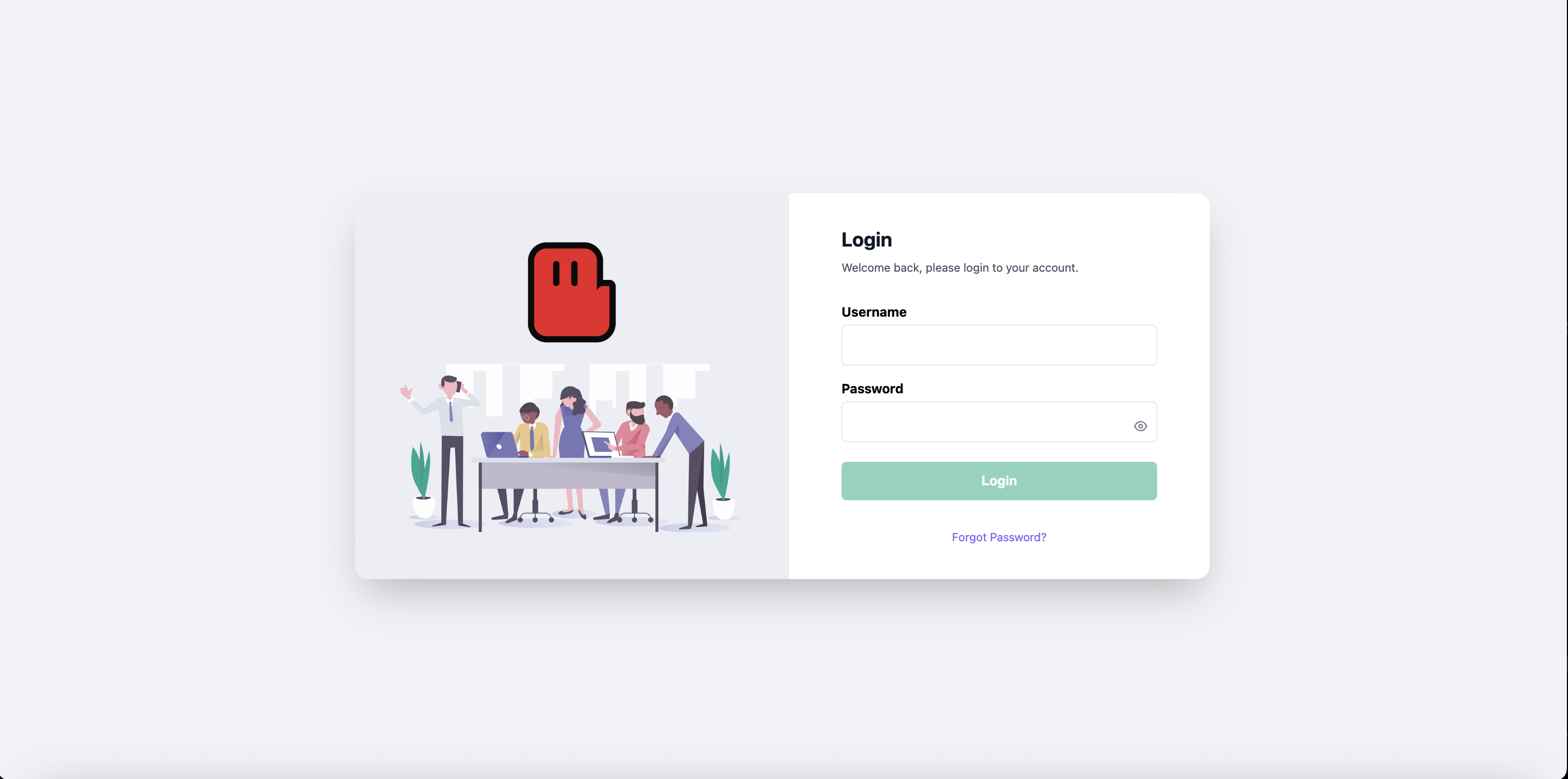
Getting started is simple. Head to the Broadcast platform and log in with your username and password. First-time users can Contact to the helo.ai team to get their account provisioned. Once inside, you'll have full access to the Campaigns, Templates, Analytics dashboards and more.
Step 2: Set Up Your SMS Template ID
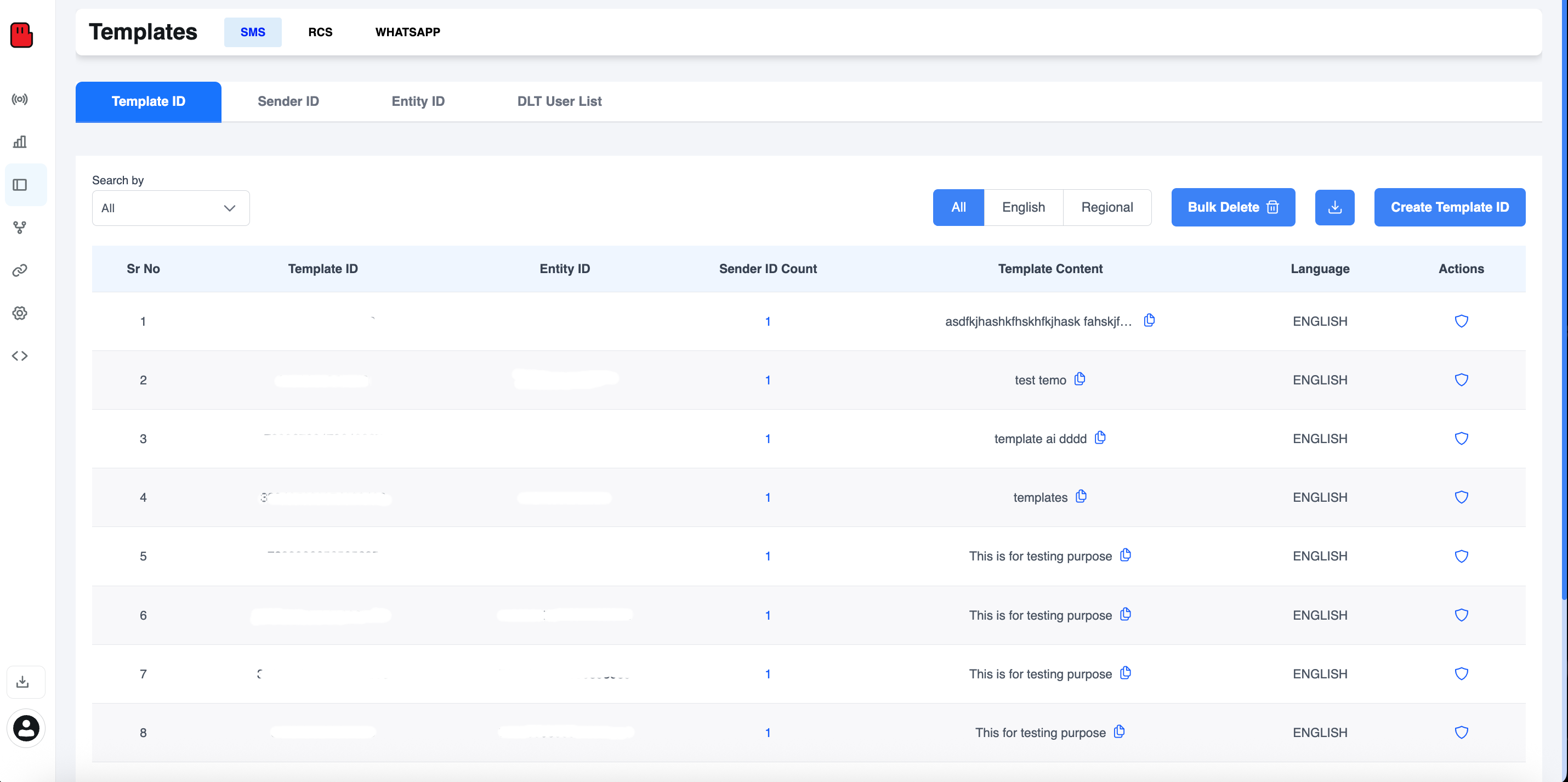
Before launching any campaign, you need a DLT-registered Template ID — mandatory for businesses sending SMS in India as per TRAI regulations.
Navigate to Templates → SMS → Template ID tab. Here you can view all your existing registered templates with details like Entity ID, Sender ID count, Template Content, and Language.
Key fields you'll see:
- Template ID — Your unique DLT-registered identifier
- Entity ID — Your registered business entity
- Sender ID Count — Number of senders linked to this template
- Template Content — The approved message body
- Language — English or Regional
Step 3: Create a New Template ID
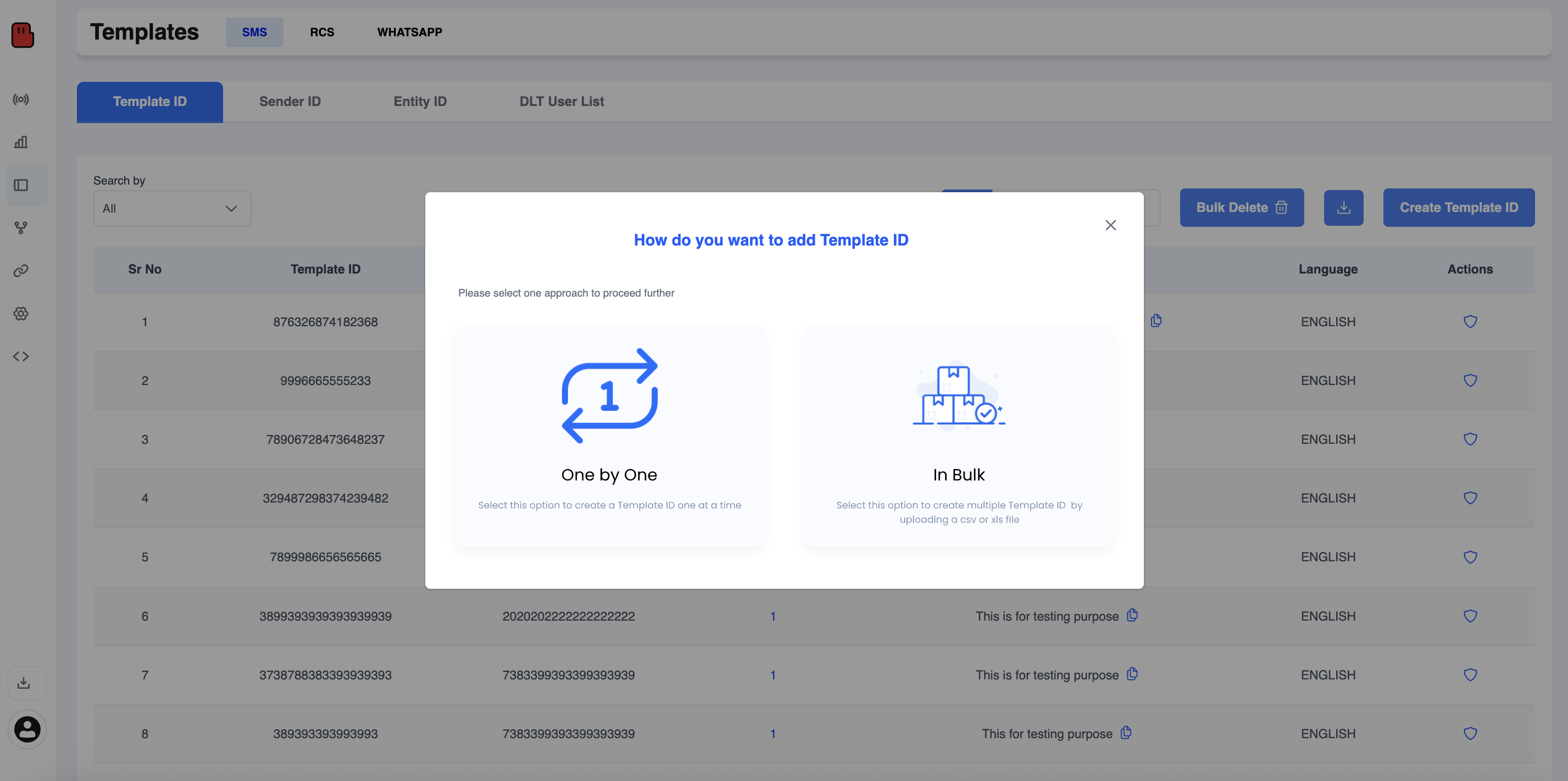
Click "Create Template ID" and choose your preferred method:
- One by One — Ideal for creating a single template with full control over each field
- In Bulk — Upload a CSV or XLS file to register multiple templates at once, perfect for large-scale operations
For most businesses starting out, "One by One" is recommended for accuracy.
Step 4: Fill In Your SMS Template Details
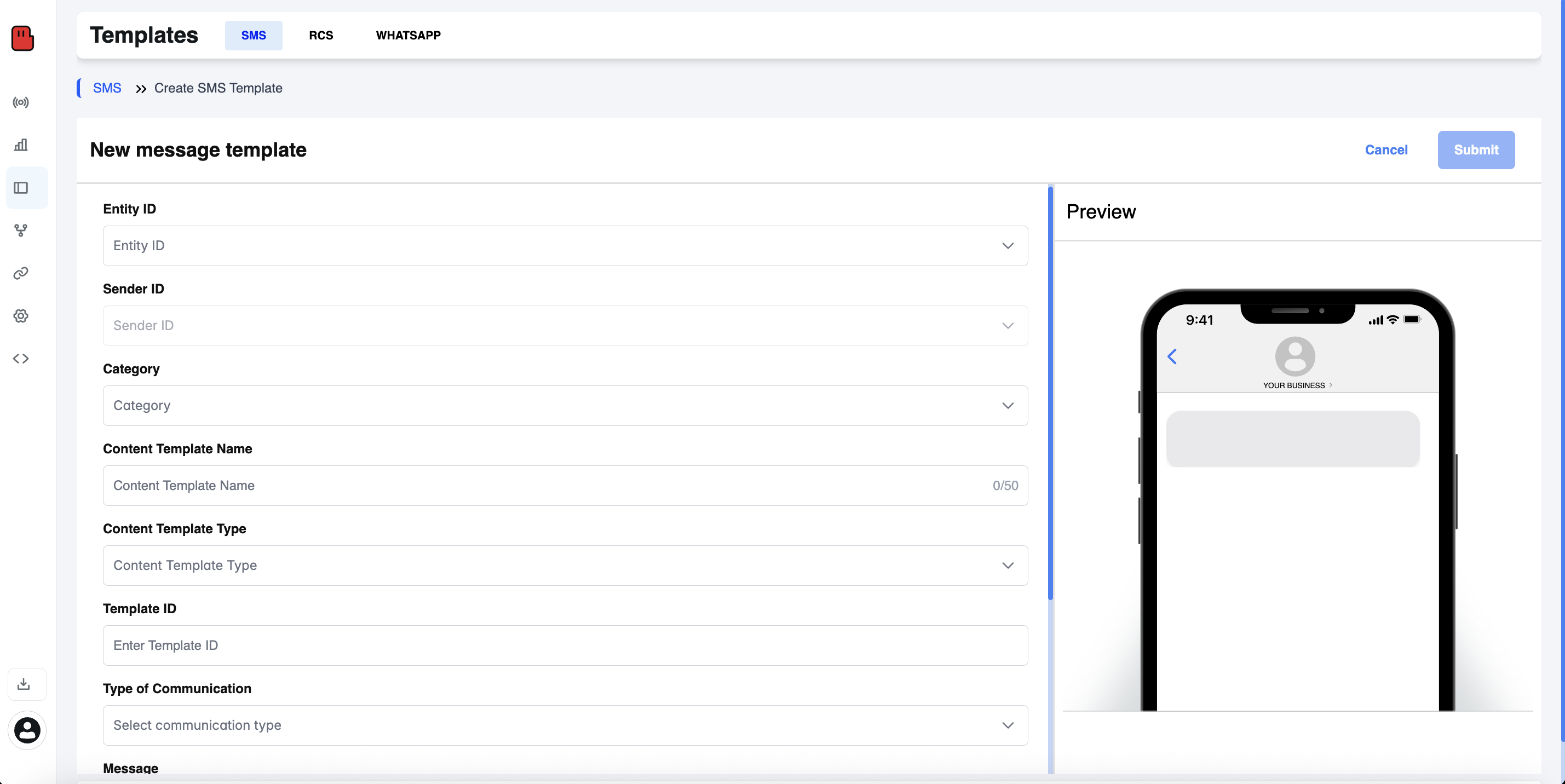
After selecting "One by One," you'll land on the New Message Template form. Fill in the following fields carefully, as these must match your DLT registration:
Field | Description |
Entity ID | Your registered business entity on DLT |
Sender ID | The 6-character alphanumeric sender name (e.g., HLOAI) |
Category | Transactional, Promotional, or Service |
Content Template Name | A descriptive internal name (up to 50 characters) |
Content Template Type | Type of message template |
Template ID | The DLT-issued template ID number |
Type of Communication | Select the communication category |
Message | Your approved SMS message body |
Template Type | Fixed or Variable (use {#var#} for dynamic fields) |
A live phone preview on the right side lets you visualize exactly how the message will appear to recipients before submitting.
Click “Submit” when done.
Step 5: Navigate to Campaigns and Create a New Campaign
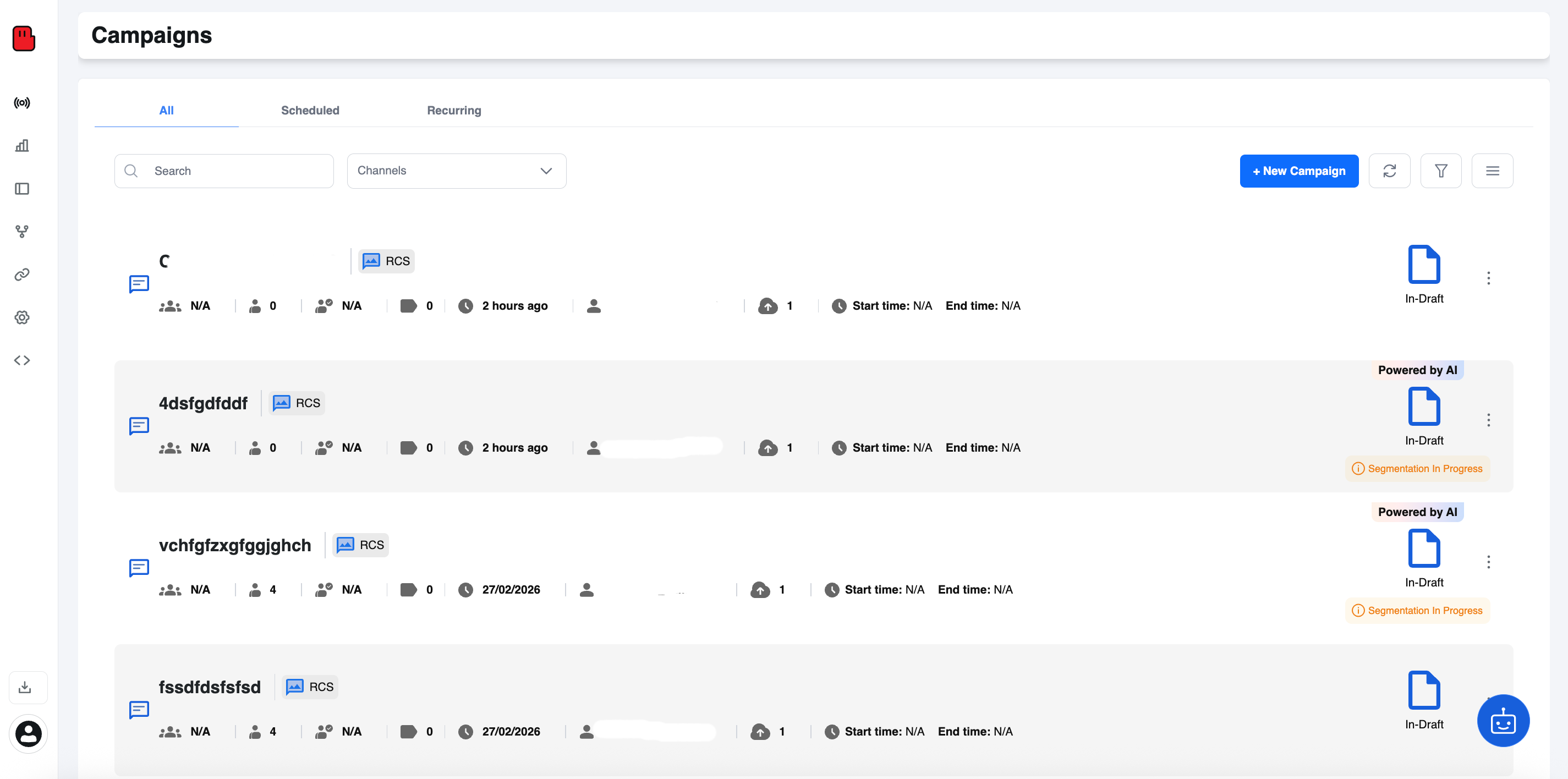
Once your template is ready, go to the Campaigns section from the left sidebar. You'll see all your existing campaigns here with key metrics at a glance:
- Audience size
- Messages sent
- Channel used (SMS, RCS, WhatsApp)
- Campaign status (In-Draft, Scheduled, Live)
- Start & End time
Click the "+ New Campaign" button in the top right to begin.
Step 6: Choose Your Campaign Creation Method
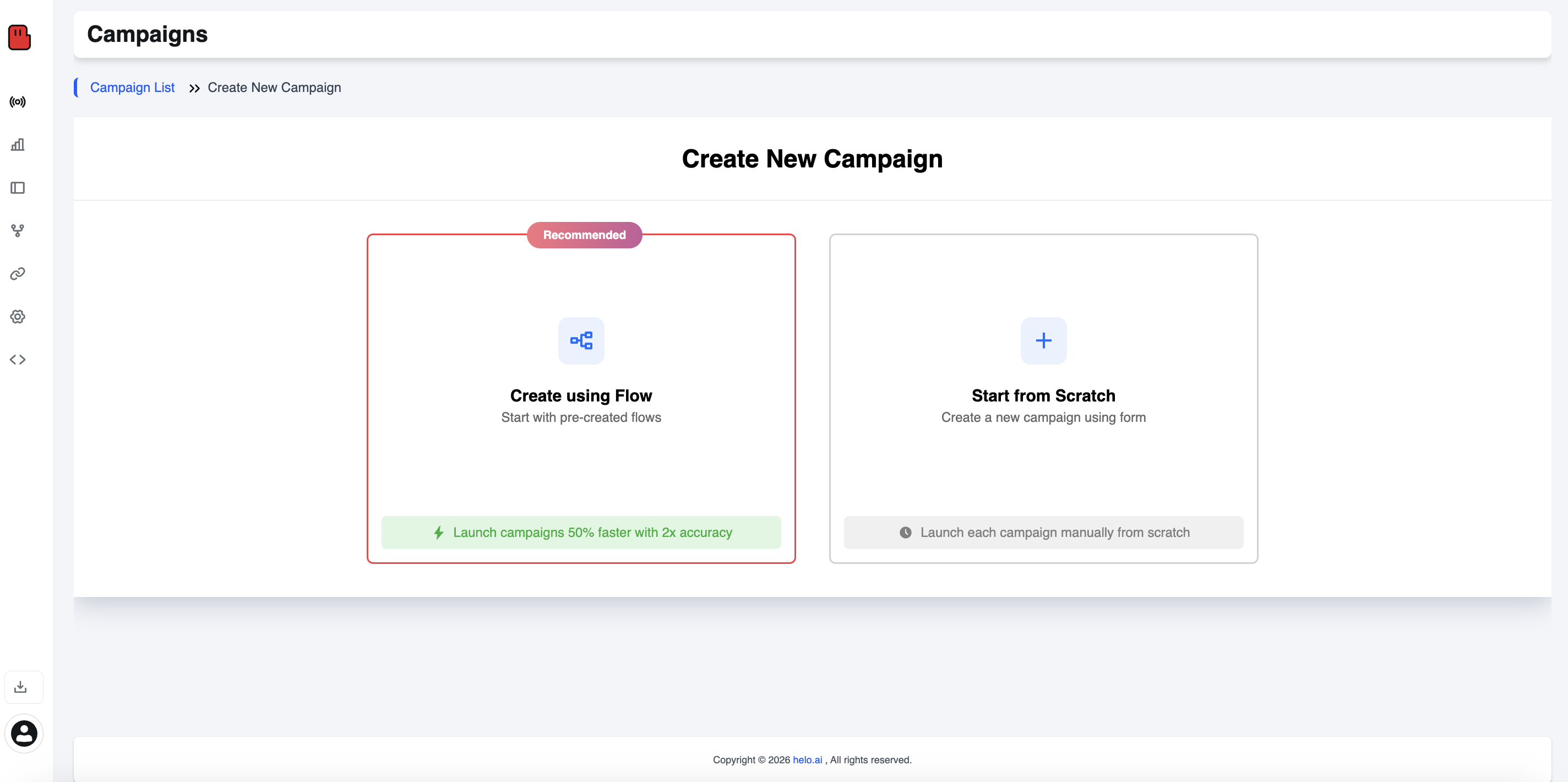
helo.ai gives you two ways to create a campaign:
Create Using Flow (Recommended)
Start with pre-built flows and launch campaigns 50% faster with 2x accuracy. Best for teams that run recurring campaign types.
Start from Scratch
Build your campaign manually using a form. Best for custom one-off campaigns with unique configurations.
For most users, "Create using Flow" is the recommended path — it's faster, reduces errors, and is especially useful for high-volume SMS operations.
Step 7: Configure Your Campaign Details
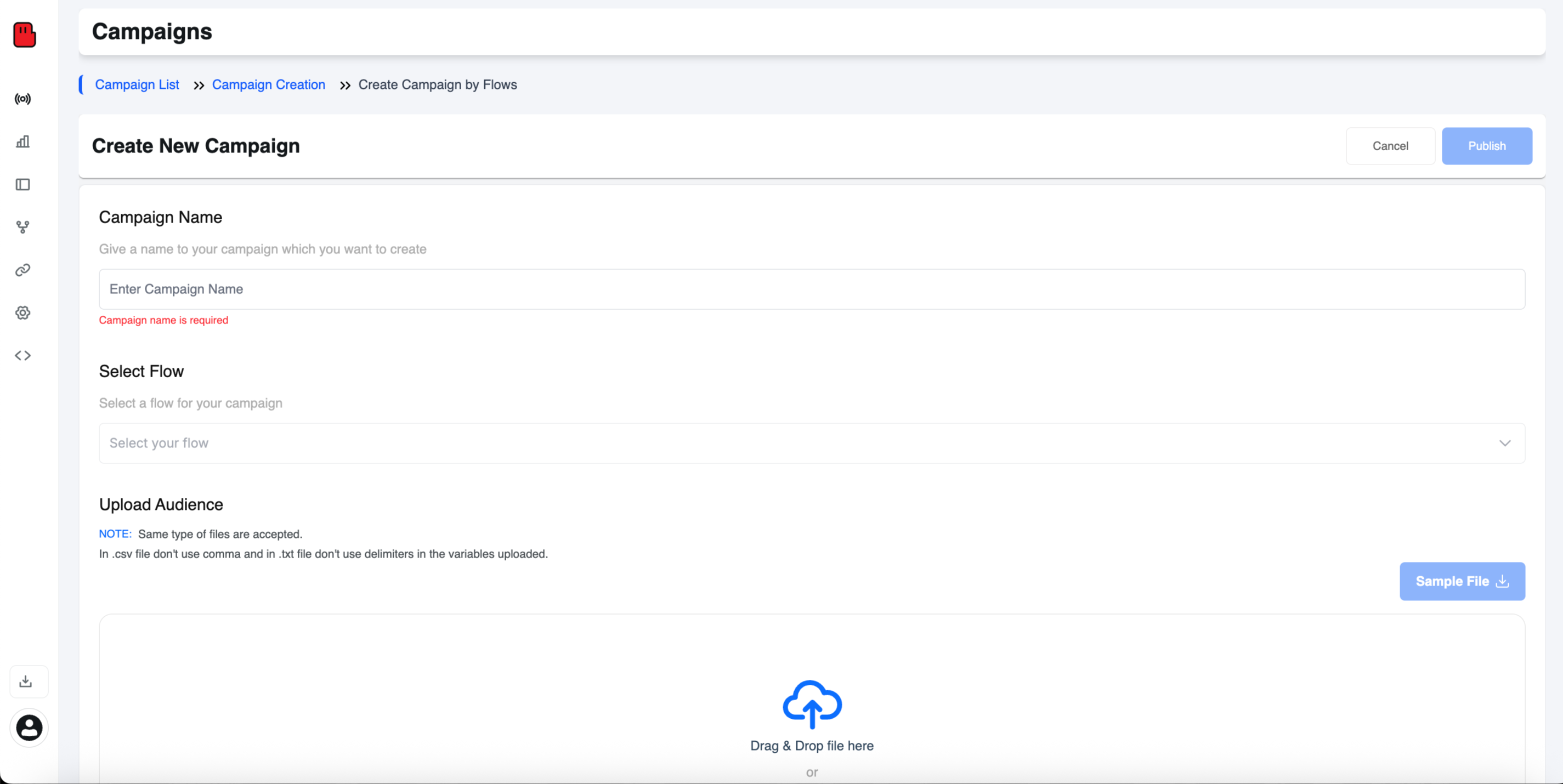
If you chose "Create using Flow," fill in these campaign essentials:
- Campaign Name — Give it a clear, identifiable name (e.g., "March_Promo_SMS_2026")
- Select Flow — Choose a pre-configured flow from the dropdown that maps to your message journey
- Upload Audience — Upload your contact list in supported formats
Step 8: Upload Your Audience File
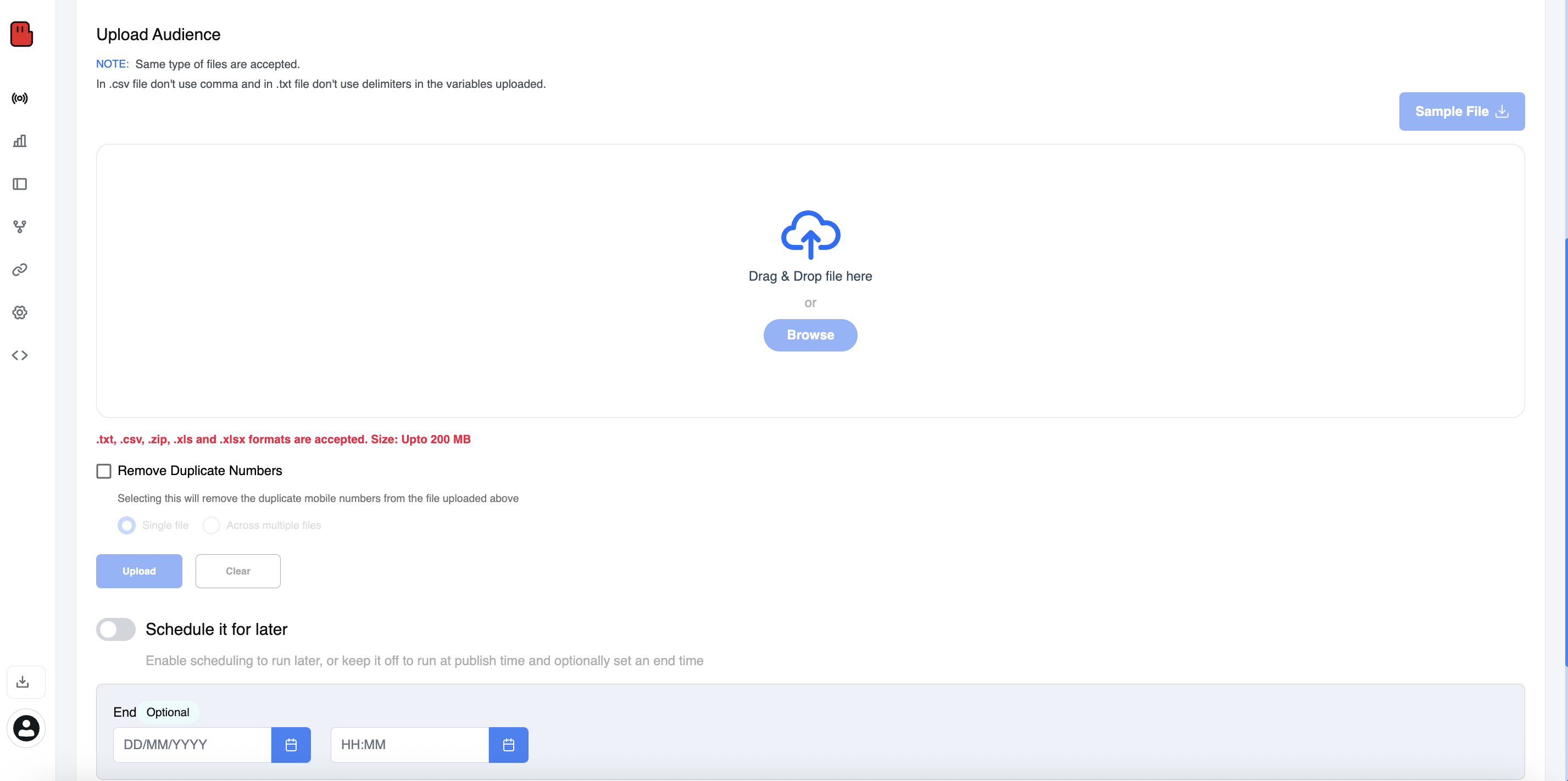
This is where you define who receives your SMS. helo.ai supports the following file formats:
.txt , .csv , .zip , .xls , .xlsx
Maximum file size: 200 MB
Important notes:
- In .csv files — do not use commas within variable values
- In .txt files — do not use delimiters within variables
- Download the Sample File to ensure your contact list is in the correct format
Additional Options:
- Remove Duplicate Numbers — Automatically deduplicates your list (within a single file or across multiple files) to avoid double-billing
- Schedule it for Later — Toggle this on to set a future start date/time (DD/MM/YYYY, HH:MM), or leave it off to send immediately upon publishing
Once your file is uploaded and settings configured, click Upload.
Step 9: Review and Publish Your Campaign
Do a final review of your campaign:
- Campaign name is filled
- Flow is selected
- Audience file is uploaded
- Schedule is set (or immediate send confirmed)
When everything looks good, click the blue "Publish" button in the top right corner. Your bulk SMS campaign is now live!
SMS Compliance: TRAI, DLT, and NDNC Rules
This is the most important section of this guide. India has some of the strictest SMS regulations in the world to fight spam. The framework is called TCCCPR (Telecom Commercial Communications Customer Preference Regulations), managed by TRAI.
Registering as a Principal Entity and Getting Sender IDs
To send bulk SMS for business, follow these DLT steps:
- Principal Entity (PE) Registration: Upload your KYC documents (PAN, GST, TAN) to a DLT portal. You will get a unique PE ID.
- Header Registration (Sender ID): This is the name that appears on the user's phone.
- Promotional Headers: Numeric, 6 digits (e.g., 567678).
- Transactional/Service Headers: Alphabetic, 6 characters (e.g., DOMINO, HDFCBK, JIOFIB).
- Note: You must prove ownership of the brand name to get the header.
Content Template Scrubbing and Variable Mapping
You cannot just type a message and send it anymore. You must register your content templates on the DLT portal first.
- Example Template: "Hello {#var#}, your OTP is {#var#}. Valid for 10 mins."
- Scrubbing: When you send a campaign, the DLT system checks (scrubs) your message against the approved template. If it doesn't match perfectly, the message is blocked.
TRAI Timing Rules (9 AM to 9 PM) and NDNC Filtering
- Promotional SMS can strictly be sent only between 9:00 AM and 9:00 PM.
- NDNC (National Do Not Call) Registry: If a user has registered for DND (Do Not Disturb), you legally cannot send them promotional SMS. Your SMS provider will automatically filter these numbers out during the sending process to keep you compliant.
Sending Internationally? (A Note on TCPA and A2P 10DLC)
If your Indian business sends SMS to customers in the USA, DLT does not apply. Instead, you must comply with US regulations:
- TCPA SMS rules: You need prior express written consent.
- A2P 10DLC registration: You must register your brand and campaign use case with The Campaign Registry (TCR) to send to US 10-digit numbers.
Real-World Use Cases: What to Send, When, and on Which Route
Every guide lists the same use cases — promotions, reminders, OTPs. You already know what to send.
Here's what competitors won't tell you: every message type needs a specific DLT route, header, and timing window — get it wrong and your perfectly crafted message never reaches anyone.
Revenue-Driving Messages (Promotional Route)
These make you money — but they come with the tightest restrictions.
Message Type | Automation Trigger | Timing |
|---|---|---|
Flash sale / discount code | Campaign schedule | 9 AM–9 PM only |
New product launch | Inventory update | 10 AM–12 PM (peak engagement) |
Loyalty rewards / birthday offers | CRM date trigger | Morning slot preferred |
Abandoned cart nudge | Cart inactive 30 min | Within allowed hours |
Seasonal / festive campaigns | Calendar event | 2–3 days before festival |
Reality check: These only reach non-DND numbers. In India, ~23 crore+ numbers are on the DND registry. So if your list is 10,000 contacts, expect only 60–70% to be reachable via promotional route.
What smart brands do differently: They don't just "blast offers." They segment — recent buyers get upsells, browsers get discount nudges, inactive users get win-back messages. Same channel, completely different results.
"{#var#}, your wishlist item is now 30% off! Grab it before midnight: {#var#}. Reply STOP to opt out."
Trust-Building Messages (Transactional Route)
These don't sell anything — but they build the trust that makes future sales possible. And they reach everyone, including DND numbers, 24/7.
Message Type | Automation Trigger | Why It Matters |
|---|---|---|
Order confirmed | Purchase event | Instant reassurance |
Shipped + tracking link | Dispatch scan | Reduces "where's my order" calls |
Out for delivery | Last-mile update | Ensures someone's home |
Delivered | Delivery confirmation | Closes the loop |
OTP / login verification | Auth event | Security — non-negotiable |
Payment received / refund initiated | Payment gateway callback | Financial trust |
The hidden ROI: Every transactional message is a branding touchpoint you're not paying extra for. A clean, well-timed "Your order shipped!" text builds more loyalty than a ₹500 ad spend.
"{#var#}, order #{#var#} shipped! Track: {#var#}. –BrandName"
(DLT reminder: whitelist your tracking domain.)
Relationship Messages (Service Route)
This is the most underused route — and the biggest missed opportunity. Service messages reach DND numbers, work 24/7, and feel helpful instead of salesy.
Message Type | Automation Trigger | Impact |
|---|---|---|
Appointment reminder (T-24h + T-2h) | Booking system | Cuts no-shows by 40–60% |
Service due / renewal reminder | CRM date field | Drives repeat revenue |
Account update / policy change | Admin trigger | Builds transparency |
Feedback / survey request | Post-service (T+2h) | Improves NPS scores |
Thank you / welcome message | First purchase / sign-up | Sets relationship tone |
Pro move that competitors ignore: Chain these into a 3-message sequence. Reminder → Confirmation → Feedback. It takes 5 minutes to set up, runs forever on autopilot, and makes your brand feel premium.
"Hi {#var#}, your appointment at BrandName is tomorrow at {#var#}. Reply 1 to confirm, 2 to reschedule."
Sector-Specific Wins (What Works Beyond Retail)
Not every business is eCommerce. Here's what actually moves the needle in specific industries:
Schools & Education Emergency closures, exam schedules, fee deadlines, PTM reminders, bus delay alerts. When something urgent happens at 6 AM — a text is the only channel that works.
Healthcare & Clinics Appointment reminders, lab report availability, vaccination schedules, prescription refill nudges. Patients expect these — and TRAI's service route makes it frictionless.
Real Estate Site visit confirmations, EMI reminders, document readiness alerts, possession updates. Long sales cycles need consistent touchpoints — texting keeps buyers warm without annoying them.
Banking & Finance Already the heaviest users of transactional messaging in India. OTPs, balance alerts, EMI due dates, KYC reminders, suspicious activity warnings.
Restaurants & Food Delivery Order confirmations, delivery ETAs, feedback requests, and (on promotional route) weekly specials or new menu launches to regulars.
The Pattern Nobody Talks About
Look at the table above again. Notice something?
The highest-delivering, lowest-complaint messages aren't promotions. They're service and transactional messages — because they're expected, helpful, and timely.
The smartest strategy in 2026 isn't "send more promos." It's:
- Build trust with transactional + service messages first
- Earn attention by being consistently useful
- Then layer in promotional campaigns to an audience that actually wants to hear from you
That's how you get high open rates, low opt-outs, and real revenue — not by blasting discount codes to a cold list.
Bulk SMS Templates You Can Copy and Paste
Here are ready-to-use templates for the most common scenarios. Just swap out the brackets with your information.
1. Promotional Offer:
Hi {first_name}! 🎉 Enjoy 25% off your next order with code SAVE25. Valid until [date]. Shop: [link]. Reply STOP to opt out.
2. Appointment Reminder:
Reminder: Your appointment with [Business Name] is tomorrow, [Date] at [Time]. Reply CONFIRM to keep it or RESCHEDULE to change. Reply STOP to opt out.
3. Shipping Update:
Great news, {first_name}! Your order #[order_number] has shipped. Track it here: [link]. Questions? Reply to this text!
4. Event Notification:
📢 Heads up! [Event Name] has moved to [New Location] due to weather. Same time: [Time]. See you there! Reply STOP to opt out.
5. School Alert:
[School Name] Alert: Due to severe weather, all classes are cancelled on [Date]. Stay safe! Check [link] for updates.
6. Payment Reminder:
Hi {first_name}, your payment of $[amount] is due on [date]. Pay now: [link]. Questions? Call [phone]. Reply STOP to opt out.
7. Welcome / Onboarding:
Welcome to [Brand Name]! 🎉 You're now signed up for exclusive deals and updates. Reply HELP for support or STOP to unsubscribe.
8. Feedback Request:
Hi {first_name}, how was your experience with [Business Name]? We'd love your feedback: [survey link]. Thanks! Reply STOP to opt out.
How to Measure Bulk SMS Success: Delivery Rate, Open Rate, and CTR
Delivery Rate (DLR): This is your most important metric. A low delivery rate usually means your DLT templates are failing scrubbing or your list has too many invalid numbers.
Click-Through Rate (CTR): Since you cannot track "opens" technically on SMS (like email pixels), you track clicks. Use a link shortener to see how many people clicked your offer.
Delivery Reports (DLR): Always check your DLRs. They tell you if the message was Delivered, Failed, Rejected (by DLT), or Undelivered (Phone switched off).
How to Avoid Spam Filtering and Improve Bulk SMS Deliverability
You've registered on DLT, approved your templates, and built a clean list. But if telecom operators filter your messages before they reach the recipient's phone, none of it matters.
In India's 2026 SMS ecosystem, deliverability isn't about hacks or tricks — it's about doing the basics right, every single time. Here's how to stay out of the spam trap:
1. Complete DLT Registration
This is the single biggest reason messages fail. If you try to send bulk SMS without DLT registration, your messages will be blocked automatically by telecom operators — not throttled, not delayed, blocked completely. Ensure your entity, headers, and templates are all approved, and update your KYC on multiple operator portals (Airtel, Jio, Vi, BSNL) for maximum delivery coverage.
2. Fix Template Mismatches
Your message looks perfect. Your DLT registration is complete. But messages silently disappear. Why?
DLT Template Mismatch means your sent SMS content doesn't match the approved template — usually the static text, variable placement, or extra punctuation. Telecom scrubbing engines compare character-by-character, and even tiny differences cause filtering.
Watch out for:
- Extra spaces or punctuation not in the approved template
- Variables in wrong format (must be {#var#})
- Variable values exceeding the 30-character limit
- Sending in a different language than what was registered
- Missing Template ID or PE ID in the message payload
Pro tip: Before every campaign, compare your actual SMS body against the approved DLT template. Test with small batches first.
3. Whitelist Every URL
TRAI now requires that all URLs, APK links, and callback numbers in your SMS be pre-whitelisted on the DLT platform. Messages with non-whitelisted URLs will be blocked by telecom operators, leading to high failure rates.
Use branded short links (e.g., yourbrand.link/offer) — generic shorteners like bit.ly will get blocked. Get URLs approved before you include them in any campaign.
4. Respect Volume Limits and Sending Patterns
Indian regulations specify limits such as no more than 6 identical messages to the same number in an hour, and no more than 200 messages to the same number per day. Exceeding these triggers operator anti-spam filters.
Beyond hard limits, sudden volume spikes are a red flag. If you normally send 5,000 messages and suddenly blast 500,000, operators will filter your traffic. Ramp up gradually and spread sends across time windows.
5. Use Only Direct Routes — Avoid Grey Routes
Some low-cost SMS providers use grey routes unofficial pathways that bypass DLT verification entirely. No DLT validation occurs. The SMS may never reach the user. Grey routes often generate fake delivery confirmations without real handset delivery.
Always ask your provider: "Do you use direct operator routes?" If prices seem suspiciously low, they're likely using grey routes. Test delivery across all major carriers — if one consistently underperforms, it's a route problem.
6. Scrub Your List Against DND/NDNC — Every Time
Sending promotional messages to DND-registered numbers triggers complaints that can get you blacklisted for up to 2 years. Penalties range from ₹25,000 to ₹2,75,000 per DND complaint if you can't produce opt-in proof.
Use your SMS provider's DND scrubbing feature to filter out DND numbers before every promotional campaign.
Remember: transactional SMS can reach DND numbers, but promotional messages cannot.
7. Never Mix Promotional and Transactional Traffic
Mixing promotional content with transactional sender IDs doesn't just violate TRAI rules it destroys your sender reputation. Common reasons for rejection include usage of promotional content in a Transactional/Service category.
Use separate sender IDs (headers) for each message type. Never sneak promotional offers into transactional templates (like adding "Use code SAVE20" in an order confirmation).
8. Comply with the 2026 Variable Pre-Tagging Rule
Under the 2026 rules, every variable in your template must have a "tag" defining its purpose. If a spot is tagged for a customer name, the system will block the message if someone tries to put a URL there. For new templates, compliance is mandatory from 15th January 2026. Existing templates must be updated within timelines communicated by DLT.
9. Watch Out for TRAI's New AI Spam Detection (March 2026)
This is the freshest development. TRAI has directed telecom operators to share information about suspected spam senders with each other within two hours of detection using AI-powered systems. Operators must comply by March 29, 2026.
If your sending patterns look like spam even if your content is legitimate AI systems may flag your number, triggering KYC re-verification and potential disconnection. The solution? Consistent, predictable sending patterns and squeaky-clean compliance.
10. Monitor Delivery Reports — And Know the Error Codes
Don't just look at "sent" numbers check actual delivery reports (DLRs) after every campaign.
Error Code | Meaning | Quick Fix |
1001 | Header not registered | Register sender ID on DLT |
1002 | Template mismatch | Compare SMS body with approved template |
2001 | Consent missing | Ensure valid opt-in for promotional recipients |
3001 | Invalid Entity ID | Verify PE ID in message payload |
A sudden drop in delivery rate is your early warning system. Investigate immediately — don't wait for customer complaints.
FAQs
Do I need DLT registration to send bulk SMS in India?
Yes. As per TRAI regulations, all commercial SMS senders in India must register their Entity ID, Sender ID, and Template ID on the DLT platform before sending messages.
Can I schedule bulk SMS campaigns for a future date?
Yes. Toggle the "Schedule it for later" option during campaign creation and set your preferred date and time.
What's the difference between Transactional and Promotional SMS?
Transactional SMS (OTPs, alerts, confirmations) can be sent 24/7. Promotional SMS (offers, discounts) can only be sent between 9 AM–9 PM and not to DND numbers.
Can I send mass texts from my personal phone?
Your phone's default messaging app only lets you text around 10 people at once — and there's no way to handle opt-outs, track delivery, or personalize at scale. 21 Anyone who wants to send bulk texts has to go through third-party apps or an SMS platform. Your phone can be the remote control, but the actual sending engine needs to live on a proper platform with DLT compliance (in India) or carrier registration.
Is mass texting legal?
Yes, mass texting is legal, as long as you follow strict compliance rules and regulations. In India, that means DLT registration, approved templates, and respecting DND rules. Globally, laws like GDPR (Europe) and TCPA (US) require explicit consent before sending. 31 As long as you follow the rules — get consent before sending, respect opt-outs, and comply with local regulations — you're on solid legal ground.
What's the difference between mass texting and group texting?
Mass texting and group texting are both ways of reaching multiple people at once. However, when you send a group text, your message ends up as part of a "group chat." Everyone in your contact list is connected by the initial text, and they can see every response in the exchange. With mass texting, each recipient gets a private, individual message — they can't see other recipients. Replies come back to you as separate one-on-one conversations.
How many characters can I include in one message?
Standard SMS messages are 160 characters long. Each English SMS is 160 GSM characters or 70 Unicode characters for Unicode languages. Go beyond that limit and your message gets split into multiple segments — which means higher costs. Keep it short, clear, and action-driven.
What happens if my message exceeds 160 characters?
Messages longer than 160 characters can be split into two and sent. This is called message concatenation. 12 Mobile handsets utilize SMS segmentation info for reconnecting the SMS message correctly. The recipient sees one seamless message, but you get charged for each segment. So a 320-character message costs you double.
Do I need any software to get started?
There is no need to install any additional software to send your bulk SMS messages. All you have to do is use an online platform like Helo Broadcast by Helo.ai to get the job done quickly and easily. Most providers offer a web-based dashboard you can access from any browser. Some also offer mobile apps and API integration for automation.
Is there a limit to how many messages I can send at once?
It depends on your provider and route type.Technically there is really no limit, however mobile carriers are a little more cautious letting someone send thousands of SMS messages at one time for spam reasons. In India, operators have anti-spam thresholds — like no more than 6 identical messages to the same number per hour. Start with smaller batches and scale up gradually.
How long does delivery take?
The average delivery time through SMS gateways is around 10 seconds but may take longer due to network congestion. Transactional messages (like OTPs) are typically prioritised and arrive within seconds. Promotional messages may take slightly longer depending on the time window and carrier load.
Can I personalise messages when sending to thousands of people?
Absolutely. It only takes a moment to insert a first name, last name, or custom field to your SMS messages. This doesn't just make your audience feel valued, it also increases the effectiveness of your campaign. In India, use the {#var#} variable format in your DLT-approved templates for personalisation.
Can I automate my messaging campaigns?
Most bulk SMS platforms enable automation features. You can pre-program automatic messages when certain conditions like abandoned shopping carts, new user registration, or order confirmations occur. You can also schedule recurring messages, set up drip campaigns, and trigger alerts based on customer actions — all without manual effort.
How do I know if my messages were actually delivered?
Every reliable provider offers delivery reports (DLRs) that show you the status of each message — delivered, failed, or pending. 9An SMS platform can text-enable your business's phone number, plus provide real-time analytics on your bulk text's delivery rates and engagement. Always check DLRs after every campaign. A sudden drop in delivery rate means something needs fixing.
Do SMS credits expire?
This varies by provider.Text Platform SMS credits do NOT expire. This means that your SMS credits will be available in your account for as long as you need them. However, not all providers work the same way — some have expiry policies. Always check before purchasing.
Do I pay for replies from recipients?
Any replies to your SMS message from a recipient are carried by the recipient. You do not pay for replies to the SMS messages you send out. Replies are charged at standard SMS rates on the recipient's network. Most platforms let you view and manage incoming replies from your dashboard at no extra cost.
What's the best time to send marketing messages?
For promotional campaigns, late morning (10 AM–12 PM) and early evening (5–7 PM) tend to perform best. In India, promotional messages can only be sent between 9 AM and 9 PM. Drop a dash of urgency, maybe some exclusivity, and send at a decent hour. Nobody wants a 2 AM "FLASH SALE!"
What are the most common mistakes that kill campaign results?
Most bulk SMS campaigns fail for the same reasons — outdated contact lists, generic messages, and poor targeting. Other common killers include DLT template mismatches, sending to DND numbers without permission, using non-whitelisted URLs, and ignoring delivery reports. Fix these basics and you'll outperform 90% of senders.


.jpeg&w=96&q=75)