


Most businesses overpay for WhatsApp API — not because it’s expensive, but because the pricing isn’t always easy to understand. With multiple cost factors like message categories, country-based rates, and BSP markups, it’s easy to miscalculate the actual spend.
In July 2025, Meta replaced conversation-based pricing with a per-message pricing model for WhatsApp API. Under this model, businesses are charged for each delivered template message based on its category, recipient country, and volume.
Because of this multi-layered pricing structure, many businesses either underestimate their costs or end up paying 20–30% more than they should.
If your business uses WhatsApp for OTPs, order updates, customer support, or marketing campaigns, understanding this pricing model is essential because it directly impacts your messaging costs and overall ROI.
In this guide, we’ll break down exactly how WhatsApp API pricing works in 2026 — including real costs, hidden fees, and how to reduce your spend without affecting performance.
WhatsApp API Pricing (2026): Quick Summary
WhatsApp API pricing in 2026 is based on a per-message model where costs depend on message category, recipient country, and monthly volume. Here’s a quick, no-fluff breakdown:
- Pricing model: Per-message pricing (since July 2025)
- Cost depends on: Message category, recipient country, and monthly volume
- Message categories:
- Marketing (highest cost)
- Utility (discounted at scale)
- Authentication (OTP messages)
- Service (free within 24-hour window)
- Free windows:
- 24-hour customer service window
- 72-hour Free Entry Point (Click-to-WhatsApp ads)
- Additional costs: BSP platform fees + markup (if any)
👉 In short: Total cost = Meta message fees + BSP charges + add-ons
WhatsApp vs WhatsApp Business App vs WhatsApp Business API
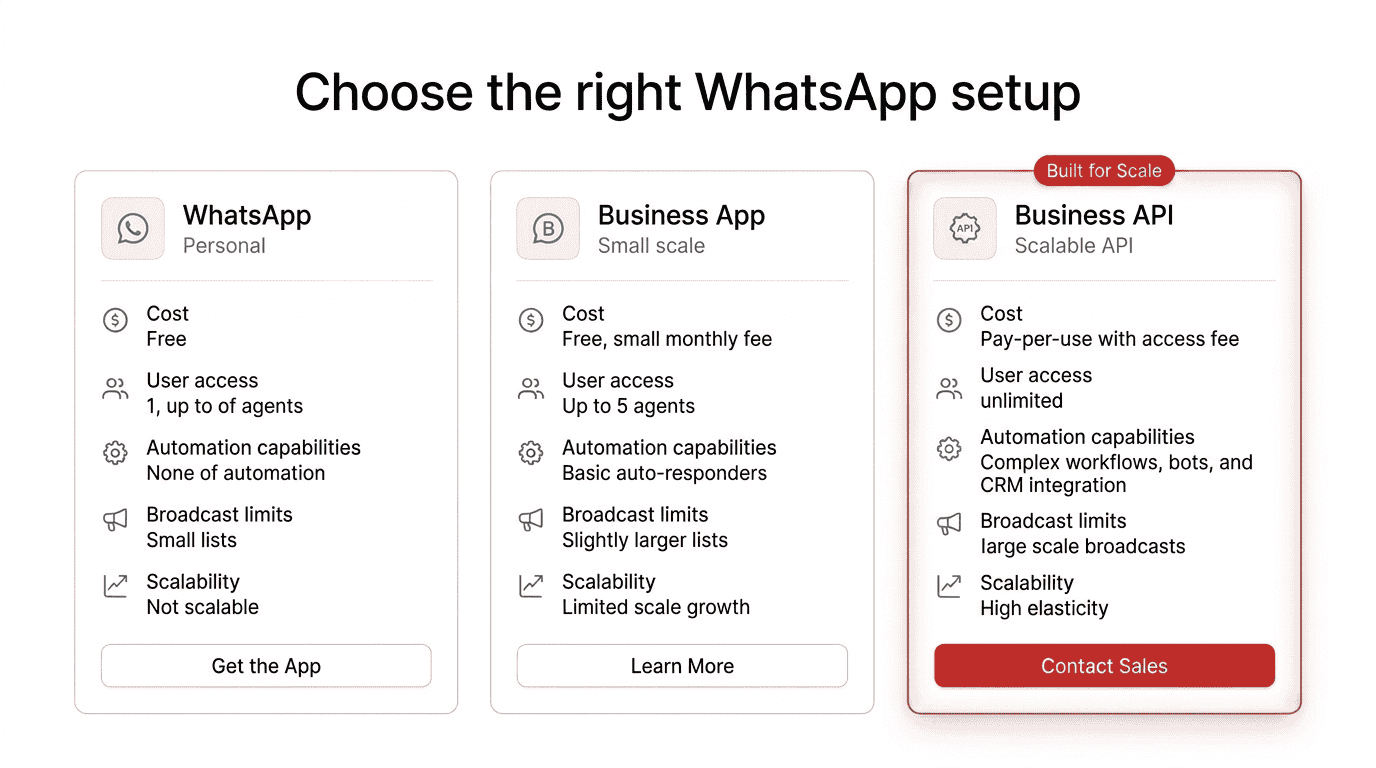
Before we get into pricing, it’s important to understand the three WhatsApp products available today each built for different use cases.
Feature | WhatsApp (Personal) | WhatsApp Business App | WhatsApp Business API |
Purpose | Personal messaging | Small businesses | Medium to large enterprises |
Cost | Completely free | Completely free | Per-message pricing by Meta + BSP platform fees |
Device Access | Single device | Up to 4 linked devices | Unlimited users and devices |
Automation | None | Basic quick replies, greeting messages | Chatbots, workflows, CRM integration, AI agents |
Bulk Messaging | Not available | Broadcast lists (256 contacts max) | Unlimited broadcasts via template messages |
Analytics | None | Basic message stats | Detailed campaign analytics, delivery reports, conversion tracking |
Integration | None | None | CRM, ERP, helpdesk, e-commerce platforms, custom APIs |
Best For | Personal use | Solo entrepreneurs, micro businesses | Growing and enterprise businesses needing scale |
The WhatsApp Business API (also called the WhatsApp Business Platform) is the only option that supports enterprise-scale messaging, automation, and integration. It’s the product this pricing guide focuses on.
If you’re evaluating whether the API is right for your business, explore Helo.ai’s WhatsApp API solution to see how companies like Bajaj Finance and Kotak Mahindra Bank use it at scale.
If you're still deciding which option fits your business, read our detailed comparison on WhatsApp Business App vs WhatsApp API to understand features, limitations, and scalability differences.
How WhatsApp API Pricing Works The Per-Message Model
Let’s break down how WhatsApp API pricing actually works in 2026.
Until June 2025, Meta charged businesses per 24-hour conversation window regardless of how many messages were exchanged. That model is now retired. Since July 1, 2025, Meta charges per delivered template message. This is the per-message pricing model.
What determines your cost per message?
The cost of each WhatsApp API message is determined by three primary factors: message category, recipient country, and monthly messaging volume.
- Message category — Marketing, Utility, Authentication, or Service. Each has a different rate.
- Recipient’s country — Rates vary by the country code of the person you’re messaging. A message sent to someone in one country can cost significantly different from the same message sent to another country.
- Monthly volume — High-volume senders unlock lower per-message rates for Utility and Authentication messages through tiered pricing.
Key change: You’re only charged for messages that are successfully delivered — not just sent.
A key shift we’ve observed post-2025 is that businesses who were optimised for conversation-based pricing often see unexpected cost spikes after moving to per-message billing — especially if they continue sending unnecessary template messages instead of leveraging free response windows.
If you're new to WhatsApp automation, it helps to first understand how WhatsApp chatbots and automated workflows work in real business scenarios.
WhatsApp API Message Categories and Their Costs
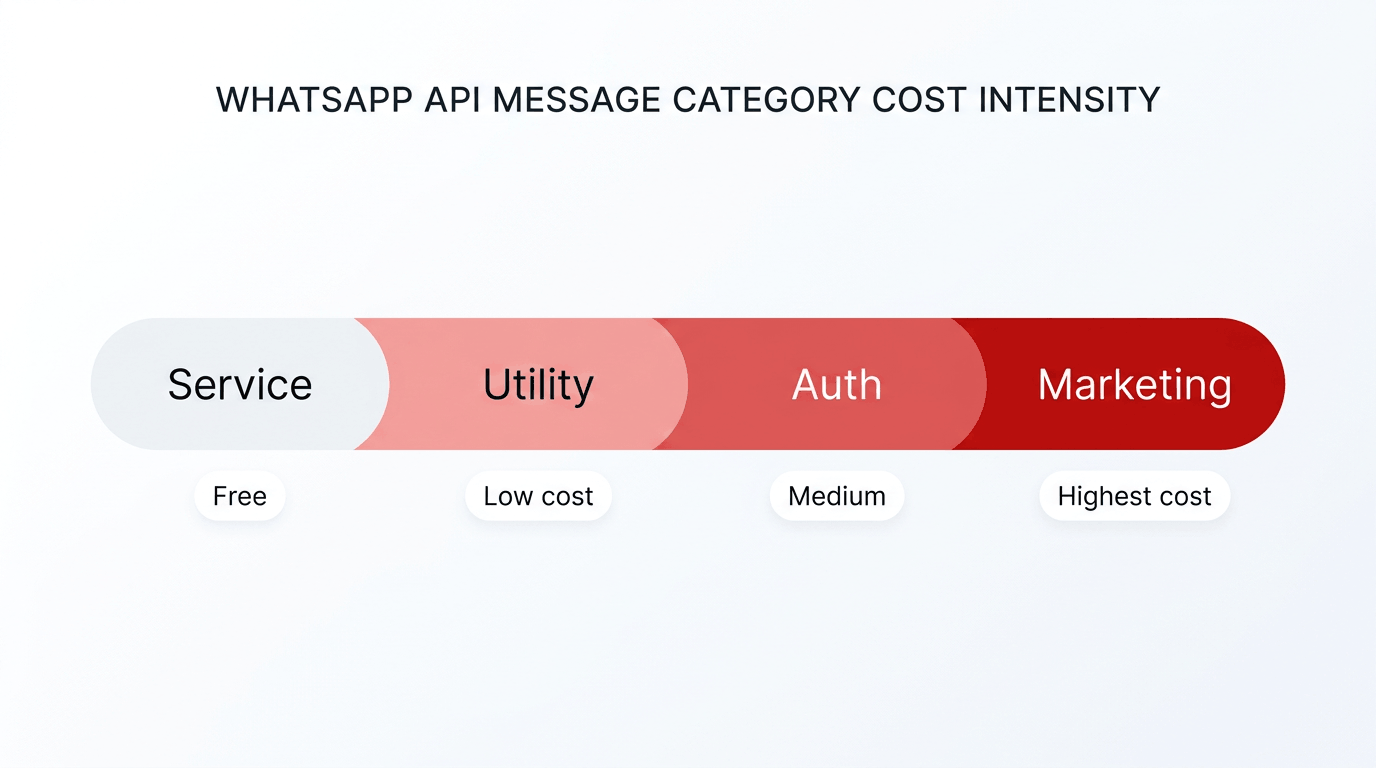
WhatsApp API messages are classified into four categories — Marketing, Utility, Authentication, and Service and each category has a different pricing structure.
Marketing Messages
Marketing messages include anything promotional — discounts, product launches, abandoned cart reminders, and re-engagement campaigns, and newsletters. Marketing messages are the most expensive category on the WhatsApp Business Platform.
- Charged per delivered template message.
- Not eligible for volume-tier discounts.
- Only exempted during the 72-hour Free Entry Point (FEP) window from Click-to-WhatsApp ads.
Utility Messages
Utility messages are transactional and triggered by user actions — order confirmations, shipping notifications, payment reminders, appointment updates, and account alerts.
- Charged per delivered template when sent outside the 24-hour customer service window.
- Completely free when sent within an open customer service window or 72-hour FEP window.
- Eligible for volume-based tiered discounts.
Authentication Messages
Used for one-time passwords (OTPs), login verification, and account recovery codes. Common in banking, fintech, and app-based businesses.
- Charged per delivered template message.
- Eligible for volume-based tiered discounts.
- Authentication-International messages (OTPs sent to users outside your home country) can cost significantly more — sometimes up to 20x the domestic rate. Plan accordingly.
Service Messages
Service messages are completely free. These are user-initiated conversations where customers reach out to your business with questions, complaints, or requests. When a user messages you, a 24-hour customer service window opens, and you can respond with unlimited free-form messages at no cost.
Category | When You’re Charged | When It’s Free | Volume Discounts |
Marketing | Per delivered template | During 72-hour FEP window | Not available |
Utility | Outside service/FEP windows | Within 24-hr service window or 72-hr FEP window | Available (up to 20% off) |
Authentication | Per delivered template | During 72-hour FEP window | Available (up to 20% off) |
Service | Never charged | Always free within 24-hr window | Not applicable |
Source: Meta WhatsApp Business Platform Pricing (official documentation)
In real-world implementations, misclassification is more common than expected. We’ve seen transactional notifications incorrectly tagged as marketing, increasing costs by 2–3x without any change in messaging volume.
WhatsApp API Pricing Breakdown - What You Actually Pay
The total cost of using the WhatsApp Business API includes Meta’s per-message fees, BSP platform charges, and any additional add-ons required for your use case.
Component 1: Meta’s Per-Message Fees
These are the meta WhatsApp messaging fees — standardised rates that every business pays regardless of which BSP they use. The rate depends on the message category and recipient’s country.
Meta publishes official rate cards for every market–category pair. You can view the full rate cards and current pricing at Meta’s developer documentation.
Component 2: BSP Platform Fees
Since WhatsApp API doesn’t come with a built-in interface, you need a Business Solution Provider (BSP) to actually use it. a platform that gives you a dashboard, chatbot builder, analytics, broadcasting tools, team inbox, and API access.
Most businesses use a WhatsApp Business Solution Provider (BSP) to access the API without building infrastructure from scratch — but choosing the right provider can significantly impact your overall cost.
BSP charges typically include:
- Monthly or annual subscription fee (ranges from $30–$500/month depending on the provider and plan).
- Some BSPs add a per-message markup on top of Meta’s rates (commonly 10–25%).
- Setup or onboarding fees (some providers charge these; many do not).
From a cost optimisation standpoint, BSP selection has a bigger long-term impact than most businesses anticipate. Even a 10–15% markup can significantly inflate monthly spend at scale, especially for high-frequency use cases like OTPs and alerts.
Helo.ai Advantage: As a direct Meta Business Partner, Helo.ai offers transparent platform pricing with plans designed for scale. No hidden fees, no surprise charges. See Helo.ai’s WhatsApp pricing →
Component 3: Optional Add-Ons
Depending on your use case, you may also need:
- Custom chatbot development or AI agent setup.
- CRM or ERP integration.
- Advanced analytics or reporting dashboards.
- Dedicated account management.
Total WhatsApp API Cost Formula
Total Monthly Cost = Meta Per-Message Fees + BSP Platform Subscription + BSP Message Markup (if any) + Optional Add-Ons
Evaluating only Meta’s per-message rates can lead to inaccurate cost estimates because the total WhatsApp API cost also includes BSP fees, markups, and optional add-ons.
In practice, businesses that evaluate only Meta’s rate card often underestimate their total cost by a noticeable margin. The actual spend becomes clear only after factoring in platform fees, markups, and usage patterns.
Real-World WhatsApp API Cost Examples
To make this more practical, let’s look at a few real-world scenarios:
1. E-commerce Brand (Marketing + Utility Heavy)
- Monthly volume:
- 8,000 marketing messages (offers, abandoned cart)
- 3,000 utility messages (order updates)
- Estimated scenario:
- Marketing messages = highest cost component
- Utility messages = partially free if sent within service window
👉 Insight: Most e-commerce brands overspend on marketing templates. By shifting campaigns into Click-to-WhatsApp ads and using the 72-hour free window, costs can drop significantly.
2. Fintech / Banking (Authentication + Utility Focus)
- Monthly volume:
- 10,000 authentication messages (OTPs)
- 5,000 utility messages (alerts, reminders)
- Estimated scenario:
- Eligible for volume discounts (up to 20%)
- High savings potential with tiered pricing
👉 Insight: High-volume OTP use cases benefit the most from WhatsApp’s tiered pricing. Choosing the right BSP without markup can reduce costs by 15–25%.
3. SaaS / Service Business (Inbound + Support Driven)
- Monthly volume:
- 2,000 service conversations (user-initiated)
- 1,500 utility messages
- Estimated scenario:
- Majority of messages fall within the free 24-hour window
👉 Insight: Businesses with strong inbound support workflows can run WhatsApp at extremely low cost — sometimes paying only for a small percentage of messages.
Across industries, the biggest cost difference isn’t driven by volume alone — it’s driven by how messaging flows are designed. Two businesses with similar volumes can have completely different costs based on strategy.
The 24-Hour Customer Service Window and 72-Hour Free Entry Points
WhatsApp API includes two important pricing windows the 24-hour customer service window and the 72-hour Free Entry Point (FEP) window.
both of which can significantly reduce messaging costs when used strategically.
The 24-Hour Customer Service Window
When a customer sends your business a message on WhatsApp, a 24-hour window opens. During this window:
- Service messages (free-form replies) — Completely free. Unlimited messages.
- Utility template messages — Also free within this window.
- Marketing templates — Still charged, even within this window.
- Authentication templates — Still charged.
The window resets every time the customer sends a new message — giving you another 24 hours.
One of the most underutilised cost levers we’ve seen is the 24-hour service window. Businesses that actively design workflows around this window often reduce their paid message volume significantly without impacting customer experience.
The 72-Hour Free Entry Point (FEP) Window
When a customer reaches you through a Click-to-WhatsApp ad or a Facebook Page CTA button, and you respond within 24 hours, a special 72-hour window activates. During these 72 hours:
- All message categories are free — including marketing templates.
This is one of the most powerful ways to reduce WhatsApp messaging costs especially for ad campaigns.
Pro Tip: Build your lead nurture sequences to fit within the 72-hour FEP window. Capture leads from Click-to-WhatsApp ads, qualify them with a chatbot, send promotional offers, and convert — all without paying a single message fee. Helo.ai’s Broadcast and Conversations products are built for exactly this workflow.
Volume-Based Pricing Tiers and Discounts
WhatsApp API pricing includes volume-based discounts for Utility and Authentication messages, where the cost per message decreases as your monthly message volume increases.
Tier | Volume Level | Utility Discount | Auth Discount |
Tier 1 | Base volume (starting messages) | 0% (base rate) | 0% (base rate) |
Tier 2 | Mid volume | 5% discount | 5% discount |
Tier 3 | High volume | 10% discount | 10% discount |
Tier 4 | Very high volume | 15% discount | 15% discount |
Tier 5 | Highest volume | 20% discount | 20% discount |
Note: Exact tier thresholds vary by country. For the latest thresholds and discount percentages, refer to Meta’s volume tier documentation.
Important rules for volume tiers
- Marketing messages are NOT eligible for volume discounts. Only Utility and Authentication qualify.
- Volume is tracked separately per message category AND per recipient country. You must reach the threshold within the same category–country pair.
- Only chargeable messages count. Messages sent during the free service window or FEP window don’t add to your volume tier.
- Volume counters reset at the start of each calendar month.
- If you operate multiple WhatsApp Business Accounts (WABAs), volumes are aggregated across all accounts.
Volume discounts are often overestimated. While they do reduce per-message cost, the overall savings are usually smaller compared to gains achieved through better categorisation and free window optimisation.
WhatsApp API Pricing Comparison API vs SMS vs Email
Businesses often compare WhatsApp API pricing with SMS and email to evaluate cost-effectiveness, engagement rates, and overall return on investment.
Metric | WhatsApp API | SMS | |
Open Rate | 90–98% | 70–90% | 15–25% |
Click-Through Rate | 15–40% | 5–10% | 2–5% |
Delivery Speed | Instant | Instant | Minutes to hours |
Rich Media Support | Images, videos, documents, buttons, carousels | Text only (limited MMS) | Full HTML |
Two-Way Conversation | Native (real-time chat) | Limited | Not practical |
Cost Per Message | Varies by category and country | Typically higher than WhatsApp in most markets | Very low per email |
Customer Preference | High (personal channel) | Moderate | Low (inbox fatigue) |
Best For | Engagement, support, conversational commerce | Alerts, OTPs, fallback | Newsletters, long-form content |
While WhatsApp API messages have a per-message cost, the engagement rates are dramatically higher. Businesses consistently report 5–10x higher click-through rates compared to email. The ROI per message makes WhatsApp a more cost-effective channel for most engagement and conversion use cases.
The smart approach? Use WhatsApp for high-engagement, high-conversion touchpoints and fall back to SMS or email for scenarios where cost-per-reach matters more. Helo.ai’s omnichannel platform supports WhatsApp, SMS, RCS, Email, and Voice — so you can route messages intelligently across channels.
To build a high-converting messaging strategy, explore our complete guide to WhatsApp marketing strategies, including campaign ideas, automation workflows, and lead generation tactics.
From a practical standpoint, we’ve seen WhatsApp outperform other channels not just in engagement, but in conversion efficiency — especially when combined with conversational flows instead of one-way broadcasts.
How to Reduce Your WhatsApp API Cost 7 Proven Strategies
Cost optimisation in WhatsApp is less about reducing volume and more about improving messaging strategy. The biggest savings typically come from structural changes — not from sending fewer messages.
Understanding the WhatsApp API pricing structure is only half the equation. Here’s how to actively reduce your WhatsApp API cost without sacrificing engagement:
Maximise the 24-Hour Service Window
When a customer messages you, handle as much as possible within the free 24-hour window. Deploy AI chatbots for instant responses, resolve queries, send order updates, and even upsell — all without triggering a single charged template.
Drive Inbound with Click-to-WhatsApp Ads
Design your ad campaigns to push customers to message you first via Click-to-WhatsApp ads. This triggers the 72-hour FEP window where all message categories — including marketing — are free. Build your entire lead nurture sequence within this window.
To maximise results, combine Click-to-WhatsApp ads with WhatsApp Flows and chatbot funnels to automatically qualify leads and capture user data within the chat itself.
Segment Before You Broadcast
Stop blasting your entire list. Use audience segmentation to send targeted campaigns to high-intent groups. One relevant message to 1,000 engaged users will outperform a generic broadcast to 10,000 contacts — and cost 90% less.
Use the Right Message Category
Ensure your templates are categorised correctly. A transactional message miscategorised as marketing will cost you more. Review your template categories regularly and recategorise if Meta has reclassified them.
Send Utility Templates Within the Service Window
Utility templates sent during an open 24-hour customer service window are free. Time your transactional notifications (order updates, payment confirmations) to coincide with active conversations.
Optimise Authentication Message Routing
Authentication-International messages (OTPs to foreign numbers) are dramatically more expensive. If your user base spans multiple countries, consider local number strategies or route authentication messages through the most cost-effective paths.
Choose a BSP with Transparent Pricing
Some BSPs add a 10–25% markup on every message. Over thousands of messages per month, this adds up fast. Choose a provider that offers transparent pricing and direct Meta billing. As a Meta Business Partner, Helo.ai offers competitive platform pricing designed for enterprise-scale messaging with no hidden markup surprises.
Ready to optimise your WhatsApp messaging costs?
Get Started with Helo.ai WhatsApp API →
WhatsApp API Pricing Calculator Estimate Your Monthly Spend
You can estimate your monthly WhatsApp API cost using a simple formula based on message volume, category rates, and BSP platform fees.
Monthly WhatsApp Cost = (Marketing msgs × Marketing rate) + (Utility msgs × Utility rate) + (Auth msgs × Auth rate) + BSP subscription fee
Example Cost Calculation
Let’s say a mid-size e-commerce business sends the following messages per month:
Message Type | Volume | Estimated Cost |
Marketing templates | 5,000 messages | Based on market rate |
Utility templates (outside service window) | 2,000 messages | Based on market rate |
Authentication (OTPs) | 1,000 messages | Based on market rate |
Service (customer replies) | 3,000 messages | Completely free |
BSP Platform Subscription | — | Varies by provider and plan |
Actual rates depend on your recipient countries. Use Meta’s official rate card to plug in your specific country rates for an accurate estimate.
For a personalised cost estimate based on your business’s messaging volume and use case, contact the Helo.ai team for a custom quote.
Frequently Asked Questions About WhatsApp API Pricing
How much does WhatsApp API cost?
Your total WhatsApp Business API cost consists of two parts: Meta’s per-message fees (which vary by message category and recipient country) and your BSP’s platform subscription and any message markup. Service messages are always free. Marketing messages are the most expensive category. The exact amount depends on your message volume, mix of categories, and choice of provider.
Is WhatsApp Business API free to use?
Accessing the WhatsApp Cloud API from Meta has no setup fee. However, you pay per-message charges for template messages (marketing, utility, and authentication). Service messages within the 24-hour customer service window are free. You’ll also need a BSP platform, which typically has a monthly subscription.
What is the WhatsApp API pricing model in 2026?
Since July 2025, WhatsApp uses a per-message pricing model. You’re charged for each template message that is successfully delivered. The previous conversation-based pricing (per 24-hour window) has been retired. Costs depend on message category, recipient country, and monthly volume.
What are WhatsApp API message categories?
There are four categories: Marketing (promotions, offers), Utility (order updates, payment reminders), Authentication (OTPs, verification codes), and Service (customer-initiated support). Marketing is the most expensive, and Service is completely free.
How does the 24-hour customer service window work?
When a customer messages your business, a 24-hour window opens. During this window, you can reply with free-form messages and utility templates at no charge. Marketing and authentication templates are still charged. The window resets with every new customer message.
What are volume discounts on WhatsApp API?
Meta offers tiered discounts for high-volume Utility and Authentication messages — up to 20% off at the highest tier. Marketing messages are not eligible for volume discounts. Volumes are tracked per category, per country, and reset monthly.
How can I reduce WhatsApp API costs?
Maximise the free 24-hour service window, drive inbound conversations via Click-to-WhatsApp ads (72-hour free messaging), segment your audience for targeted campaigns, categorise templates correctly, and choose a BSP with transparent pricing. Helo.ai’s platform is built to help you optimise every one of these levers.
What is WhatsApp Cloud API pricing?
WhatsApp Cloud API pricing follows the same per-message rates as the standard WhatsApp Business API. The Cloud API is hosted by Meta (no server setup required), and message rates are identical. The difference is in hosting and maintenance — not in message costs.
Can I use WhatsApp API without a BSP?
Technically, yes — you can use the WhatsApp Cloud API directly. But you’ll need to build your own messaging interface, chatbot logic, broadcasting tools, analytics, and team inbox from scratch. For most businesses, using a BSP saves months of development time and provides a ready-to-use platform.
How do BSP markup charges affect my total cost?
Some BSPs add 10–25% on top of Meta’s per-message rates. This means for every message Meta charges you $0.01, your BSP might charge $0.012. Over thousands of messages monthly, WhatsApp API markup charges can significantly inflate your costs. Look for providers that offer direct Meta billing or transparent pass-through pricing.
Get Started with WhatsApp Business API on Helo.ai
Managing WhatsApp API pricing effectively requires clear visibility into message costs, platform fees, and optimisation strategies.
Helo.ai is a 25-year veteran in enterprise communications and an official Meta Business Partner. Our WhatsApp API platform includes:
- AI-powered chatbots for automated customer engagement.
- Broadcast campaigns at scale across WhatsApp, SMS, RCS, and Email.
- Team inbox with multi-agent support and smart routing.
- WhatsApp Flows for structured in-chat forms and data collection.
- Click-to-WhatsApp ad integration for lead capture.
- Real-time analytics and campaign performance tracking.
- CRM, ERP, and e-commerce platform integrations.
- Dedicated account management for enterprise clients.
Talk to our WhatsApp API experts for a custom pricing consultation
-1.png&w=828&q=75)

.jpeg&w=96&q=75)