



If you're still manually replying to every customer message, you're already behind.
.png)
Today, businesses are using WhatsApp automation to send instant replies, run campaigns, and manage thousands of conversations simultaneously — without increasing team size or working overtime.
From WhatsApp broadcast campaigns to trigger-based notifications and AI-powered chatbots, automation has become a core part of how modern businesses communicate. And in 2026, customers don't wait — if your competitor responds in seconds and you take four hours, the lead is gone.
This complete guide covers everything you need to know: what WhatsApp business automation is, how it works, how to set it up, and how to use it to grow your business faster — with zero coding required.
What is WhatsApp automation for businesses?
WhatsApp automation is the use of software and pre-built workflows to automatically send messages, respond to customers, and manage conversations on WhatsApp — without anyone on your team typing a single reply.
Instead of a staff member responding to each "What's the price?" or "Where's my order?" message manually, automation handles it instantly. The customer gets a reply in seconds. Your team never sees the query.
But WhatsApp business automation goes much further than just auto-replies. It includes:
WhatsApp workflow automation — building logical rules that move customers through a journey. For example: if a customer clicks "View Pricing," send them your brochure and tag them as a high-intent lead in your CRM.
WhatsApp chatbot automation — using artificial intelligence to answer 70–80% of customer questions automatically, in a natural, conversational way.
WhatsApp trigger messages — instant automated messages that fire the moment a specific event happens. A customer places an order: confirmation sent. A cart is abandoned: recovery message sent. A payment is due: reminder sent.
Think of it this way. A basic WhatsApp Business App is like a receptionist who remembers your name. WhatsApp Business API automation is like an entire customer service team that works 24/7, never makes mistakes, and knows every customer's history before the conversation even starts.
Why WhatsApp Automation Matters in 2026
 (1).png)
Customer expectations have shifted permanently. People expect immediate responses — and if they don't get one, they move to a competitor who will.
Here's the reality of where things stand in 2026:
- WhatsApp has over 2 billion active users globally, making it the world's most-used messaging platform (Meta)
- WhatsApp messages achieve a 98% open rate — compared to 21% for email and 19% for SMS
- 82% of consumers expect businesses to respond instantly
- Businesses using WhatsApp automation report handling 70–80% of customer queries without any human involvement
- Automated abandoned cart messages on WhatsApp recover 45–60% of lost sales on average
The businesses winning in 2026 aren't necessarily the biggest or best-funded. They're the fastest to respond, the most consistent in follow-up, and the most personal at scale. That's exactly what WhatsApp automation enables.
But statistics alone don’t explain how this works in practice — the real advantage comes from how these automated conversations are structured and executed in real time.
5 Core Types of WhatsApp Automation
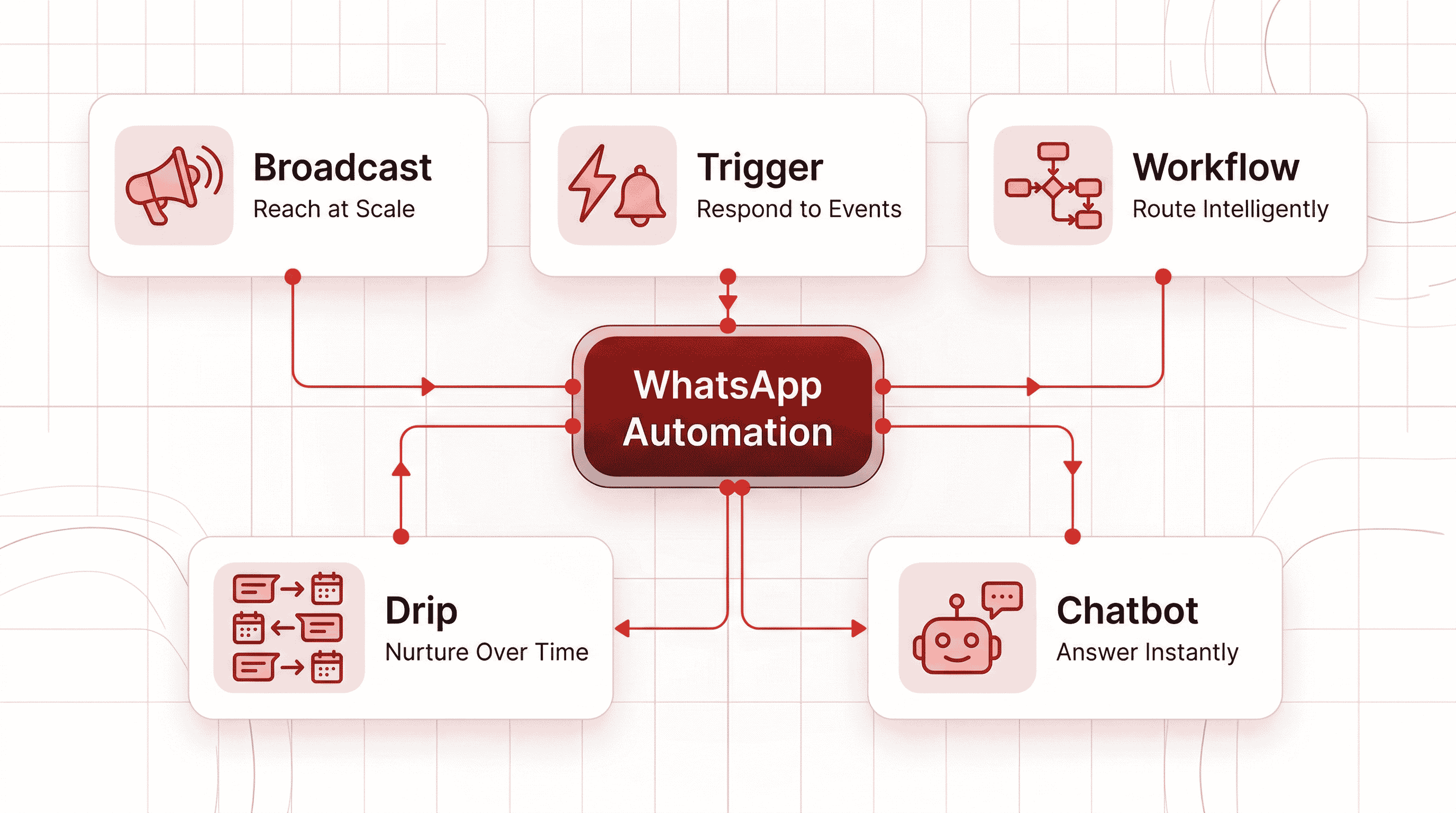
Not all WhatsApp automation works the same way. Before you set anything up, understand the five types and which one fits your goal.
1. WhatsApp Broadcast Automation
Send a single personalised message to your entire contact list simultaneously. With the WhatsApp Business API, there is no contact limit. You can reach 100,000+ customers in one campaign.
The real power comes from segmentation. Send your VIP customers an exclusive early-access offer. Send first-time buyers a welcome discount. Send lapsed customers a win-back campaign. Each group gets a different message — all sent automatically.
Best for: Product launches, flash sales, seasonal promotions, important announcements.
2. WhatsApp Drip Campaigns
A drip campaign is a series of automated messages sent over time to gradually move a lead toward a purchase. Instead of overwhelming someone with everything at once, you drip value — steadily and strategically.
A typical 7-day sequence might look like:
- Day 1: Welcome message + overview of what you offer
- Day 3: Customer success story or key benefit
- Day 5: Answer the most common objection
- Day 7: Limited-time offer to convert
Best for: Lead nurturing, onboarding new customers, re-engaging dormant contacts, subscription renewals.
3. WhatsApp Trigger Messages
Trigger messages are the "set it and forget it" automation. They fire automatically the moment a specific customer action occurs — on your website, in your app, or in your payment system.
Common triggers include:
- Cart abandoned → recovery message sent 30 minutes later
- Order placed → instant confirmation
- Payment failed → polite retry reminder
- Delivery completed → follow-up asking for feedback
- Application incomplete → drop-off recovery message
Best for: E-commerce, fintech, any business with transaction-driven customer journeys.
4. WhatsApp Chatbot Automation
An AI-powered WhatsApp chatbot is your first line of customer interaction — handling repetitive questions, qualifying leads, booking appointments, and processing basic requests, all without human involvement.
Modern chatbots built on the WhatsApp Business API can:
- Understand natural language (not just keywords)
- Personalise responses based on customer history
- Switch languages mid-conversation
- Transfer to a human agent when needed — with full context carried over
Best for: Customer support, lead qualification, appointment booking, FAQ resolution.
5. WhatsApp Workflow Automation
Workflow automation is the intelligence connecting everything else. It uses "if/then" logic to route customers through the right path based on their actions.
Example: A customer clicks "Pricing" in your chatbot → they're automatically tagged as "High Intent" in your CRM → a sales rep is notified → a follow-up message is scheduled for 24 hours later if no response.
This is where WhatsApp stops being a messaging channel and becomes a full sales and support system.
Best for: Sales pipelines, multi-step customer journeys, CRM synchronisation.
Quick Reference: Which Type Do You Need?
Automation Type | Best For | Example |
|---|---|---|
Broadcast | Promotions & announcements | "Our Summer Sale is live — shop now" |
Drip | Lead nurturing over time | "Day 3: Here's how our customers use [Product]" |
Trigger | Transaction-based messages | "Your order #1234 is confirmed and being packed" |
Chatbot | 24/7 queries & support | "Hi! I can help with: 1. Tracking 2. Pricing 3. Returns" |
Workflow | Complex multi-step funnels | CRM tagging → agent alert → scheduled follow-up |
What a WhatsApp Automation Conversation Actually Looks Like
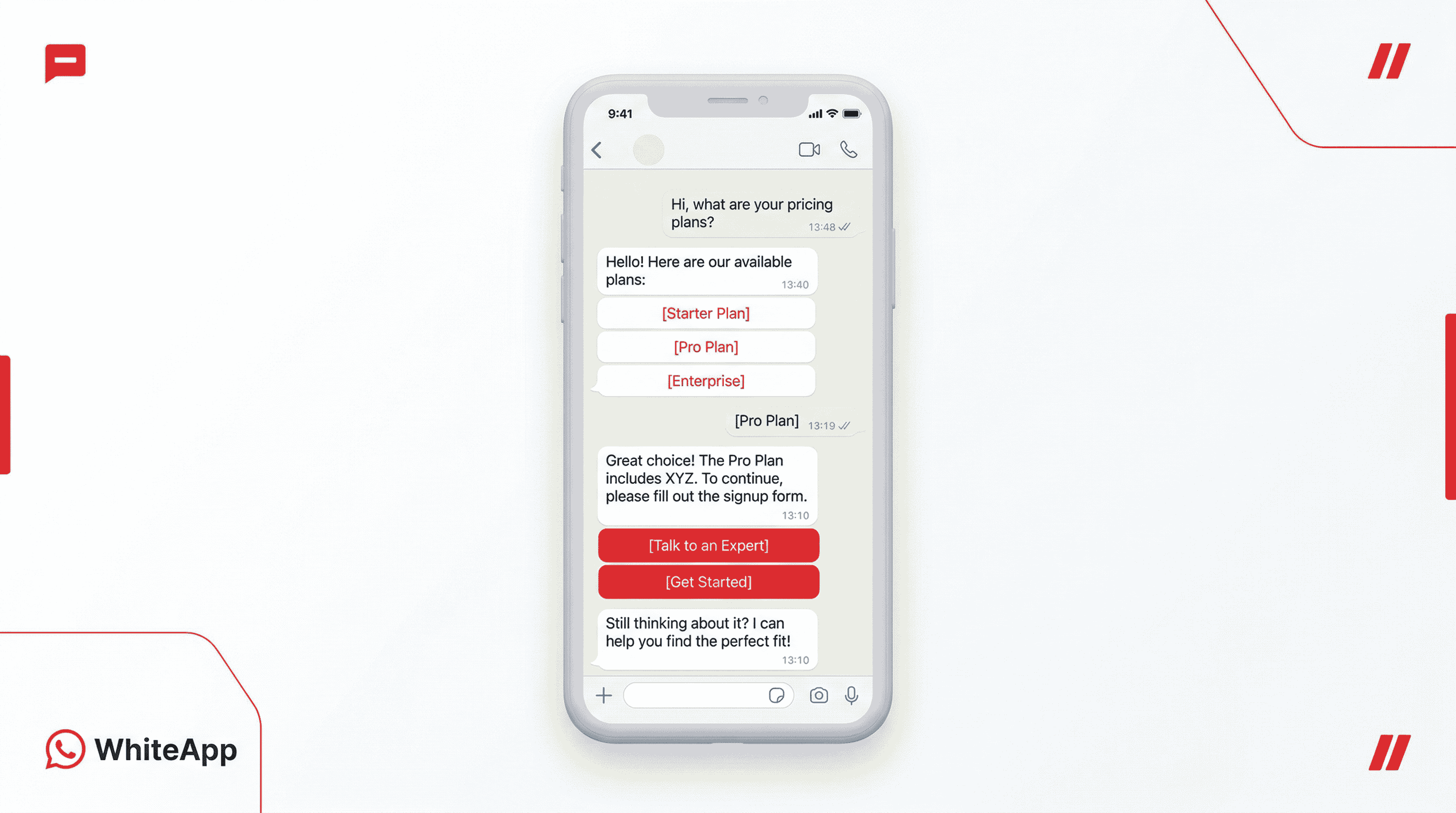
Understanding features is one thing. Seeing how automation works inside a real conversation is what makes it click.
Here’s a simplified example of how a typical customer interaction flows:
Step 1: User Starts the Conversation
User:
Hi, I want to know your pricing
Automation instantly responds:
“Sure — I can help with that. What are you looking for?”
• View Plans
• Book Demo
• Talk to Sales
Step 2: User Selects an Option
User clicks: View Plans
Automation responds:
“Here are the available plans based on your requirement.”
• Basic
• Growth
• Enterprise
Step 3: Intent Becomes Clear
User clicks: Growth Plan
Automation now:
- Shares plan details
- Highlights key benefits
- Adds a call-to-action
“Would you like to get started or speak to an expert?”
• Get Started
• Talk to Expert
Step 4: Conversion or Escalation
If user clicks Get Started:
→ Payment or signup link is sent instantly
If user clicks Talk to Expert:
→ Conversation is assigned to a sales agent with full context
Step 5: If the User Drops Off
If the user doesn’t respond:
After a few hours, automation follows up:
“Just checking — would you like help choosing the right plan?”
What This Flow Solves
Instead of:
- Delayed replies
- Unstructured chats
- Lost leads
You now have:
- Instant response
- Guided interaction
- Clear conversion path
This is what turns WhatsApp from a messaging tool into a structured sales and support system.
How to Set Up WhatsApp Business Automation Step-by-Step
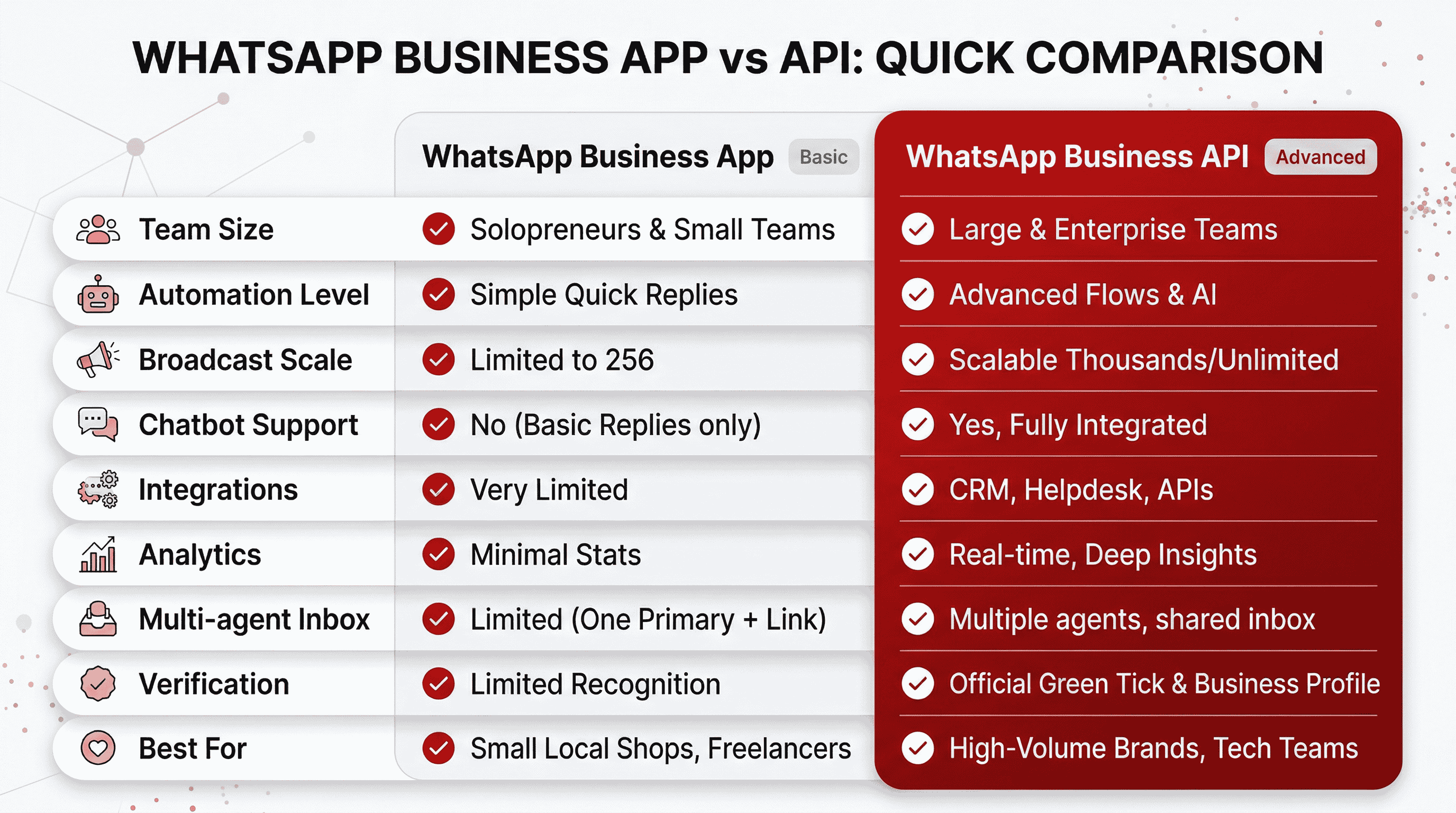
There are 2 main ways to set up WhatsApp automation, depending on your business size and needs:
- WhatsApp Business App (Basic Setup)
- WhatsApp Business API (Advanced Setup)
📌 Read more: Difference between WhatsApp Business App and WhatsApp Business API
WhatsApp Business App: Basic Automation Setup
Best for: Freelancers, local shops, very small businesses just getting started
The WhatsApp Business App is free and available on Android and iOS. It takes about 15 minutes to set up and requires no technical knowledge whatsoever.
Step 1: Download & Complete Your Business Profile
Install the WhatsApp Business App and fill in every field: business name, category, address, website, and business hours. A complete profile builds trust instantly — customers can see they're talking to a legitimate business before they even send a message.
Step 2: Set Your Business Hours
Go to Settings → Business Tools → Business Hours. This is the trigger that tells your automated messages when to fire. Set this before turning anything else on, or your away messages will fire at the wrong times.
Step 3: Activate Your Three Automated Messages
Inside Business Tools, switch on:
- Greeting Message — sent automatically to anyone who messages you for the first time, or after 14 days of inactivity. First impressions matter, and this ensures yours is always good.
- Away Message — fires when customers message outside your business hours. Even at 2am, they get an immediate response. Set their expectation for when you'll follow up.
- Quick Replies — keyboard shortcuts like
/priceor/locationthat let you send common answers with a single tap. Saves hours every week across high-volume conversations.
Limitations of the WhatsApp Business App
The free app works well for getting started. But growing businesses run into its ceiling fast:
- Broadcast limit of 256 contacts — and only people who've saved your number will receive it
- No chatbot or automated conversation flows
- No connection to your CRM, Shopify store, or any other software
- No message analytics — you can't track open rates, click-throughs, or agent performance
- Messages cannot include clickable buttons or interactive elements
- No path to getting the WhatsApp blue tick (verified badge)
- Cannot send proactive notifications (orders, deliveries, reminders)
- One user at a time — no shared team inbox
If any of these are holding your business back, the WhatsApp Business API is your answer.
WhatsApp Business API: Full-Scale Automation
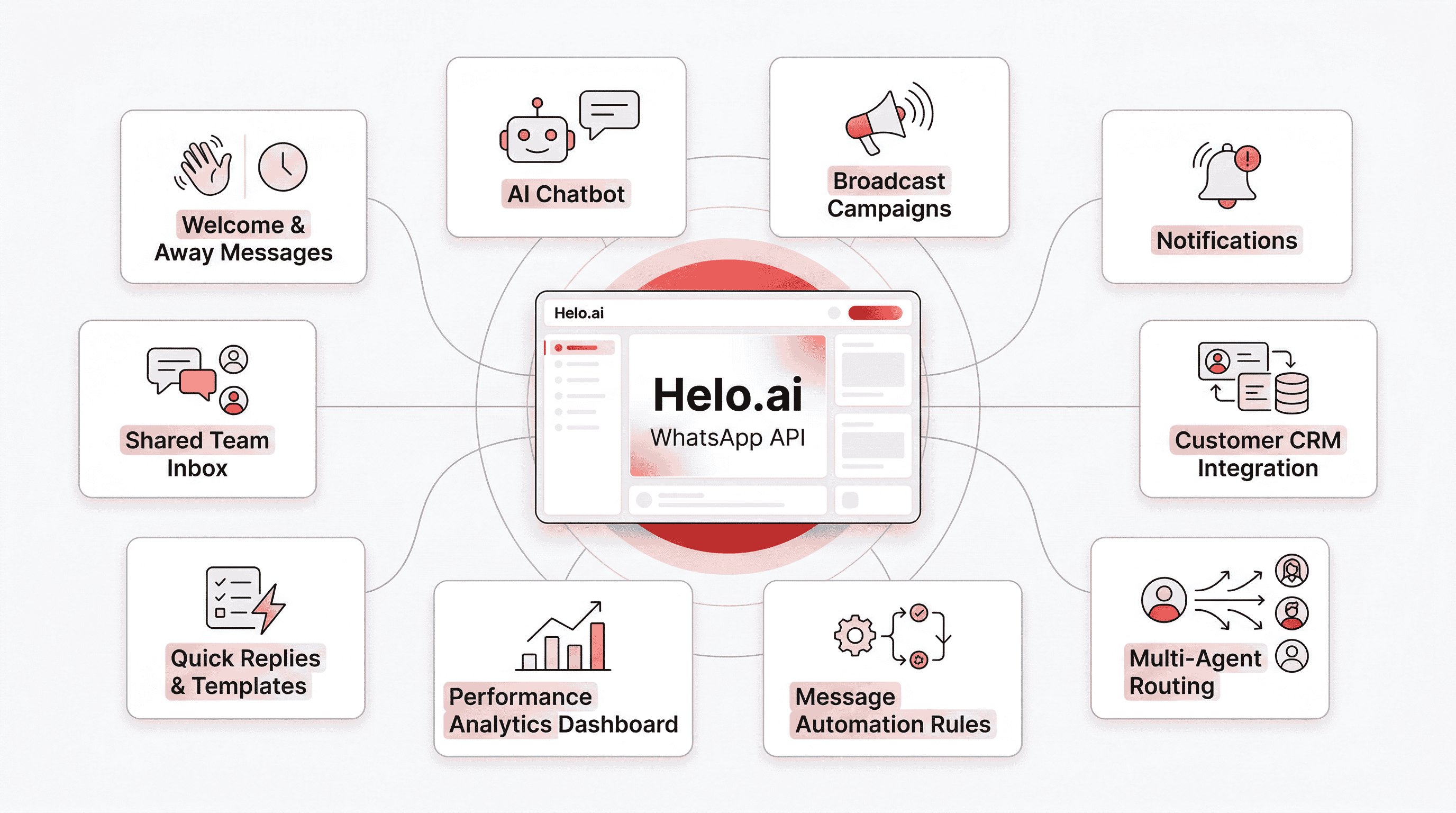
Best for: Growing businesses, e-commerce brands, enterprises, sales and support teams
The WhatsApp Business API removes every ceiling the free app has. It's the official, Meta-approved way to automate WhatsApp at scale — with AI chatbots, unlimited broadcasts, CRM integrations, and a shared team inbox for your whole organisation.
Helo.ai is an official Meta Partner and WhatsApp Business API provider with 25 years of enterprise communication experience. Clients including Kotak Mahindra Bank, HDFC, Bajaj Finserv, Axis Bank, Reliance Digital, and Tata Power use Helo.ai to run their WhatsApp communication at scale. Businesses on the platform see an average 40% improvement in response rates and up to a 2x improvement in ROI.
Here's everything you can do:
1. Welcome Messages, Away Replies & Off-Hours Automation
The foundation of any WhatsApp automation setup:
- A Welcome Message the moment a new customer messages you — with buttons, quick replies, and a clear menu of options
- An Off-Hours Message that fires automatically outside business hours, sets response expectations, and optionally starts a chatbot flow so the customer isn't left waiting
- Custom timezone scheduling so messages always fire at the right local time, regardless of where your team is based
Unlike the free app, these messages can include interactive buttons, product links, images, and rich media — giving customers something to act on immediately, not just a plain text acknowledgement.
2. AI-Powered WhatsApp Chatbots (No Coding Required)
AI-powered chatbots are designed to handle repetitive conversations at scale, reducing the need for manual responses.
Instead of teams answering the same questions repeatedly, chatbots can manage common queries automatically — across different languages and time zones — while keeping conversations consistent and responsive.
WhatsApp Chatbots can:
- Answer product questions, pricing queries, and policy FAQs instantly
- Guide customers through purchase decisions with personalised recommendations
- Book appointments, schedule viewings, and manage cancellations inside the chat
- Collect lead information and qualify prospects by budget, intent, and timeline
- Process payments and send confirmations without the customer leaving WhatsApp
- Gather post-purchase feedback and NPS scores automatically
And when a customer needs a real person, the chatbot transfers the conversation to a live agent — instantly, with the full chat history carried over. The agent knows exactly what was discussed. No repeat questions, no frustrated customers.
Helo.ai's WhatsApp chatbot builder uses a drag-and-drop, no-code interface. Build your flows visually, set your triggers, and go live. No developers needed.
Modern businesses rely on WhatsApp chatbot to handle FAQs, qualify leads, and support customers 24/7.
3. Broadcast Campaigns — Reach Unlimited Contacts
WA Broadcast messaging allows businesses to reach large audiences with personalised communication.
What you can do:
- Send promotions, offers, and product launches to unlimited contacts simultaneously
- Schedule campaigns in advance — pick your date, time, and audience segment
- Personalise every message dynamically using variables like
{{name}},{{last_order}}, or{{product_name}} - Track opens, click-throughs, and replies in real time from a single dashboard
- Segment audiences by purchase history, location, behaviour, or custom tags
4. Automated Notifications — Orders, Payments & Deliveries
Trigger-based notifications are a core part of WhatsApp automation. These messages are sent automatically the moment a specific event occurs within your business systems
- Order placed → instant confirmation with order details
- Payment received → confirmation receipt
- Payment failed → polite retry reminder with payment link
- Order shipped → live tracking update
- Delivery completed → feedback request
- Cart abandoned → recovery message 30 minutes later
- EMI due → advance reminder 3 days before
- Application incomplete → drop-off recovery message
These messages don't require anyone to press send. They're triggered by your CRM, e-commerce platform, or payment gateway the moment the event occurs.
5. WhatsApp Flows — Interactive Journeys Inside the Chat
WhatsApp Flows let you build structured, screen-by-screen customer experiences inside WhatsApp — no app download, no website redirect required.
You can create flows for:
- Customer sign-ups and onboarding
- Product selection, cart building, and checkout
- Service requests and complaint registration
- Appointment booking and rescheduling
- Feedback collection and satisfaction surveys
Customers tap through the flow, fill in details, and complete the action — entirely within their WhatsApp chat. No friction, no drop-off from redirects.
6. OneView Inbox — Your Whole Team, One WhatsApp Number
When your business grows, you need multiple people managing WhatsApp. But handing out one phone is chaos.
OneView Inbox consolidates every customer conversation — across WhatsApp, website chat, Facebook Messenger, Instagram, and 15+ other channels — into a single shared dashboard. Your whole team can:
- See and respond to all conversations from one place
- Assign chats to specific agents or departments
- Track each agent's response times and resolution rates
- Avoid duplicated replies and missed messages
No screenshots. No forwarding. No "did someone already reply to this?"
7. Click-to-WhatsApp Ads (CTWA)
Running Facebook or Instagram ads? With click-to-WhatsApp campaigns, users who tap on an ad are taken directly into a WhatsApp conversation instead of being redirected to a landing page — reducing drop-offs and shortening the path to interaction.
The moment they tap, a chat opens with your business. An automated flow qualifies them, answers questions, and moves them toward a conversion. Every ad becomes a direct conversation starter.
8. WhatsApp Blue Tick Verification
The free WhatsApp Business App does not support business verification, but the WhatsApp Business API enables eligible businesses to apply for it.
Once verified by Meta, a business profile displays a blue checkmark next to its name. This helps customers recognise that they are interacting with an official and authentic business account, which can improve trust and reduce confusion around impersonation or spam.
9. Multilingual Messaging — Serve Every Customer in Their Language
Helo.ai supports automated messaging in 50+ languages. Your chatbot flows, notification templates, and broadcast campaigns can be localised for each audience — automatically sending messages in the customer's preferred language.
For businesses serving regional or international audiences, this is the difference between a message that connects and one that gets ignored.
10. Advanced Analytics — Know What's Working
Every message, campaign, and chatbot flow you run through Helo.ai is tracked. The Clarity analytics dashboard shows you:
- Delivery and open rates for every campaign
- Click-through rates on buttons and links
- Chatbot flow completion and drop-off rates
- Agent response times and resolution rates
- Revenue attributed to WhatsApp campaigns
These numbers tell you exactly what's working, where customers are dropping off, and where to optimise next.
Getting Started with Helo.ai
- Talk to the team — contact Helo.ai and they'll guide you through the WhatsApp API application and onboarding process
- Connect your number — your existing business number can be ported across
- Build your first flow — use the no-code builder to set up welcome messages, your first chatbot, or a broadcast campaign
- Go live and track — your automation runs on its own; you monitor performance from the dashboard
Helo.ai handles the technical setup. You focus on the business.
Image not found
Industry Use Cases for WhatsApp Automation in 2026
WhatsApp automation looks different depending on your industry. Here's how leading sectors are using it to stay ahead.
E-commerce & D2C: The Revenue Recovery Engine
Speed is everything in e-commerce. A customer abandons a cart and gets a WhatsApp reminder 30 minutes later with their items and a "10% off if you complete in the next 2 hours" offer. That's a sale you'd have otherwise lost.
Key automations for e-commerce businesses:
- Abandoned cart recovery — trigger messages that recover 45–60% of abandoned purchases
- COD verification — confirm cash-on-delivery orders before shipping, reducing returns by up to 30%
- Order and delivery updates — automated confirmation, shipping, and delivery notifications
- Product catalogue — let customers browse and buy inside WhatsApp using Flows
- Post-purchase follow-up — review requests, reorder reminders, upsell recommendations
Real result: Businesses using WhatsApp automation for cart recovery report a 20–30% increase in recovered sales compared to email-only recovery.
Businesses using a done-for-you abandoned cart recovery journey see significantly higher conversion rates from lost visitors.
Real Estate: The 24/7 Virtual Assistant
Real estate leads are expensive. If you don't respond to a portal inquiry within 5 minutes, the lead goes cold. With WhatsApp automation, response time is zero.
Key automations for real estate:
- Instant lead qualification — when a lead comes in from an ad, an AI chatbot immediately asks: "What's your budget?" and "Which area are you interested in?" The answers are logged and the lead is scored before any agent gets involved
- Site visit scheduling — customers pick a date and time through a WhatsApp Flow without calling or emailing
- Automated nurture — drip campaigns that send project brochures, construction updates, and virtual tour links weekly
Real result: Agents using WhatsApp automation for instant lead response report 4x more site visit bookings compared to manual follow-up.
Education & EdTech: The Enrolment Booster
Admissions teams are overwhelmed with the same questions. Fee reminders go unnoticed in email inboxes. WhatsApp automation fixes both.
Key automations for education:
- Admissions chatbot — instantly answers questions about fees, course duration, eligibility, and placement records
- Application follow-up — automatically nudge students who started but didn't complete applications
- Fee reminders — trigger a polite payment reminder 3 days before the deadline with a direct UPI payment link
- Class and exam alerts — automated notifications for timetable changes, link shares, and result announcements
Real result: Education institutions using WhatsApp for fee reminders report a 60% reduction in late payments compared to email-only communication.
Industry ROI at a Glance
Industry | Primary Pain | Automation Fix | Reported Result |
|---|---|---|---|
E-commerce | Cart abandonment | Trigger-based recovery | 20–30% more recovered sales |
Real Estate | Slow lead response | Instant qualification bot | 4x more site visit bookings |
Education | Manual fee collection | Drip payment reminders | 60% fewer late payments |
BFSI | Loan query volume | AI chatbot + CRM sync | 60% reduction in manual interventions |
Retail | Customer re-engagement | Personalised campaigns | 30% increase in repeat purchases |
For BFSI and financial services use cases, see banking solutions. For retail, see retail solutions.
The Compliance Rules You Cannot Ignore in 2026
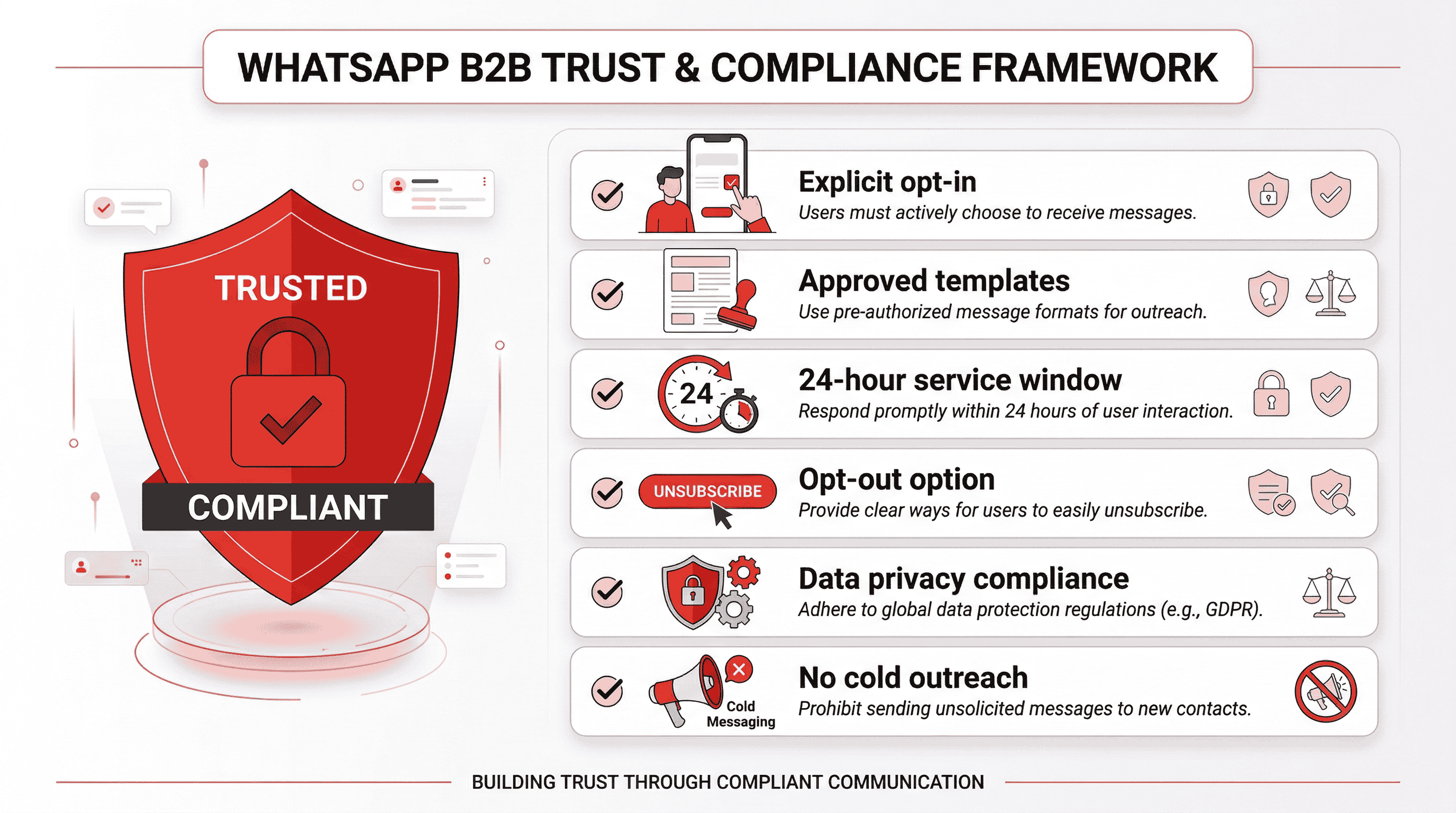
Meta has tightened its WhatsApp Business policies significantly. Violating them doesn't just mean your message fails to deliver — it can mean your entire business number is banned permanently. Read these before you send a single automated message.
Explicit Opt-In is Non-Negotiable
Never send an automated message to someone who hasn't specifically agreed to receive WhatsApp messages from your business. This isn't just a best practice — it's a requirement to keep your Meta Business API account active. Collect opt-in at checkout, on your website, or through lead capture forms. Document every consent.
Use Approved Message Templates for Outbound Messages
Any message you send first (instead of replying to a customer) must follow a pre-approved template. Meta reviews these templates to prevent spam. Submit templates through your WA API provider and allow 24–48 hours for approval.
Respect the 24-Hour Service Window
Once a customer messages you, you have a 24-hour window to chat freely. After that window closes, you must use an approved template to re-engage. This rule exists to protect users from businesses spamming them after a single inquiry.
Always Offer an Opt-Out
Every marketing broadcast must include a clear way for customers to unsubscribe — a "Stop Notifications" button or a "Reply STOP to unsubscribe" instruction. Respecting opt-outs protects your account health and your brand reputation.
Comply with Data Privacy Laws
If you serve customers in the EU, GDPR applies to how you collect, store, and process WhatsApp data. In India, similar responsibilities are defined under the Digital Personal Data Protection (DPDP) Act.
This means businesses must ensure that customer data is handled securely, with proper consent, storage practices, and access controls in place.
For full details, refer to the official GDPR guidelines.
No Cold Outreach Blasts
Mass cold outreach — even with API-approved templates — results in high block rates and can trigger Meta account review. WhatsApp is not a cold email substitute. Only message people who have opted in.
📌 Read more: WhatsApp API Compliance: Rules, Opt-In & Policy Explained
Top 5 WhatsApp Automation Mistakes to Avoid
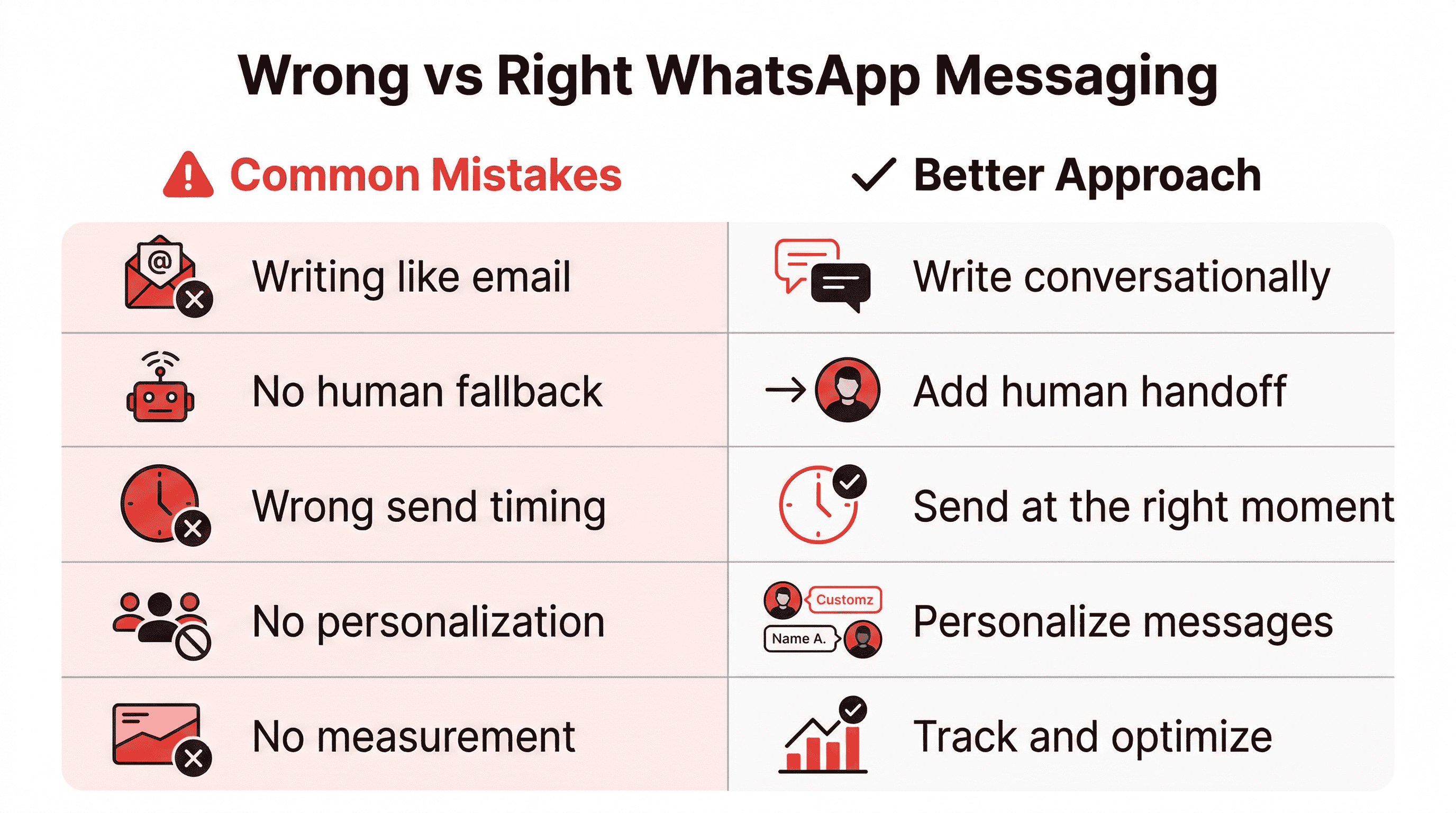
Even the best WhatsApp automation tool fails if used incorrectly. These are the most common reasons businesses see poor results — and how to avoid them.
Writing Messages Like Emails
Long paragraphs with headers and bullet points feel wrong in WhatsApp. People are in a chat environment. Write like you're talking to a real person. Short sentences. Conversational tone. One idea per message.
Over-Automating Without a Human Fallback
If a chatbot fails to understand the user, it creates frustration.
Always offer a clear option to connect with a human. When queries become complex, transfer the conversation to an agent without making the user repeat information.
Sending at the Wrong Time
Sending promotional messages at inappropriate hours such as late at night can lead to poor engagement and may increase the likelihood of users blocking your number.
It’s best to schedule messages based on the customer’s local time zone, ensuring communication feels timely, relevant, and respectful.
Ignoring Personalisation
"Dear Customer" gets ignored. {{name}} gets responses. Use dynamic variables to personalise every automated message with the customer's name, last order, location, or any other relevant data point. The more relevant the message, the higher the engagement.
Not Measuring Anything
Not measuring performance makes it difficult to improve your results.
Track key metrics such as response rates, click-through rates, and conversation drop-offs to understand what is working and where optimisation is needed.
Frequently Asked Questions
Is WhatsApp automation legal?
Yes, WhatsApp automation is completely legal when done using the official WhatsApp Business API and with explicit user opt-in. Automation that follows Meta’s policies, template rules, and consent guidelines is fully compliant.
Can I automate WhatsApp messages for free?
You may access limited automation during trial periods, but scalable WhatsApp automation requires WhatsApp Business API access and a platform. Paid automation ensures compliance, reliability, analytics, and long-term account safety.
Is WhatsApp Web automation safe for businesses?
No. WhatsApp Web automation relies on browser scripts or extensions and violates WhatsApp’s Terms of Service. It carries a high risk of number bans, data issues, and zero official support, making it unsafe for businesses.
Can WhatsApp automation replace human agents completely?
No. WhatsApp automation works best when combined with human agents. Chatbots handle repetitive queries efficiently, while human agents manage complex conversations, ensuring better customer experience, trust, and resolution quality.
What is the difference between WhatsApp automation and WhatsApp Web automation?
WhatsApp automation uses the official Business API to automate messages safely and at scale. WhatsApp Web automation uses unofficial browser tools, which are risky, non-compliant, and unsuitable for long-term business use.
Do customers need to opt in for WhatsApp automation?
Yes. Customer opt-in is mandatory for WhatsApp automation. Businesses must clearly inform users and obtain consent before sending automated or promotional messages. Messaging without opt-in can lead to account restrictions or bans.
Can WhatsApp automation be used for marketing messages?
Yes, WhatsApp automation can be used for marketing if users have opted in and messages are sent using approved marketing templates. Automation helps deliver personalised, timely campaigns without violating WhatsApp’s messaging policies.
Is WhatsApp automation suitable for small businesses?
Yes. WhatsApp automation is suitable for small businesses to automate replies, capture leads, send updates, and manage customer queries efficiently. It reduces manual workload and helps small teams deliver faster, professional responses.
What types of messages can be automated on WhatsApp?
Businesses can automate welcome messages, FAQs, appointment reminders, order updates, payment alerts, support follow-ups, and campaign messages. All outbound messages must follow WhatsApp’s template and consent guidelines.
How do I choose the right WhatsApp automation platform?
Choose a platform built on the official WhatsApp Business API that offers automation workflows, chatbot support, broadcast messaging, analytics, compliance controls, and easy integration with your existing business systems.
Final Thoughts: Automation Is About Conversations, Not Volume
WhatsApp automation isn’t about sending more messages. It’s about sending better messages at the right time, with less effort. It's also important that it dones’t sound robotic in the entire process because empathy is equally important to keep that customer engaged, which a bot cannot do.
When implemented correctly, automation:
- Improves response time
- Reduces operational load
- Enhances customer experience
- Scale communication safely
And as WhatsApp continues to evolve, businesses that adopt official, compliant automation will always stay ahead.



.png&w=828&q=75)