

Staying connected with friends, family, and colleagues has never been easier, but timing can be tricky. Whether you want to send birthday wishes at midnight, reach out to international contacts during their business hours, or simply ensure important reminders go out on time, knowing how to schedule messages on Whatsapp can be a game-changer.
While the official Whatsapp app doesn't offer a built-in feature to schedule messages for regular whatsapp users, there are several effective ways to schedule your Whatsapp messages across various platforms. This step-by-step guide will walk you through multiple methods to automate messages and ensure your messages reach recipients exactly when you want them to.
Why Schedule Whatsapp Messages?
Before diving into the how-to, let's explore why message scheduling has become essential for both personal and business communication.
Sending the right message at the right time matters. Perhaps you're coordinating with someone in a different time zone, or you want to send a thoughtful greeting without staying awake until midnight. For businesses, the feature to schedule messages helps maintain professionalism by ensuring communication happens during business hours, even when you're unavailable.
Message scheduling streamlines your workflow, helps you stay organized, and ensures that the message is sent when it will have the most impact. Users can schedule reminders, follow-ups, and important announcements in advance, freeing up mental space for other tasks.
Understanding WhatsApp's Official Options
Using WhatsApp Business API
For larger organizations, the official Whatsapp Business API provides robust message scheduling capabilities. This solution is integrated with Whatsapp Business platforms and allows companies to schedule Whatsapp messages using various automation tools.
Using Whatsapp Business API requires working with approved business solution providers. While this option offers powerful features for sending bulk whatsapp messages and managing recurring messages, it's designed for enterprises rather than individual users or small businesses.
Image not found
Using the WhatsApp Business App
The Whatsapp Business app offers some automation features that come close to scheduling, though they work differently than traditional scheduling. The business app lets you set up away message responses and greeting messages, which can help automate your business communication to some extent.
Here's what you can do with the Whatsapp Business app:
Away Messages: Set up automatic replies when you're unavailable. You can customize these messages based on your schedule and even set specific date and time parameters for when they're active.
Quick Replies and Message Templates: While not true scheduling, these features help you send message responses faster, ensuring that customers receive timely communication.
To use these features, download the business app from the Google Play Store or Apple App Store, set up your business profile, and explore the automation options in the settings menu.
Also Read: Difference between WhatsApp Business and WhatsApp Business API
Method 1: Schedule WhatsApp Messages on Android
Android device users have the most flexibility when it comes to scheduling. Several third-party apps on Android make it simple to schedule a message for delivery at your chosen time.
Using Third-Party Apps Like SKEDit
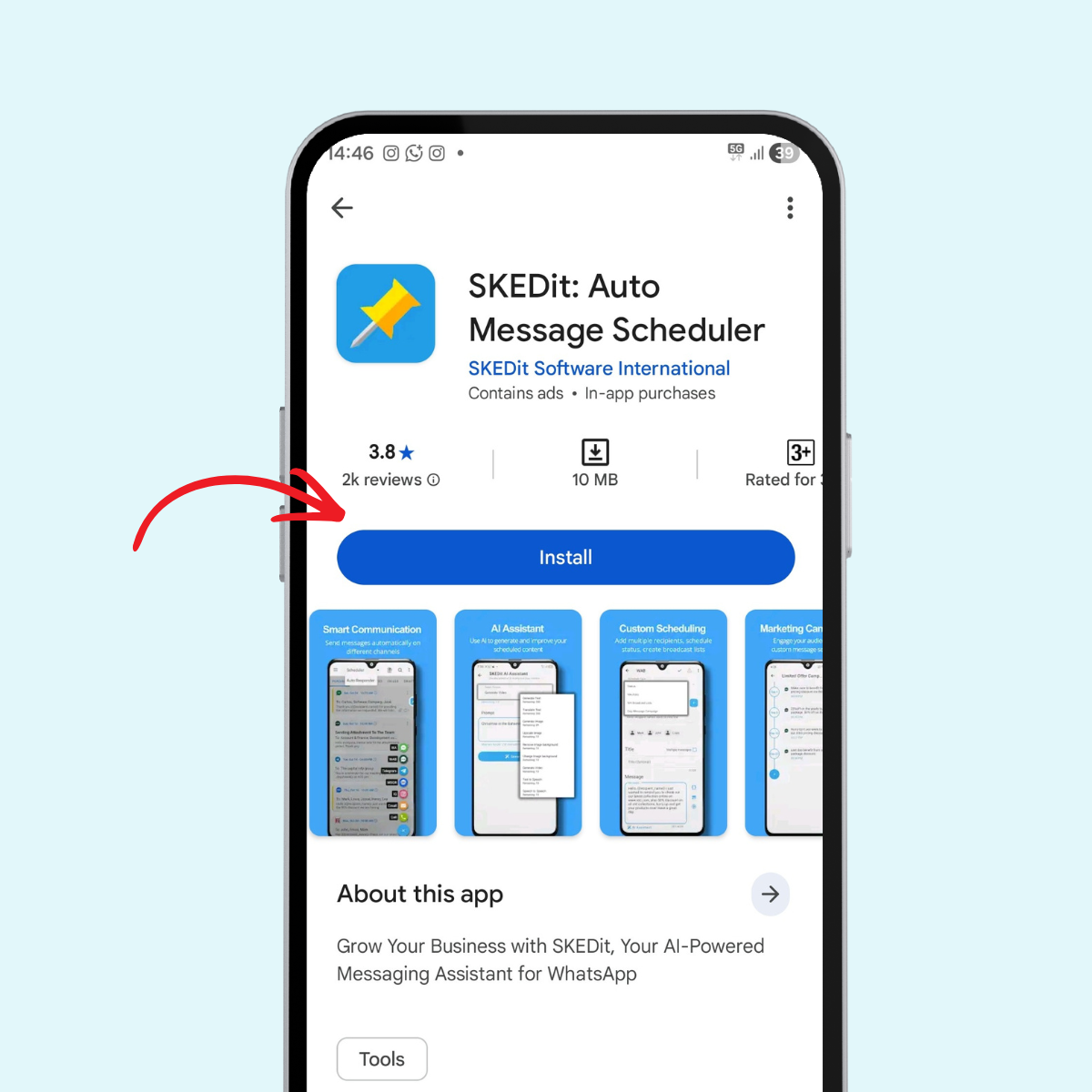
SKEDit is one of the most popular message scheduler app options for Android. Here's how to schedule messages using this method:
Step 1: Download and install a message scheduler from the Google Play Store. SKEDit app.
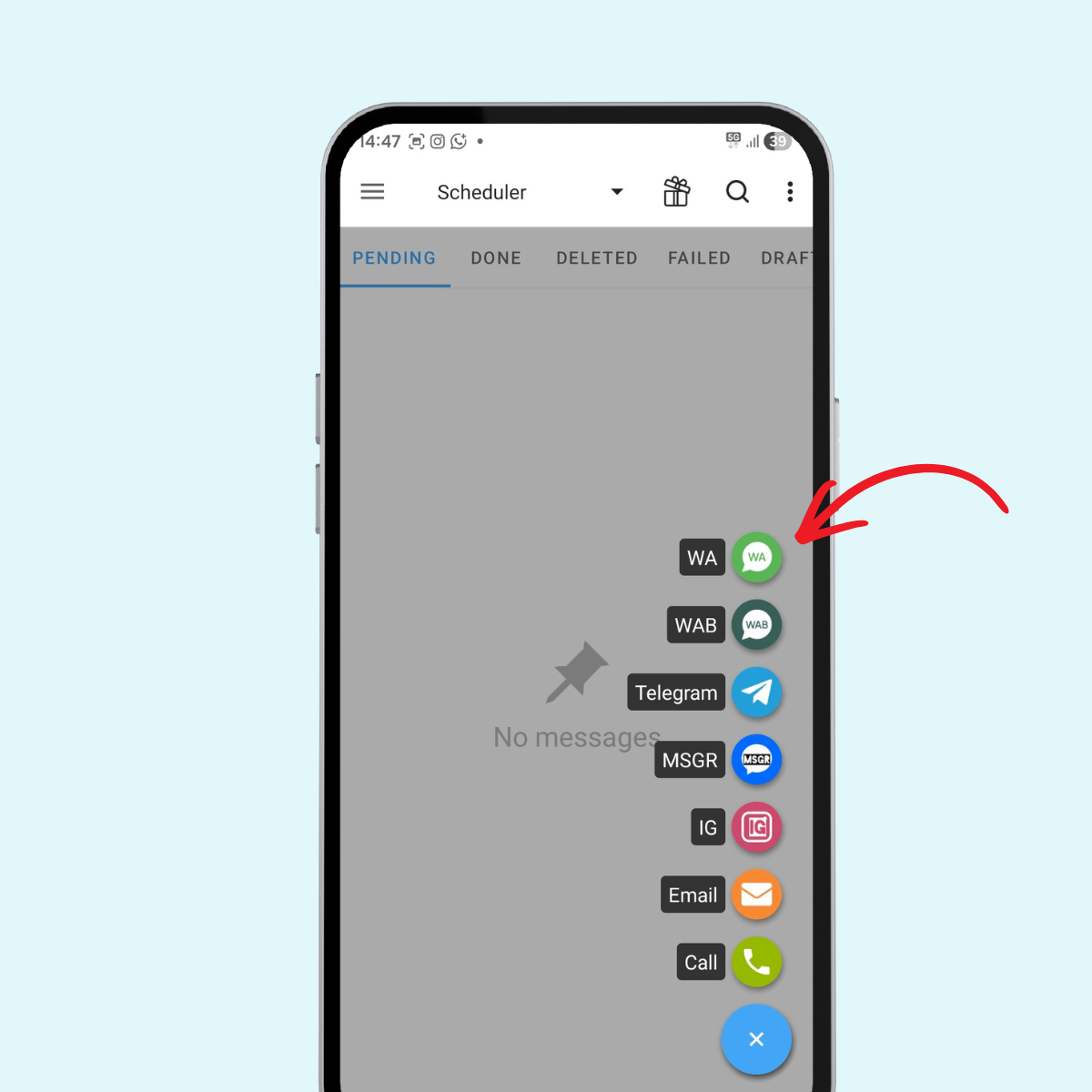
Step 2: Launch the app and select the WhatsApp option from the available messaging platforms.
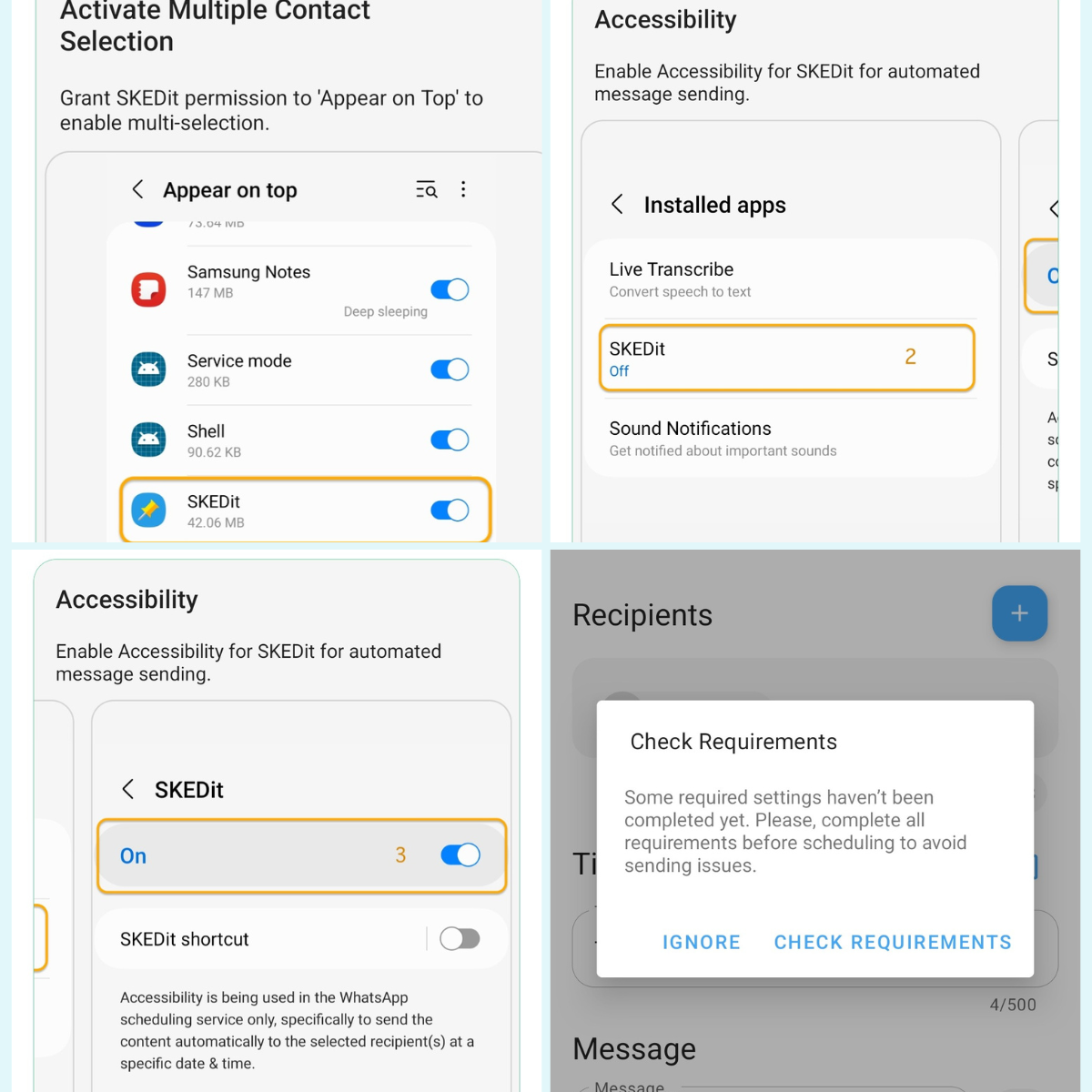
Step 3: Grant the necessary permissions. These apps need accessibility permissions to send the message on your behalf.
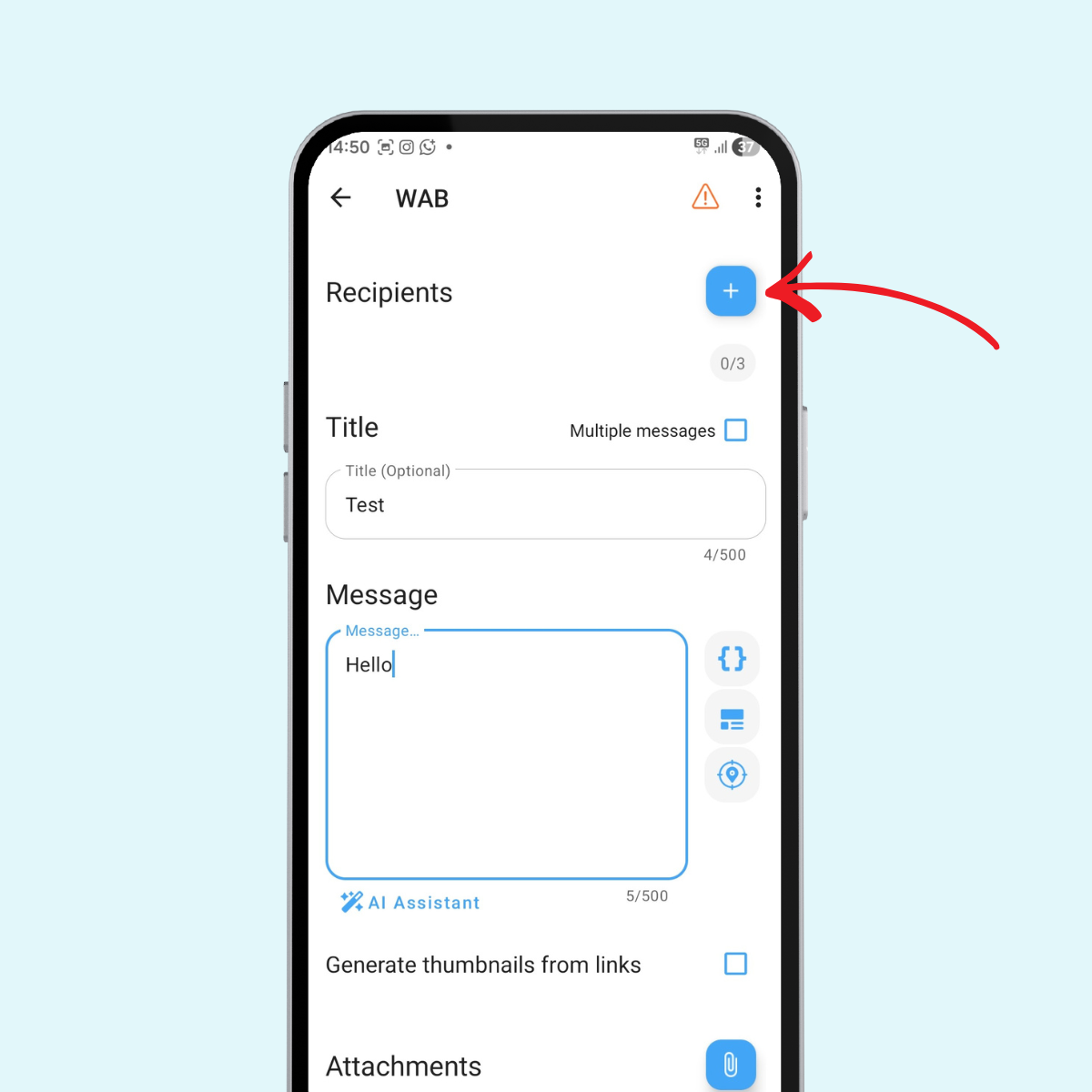
Step 4: Choose the recipient from your contacts list.
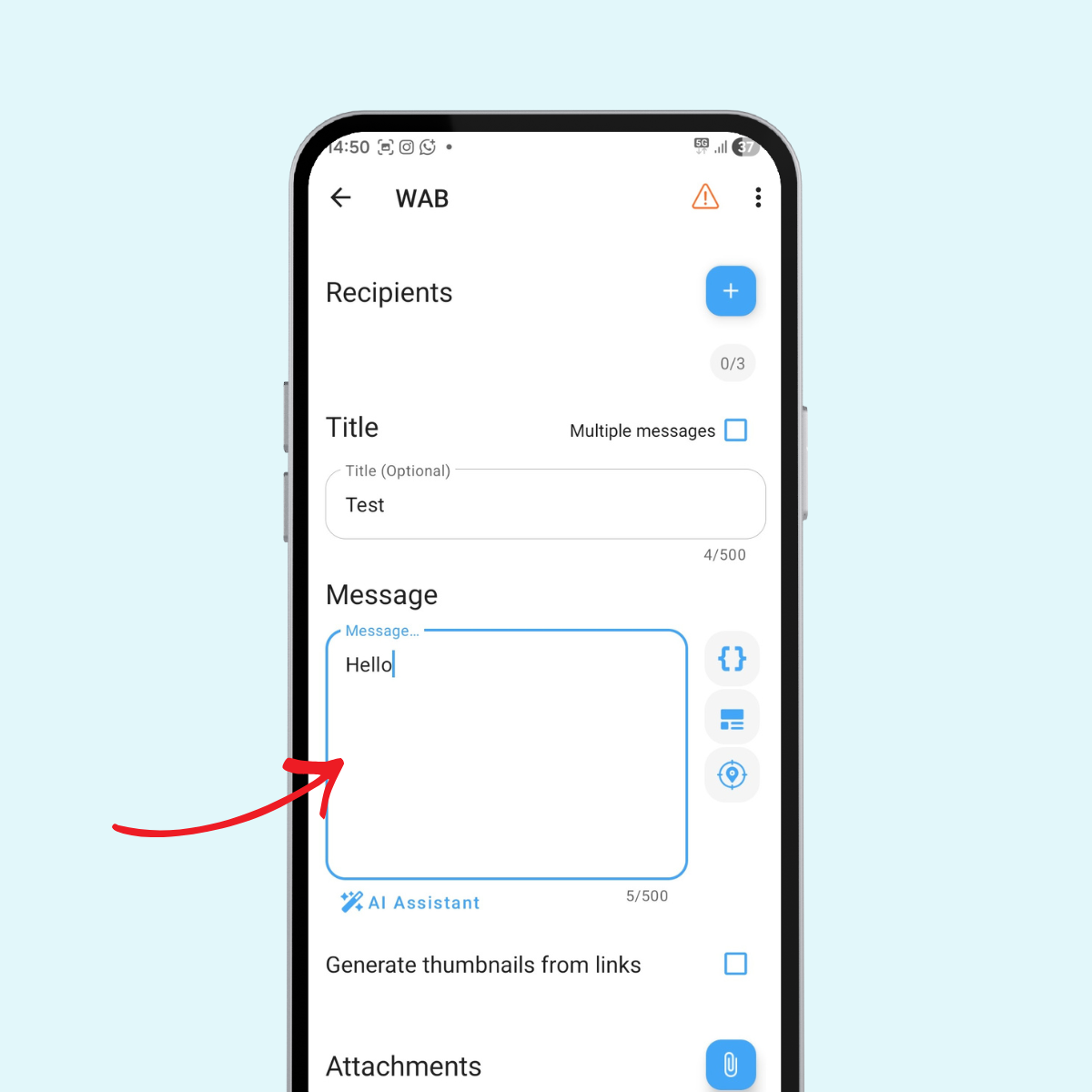
Step 5: Enter the message you want to schedule in the provided text field.
Step 6: Set the date and time when you want the message delivered.
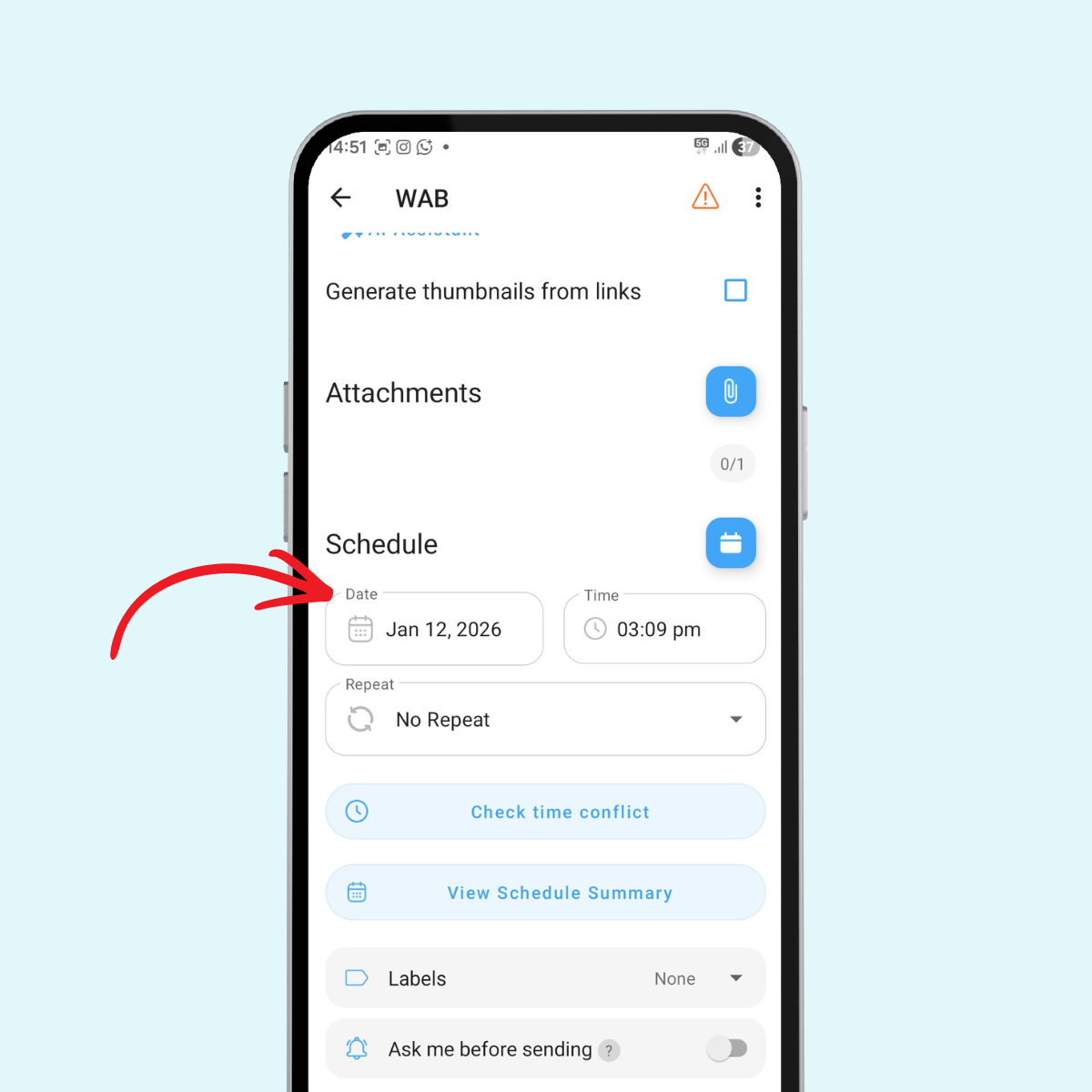
Step 7: Personalize your message if needed, adding any specific details or customizations.
Step 8: Confirm the schedule option and save your scheduled message.
The app will automatically use Whatsapp to send your message at the specified time. Just ensure that the message scheduler app is running in the background and your phone has an internet connection when it's time the message should go out.
Important Note: For sending a scheduled message to work properly, your Android phone must remain powered on with an active internet connection at the scheduled time. The third-party apps work by automating the process of opening Whatsapp and sending the message manually on your behalf.
Method 2: Schedule WhatsApp Messages on iPhone
iPhone users face more limitations since iOS has stricter app permissions. However, there are still effective ways to schedule Whatsapp message delivery.
Use the Shortcuts App to Automate Messages
Apple's shortcuts app provides a workaround for scheduling. While it requires more setup than Android apps, it's a reliable method once configured.
Step 1: Open the Shortcuts app on your iPhone (pre-installed on most devices).
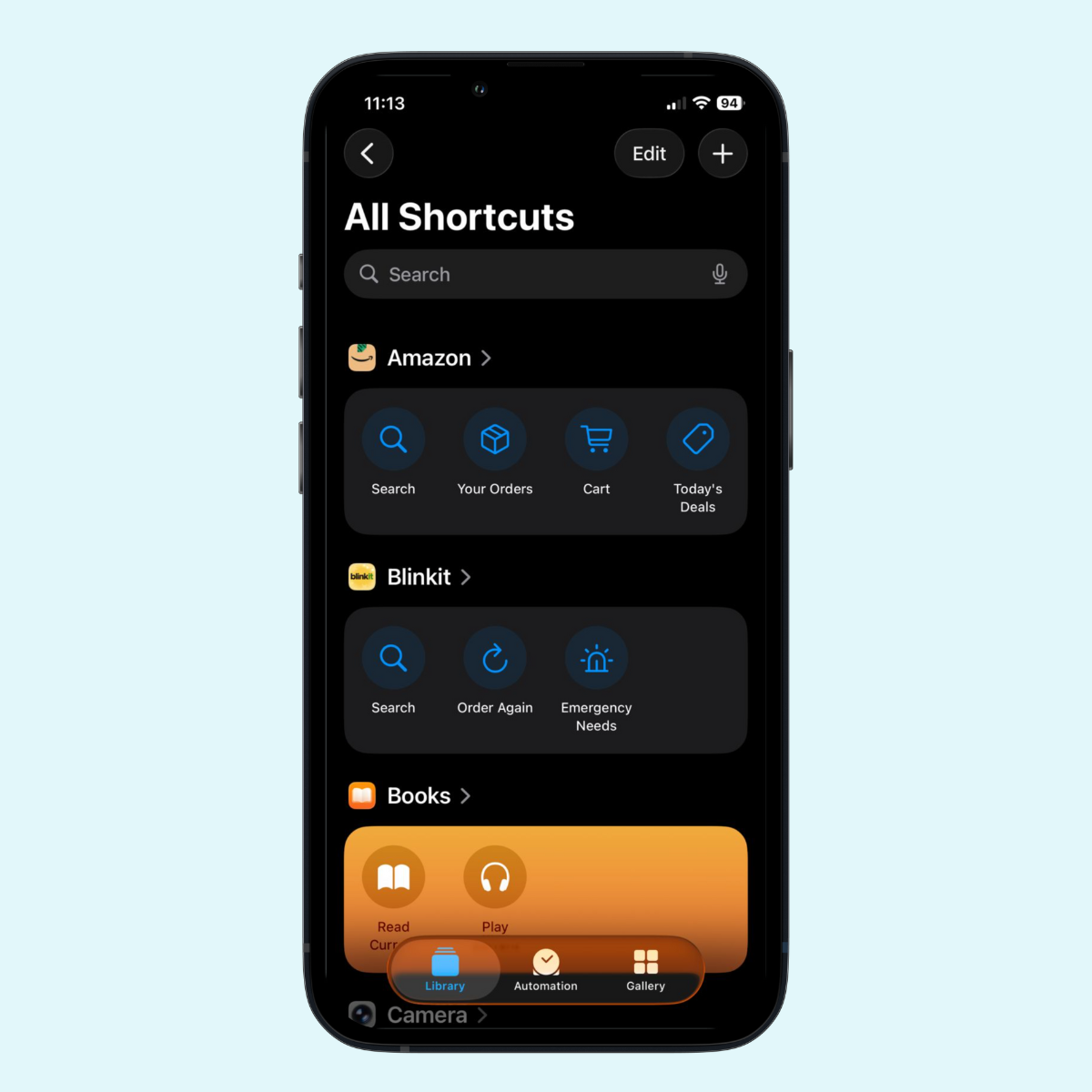
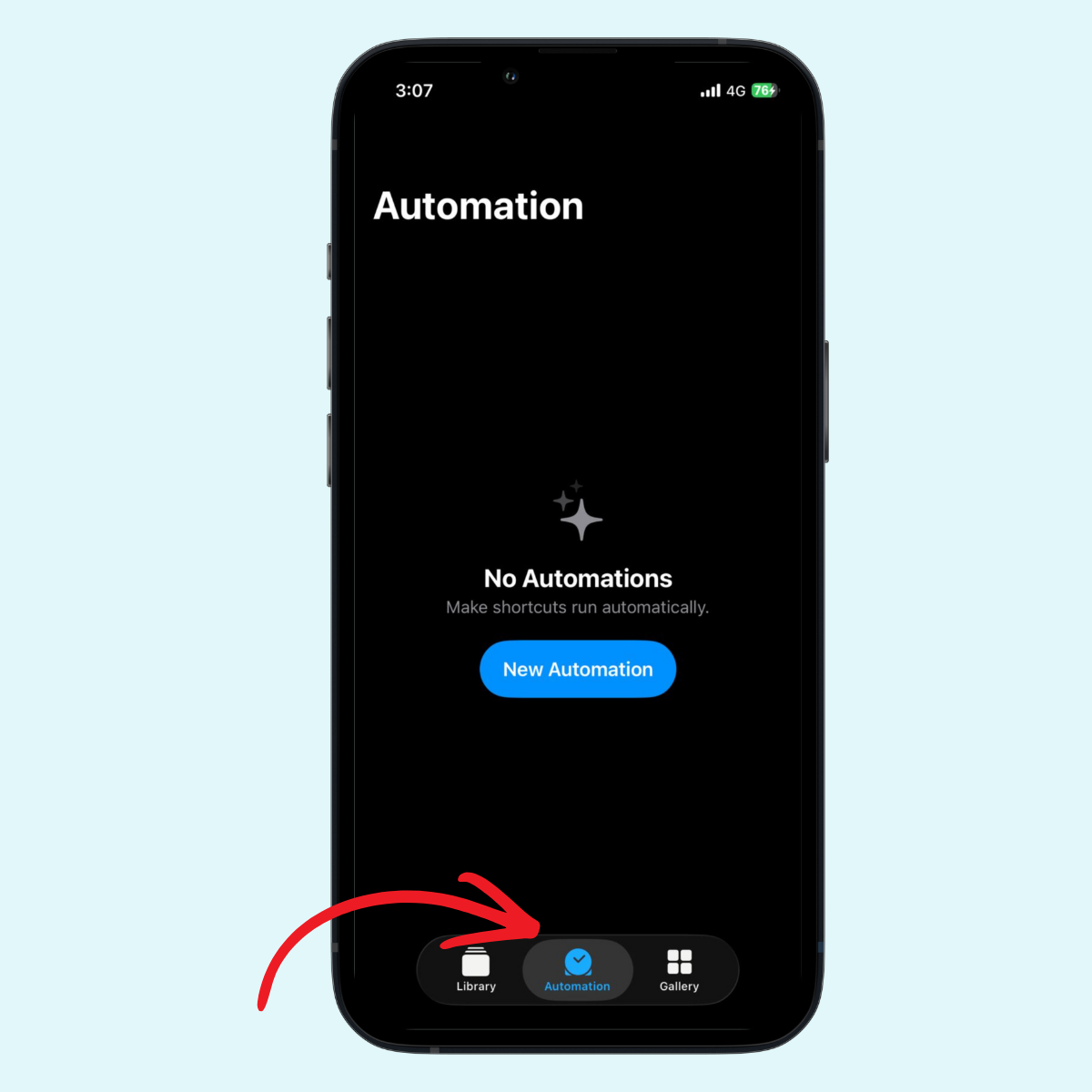
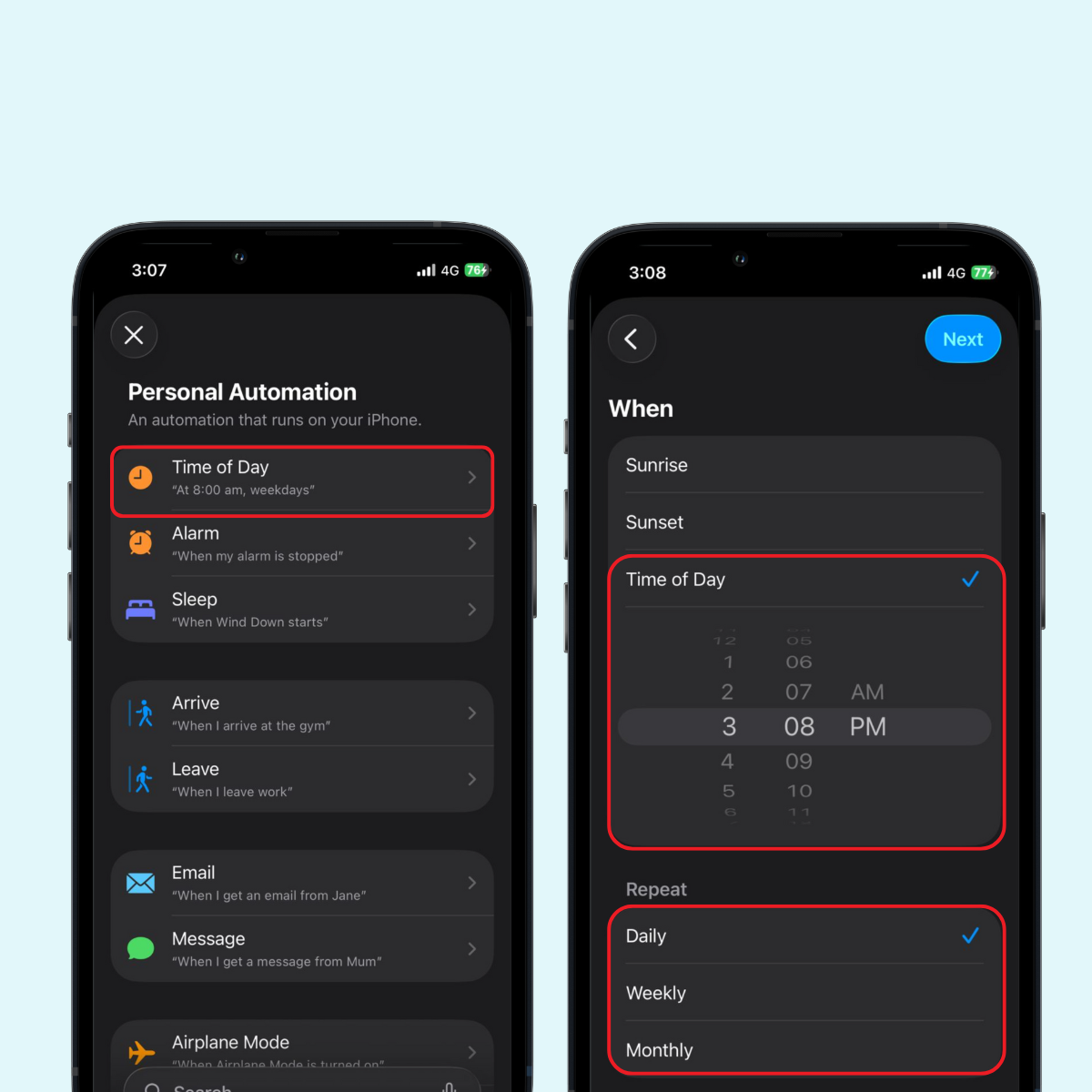
Step 2: Create a new automation by tapping the "Automation" tab.
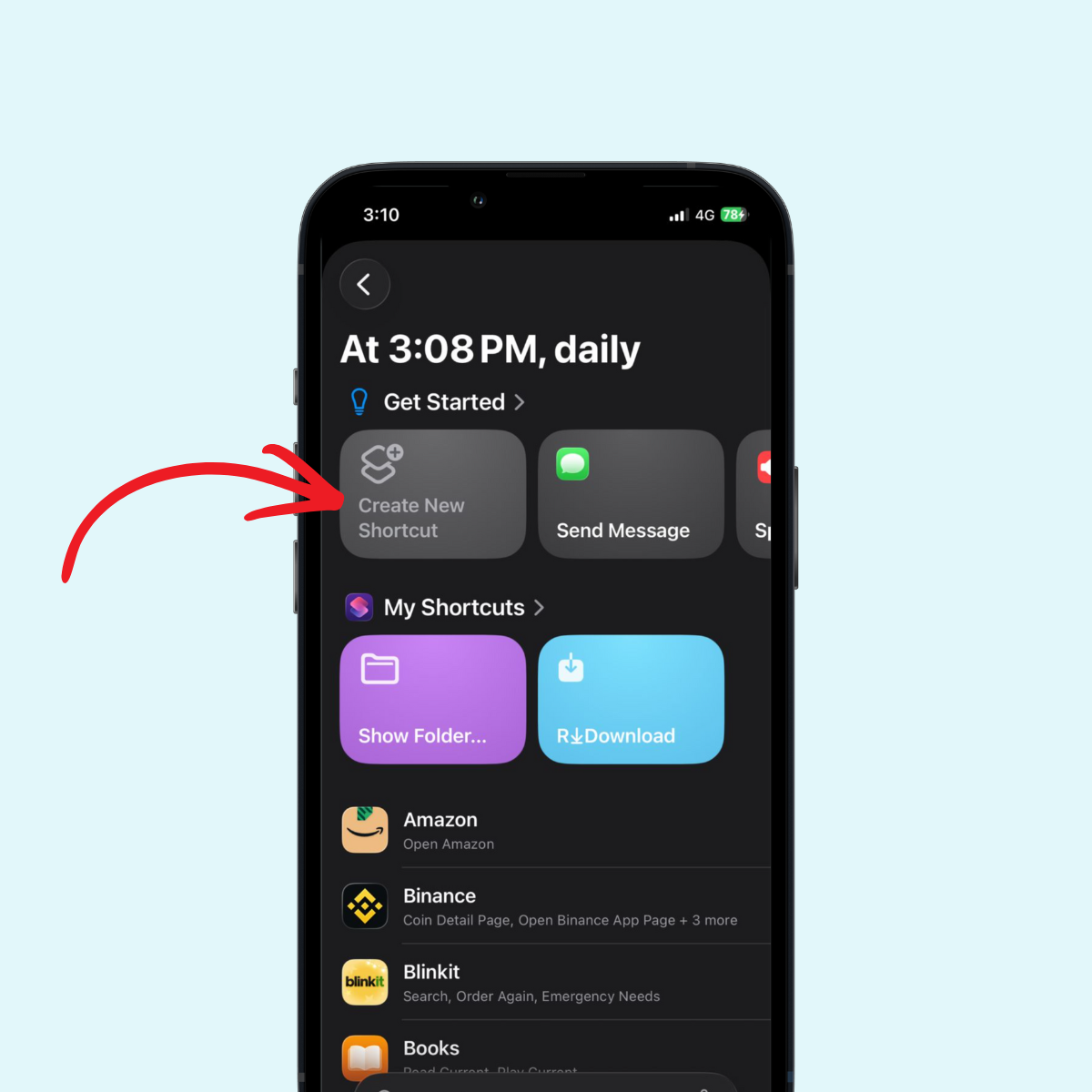
Step 3: Create a New Shortcut by tapping the “Create New Shortcut”.
Step 4: Find WhatsApp App or scroll and then Click on WhatsApp App
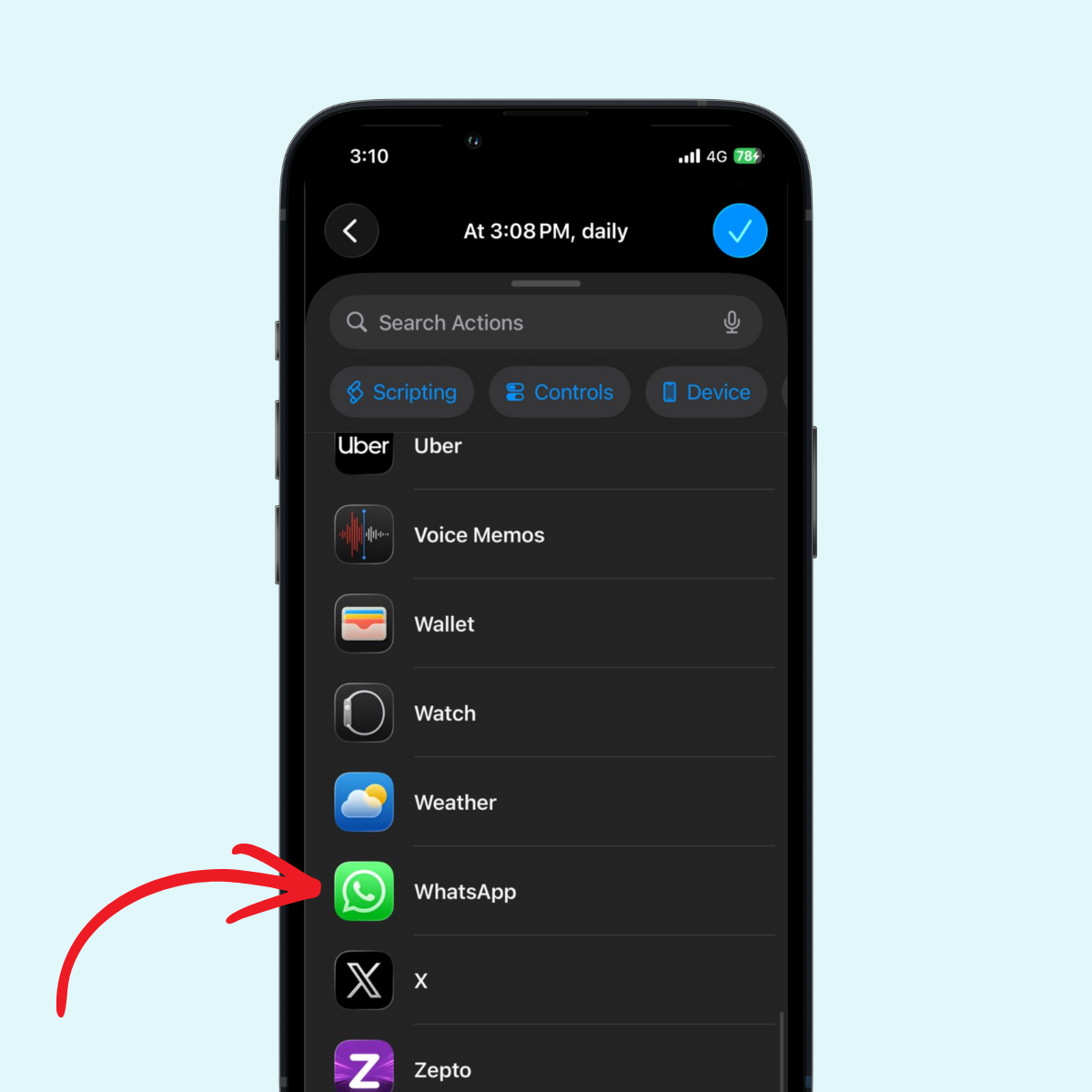
Step 5: Select "Time of Day" as your trigger and set your desired date and time.
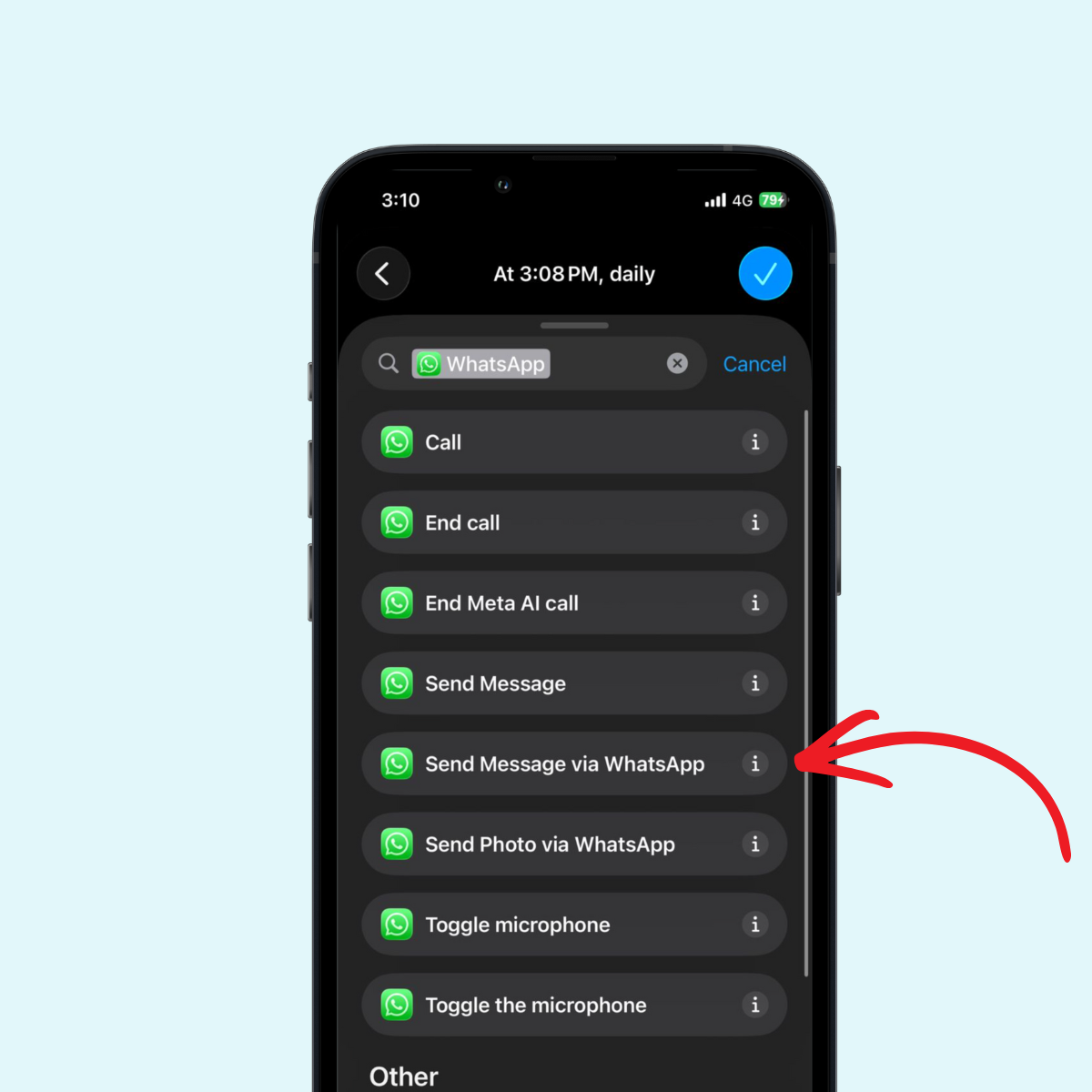
Step 6: Add an action to send a message via Whatsapp.
Step 7: Enter the message content and select the recipient.
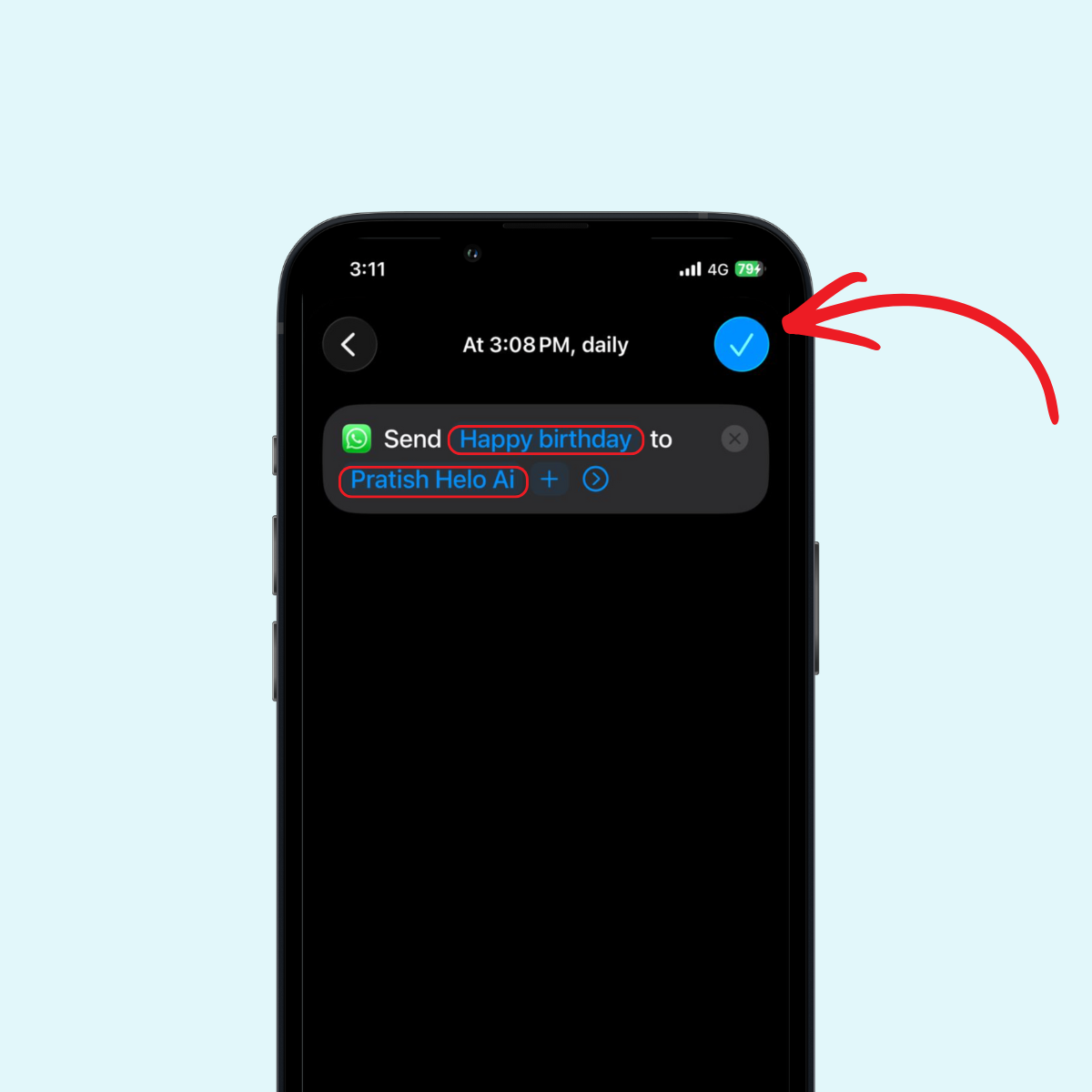
Step 8: Configure the automation to run automatically without confirmation.
This method works well for one message at a time, though setting up multiple messages requires creating separate automations for each.
Method 3: WhatsApp Web Scheduling Solutions
For those who prefer working from their computers, Whatsapp Web offers some scheduling possibilities through browser extensions and desktop applications.
Several Chrome extensions and desktop tools can help you schedule send messages through Whatsapp Web. These tools typically work by keeping your browser tab active and automatically sending messages at predetermined times.
However, these solutions require your computer to remain on with Whatsapp Web active when the scheduled message needs to go out. They're best suited for business hours communication when you're already at your desk.
Best Practices for Scheduling WhatsApp Messages
To make the most of message scheduling, follow these guidelines:
Respect Time Zones: When sending messages to customers or contacts in different locations, schedule messages based on their local time, not yours.
Test Your Setup: Before relying on scheduled messages for important communication, send test messages to yourself to ensure that the message delivery works as expected.
Keep Messages Personal: Even though you're automating messages, avoid making them sound robotic. Personalize your message content to maintain authentic connections.
Mind the Frequency: Scheduling multiple messages to the same person can feel overwhelming. Space out your communications appropriately.
Stay Within Guidelines: Use third-party apps responsibly and ensure you're not violating Whatsapp's terms of service with excessive automation or bulk messaging.
Plan for Business Communication: For Whatsapp marketing purposes, schedule your promotional messages during appropriate business hours when recipients are most likely to engage.
WhatsApp Automation for Business
Businesses using Whatsapp for customer communication can benefit significantly from Whatsapp automation. Beyond simple scheduling, comprehensive message strategies help maintain consistent customer engagement.
The Whatsapp Business solution offers tools for managing messages to customers efficiently. By combining message templates with scheduled delivery, businesses can send whatsapp updates, confirmations, and reminders without manual intervention.
For Whatsapp marketing campaigns, timing matters tremendously. Scheduling bulk messages for optimal delivery times can significantly improve engagement rates. However, always ensure your whatsapp messages provide value and comply with anti-spam regulations.
Troubleshooting Common Scheduling Issues
Even with the best setup, you might encounter challenges when trying to schedule Whatsapp messages in 2026. Here are solutions to common problems:
Messages Not Sending: Ensure your device is connected to the internet at the scheduled time. Check that battery optimization settings aren't restricting background app activity.
Permission Issues: Review and grant all necessary permissions to your message scheduler app. Some Android updates reset these permissions.
App Crashes: Keep your apps updated to the latest versions. Outdated apps may not work properly with newer versions of Whatsapp.
Delivery Delays: Messages could be delayed if your internet connection is unstable. Always maintain a reliable connection during scheduled send times.
How to Schedule Messages Without Third-Party Apps
If you prefer to avoid third-party apps, consider these alternative approaches:
Manual Reminders: Set phone reminders to prompt you to send message content at specific times. While not fully automated, this ensures you don't forget important communications.
Draft Messages: Prepare your messages in advance and save them as drafts or notes. When the reminder goes off, simply copy and send the message.
WhatsApp Makes It Easier: Keep watching for updates from Whatsapp, as the platform continues evolving. Future versions may include native scheduling features.
Platform-Specific Considerations
For Android Apps Users
Android users enjoy the widest range of options for scheduling. The open ecosystem allows message scheduling apps to integrate deeply with the system, making automated message delivery more reliable.
For iPhone Users
While iPhone users have fewer options, the shortcuts app to automate messaging is improving with each iOS update. Apple's focus on privacy means solutions may be more limited but typically more secure.
Ensuring Your Messages Are Effective
Scheduling is only half the battle. To ensure your messages resonate with recipients:
Clear Communication: Make sure your message conveys exactly what you intend, as you won't be available to clarify immediately if it sends while you're unavailable: Make sure your message conveys exactly what you intend, as you won't be available to clarify immediately if it sends while you're unavailable.
Context Awareness: Consider what else might be happening when your message arrives. Avoid scheduling during typical sleep hours unless it's expected.
Follow-Up Strategy: Have a plan for responding to replies that come after your scheduled message is sent: Have a plan for responding to replies that come after your scheduled message is sent.
The Future of WhatsApp Message Scheduling
As messaging platforms evolve, we can expect more integrated scheduling features. The gap between what users want and what Whatsapp doesn't offer natively continues to narrow as the platform adds new capabilities.
Businesses especially are driving demand for better scheduling tools, which may prompt official solutions that don't require workarounds or third-party apps.
Conclusion
Learning how to schedule messages on Whatsapp opens up new possibilities for managing your time and communication effectively. Whether you're using the Whatsapp Business app for professional purposes, relying on third-party apps like SKEDit on your Android device, or using the shortcuts app on your iPhone, there's a solution that fits your needs.
Remember that sending messages without being actively present requires your device to stay connected. Plan accordingly, test your setup, and always ensure that the message you want to send is scheduled correctly.
By following this comprehensive guide, you can master Whatsapp schedule message techniques and ensure your messages reach the right people at exactly the right time to send them. Start implementing these strategies today and discover how to schedule your communications more efficiently.