

.png)
TL;DR (Safe Bulk WhatsApp Messaging in 2026)
If you want to know how to send bulk messages on WhatsApp without getting banned, use official methods:
- WhatsApp Business App broadcast list (free, limited to 256 saved contacts per list)
- WhatsApp Business API (official, scalable for 1,000+ recipients with templates + opt-in)
Avoid Chrome extensions or unofficial bulk senders—they’re the fastest way to get blocked or restricted.
Quick Comparison: API vs Business App vs Unofficial Tools
Method | Best for | Scale | Compliance Risk | Automation | Key Limitation |
|---|---|---|---|---|---|
WhatsApp Business API | Serious bulk + automation | High | Low (when compliant) | Yes | Needs templates + setup |
WhatsApp Business App Broadcast | Small batches | Low | Medium | No | 256 contacts per list + recipients must save your number |
Extensions / Bulk sender tools | “Quick hacks” | Varies | High | Yes | Violates policy patterns → bans/restrictions |
If you want to send thousands of WhatsApp messages at scale without triggering bans, this guide will show you exactly how to do it right.
WhatsApp Business reached 764 million monthly active users in Q4 2024, representing a 12% year-over-year growth that signals massive opportunity for businesses. With 175 million daily interactions between customers and businesses, WhatsApp has evolved into the most powerful direct communication channel for modern enterprises. But here's the critical challenge: sending bulk messages incorrectly can result in permanent account bans that destroy your customer communication overnight.
This comprehensive guide walks you through three official methods to send bulk WhatsApp messages, from free broadcast lists to enterprise-grade API automation. You'll learn proven best practices, discover AI-powered tools that optimize campaigns, understand exactly what triggers bans, and master the strategies that over 200 million businesses worldwide use to scale their WhatsApp messaging safely and effectively.
Understanding WhatsApp Bulk Sender in 2026
WhatsApp bulk messaging in 2026 refers to high-volume, one-to-many business communication sent through WhatsApp's official business channels, particularly the WhatsApp Business API or WhatsApp Cloud API. According to WhatsApp Business Platform Terms and WhatsApp Policies, legitimate bulk messaging requires using templated, often automated messages sent at scale to users who have explicitly opted in for business communication.
There are three reliable options:
- Broadcast Lists (WhatsApp Business App): Free, limited to 256 contacts.
- WhatsApp Business API (Cloud/API): paid, scalable, and fully official.
- Third-party tools or Chrome extensions: Quick but risky; not endorsed by Meta.
According to Meta’s official WhatsApp Business Messaging Policy, bulk messaging is permitted only through approved business tools and requires explicit user opt-in.
👉Recommended read: WhatsApp Business vs WhatsApp Business API |
Think of these as levels:
WhatsApp Broadcast → for small lists.
WhatsApp API → for scale and compliance.
Third-party tools or Chrome Extensions → for testing, not long-term use.
Before you send anything, you also need to know what counts as spam.
WhatsApp blocks numbers that:
- Send messages to users who haven’t opted in.
- Send repetitive or irrelevant content.
- Use unauthorized automation tools.
So yes, you can do bulk messaging, but you must do it right.
Let’s begin.
Expert Note: Think of these as levels of maturity. Use Broadcasts for personal client lists. Move to the API when you need to reach 1,000+ people. Avoid Extensions unless you are willing to lose your phone number. |
Method 1: WhatsApp Business API (Official, Scalable & Smart)
.jpeg)
The WhatsApp Business API is the only official and scalable way to send bulk WhatsApp messages to thousands of users without saving their numbers — provided users have opted in.
How to Send Bulk Messages on WhatsApp Using the WhatsApp Business API (Step-by-Step)
With the WhatsApp Business API, bulk messaging is done using approved message templates and opted-in recipients. You can personalise messages (name/order/location), schedule campaigns, track delivery and replies, and route conversations to your team inbox—without relying on risky automation hacks.
Here’s how to do it.
Steps summary:
- Get WhatsApp Business APi
- Connect and configure your account
- Create WhatsApp message template
- Create your first campaign
- Track performance and optimse
Step 1: Get WhatsApp Business API Access
You need to have WhatsApp business API in oder to run a WhatsApp campaigns, officially.
You can apply directly through Meta Business Manager or via a certified WhatsApp Business Solution Provider (BSP) like Helo.ai.
- Business verification is mandatory
- Approval typically takes 1–7 days
Our insight: Approval is easy. Surviving the first week is harder. We always advise clients to warm up with utility or update templates first, not promotions. |
Since the WhatsApp API has no interface, you need a dashboard like Helo Broadcast to actually send the messages.
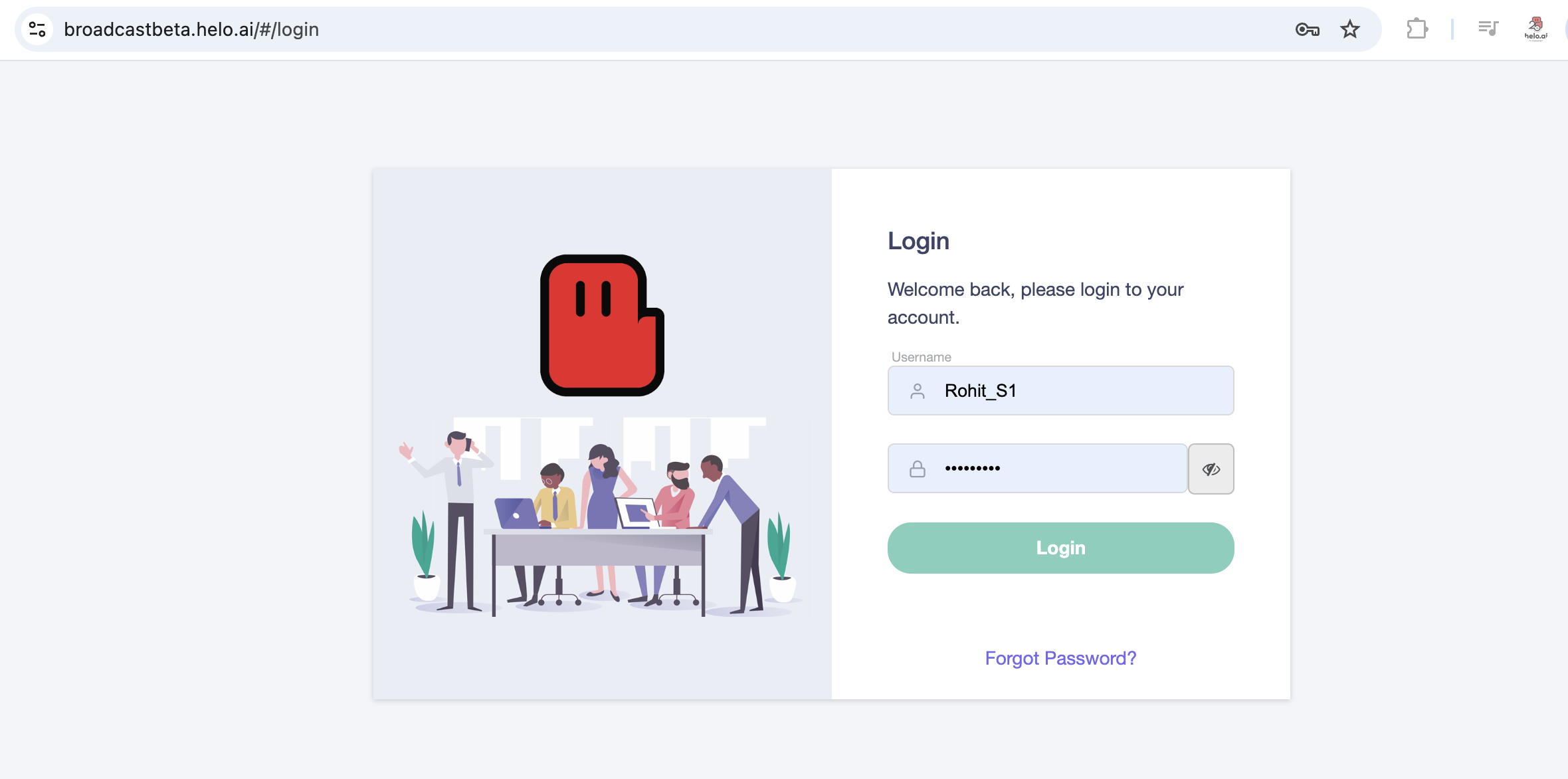
Step 2: Connect & Configure Your Account
Once you ge your WhatsApp Business API, you will get a web-based dashboard from your official META business solution provider
(no coding required)
- Sync CRM or lead sources (optional)
- Set sending limits and schedules
What many businesses miss: Uploading 50,000 contacts on day one almost always triggers a quality review. Start with 500–1,000 messages/day, then scale. |
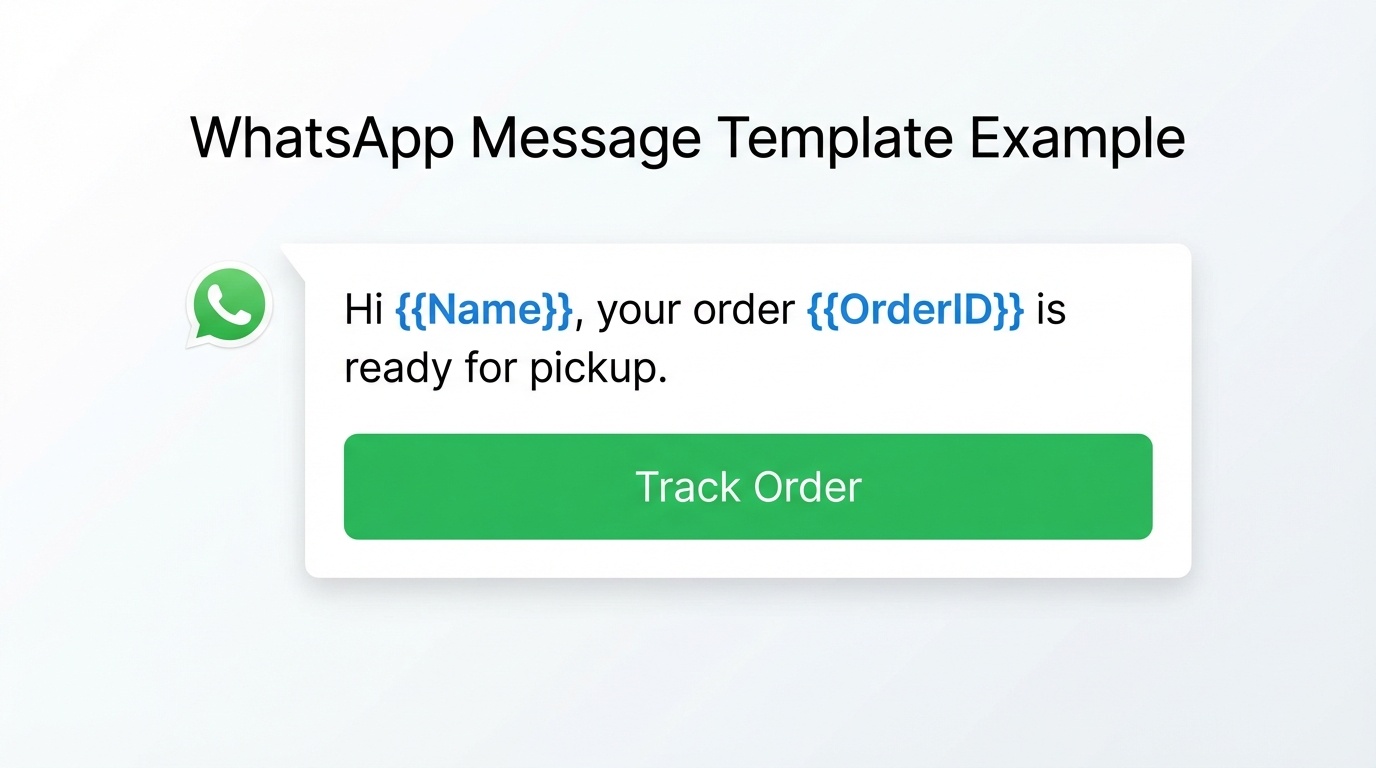
Step 3: Create WhatsApp Templates
All outbound bulk messages must use pre-approved WhatsApp message templates. You can only send messages after META approves your message templates.
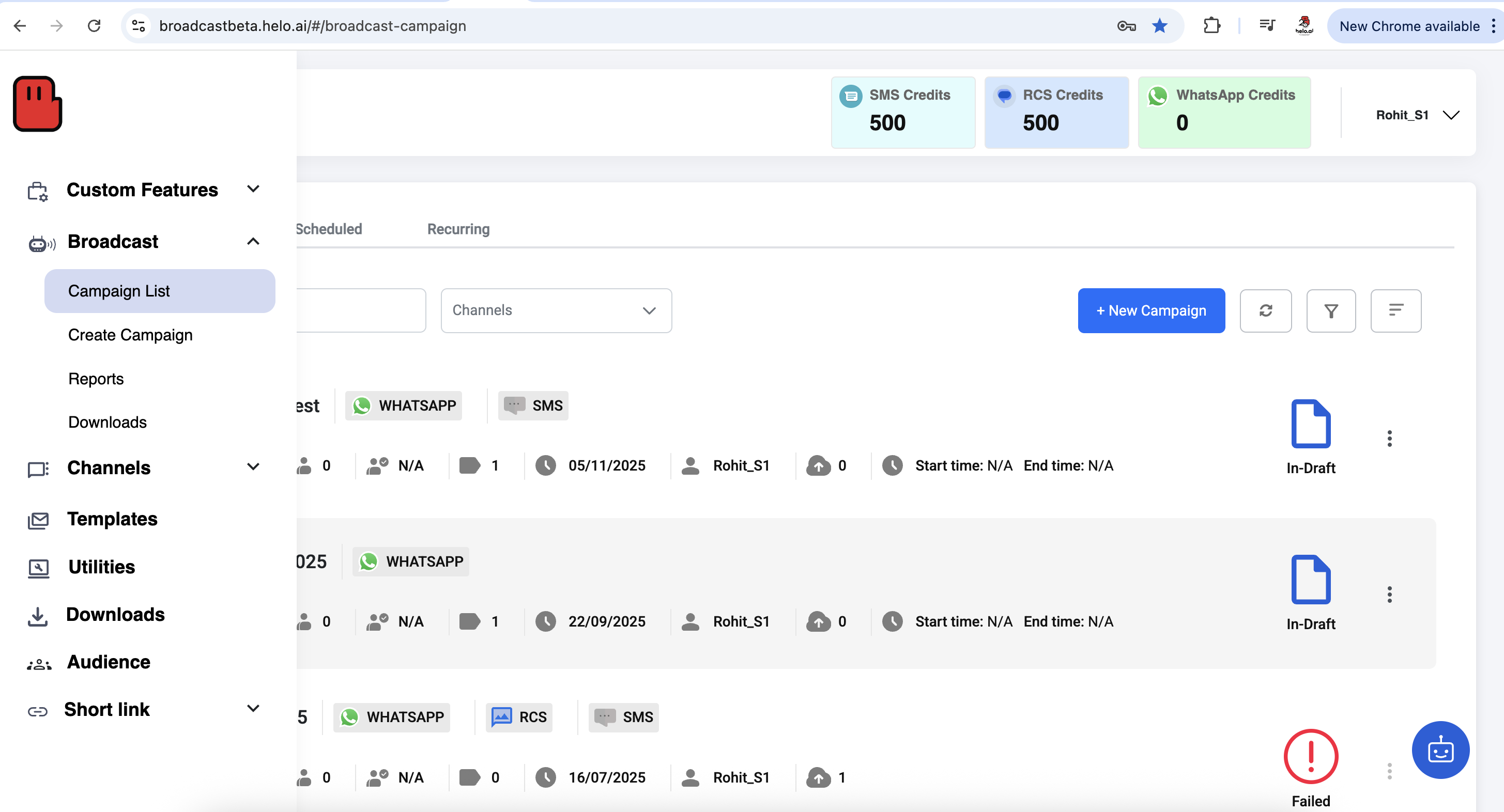
This can be easily done with Helo Broadcast panel, directly without leaving the platform.
Hover over to the left sidebar and go to the “Templates” option
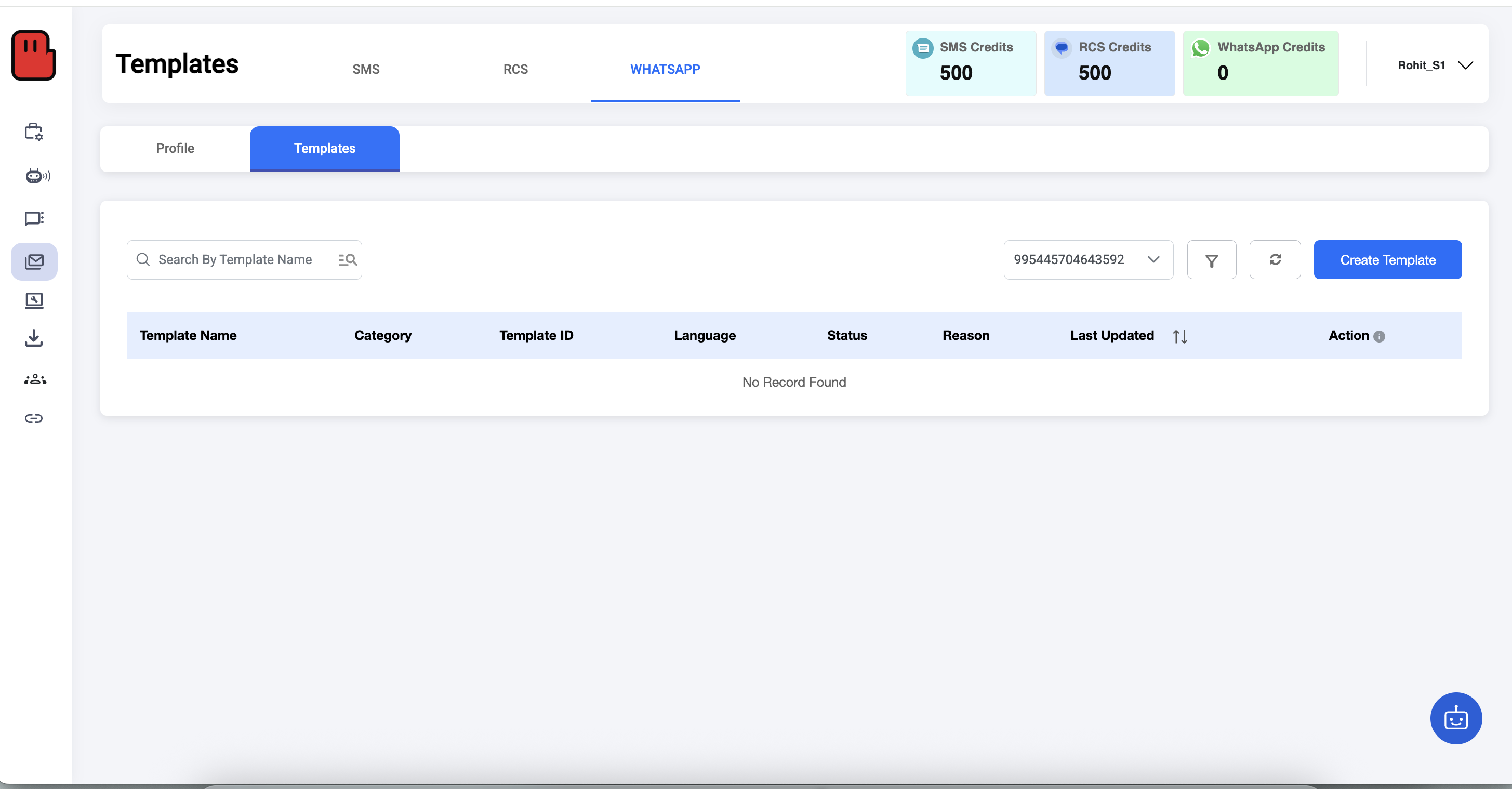
On the top, select “WhatsApp” → go to “Template” → Hit “Create Template” on the right side of the dashboard.
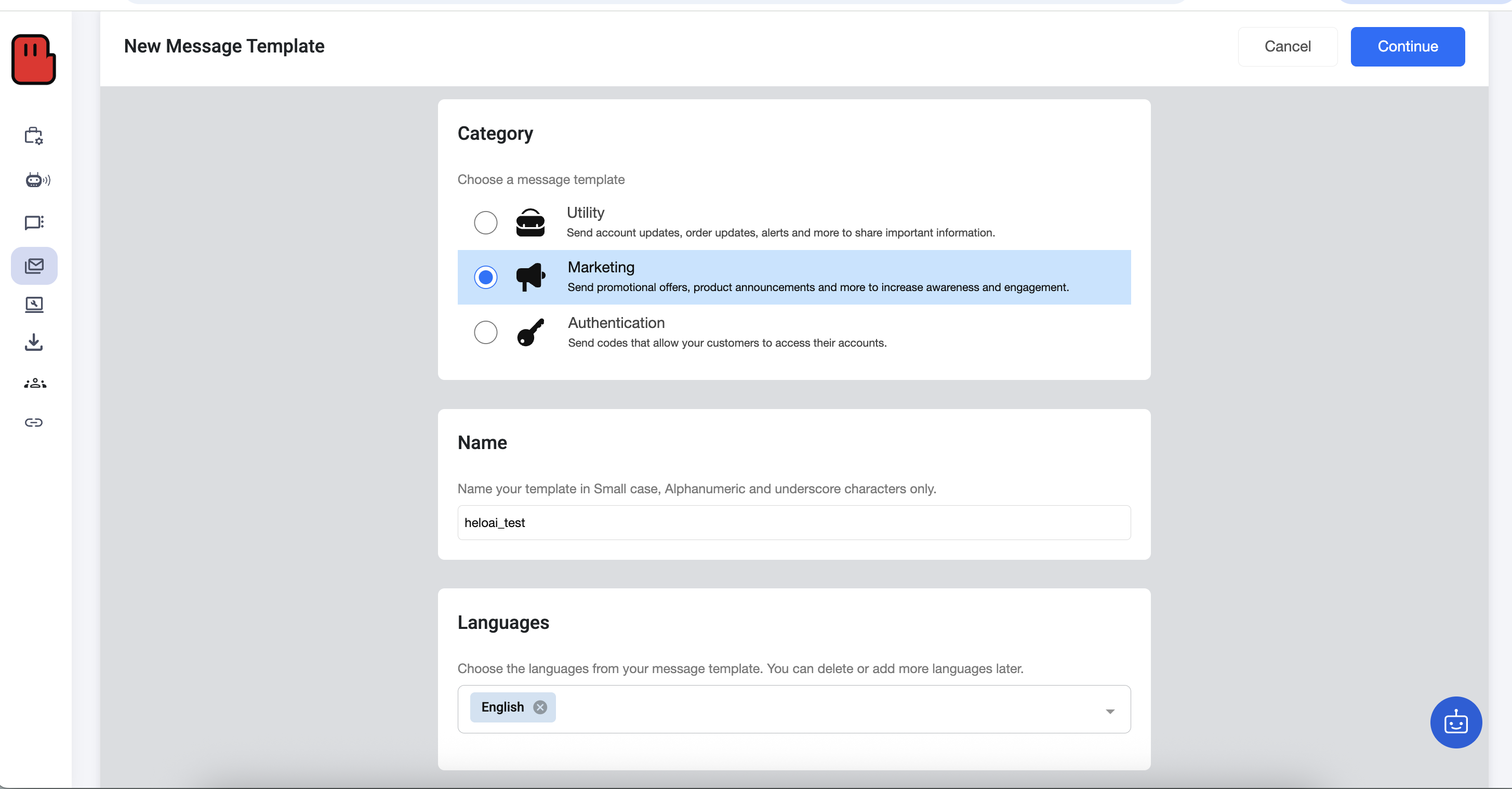
Select your message category, name your template and select the language (you can select multiple languages) → hit “Continue” on the top right corner.
Select what you want in the header (none, text, media or document) → Write down the body of the content → add footer (optional) → add CTA button (optional).
→ Once done, click on the “Submit” button in the top right corner.
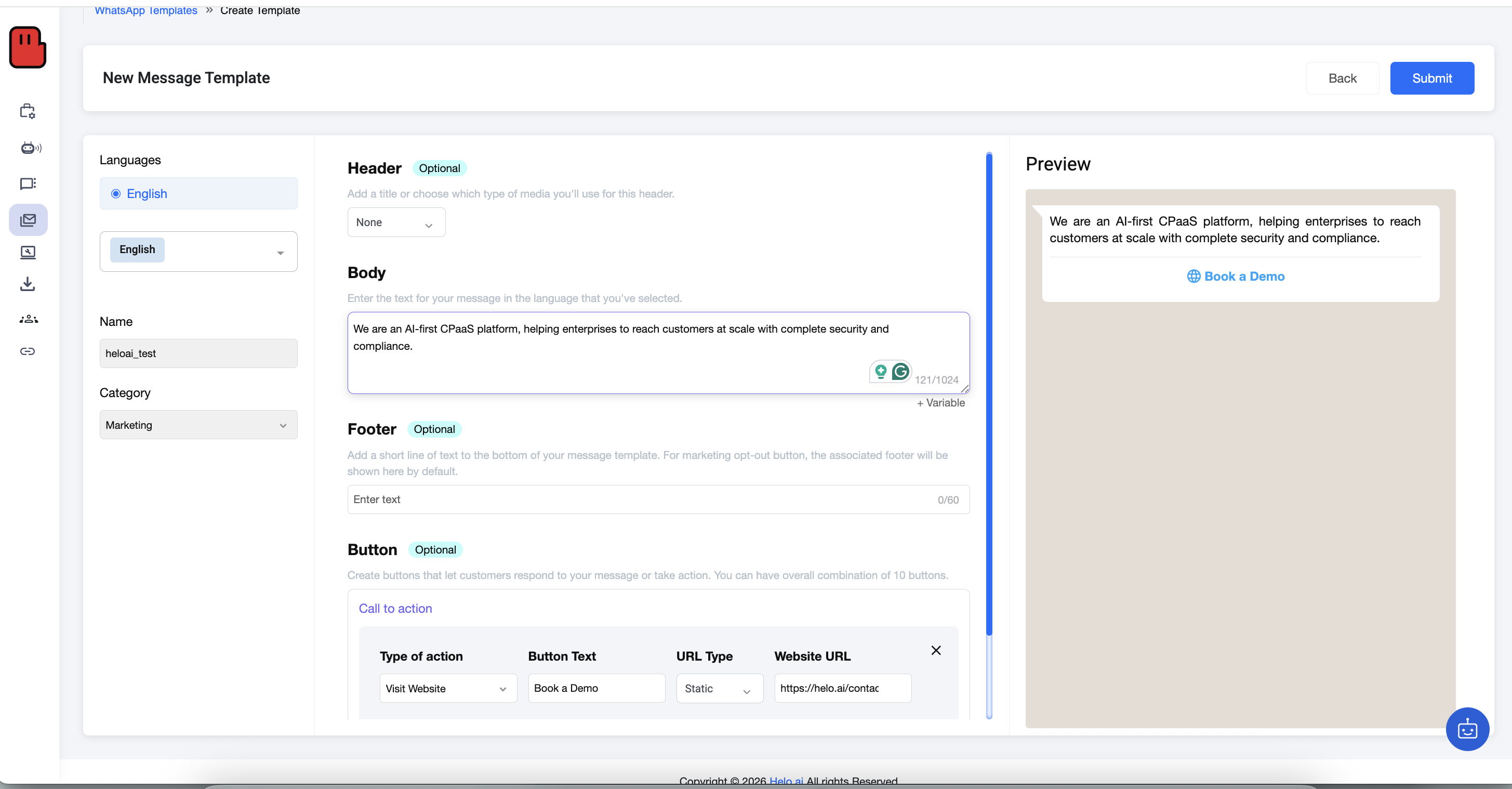
Review and confirm
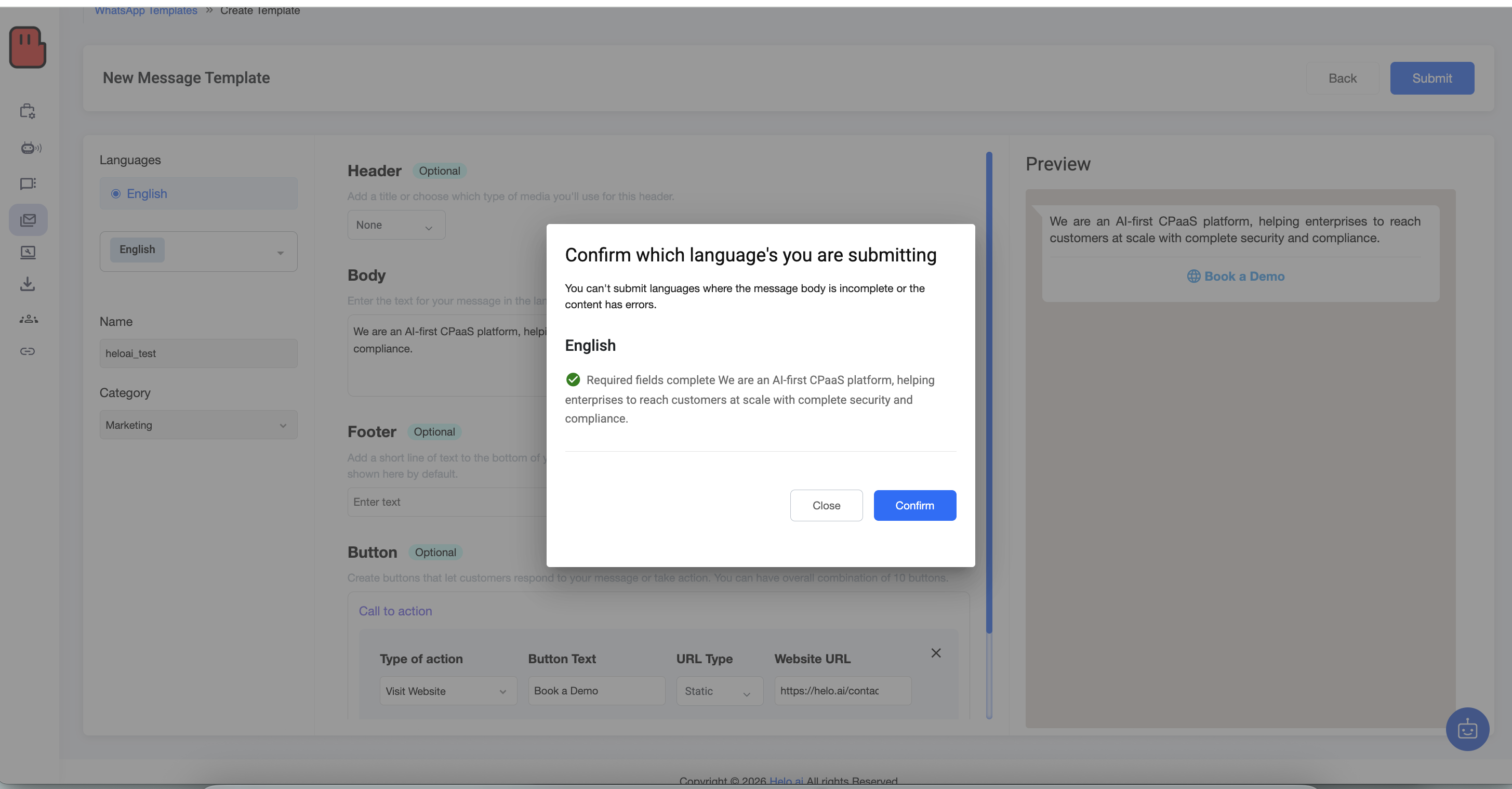
That’s it, your template is sent for approval to META directly from the Helo Broadcast panel. Wait for your template to get approved. (usually takes a few hours)
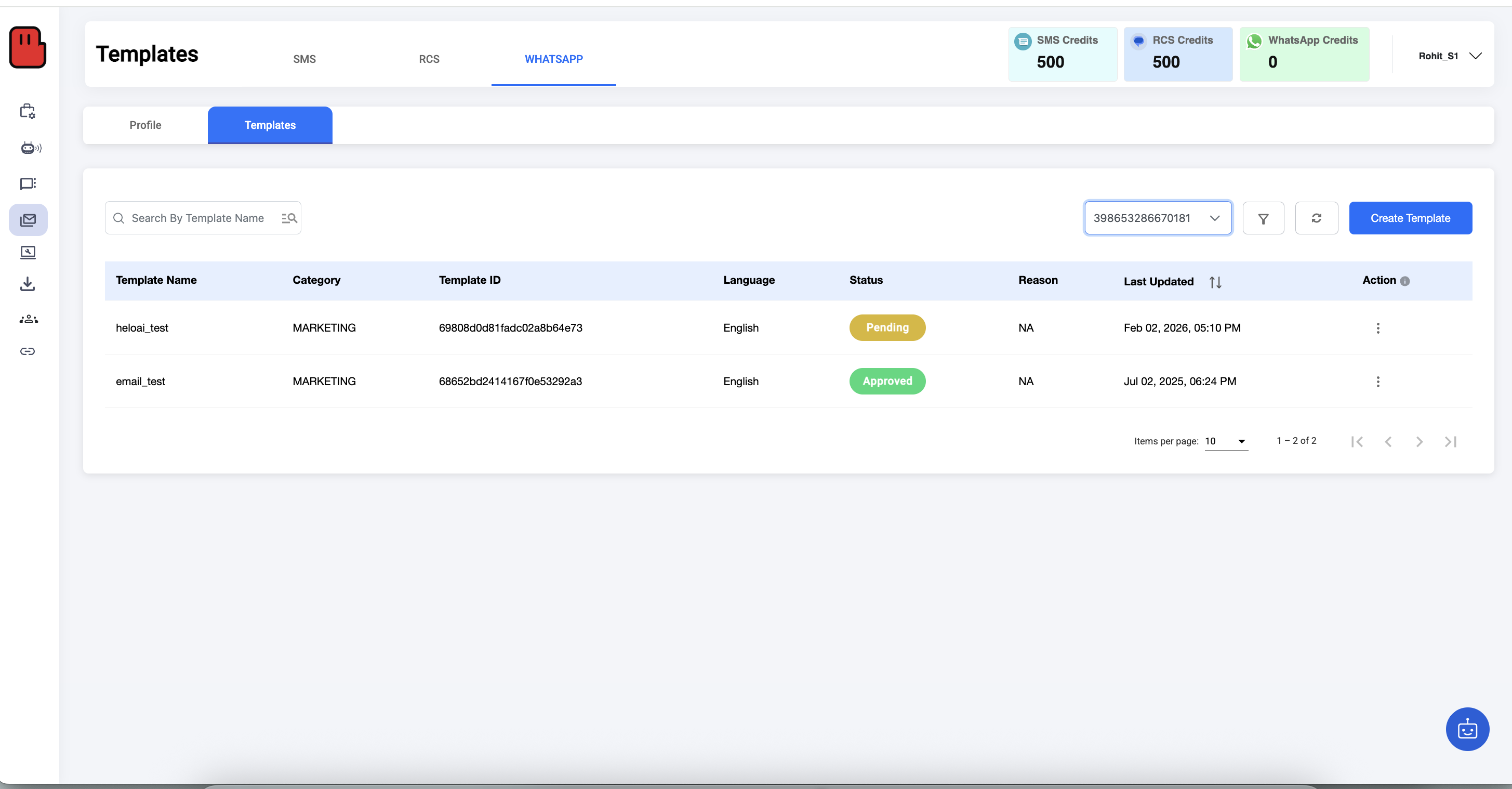
Templates are reviewed by WhatsApp to ensure compliance and user safety.
Step 4: Create your first campaign
Once your template is approved, now you are all prepared to run your campaign with WhatsApp.
It is super simple with Helo Braodcast. Here’s how to do it:
Go to the sidebar, under the “Broadcast”, select “Create Campaign”
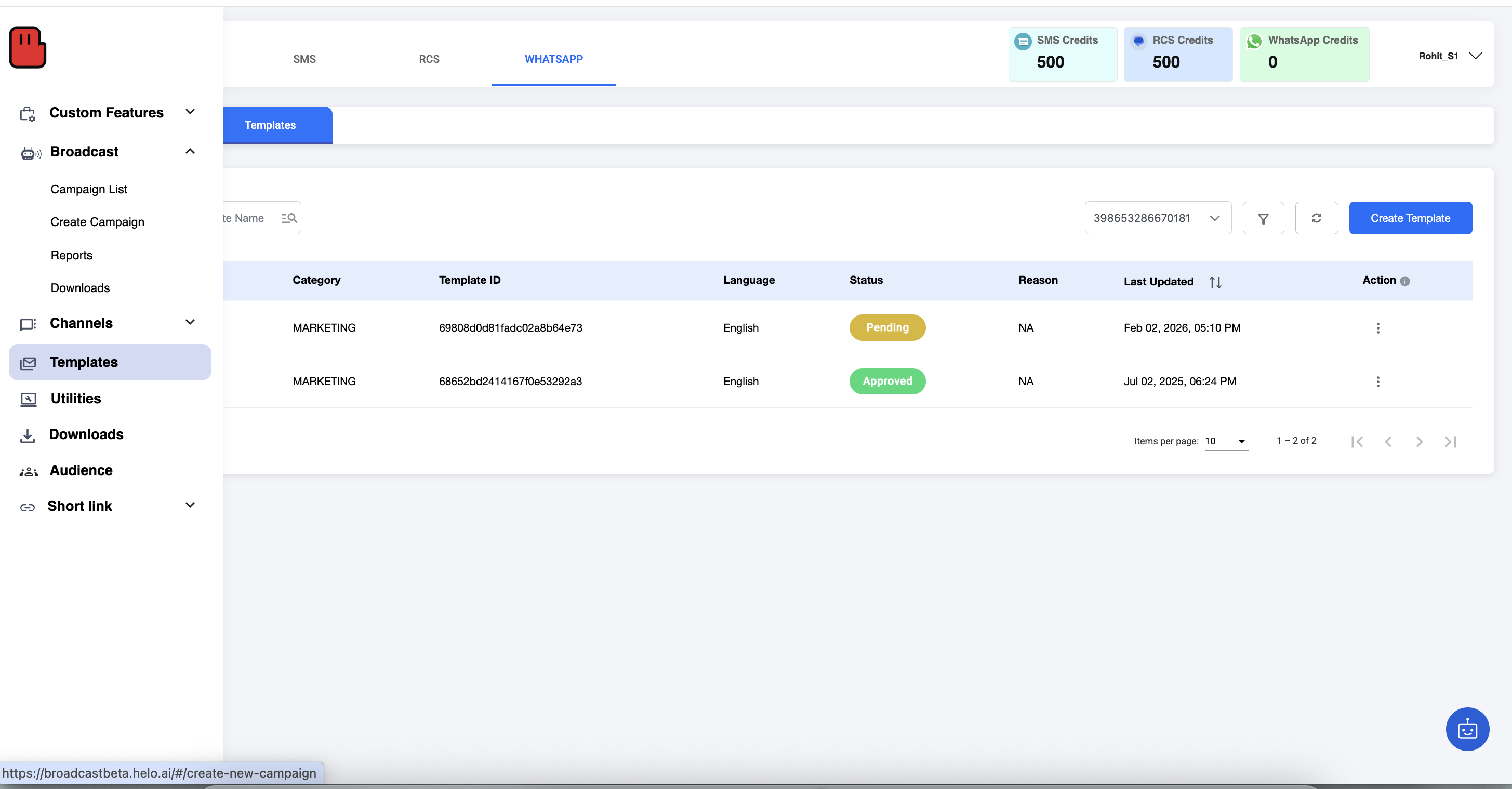
Enter Campaign name → Select channel → add tag (optional) → hit “Continue” on the top right corner.
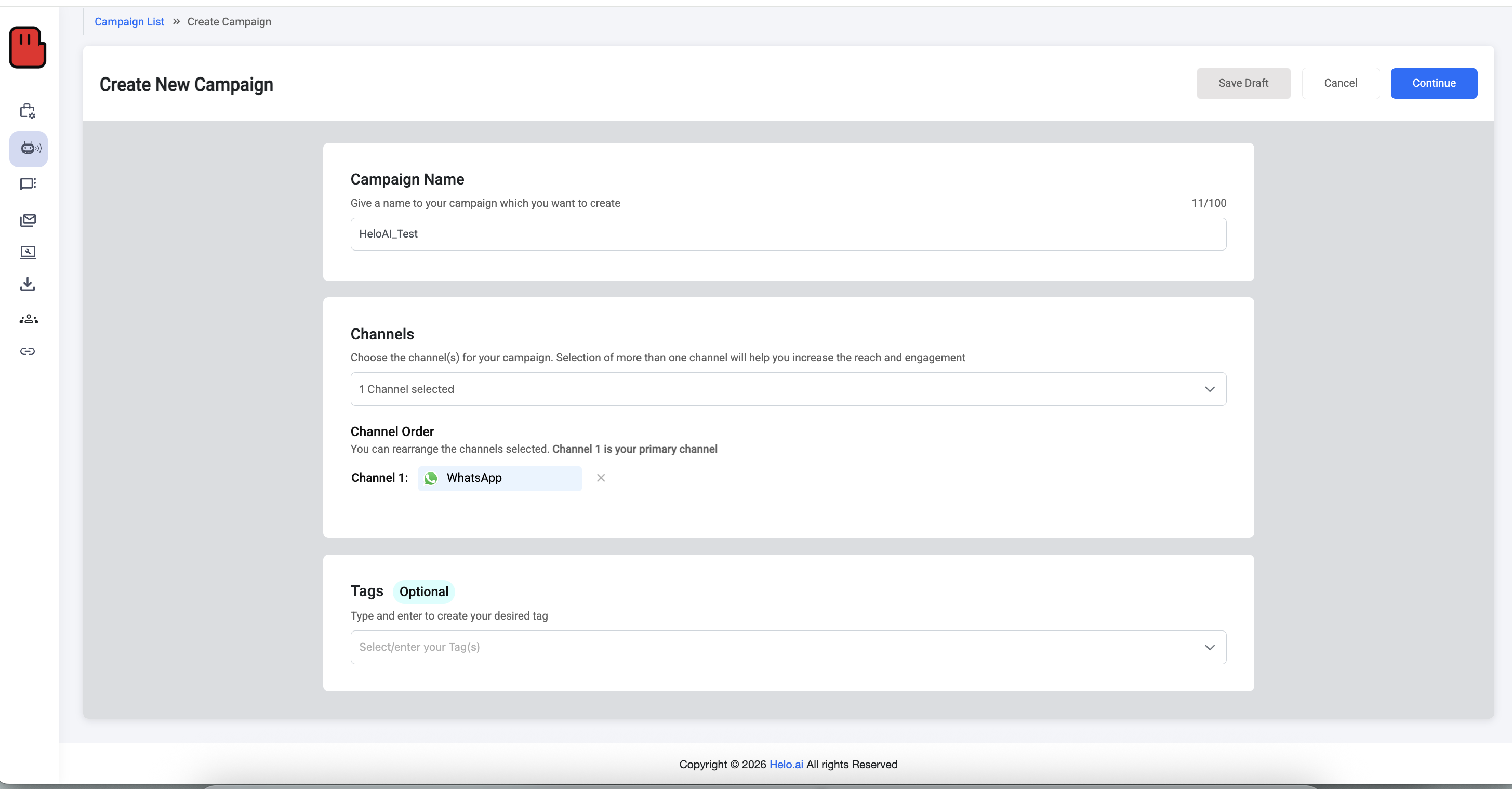
Select your WABA name (this will already be added by Helo.ai’s team from the backend for you) → Select your number (this will already be there as well, you need to just select from the drop-down) → Click “Next” in the bottom right.
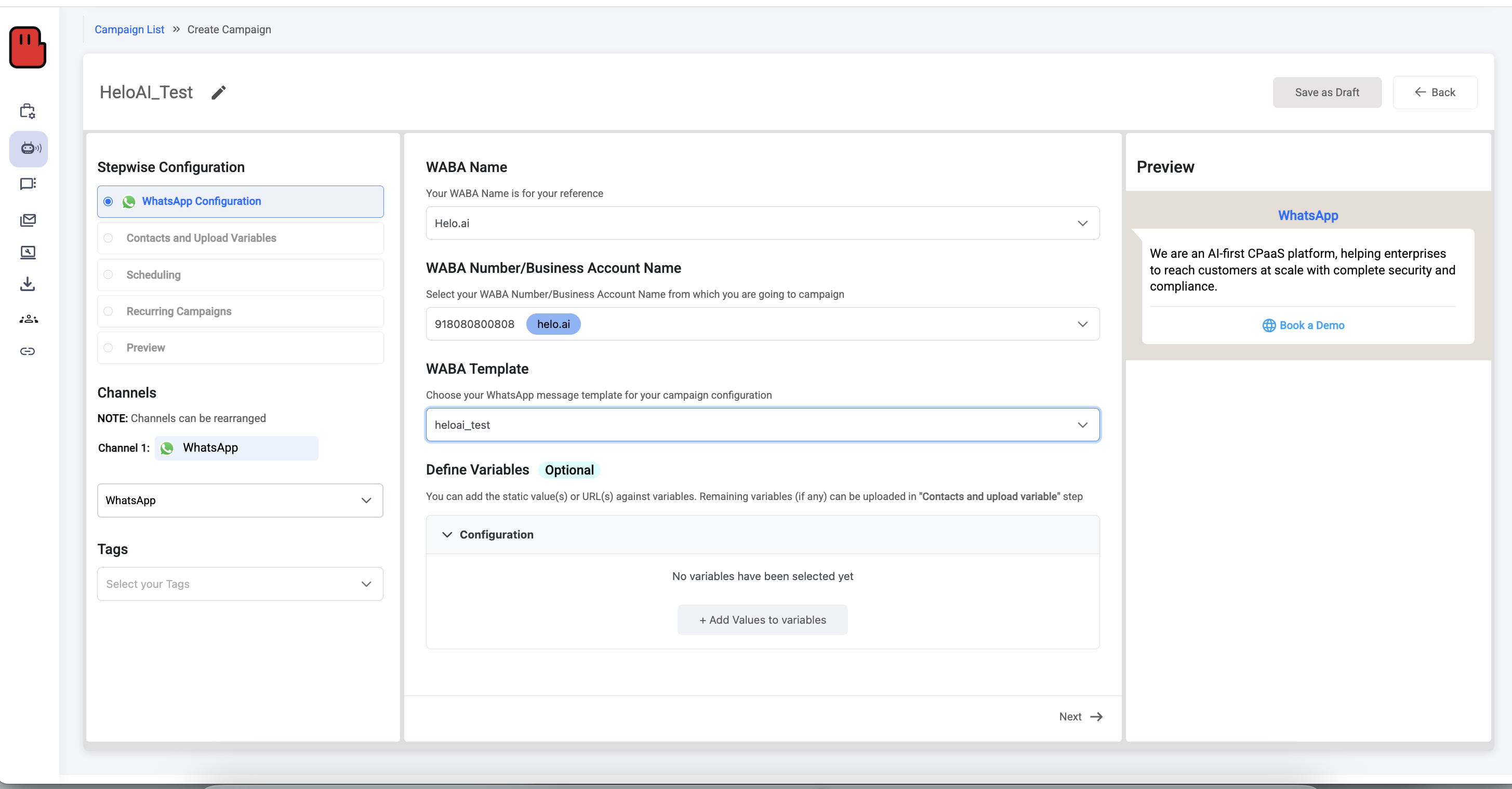
Upload your customer list over here
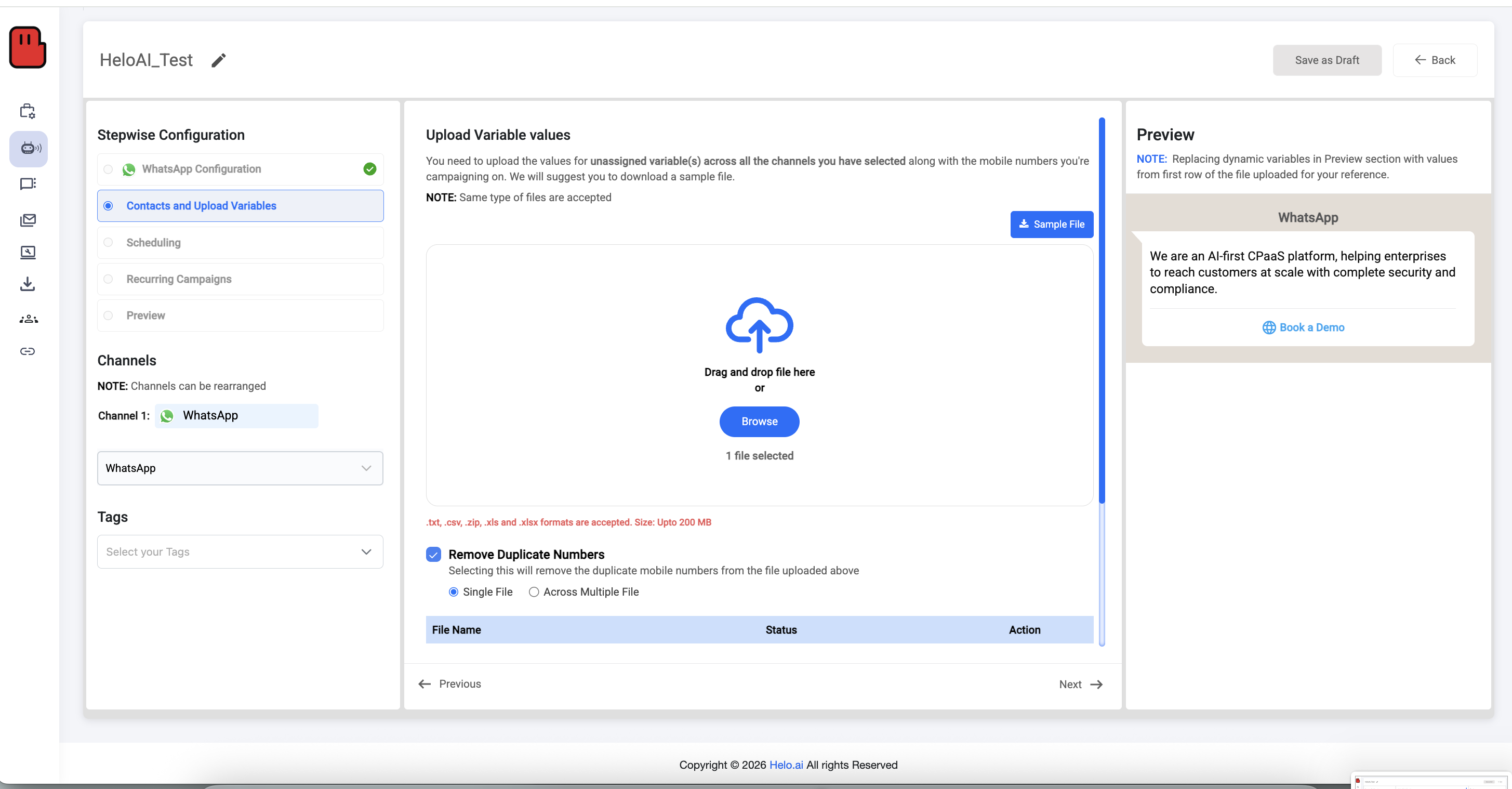
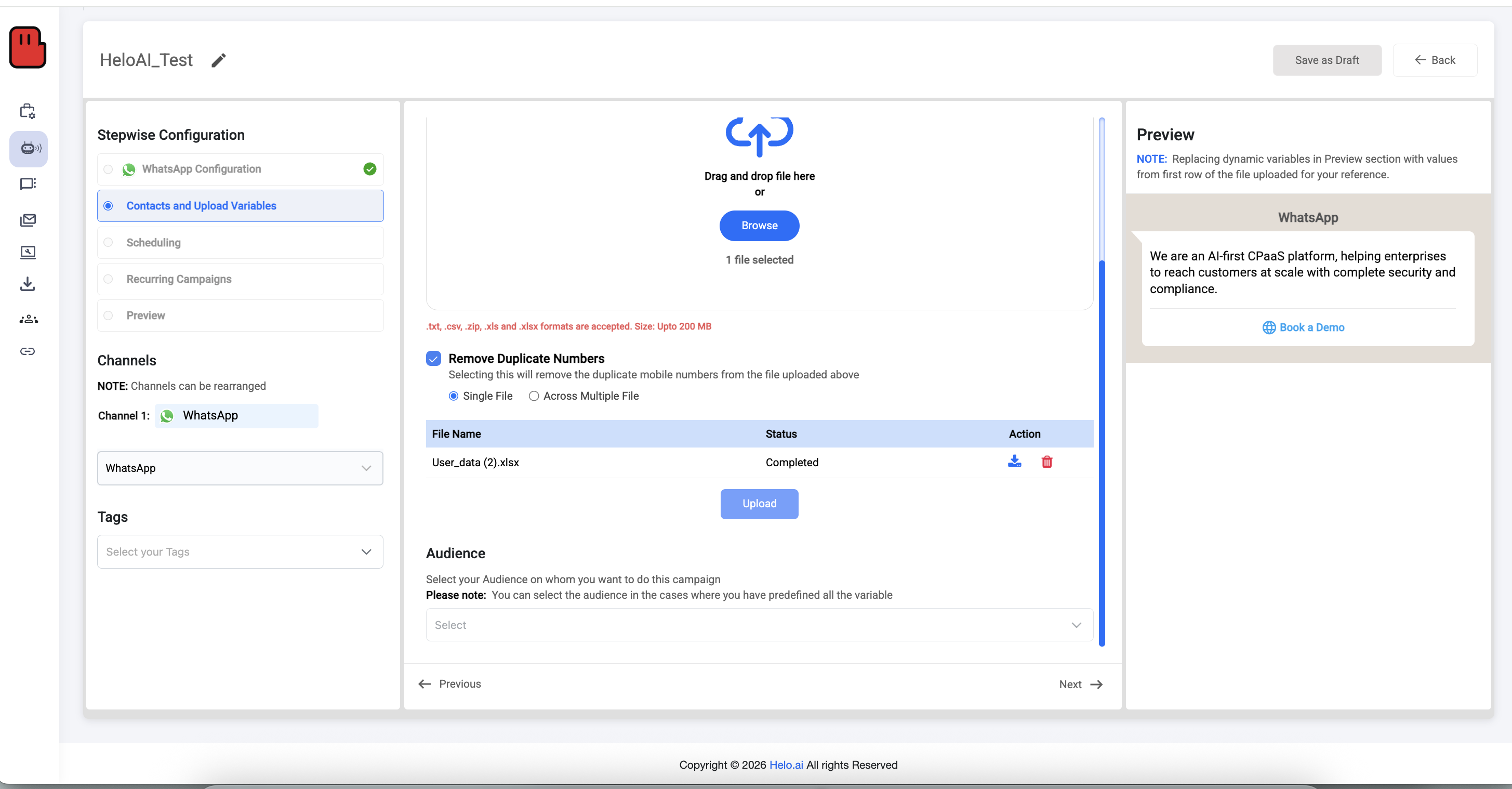
Once done, you can also select your previous audience if you already have one; if not, just click “Next’ in the bottom right corner.
Now you can either start or schedule your campaign. Choose your option and hit “Next” at the bottom right corner.
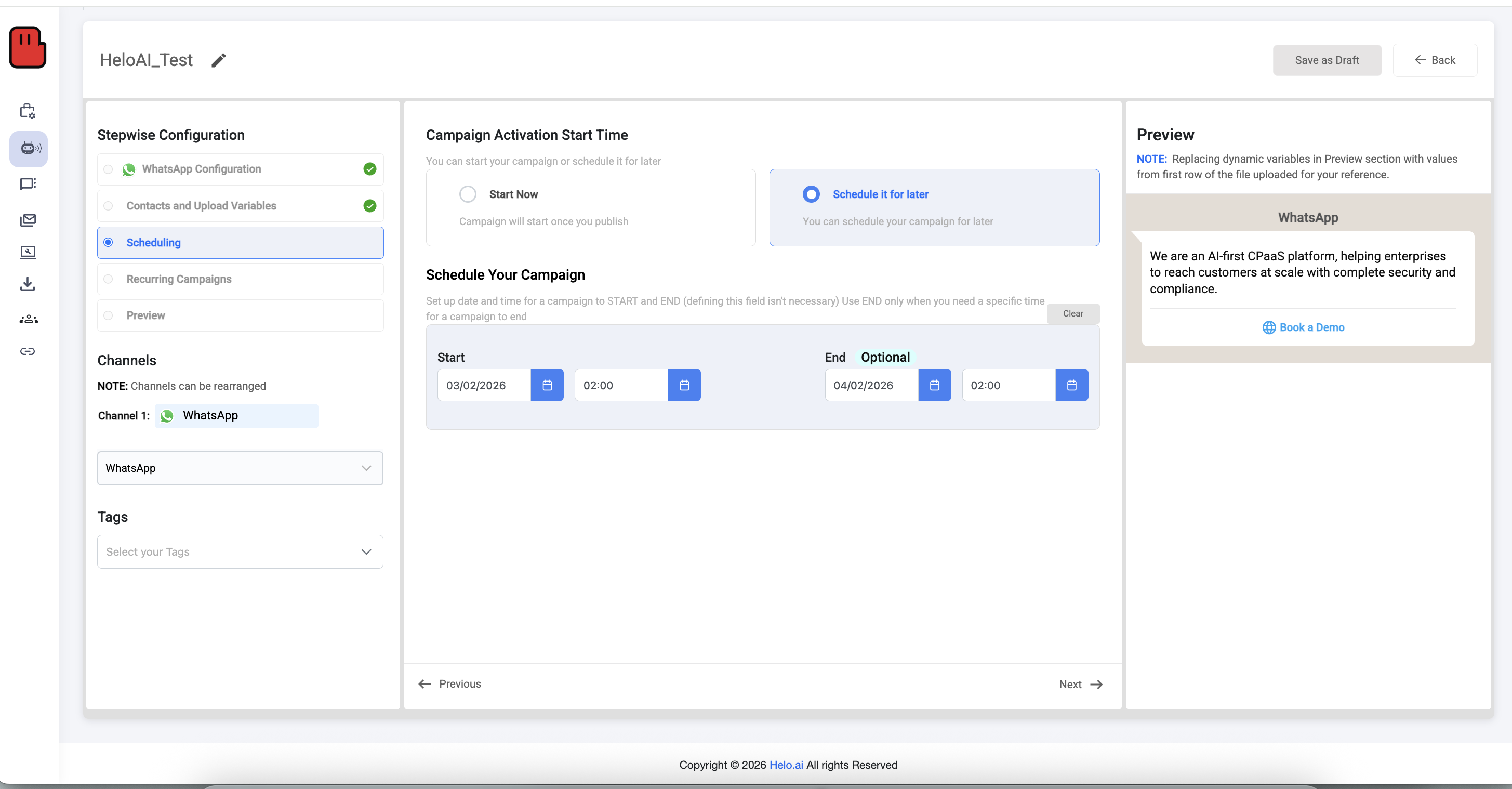
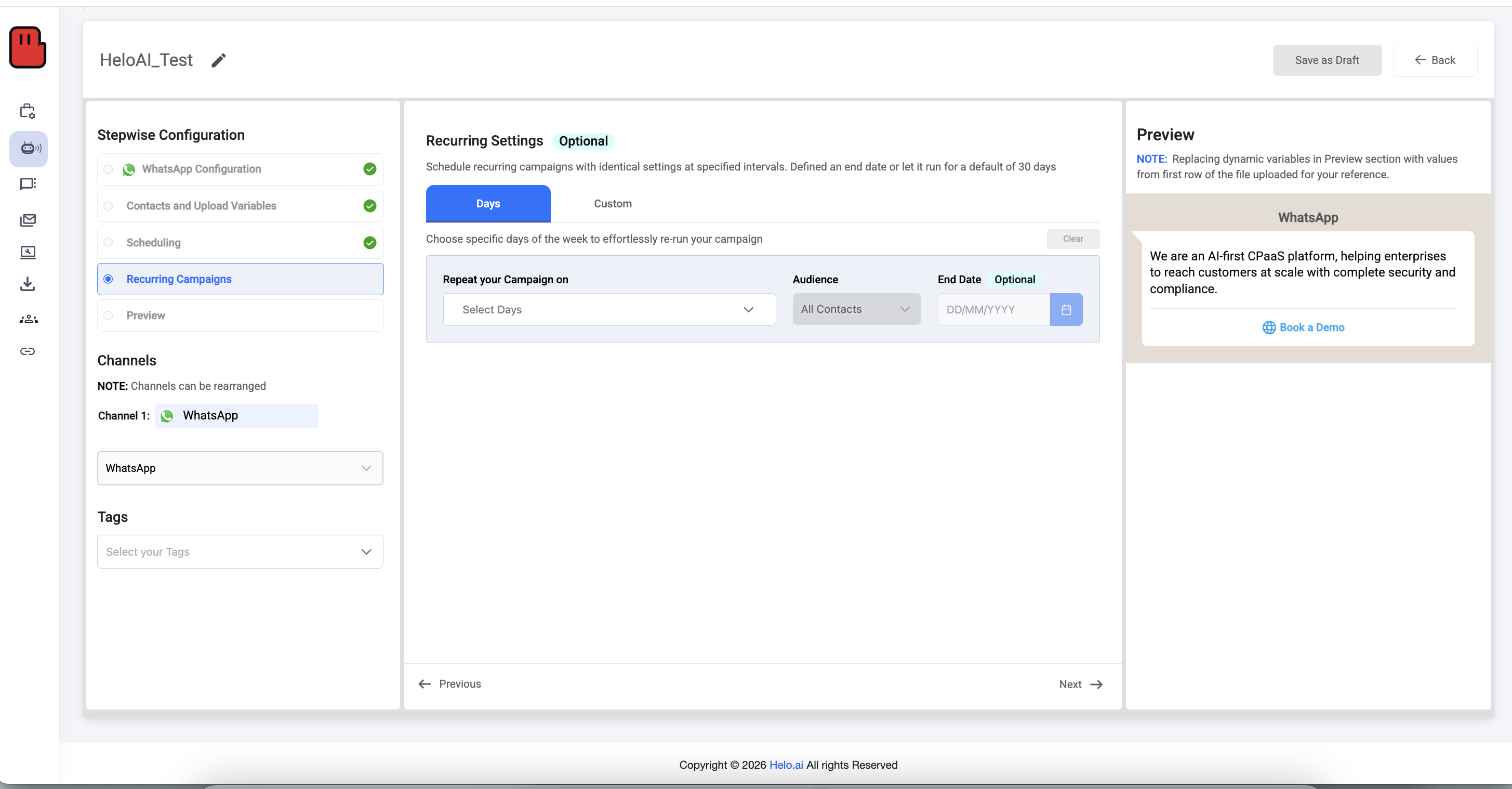
If you want this campaign to be recurring, you can set it up accordingly; if not, just proceed further.
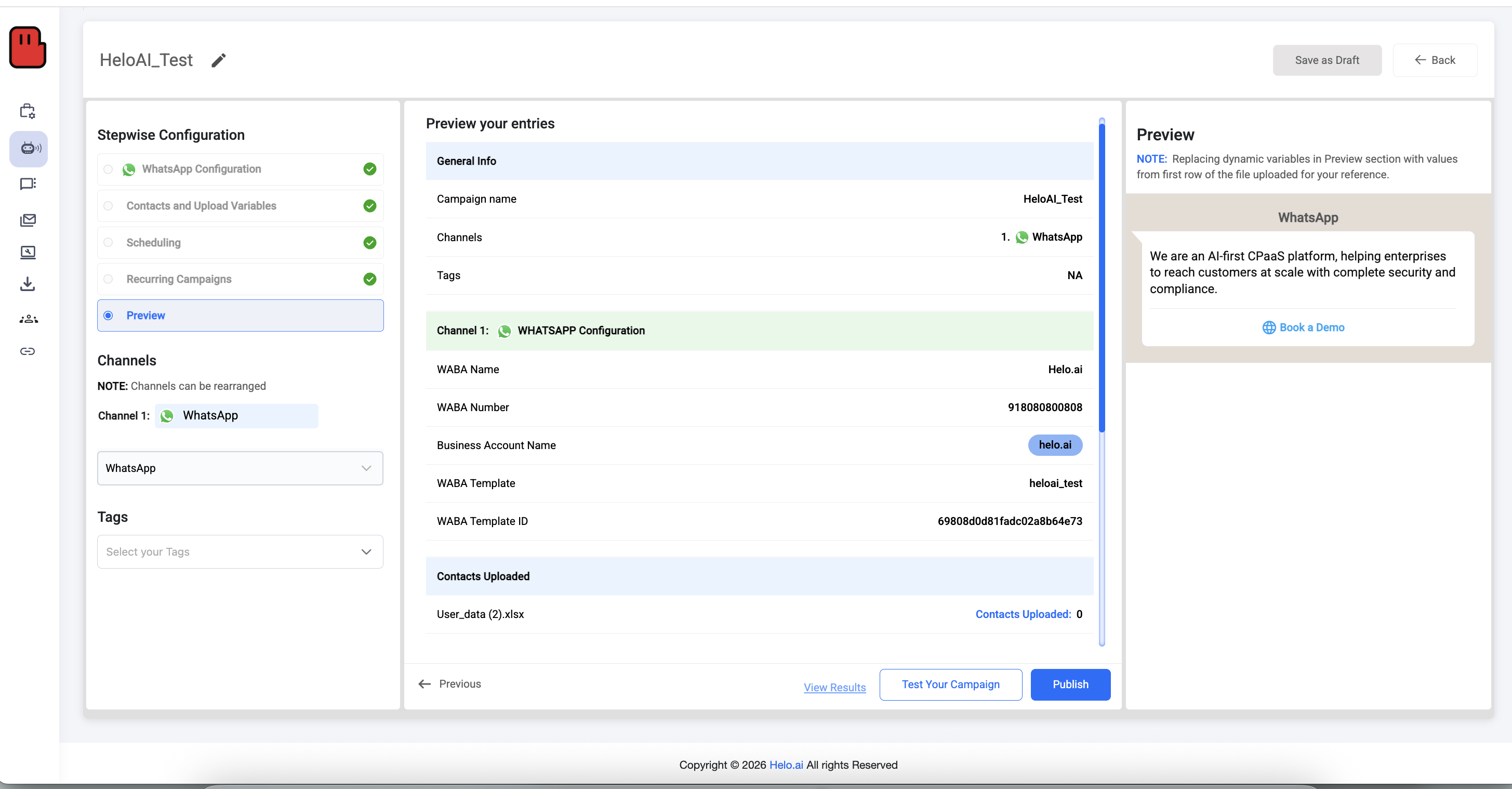
The Final Step: Preview your campaign, then you can either test your campaign by clicking on “Test Your Campaign” or publish it directly by clicking on “Publish”. Both buttons are located adjacent ot each other at the bottom right corner.
What we’ve observed: |
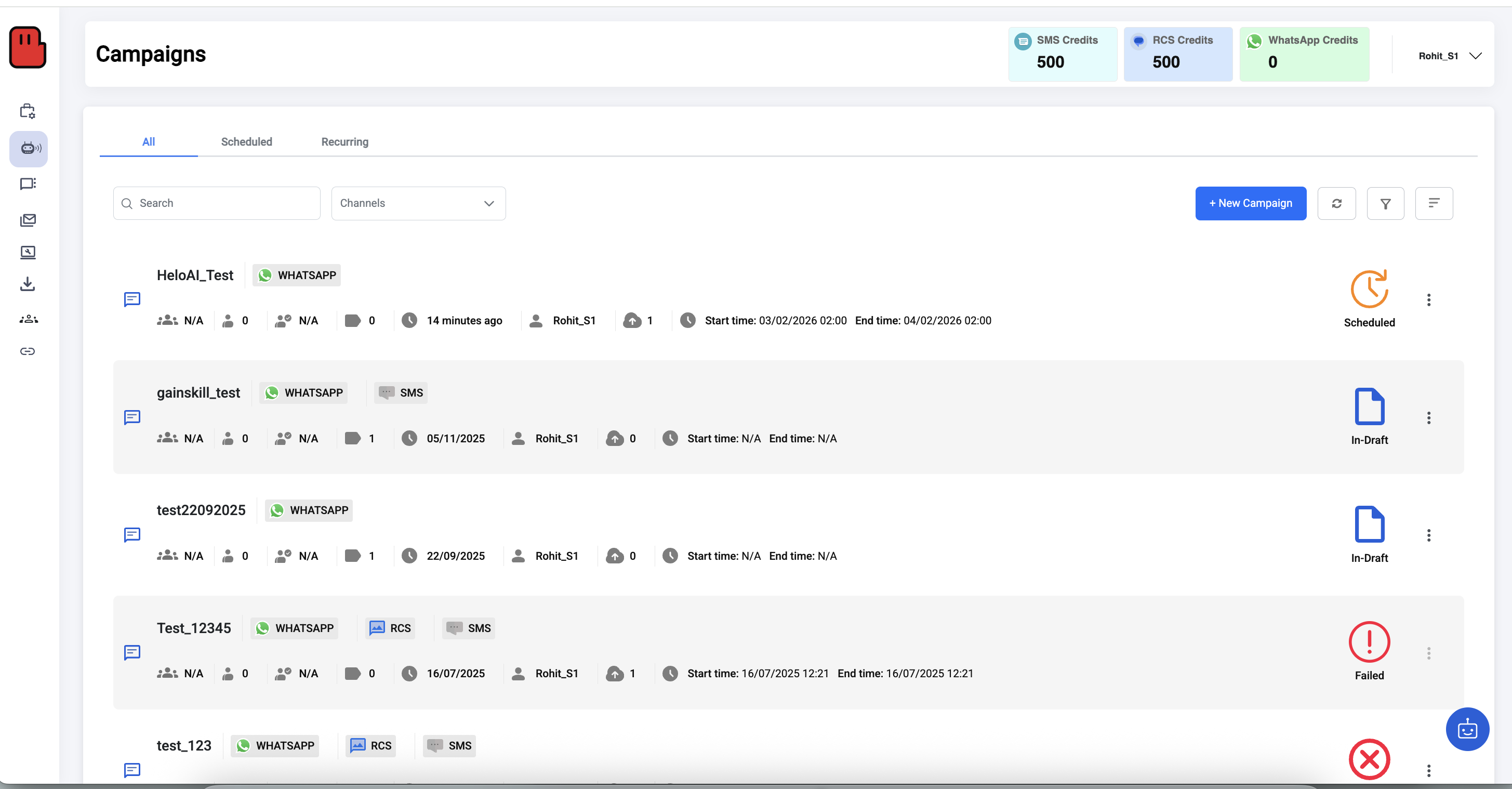
You can check all your scheduled and published campaigns over here:
Step 5: Track Performance & Optimise
The API provides detailed analytics, including:
- Sent, delivered, read, and reply rates
- Click tracking
- Quality score and delivery health
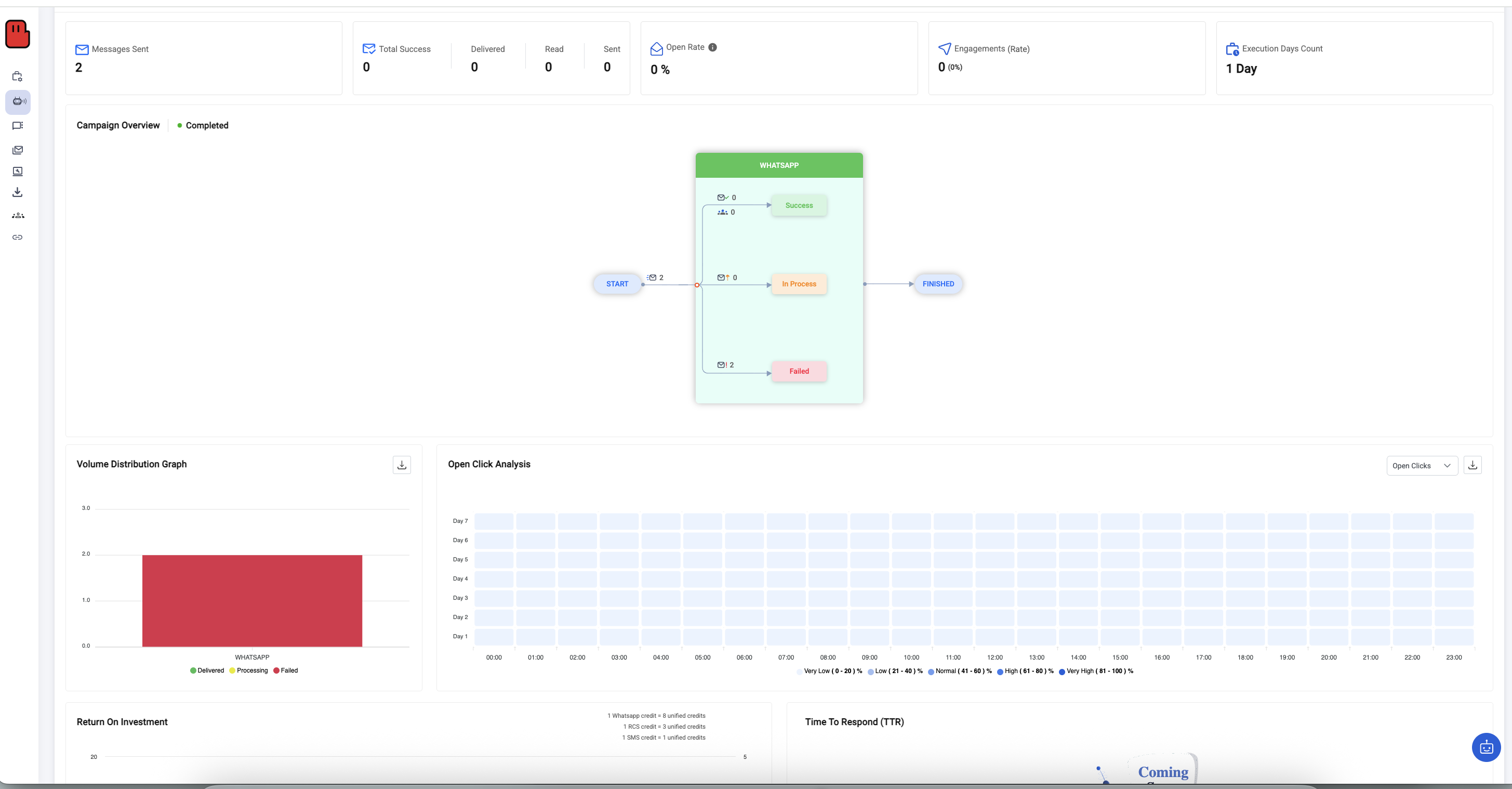
This data helps optimise timing, content, and audience targeting.
How does the WhatsApp Business API work?
- You connect your verified business account through Meta Business Manager.
- You create pre-approved message templates for outbound (marketing, utility, or authentication) communication.
- Users must opt in first via website form, in-store QR, or other consent mechanism.
- You then send messages at scale through your BSP dashboard or integrated CRM.
Pro Tip: The API allows you to send messages to users who have not saved your number, provided they have opted-in to receive updates from you (via your website, checkout, or lead form). |
The 24-hour customer service window (important)
When a user messages your business, a 24-hour window opens where you can reply with free-form messages. Outside that window, you must use a pre-approved template to start or re-open a conversation. This is why most bulk outreach is template-based.
Policy reference: WhatsApp Business messaging policy and rules are outlined by WhatsApp/Meta
WhatsApp Business API Pros & Cons
Aspect | Pros | Cons |
Scale | Send 1,000 → 100k+ messages/day | Requires API onboarding |
Compliance | Meta-approved | Template review needed |
Automation | Flows, variables, scheduling | Technical setup |
Analytics | Advanced insights | Paid per conversation |
What does bulk WhatsApp messaging cost?
Meta bills per delivered message, not per conversation. That switch happened on 1 July 2025, and India moved to rupee billing in January 2026 with another adjustment on 1 July 2026.
Current Meta rates for India, before your BSP's platform fee:
Category | Rate per message | With 18% GST |
|---|---|---|
Marketing | ₹0.8631 | ₹1.0185 |
Utility | ₹0.1150 | ₹0.1357 |
Authentication | ₹0.1150 | ₹0.1357 |
Authentication (international) | ₹2.4971 | ₹2.9466 |
Effective 1 July 2026. Verify against Meta's official rate card before you budget — these move.
Two things to notice.
Marketing costs about 7.5× utility, and marketing has no volume discount at any volume. That's deliberate on Meta's part. Utility and authentication do get marginal discounts as monthly volume climbs, stepping down toward 30% off the list rate, but only messages inside a tier get that tier's price.
A worked example. Sending one marketing template to 50,000 opted-in users in India: 50,000 × ₹0.8631 = ₹43,155, or ₹50,923 with GST. Add your platform fee on top. Run the same 50,000 as a utility template and Meta's charge drops to ₹5,750.
You only pay for delivered messages. If the number isn't on WhatsApp or has blocked you, no charge. If it's delivered and the recipient then marks it spam, you pay and your quality rating takes the hit.
The 1 October 2026 change. Service messages, meaning free-form replies inside the 24-hour window opened when a customer messages you, are free today. From 1 October they're billed at the utility rate. Utility templates sent inside an open window lose their exemption too. If you're running support at volume on WhatsApp, model this now.
Click-to-WhatsApp ad clicks and Facebook CTA button clicks still open a 72-hour free window. For acquisition campaigns that's the cheapest entry point Meta offers.
[[FILL: updated India pricing you flagged]]If Helo's platform fee structure changed alongside the Meta rate move, add a line here. The old page said "~₹1,000–8,000/month" — confirm whether that's still current.
Also read: What changed in WhatsApp's per-message pricing
Method 2: WhatsApp Business App (Free, Built-In & Beginner-Friendly)
If you’re just starting out, the WhatsApp Business App is your safest entry point. It’s free bulk message, official, and perfect for sending small-batch updates like store offers, appointment reminders, or festive wishes.
How Send Bulk Messages Using WhatsApp Broadcast Lists
- Install the WhatsApp Business App (iOS/Android).
- Tap Chats → New Broadcast.
- Select up to 256 contacts. Remember: they must have saved your number to receive your message.
- Type your message—text, image, video, or link.
- Hit Send. Each recipient gets it as a personal chat (no whatsapp group clutter).
The Crucial Rule: Your message will ONLY be delivered if the recipient has saved your number in their mobile phone. If they haven't saved it, they won't see it. This is WhatsApp's built-in anti-spam filter. |
👉Recommended read: How to create a WhatsApp Business Account |
WhatsApp Business App Broadcast Pros & Cons
Aspect | Pros | Cons |
Cost | Free forever | 256 contacts per list |
Ease of use | Simple, no setup | Manual process |
Compliance | Fully official | Recipients must save your number |
Analytics | Basic | No campaign tracking |
When to Use This
- Local stores, freelancers, or small brands with a few hundred customers.
- Use it for occasional updates — not daily marketing.
If you try to “blast” thousands of whatsapp numbers from one phone, you’ll hit the limit — or worse, the ban wall.
Also Read: How to Schedule WhatsApp Message: Guide
Method 3: Third-Party Tools & Extensions (Quick but Risky)
Many tools market themselves as “WhatsApp SMS blast” solutions, promising instant bulk messaging—but most of these are unofficial and risky.
Search “bulk WhatsApp sender” on Google, and you’ll find hundreds of Chrome extensions promising to send 1,000+ messages instantly.
While tempting, these aren’t official. They automate WhatsApp Web, mimicking human activity which may breach WhatsApp’s Terms of Service.
Popular Tools
- WA Bulk Message Sender (Chrome) – Upload Excel, send media with delays.
- SheetWA / Walution – Google Sheets add-ons with personalisation fields.
- Privyr / WA Sender Pro – CSV uploads, delays, paid tiers (~₹800–3,000 monthly).
Why We Do Not Recommend This
- Immediate Bans: WhatsApp detects non-human behavior (sending too fast, no typing intervals) and will permanently ban your number.
- Data Privacy: You are uploading customer data to unknown 3rd-party servers.
- No Support: If you lose your number, Meta support will not help you recover it because you violated their Terms of Service.
Typical Steps
- Install the extension.
- Open WhatsApp Web → scan QR.
- Upload Excel with contact numbers and message fields.
- Set delay intervals (5–10 seconds).
- Click Start.
Why It’s Risky
Aspect | Risk |
Account safety | Can trigger bans or rate limits |
Privacy | No data protection guarantee |
Compliance | No opt-in validation |
Support | None — Meta won’t help if you’re blocked |
Use these only for short-term testing. For real marketing, move to the API.
Ready-to-use WhatsApp bulk message templates
Marketing (Offer)
Hi {{1}}, quick update: our {{2}} offer is live. Get {{3}} off today. Tap here: {{4}}
Reply STOP to opt out.
Marketing (Webinar/Workshop)
Hi {{1}}, you’re invited to {{2}} on {{3}}. Save your seat: {{4}}
Reply STOP to opt out.
Utility (Order update)
Hi {{1}}, your order {{2}} has shipped. Track here: {{3}}. ETA: {{4}}.
Utility (Appointment reminder)
Hi {{1}}, reminder: your appointment is on {{2}} at {{3}}. Reply 1 to confirm, 2 to reschedule.
Authentication (OTP)
Your verification code is {{1}}. Do not share this code with anyone.
How to Avoid Getting Banned on WhatsApp Business
Using WhatsApp Business effectively requires more than good intentions—your execution matters. Follow these best practices to maintain a healthy sender reputation and prevent account bans.
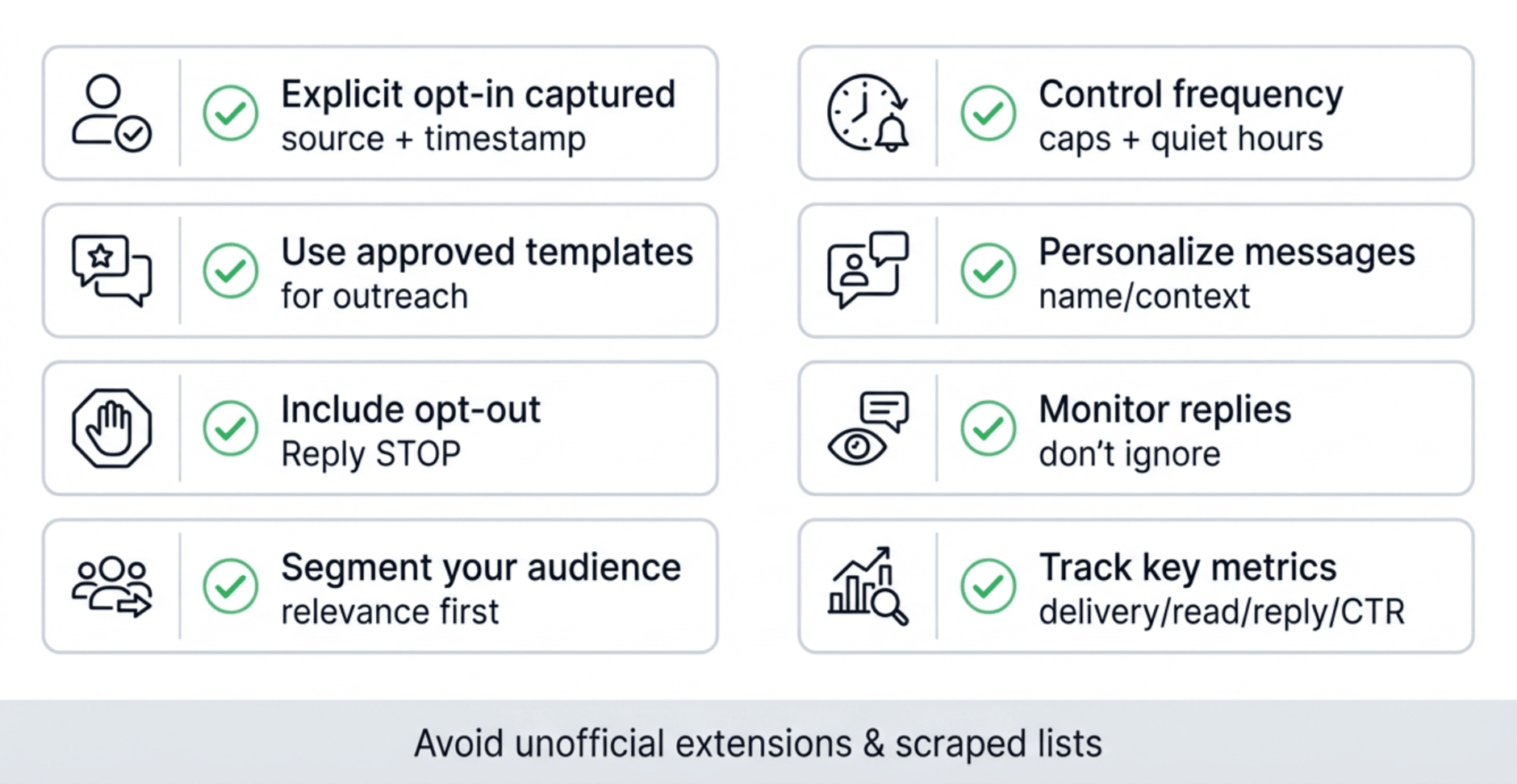
Pre-send compliance checklist (use before every campaign)
- We have proof of opt-in for this audience (source + timestamp)
- Template category is correct (marketing/utility/authentication)
- Message includes a clear opt-out (or automated opt-out flow)
- Frequency cap is set (avoid over-messaging)
- Audience is segmented (don’t blast everyone)
- Replies are monitored (bot or team inbox)
Also Read: WhatsApp API Compliance Rules, Opt In and Policy Guide
7 Best Practices to Use WhatsApp Business API Safely
1. Send Messages Only to Opted-In Contacts
Always communicate with users who have given clear and explicit consent. This protects your brand and keeps your account compliant.
2. Include a Simple Opt-Out Option
Give users the freedom to unsubscribe at any time. A clear instruction like “Reply STOP to unsubscribe” helps maintain trust and transparency.
3. Keep Your Content Relevant
Share messages aligned with the customer’s preferences and previous interactions. Relevant communication improves engagement and reduces user complaints.
4. Avoid Spam-Like Language
Steer clear of all-caps, excessive emojis, misleading claims, or suspicious links. Clean, trustworthy messaging ensures better deliverability.
5. Scale Your Sending Gradually
Don’t blast large volumes on day one. Begin with around 100 messages per day and increase steadily as your quality rating improves.
6. Maintain Healthy Timing Practices
Avoid sending messages late at night or delivering multiple bursts too close together. Respecting timing helps avoid negative user feedback.
7. Use Official WhatsApp Business Tools
Platforms with official API access manage throttling, consent tracking, and message delivery—keeping your account compliant and protected.
Mistakes That Trigger Bans
Mistake | Risk Level | Fix |
Sending to un-opted numbers | ⚠️ High | Collect consent first |
Using unapproved templates | ⚠️ Medium | Submit for approval |
Installing spam extensions | ⚠️ High | Stick to API or the App |
Sending too fast | ⚠️ Medium | Add delays/scheduling |
Ignoring replies | ⚠️ Low | Engage or close thread |
Using “WhatsApp SMS blast” tools | ⚠️ High risk | Leads to bans due to policy violations |
Remember: WhatsApp tracks user feedback (blocks & reports).
Too many complaints → account flagged → temporary or permanent restriction.
How to Increase WhatsApp Messaging Limits
When you start with the Business API, your account is in Tier 1 — allowing up to 1,000 unique recipients per 24 hours.
You can climb tiers automatically based on quality.
Tier | Daily Limit | Requirement |
1 | 1K recipients | Verified business |
2 | 10K | Consistent quality score |
3 | 100K | High engagement & low block rate |
4 | Unlimited | Enterprise-level accounts |
Tips to upgrade fast:
- Keep message templates highly relevant.
- Respond to user messages quickly (within 24 hours).
- Maintain a low complaint ratio (<2%).
- Verify your display name & business details.
Messaging limits & quality rating (why some accounts can’t scale)
WhatsApp applies messaging limits based on your business portfolio and performance (quality rating, blocks, complaints, engagement). If your messages feel spammy, your ability to reach new users at scale can drop. If your messages are relevant and users engage, your limits can increase over time.
Official documentation: Messaging limits are defined in Meta’s WhatsApp docs
Send Bulk WhatsApp Messages Smarter with Helo Broadcast
Helo.ai is an official WhatsApp Business Solution Provider (BSP) supporting businesses across India with compliant bulk WhatsApp messaging and automation.
Why Businesses Use Helo Broadcast
- Verified & compliant: Powered by the official WhatsApp API — zero ban risk.
- Faster onboarding: Go live in 24 hours — no tech skills needed.
- Personalised bulk campaigns: Use contact attributes like Name, Location, Plan Type and much more.
- Real-time analytics: Track delivery, reads, clicks, and replies on one dashboard.
- Templates made easy: Pre-approved templates for marketing, utility, and updates.

Frequently Asked Questions
Is bulk WhatsApp messaging legal?
Yes—if you message only users who have opted in and you use official WhatsApp Business tools (Business App for small batches or Business API for scale).
What is WhatsApp’s 24-hour rule?
After a user messages you, you can reply freely for 24 hours. Outside that window, businesses typically need approved templates to re-engage.
How many bulk messages can I send per day?
It depends on your WhatsApp messaging tier and quality rating. New setups may start lower and can scale up based on performance.
Can I send bulk WhatsApp messages for free?
Yes, but only in limited volumes using WhatsApp Broadcast Lists. Large-scale bulk messaging requires the WhatsApp Business API.
Can I send WhatsApp messages without saving numbers?
You can only send mass WhatsApp messages without saving numbers by using the official WhatsApp Business API or certified Business Solution Providers (BSPs) such as Helo.ai or Respond.io. These platforms allow you to upload contact lists via CSV files and send messages directly legally and securely. The WhatsApp Business App itself does not support this feature; recipients must have your number saved to receive your broadcasts.
What’s the difference between WhatsApp Business App and API?
The WhatsApp Business App is a free mobile app meant for small businesses that handle limited communication manually. In contrast, the WhatsApp Business API (or Cloud API) is a professional, automated platform for medium and large enterprises. It supports bulk messaging, chatbots, CRM integration, and real-time analytics. The API also requires message template approval and customer opt-ins, ensuring full compliance with Meta’s policies.
How do I avoid getting banned on WhatsApp?
To avoid WhatsApp bans, always message opted-in users, use approved templates, avoid third-party tools, and scale sending volumes gradually.
Can I personalise each message?
Yes, with the WhatsApp Business API, you can send personalised bulk messages using dynamic variables such as customer name, location, or order details. This makes every message feel more human and targeted, improving click-through and response rates. Tools like Helo Broadcast and other API-based platforms make personalisation easy just upload a contact list with variable columns and watch your engagement soar.
How much does WhatsApp API cost?
The WhatsApp Business API cost depends on your country and the type of conversation (marketing, utility, authentication, or service). In India, it typically ranges between ₹0.30 and ₹0.80 per message, billed per 24-hour conversation window. Meta also offers free entry points when users message you first. Most Business Solution Providers charge additional platform or setup fees, but the API remains the most scalable and reliable option for enterprises.
Do I need technical skills to use the API?
Not at all. Modern WhatsApp API platforms like Helo Broadcast come with no-code dashboards that make it simple for marketers and business owners to send bulk campaigns, create templates, and view analytics no developer required. Once your business is verified, you can go live in less than a day and start sending personalised WhatsApp messages at scale without any technical complexity.
What is the best way to send bulk messages on WhatsApp?
The best way to send bulk messages on WhatsApp is by using the official WhatsApp Business API or Broadcast Lists. The API is ideal for sending messages at scale with automation and compliance, while broadcast lists are suitable for smaller batches.
Is WhatsApp SMS blast safe?
No, most tools that claim to offer WhatsApp SMS blast services are unofficial and violate WhatsApp policies. Using them can result in account bans. It is always recommended to use the official WhatsApp Business API or broadcast features.
Final Thoughts Scale Smart, Not Spam
WhatsApp bulk messaging is one of the fastest ways to reach customers — but only when done responsibly.
If you’re a small business, start with the WhatsApp Business App.
If you’re scaling or need automation, move to the Business API.
And if you want the best of both worlds — compliance, personalisation, and speed — tools like Helo Broadcast make it effortless.
At the end of the day, it’s not about sending more messages. It’s about sending the right message to the right person* at the right time.
Stop blasting. Start conversing. That’s how modern brands win on WhatsApp.


.png&w=828&q=75)