

The WhatsApp Business App is a good option for small scale businesses. But the moment you have to reach out to customers via WhatsApp at scale, the App is not enough. It gets extremely difficult to reply to increasing messages as the App is not equipped to do that on its own. It does not allow for automation and CRM integration, which means reaching out to leads on time becomes nearly impossible.
For enterprises, the problem gets bigger. Multiple teams need to handle conversations simultaneously. Sales, support, and marketing cannot all work from one phone. Leads need to be routed to the right person automatically. Follow-ups need to go out on time without someone manually tracking every conversation. And all of this needs to connect back to the CRM so nothing gets lost between teams.
The WhatsApp Business App was never built for any of that. The WhatsApp Business API for enterprise was.
What Is WhatsApp Business API for Enterprise
The WhatsApp Business API is the enterprise version of WhatsApp, built for companies that handle large volumes of conversations. The WhatsApp Business App is made for small teams replying from a single phone. The API is made for businesses where many agents, tools, and systems need to work together.
The API does not have its own app or interface. It connects WhatsApp directly to your CRM, support tools, marketing platforms, and internal systems, so chats become part of how the business already works.
It is built for enterprises where chat volume is too high for one person, where multiple agents need a shared inbox, and where conversations need proper tracking and reporting.
What the API enables and the App cannot, includes automation, multi-agent inboxes, CRM integration, and bulk notifications. Beyond that, it supports chatbots, smart routing, and analytics that link conversations to revenue.
Key Features Enterprises Need From WhatsApp API
The verified blue tick
A verified WhatsApp Business Account shows a blue tick next to your business name. It looks small, but it does a lot of heavy lifting. Customers know the message is actually from you, not a scam. For banks, hospitals, and big consumer brands, the blue tick/green tick is doing real work. Customers have been spammed enough to ignore anything that looks unverified.
A shared team inbox
Enterprise conversations cannot live on one person's phone. Sales, support, and operations all need to see the same chats, pick up where someone else left off, and assign conversations to the right person without confusion. Once more than two or three people are replying to customers, a shared inbox stops being a nice-to-have.
Connecting WhatsApp with the systems you already use
WhatsApp works best when it talks to the rest of the business. Pulling up a customer’s order history, lead status, or last payment inside the same chat saves agents from jumping between five tools to answer one question. CRM and ERP integrations are what make conversations feel informed, not generic.
Automation for timely responses
At scale, not every conversation can start manually. Automation helps businesses manage first responses, qualification flows, appointment bookings, FAQs, and routing without slowing the customer down. The strongest setups usually use bots to support agents, not replace them entirely.
Bulk notifications
Enterprises send a lot of outbound messages: payment reminders, delivery updates, KYC nudges, appointment confirmations, renewal alerts. The API lets businesses send these through approved templates, so the messages stay compliant, trackable, and on-brand even when they go out to lakhs of customers at once.
Learn: How to send WhatsApp Bulk Message
Analytics
Once WhatsApp becomes a real customer channel, the business needs to see how it is performing. Response times, drop-offs, lead quality, agent productivity, conversion rates. Without analytics, WhatsApp stays an inbox. With analytics, it becomes a measurable part of the funnel.
Security and encryption
Large enterprises handle sensitive customer data every day. Access controls, encrypted conversations, audit logs, and permission management become critical once WhatsApp starts handling onboarding, payments, support, or account-related communication at scale.
Real Enterprise Use Cases of WhatsApp Business API
BFSI workflows already depend heavily on conversations. Loan applications, KYC completion, EMI reminders, claim updates, collections. None of this works without constant follow-ups. Once volumes increase, manual coordination starts breaking fast. Teams miss callbacks, reminders go late, and customers keep repeating the same information across channels. The WhatsApp Business API helps automate a lot of this operational load while keeping conversations faster and more structured. For many BFSI businesses, quicker follow-ups directly impact conversion and collection rates.
Healthcare: appointments, reports, and patient communication
Hospitals and clinics deal with a huge amount of repetitive communication every day. Appointment confirmations, lab report updates, prescription refill reminders, post-consultation follow-ups. Most of it still happens manually in many places.
WhatsApp helps simplify that layer. Patients get updates faster, front-desk teams spend less time chasing calls, and communication becomes easier to manage across departments. Even something as simple as automated appointment reminders cuts down on missed visits.
E-commerce and D2C: order updates, support, and cart recovery
For e-commerce brands, a lot of customer anxiety comes after the purchase, not before it. Order tracking, COD confirmation, delivery delays, returns, exchanges, support queries. Customers want updates quickly and usually don't want to wait on calls or emails for them. That's why WhatsApp works so well here. The interaction feels immediate and familiar. Brands also use it for abandoned cart recovery and post-purchase upsells because conversations usually get seen and answered much faster than emails.
Education: admissions and student engagement
Educational institutions usually see conversation volumes explode during admission periods. Students and parents ask about applications, fees, documents, course details, deadlines, counselling slots, all at the same time.
Managing this manually across calls and emails becomes chaotic fast. The WhatsApp Business API helps institutions organise these conversations better, automate repetitive responses, and keep communication moving without overwhelming admin teams.
WhatsApp Business API pricing for enterprises
Pricing is where most enterprises lose money on WhatsApp without realising it. Not because the system is complicated, but because it is layered, and the layers are easy to miss.
Here is how the cost actually works.
The two layers of cost
● Meta's conversation charges. What you pay Meta directly. WhatsApp charges by conversation, not by message. A conversation is a 24-hour window, and everything sent inside it counts as one charge.
● Your BSP's platform fee. A Business Solution Provider like helo.ai gives you the dashboard, automation, and integrations that make the API usable. They charge a monthly platform fee. Some BSPs also add a 10 to 25 percent markup on Meta's rates without flagging it.
The four conversation categories
Each one is priced differently.
● Marketing. Offers, launches, cart reminders. Most expensive.
● Utility. Order updates, payment confirmations, delivery alerts. Cheaper than marketing.
● Authentication. OTPs and verification codes. Usually the cheapest paid category.
● Service. Customer-initiated conversations. Free for 24 hours from the customer's first message.
Two free windows most enterprises miss
● 24-hour service window. Opens when a customer messages first. Replies inside the window are free for service and utility messages. Marketing still costs.
● 72-hour entry point window. Opens when a customer comes in through a Click to WhatsApp ad, if the business replies within 24 hours. Every message
inside is free, including marketing. For enterprises running CTWA at scale, this is the biggest cost lever available, and the one most often missed.
Read Complete: WhatsApp API Pricing Breakdown
What it costs in India in 2026
India is one of the cheapest WhatsApp markets globally.
● Marketing conversations: roughly ₹0.58 to ₹0.80 per conversation
● Utility and authentication: cheaper still
● Service conversations inside the window: free
Meta updates these rates periodically. The live numbers are always worth checking on Meta's official pricing page before planning campaigns.
Utility and authentication conversations also come with volume-based discounts that reset every month.
For most mid-sized Indian enterprises, monthly costs land between ₹25,000 and ₹2,00,000, depending on volume, template mix, and BSP pricing. Larger enterprises running heavy marketing campaigns can cross several lakhs.
Also Read: WhatsApp API pricing in india
Where enterprises overspend
Three patterns decide whether the bill stays steady or grows faster than your conversation volume:
● More outbound than inbound. Business-initiated conversations cost more. Pulling customers in first through QR codes, CTAs, and CTWA ads cuts the bill.
● Wrongly categorised templates. A utility message approved as marketing costs you marketing rates every time. Many enterprises overpay simply because their templates sit in the wrong category.
● Quiet BSP markups. Ask for a full breakdown of Meta's rates, the platform fee, and any per-conversation markup. helo.ai charges Meta's rates directly with no hidden markup.
Getting started with WhatsApp Business API
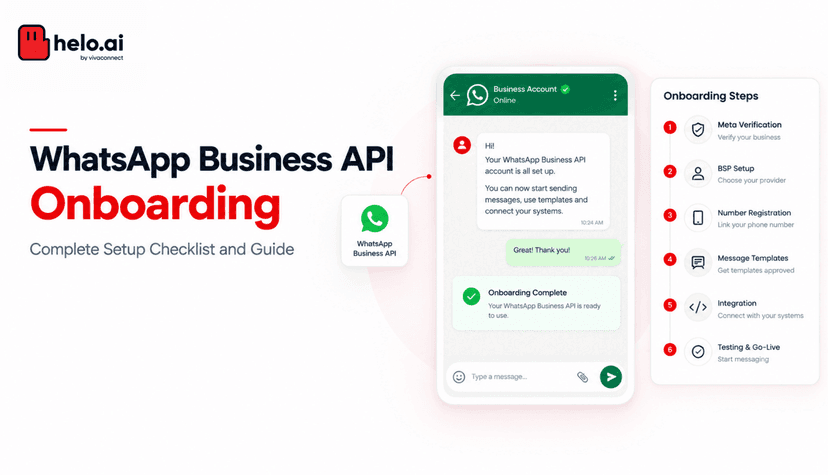
Setting up the API takes more than downloading an app, but the process itself is predictable. Most delays happen because enterprises walk in unprepared.
Here is what the path looks like:
● Pick a BSP. You cannot connect to WhatsApp directly. A Business Solution Provider like helo.ai handles the technical setup, dashboard, and ongoing support. Choose based on transparent pricing, CRM integrations, and the features you actually need.
● Verify your business with Meta. Submit your business documents, verify your domain, and link your Facebook Business Manager. Usually takes a few days if your paperwork is in order.
● Apply for the green tick. Not automatic. Meta approves it based on brand visibility and category. BFSI, healthcare, and well-known consumer brands clear it faster.
● Set up your number. Pick a dedicated number that is not already in use on the WhatsApp Business App or personal WhatsApp. Porting works, but has to be done cleanly.
● Get your templates approved. Every outbound message uses a pre-approved template. Submit them by category, and get the category right the first time. Wrong category means rework.
● Connect to your CRM. This is where the API stops being functional and starts being useful. Chats should sync with sales, support, and marketing systems automatically.
● Train your teams. Sales, support, and marketing all need to know the shared inbox, the routing rules, and the analytics they can actually act on.
The WhatsApp Business App is fine until your business outgrows it. Chats start getting missed. Follow-ups slip. Sales, support, and marketing all end up working from different versions of the same conversation. That is the moment the API stops being optional.
It is what gives enterprises the things the App was never built for. Shared inboxes the whole team can use. Automation that handles the volume manual replies cannot. CRM and ERP integrations that pull conversations into the rest of how the business already runs. Templates that let businesses scale outbound messaging without compliance becoming a mess. Analytics that actually show what is working.
The bigger question is who you run it with. helo.ai is built for this. Transparent pricing, enterprise infrastructure, real support from setup to scale, and integrations that fit how your teams already work.
If WhatsApp is becoming a real customer channel, this is usually where businesses realise they need something more structured.
FAQs
What is the WhatsApp Business API for enterprise?
It is the version of WhatsApp built for businesses that handle conversations at scale. Unlike the WhatsApp Business App, the API has no front-end interface of its own. It connects WhatsApp directly to your CRM, support tools, marketing platforms, and internal systems, so chats become part of how the business already works.
How is the API different from the WhatsApp Business App?
The App is built for one phone, one user, manual replies. The API is built for many agents, many tools, and high volumes. The App stops being enough the moment chats start getting missed, follow-ups become inconsistent, or two people end up replying to the same customer.
Do I need a developer to set up the API?
Not really. Enterprises do not connect to Meta directly. A BSP like helo.ai handles the technical setup, verification, template approvals, and CRM integration. Internal teams mostly focus on workflows and templates, not code.
How long does it take to go live on the API?
For most enterprises, two to four weeks. The biggest delays come from incomplete business verification documents, slow domain verification, and templates submitted in the wrong category.
Is the green tick mandatory for the API?
No. The API works without it. But for BFSI, healthcare, and large consumer brands, the green tick directly affects open rates and customer trust. It is worth applying for, even if approval takes time.
Can I run Click to WhatsApp ads on the API?
Yes, and at any real volume, you should. The API is what unlocks automated welcome flows, qualification bots, lead routing, and CRM sync for CTWA campaigns. Running CTWA on the App means manually handling chats that the API could route automatically.
How much does the WhatsApp Business API cost in India?
There is no fixed monthly cost. Enterprises pay Meta per conversation (which varies by category) and a platform fee to their BSP. For most mid-sized Indian enterprises, the monthly bill lands between ₹25,000 and ₹2,00,000, depending on volume and template mix.
Can I send bulk marketing messages on the API?
Yes, through pre-approved templates. Marketing templates are charged per conversation, so volume planning matters. Enterprises that mix utility and marketing templates well, and use the 72-hour free entry window from CTWA ads, keep their costs predictable.
Can I integrate the API with my existing CRM?
Yes. Salesforce, HubSpot, Zoho, SAP, and most enterprise CRMs integrate with the API through your BSP. This is what allows customer records, lead status, and ticket history to update automatically as conversations happen.
What happens to chat history if I move from the App to the API?
Chat history from the WhatsApp Business App does not transfer to the API. This is one of the reasons enterprises plan the switch carefully and pick the right time, usually before campaign volume spikes.
Is WhatsApp API secure for enterprise use?
Yes. Messages are end-to-end encrypted by default. For enterprise compliance, BSPs add another layer with role-based access, audit logs, permission controls, and data residency options. For BFSI, healthcare, and regulated sectors, this is non-negotiable.
When should an enterprise switch from the App to the API?
When chats start getting missed, when more than two or three people are replying to customers, when follow-ups become inconsistent, or when CRM and analytics gaps start affecting decisions. Most enterprises switch slightly later than they should, after the cost of lost leads has already crossed the cost of switching.