.png)


Quick Intro: Why This Matters Right Now
For 11 years, WhatsApp had no ads. Then in June 2025, Meta finally flipped the switch. WhatsApp Status Ads went live — full-screen, vertical, click-to-chat ads inserted between Status updates from a user's contacts. By December 2025, the rollout had gone global. And right now, in 2026, WhatsApp Status Ads are the freshest ad inventory in the Meta ecosystem — with 1.5 billion daily users in the Updates tab, and competition still light enough for early movers to win.
If you're a performance marketer staring down rising Facebook and Instagram CPMs, this is the goldmine moment. This guide is for you — built for marketers, not beginners. We'll cover the full format ecosystem (Status Ads vs CTWA vs Promoted Channels), the exact creative specs, a 7-step Meta Ads Manager setup walkthrough, real targeting mechanics, KPIs that matter, and ROI math you can actually use. Let's go.
What Are WhatsApp Status Ads?
.png)
WhatsApp Status Ads are full-screen, vertical (9:16) image or video advertisements that appear between user-generated Status updates inside WhatsApp's Updates tab — the same tab that houses Status and Channels. When a user taps the ad, they're sent directly into a chat with your business via a "Send Message" or "Chat on WhatsApp" CTA.
The format is functionally similar to Instagram Stories ads — but with one massive difference: instead of pushing traffic to a landing page, the ad opens a direct conversation. That's a near-zero-friction path from impression to qualified lead. No form. No website. No bounce. Just a chat.
Personal chats, calls, and groups remain entirely ad-free and end-to-end encrypted, as confirmed by WhatsApp's official ads page. Ads are confined to the Updates tab, which Meta argues is the discovery layer of WhatsApp — not the conversation layer.
The 2025-2026 Rollout Timeline
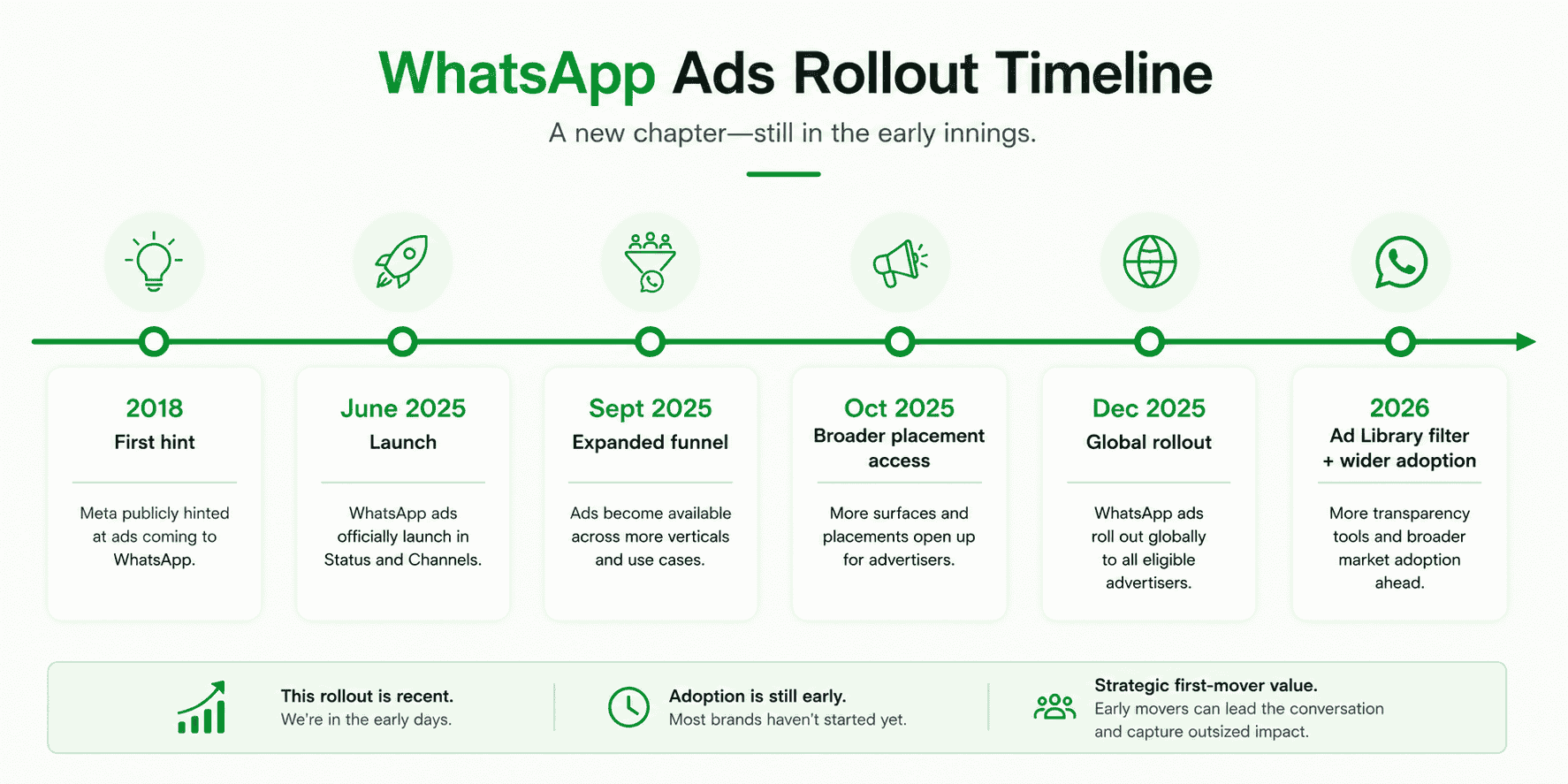
Here's how this unfolded — and why understanding the timing matters for your competitive positioning:
- November 2018: Meta first hints at WhatsApp ads (then shelved).
- June 16, 2025: Status Ads officially launch in select regions with a limited set of advertisers.
- September 2025: Meta expands the format with click-to-message ads on Facebook/Instagram that link to WhatsApp Status — creating a cross-platform funnel.
- October 2025: Status placement opens up more broadly inside Meta Ads Manager under the Messages objective.
- December 2025: Global rollout completes. Ireland and some EU markets follow in early 2026 due to regulatory review.
- 2026: Ad Library adds a WhatsApp filter — meaning you can now spy on competitor Status creatives.
If you're not testing this format in Q2-Q3 2026, you're handing your competitors a first-mover window that won't be open much longer.
WhatsApp Ad Formats: Status Ads vs Promoted Channels vs Click-to-WhatsApp Ads
This is the part nobody explains clearly. Meta now offers four distinct WhatsApp advertising formats. Pick the wrong one and you'll under-spend on awareness or over-spend on the wrong placement.
Format | Where It Appears | Objective | Best For | Path After Click |
|---|---|---|---|---|
WhatsApp Status Ads | Between Status updates inside WhatsApp's Updates tab | Awareness + Conversation start | New customer acquisition, lead gen, awareness | Opens chat with your business |
Promoted Channels | Channel discovery directory inside WhatsApp | Channel follower growth | Brands building owned audience on WhatsApp | Adds user to your Channel |
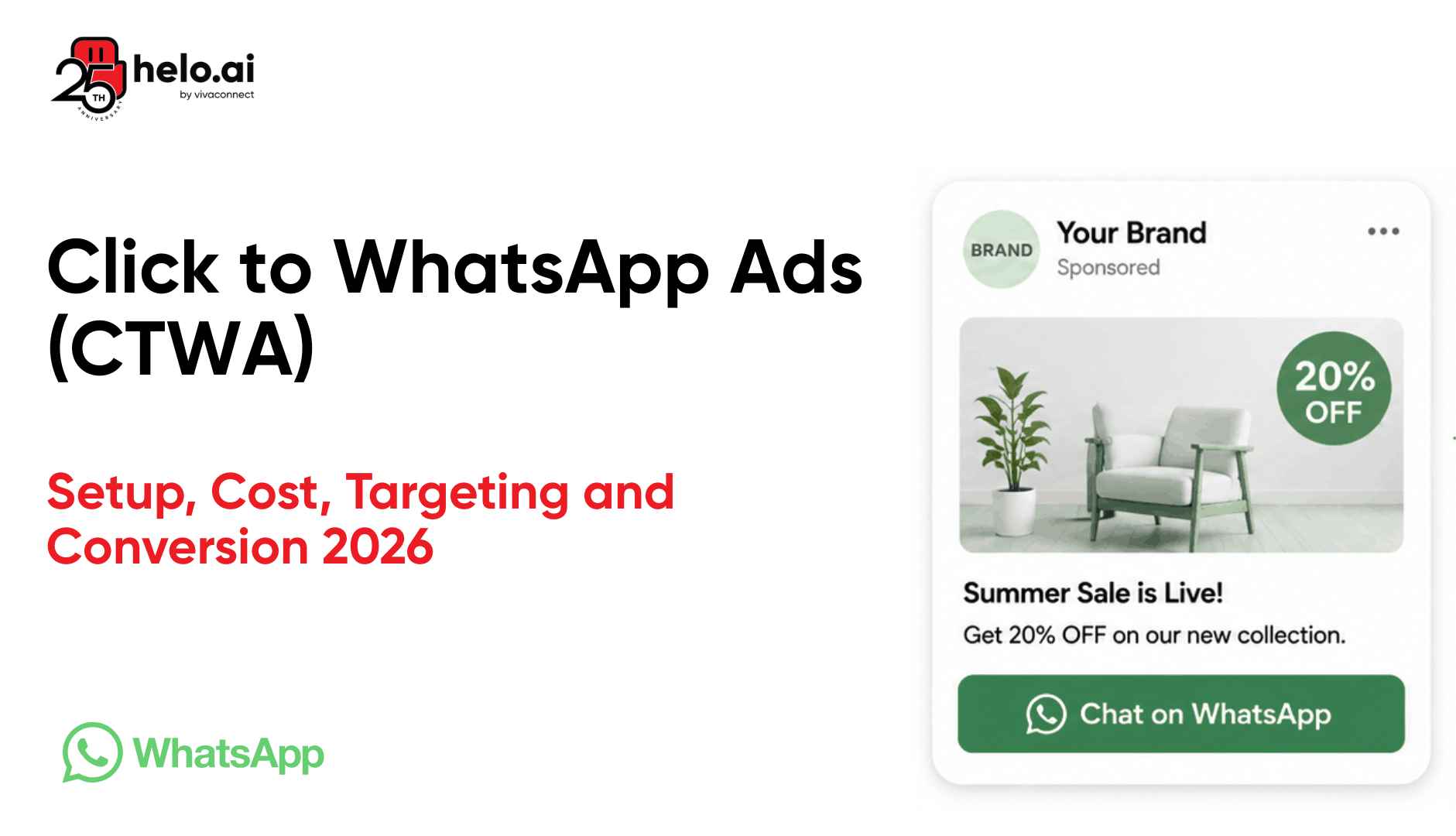
Click-to-WhatsApp Ads (CTWA) | Facebook & Instagram feeds, Stories, Reels | Conversation + Lead gen | Existing Meta advertisers expanding into chat | Opens chat with your business |
Status Click-to-Chat (Hybrid) | Facebook/Instagram ads that click through to WhatsApp Status placement | Cross-platform discovery | Brands wanting full-funnel control | Opens WhatsApp Status, then chat |
If you're already running Click-to-WhatsApp Ads, Status Ads are the natural next addition. The two formats stack beautifully — CTWA captures intent on Meta's feed platforms, Status Ads captures discovery inside WhatsApp itself.
WhatsApp Status Ads: Creative Specs Cheatsheet
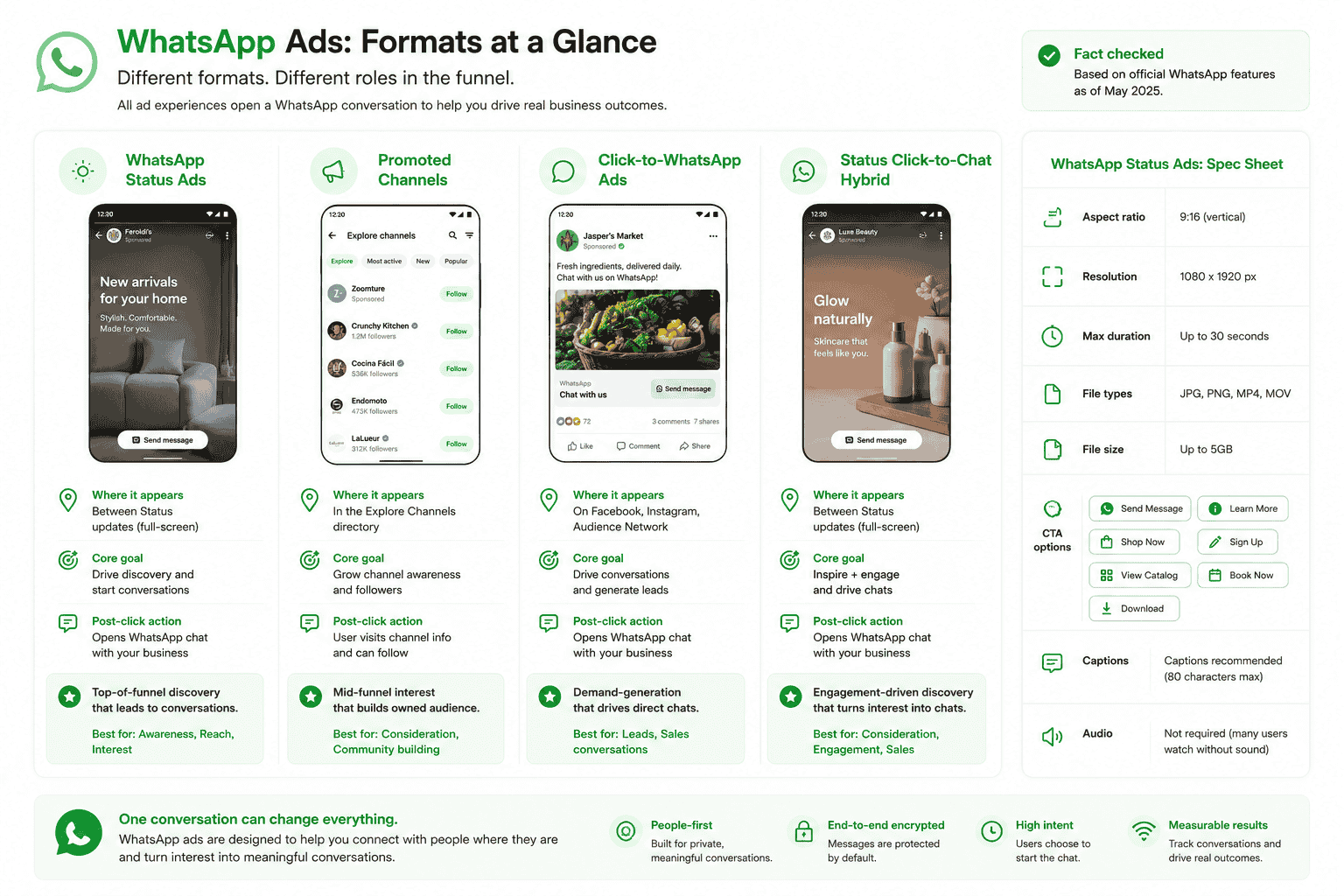
Save this. Print it. Tape it next to your designer's monitor.
Specification | Requirement |
|---|---|
Format | Image or Video |
Aspect Ratio | 9:16 (vertical, full-screen) |
Resolution | 1080 × 1920 pixels (minimum) |
Video Length | Up to 30 seconds (shorter = higher completion rate) |
File Type (Image) | JPG, PNG |
File Type (Video) | MP4, MOV |
CTA Button | "Send Message," "Chat on WhatsApp," or "Learn More" |
Duration on Status | 24 hours (then disappears) |
Sound | Optional but recommended for video (with captions for sound-off viewing) |
Text Overlay | Avoid heavy text — Meta's text-to-image policy still applies |
Pre-Filled Welcome Message | Customisable — pre-write what auto-fills when user taps |
Pro tip: Reuse Instagram Stories creatives for fast Status Ad testing — same aspect ratio, same length, same vertical-first design. Just swap the CTA and the welcome message.
How to Run WhatsApp Status Ads: Step-by-Step Meta Ads Manager Setup
Here's the exact workflow inside Meta Ads Manager. End-to-end, this takes 15-30 minutes for an experienced media buyer.
Step 1: Set Up Your Foundations
Before you open Ads Manager, you need three things in place — a WhatsApp Business Account (via the free app or, better, the WhatsApp Business API), a Facebook Page linked to your business, and both connected inside the same Meta Business Manager portfolio. If you haven't moved to the API yet, our WhatsApp Business API for enterprise breakdown covers the why and how.
Step 2: Open Meta Ads Manager and Create a Campaign
Head to Meta Ads Manager and click "Create." Select Engagement or Traffic as your campaign objective — these are the two objectives that currently unlock WhatsApp Status as an available placement. The classic "Messages" objective also works.
Step 3: Choose Your Campaign Objective
Under campaign-level settings, choose "Messages" if you want to optimise directly for conversation starts. This tells Meta's delivery system to find users most likely to message your business after seeing the ad — and is the highest-converting objective for Status placement.
Step 4: Build Your Ad Set
At the ad set level, define your audience (location, language, age, interests), set your budget (daily or lifetime), and pick your schedule. Note: Status Ads have limited targeting signals compared to Facebook/Instagram ads — Meta uses country, city, language, device, and limited app activity (Channels followed, ads engaged with). No interest stacking, no detailed behavioural layering. Keep audiences broad and let Meta's algorithm find the right users.
Step 5: Select WhatsApp Status as Placement
This is the critical step everyone gets wrong. Under "Placements," choose Manual Placements (not Advantage+). Then check:
- ✅ WhatsApp Status (the new placement)
- ✅ Instagram Stories (required — Meta currently bundles these)
You can deselect Facebook Stories, Reels, Feed, and Audience Network if you want a pure Status-first test. Note: if you previously enabled brand safety settings, you may be auto-opted out of Status — you'll need to manually opt back in.
Step 6: Upload Creative and Configure CTA
Upload your 1080×1920 vertical creative. Add a CTA button — "Send Message" is the highest-converting option. Then configure your pre-filled welcome message — the message that auto-populates when the user taps the ad and lands in chat. Example: "Hi! I saw your ad — I'd like to know more about [product]."
Step 7: Set Up the Welcome Message & Launch
Build your post-tap experience. The moment a user enters your chat, your bot or agent needs to respond instantly. This is non-negotiable — response times above 60 seconds tank conversion rates. Integrate a WhatsApp chatbot or automated WhatsApp Flows to handle the first response, qualify the lead, and route to a human only when needed. Then hit publish, set up tracking, and monitor delivery for the first 48 hours before scaling.
Targeting and Privacy: How Meta Decides Who Sees Your Ad
Here's where Status Ads behave differently from anything else on Meta. Because WhatsApp messages are end-to-end encrypted, Meta cannot use message content for targeting. Instead, the system uses a deliberately limited data set:
- Country and city (general location)
- Device type and language
- Channels the user follows
- Activity inside the Updates tab (which Status they view, which ads they tap)
- Optionally — if the user has linked WhatsApp to their Meta Accounts Center — Facebook and Instagram interest/behavioural data
This privacy-respecting approach means broad targeting works better than narrow targeting on Status Ads. Don't try to micro-segment. Let Meta's algorithm find your conversation-ready users based on creative-driven signals.
WhatsApp Status Ads vs Click-to-WhatsApp Ads: Which to Run
Marketers ask this constantly. The honest answer: run both, for different jobs.
Click-to-WhatsApp Ads are still your workhorse — they live on Facebook and Instagram feeds where users browse for hours, and they have richer targeting. Use them for prospecting, retargeting, and bottom-of-funnel conversion. They've already proven CPMs 30-50% cheaper than equivalent landing-page traffic ads and have unlocked the click-to-WhatsApp 72-hour free conversation window — a massive cost advantage for nurture sequences.
WhatsApp Status Ads are your discovery layer — capturing users inside the messaging app, in a high-attention state, while they're casually scrolling Status. They're better for awareness, brand-building, and reaching audiences who don't engage heavily with Facebook or Instagram. They convert into conversations at higher rates because users are already in messaging mode.
Smart media plans in 2026 use CTWA for prospecting + retargeting and Status Ads for in-app discovery + frequency capping. Run a 70/30 budget split (CTWA/Status) initially, then optimise based on cost-per-conversation.
Creative Best Practices for WhatsApp Status Ads That Convert
Status Ads are not Stories Ads. They appear in a more intimate context — between updates from a user's close contacts. Your creative needs to respect that vibe. Here's what's working in 2026:
- Hook in the first 1.5 seconds. Status viewers tap-skip fast. Lead with the offer, the face, or the visual hook — no slow-burn intros.
- Use a human face. Status content is personal — Status Ads with human presence outperform pure product shots by 40-60% in completion rate.
- Make the offer crystal clear. Status disappears in 24 hours; users expect urgency. "30% off this weekend" beats "Discover our new collection."
- Add captions. Many users watch Status with sound off. Bold, readable captions are mandatory.
- Conversational CTA copy. "Tap to chat with us" works better than "Shop now." Match the medium.
- Pre-fill the welcome message. A pre-filled "Hi, tell me more about [product]" cuts friction and lifts message-send rates 2-3x.
- Bot-ready landing. Have your WhatsApp chatbot primed to respond in under 30 seconds — long delays kill conversion. Test escalation paths before scaling spend.
- Test 3-5 creatives per ad set. Status creative fatigues fast (24-hour cycle psychology). Refresh every 7-10 days minimum.
KPIs and ROI Math for WhatsApp Ads in Status
Here's what to actually track — and what "good" looks like in 2026.
The Metrics That Actually Matter
Forget impressions and CTR — those are vanity for a chat-first format. Focus on the metrics that map to revenue:
- Cost Per Conversation (CPC): What you pay for each new chat started. In India, expect ₹15-₹60. In US/UK, $1-$5.
- Message Reply Rate: % of users who actually message after tapping. Target 50%+ with a strong pre-filled message.
- Qualified Lead Rate: % of conversations that hit your qualification criteria. 25-40% is healthy.
- Cost Per Qualified Lead (CPQL): Where the real efficiency math lives.
- Conversion Rate (chat → sale): Depends on industry but 5-15% is typical for D2C.
- ROAS (Return on Ad Spend): The bottom line. Aim for 4x+ on cold Status traffic.
For a deeper KPI framework, see our WhatsApp marketing ROI guide.
Real ROI Math
Let's run numbers. An Indian D2C brand spends ₹50,000 on a 14-day Status Ads test:
- 8,500 conversations started @ ~₹6 cost per conversation
- 55% reply rate → 4,675 active chats
- 30% qualified → 1,400 qualified leads
- 8% conversion → 112 sales @ ₹1,800 AOV
- Revenue generated: ₹2,01,600
- ROAS: ~4x on the very first test campaign
Scale that — add retargeting, refine creative, layer chatbots and Flows for in-chat conversion — and 8-12x ROAS becomes realistic within 60-90 days. This is why every D2C team needs to be testing this NOW.
Common Mistakes That Sink WhatsApp Status Ad Performance
- Treating it like a landing-page ad. Status Ads start chats, not website visits. Build for the chat.
- Slow first-response. No bot or human responding in 30 seconds = dead conversation.
- Over-targeting. Status has limited signals — narrow audiences underperform broad ones.
- Wrong placement bundle. Forgetting to also enable Instagram Stories blocks Status delivery.
- Generic welcome message. A blank chat tanks conversion. Always pre-fill.
- No tracking infrastructure. Without Conversations and a CRM, you can't measure cost-per-qualified-lead. You're flying blind.
- Underbudgeting. Status needs ~50 conversations/week per ad set to exit learning. Daily budgets of ₹1,500-₹3,000 minimum.
- Ignoring creative fatigue. Status Ad fatigue hits fast — refresh every 7-10 days. Use the Ads Library WhatsApp filter to spy on competitor creatives.
Conclusion: The First-Mover Window Is Open
WhatsApp Status Ads are the most significant new ad inventory Meta has launched in a decade. The audience is enormous (1.5B daily Updates tab users), the competition is still light, and the format converts uniquely — chat-first, friction-zero, conversation-driven. For performance marketers staring at climbing Facebook and Instagram CPMs, this is the rare moment where a brand-new placement is genuinely under-priced.
But the window won't stay open forever. By H2 2026, CPMs on Status will normalise as more advertisers pile in. Build your test today: stand up a Click-to-WhatsApp foundation, layer Status Ads on top, automate first-response with a chatbot, track cost-per-qualified-lead religiously, and refresh creative weekly.
If you want a partner who's built WhatsApp ad funnels for banks, fintechs, D2C brands, and retailers — and has powered 200M+ WhatsApp messages a month — Helo.ai's campaign management team can architect, launch, and optimise your Status Ads strategy end-to-end. Talk to our team and we'll map your first test in 30 minutes.
Frequently Asked Questions (FAQs)
1. What are WhatsApp Status Ads?
WhatsApp Status Ads are full-screen, vertical (9:16) image or video advertisements that appear between user-generated Status updates inside WhatsApp's Updates tab. When tapped, they open a direct chat with the advertising business via a "Send Message" CTA. They launched in June 2025 and went global by December 2025.
2. How do WhatsApp ads in Status work?
WhatsApp ads in Status work like Instagram Stories ads — they appear between contacts' Status updates, run for 24 hours, and use a vertical 1080×1920 creative. Unlike traditional ads, they drive users into a one-to-one chat with the business instead of a landing page, enabling friction-free conversational commerce.
3. How can I create WhatsApp Status Ads in Meta Ads Manager?
To create WhatsApp Status Ads, open Meta Ads Manager, choose the Messages, Engagement, or Traffic objective, connect your WhatsApp Business Account, build your ad set, select Manual Placements, enable both WhatsApp Status and Instagram Stories, upload a 9:16 creative (max 30 seconds for video), configure a pre-filled welcome message, and launch.
4. What are the WhatsApp Ad Formats available in 2026?
In 2026, four WhatsApp ad formats exist: WhatsApp Status Ads (in the Updates tab), Promoted Channels (in Channel discovery), Click-to-WhatsApp Ads (on Facebook and Instagram driving to WhatsApp chat), and Status Click-to-Chat hybrid ads (cross-platform ads linking to WhatsApp Status placement).
5. Are WhatsApp ads on Status available in my country?
WhatsApp Status Ads completed global rollout in December 2025, with availability in most countries by Q1 2026. Some EU markets, including Ireland, are launching gradually through 2026 due to regulatory review. Check your Meta Ads Manager placement options — if WhatsApp Status appears under Manual Placements, the format is available in your account.
6. How much do WhatsApp Status Ads cost?
WhatsApp Status Ads use Meta's standard auction-based pricing, optimised for cost per conversation. Typical cost per conversation ranges from ₹15-₹60 in India and $1-$5 in the US/UK, varying by audience size, creative quality, and competition. Daily budgets of ₹1,500-₹3,000 per ad set are recommended for stable learning.
7. What is the difference between WhatsApp Status Ads and Click-to-WhatsApp Ads?
WhatsApp Status Ads appear inside WhatsApp itself (Updates tab) and capture users in messaging mode. Click-to-WhatsApp Ads appear on Facebook and Instagram and drive users from those platforms into a WhatsApp chat. Status Ads are better for in-app discovery; Click-to-WhatsApp Ads offer richer targeting and work better for prospecting and retargeting.