

Let me cut to the chase. You're probably reading this because you've got a sale tomorrow, a launch next week, or a customer list that's not converting and you need a WhatsApp promotion message that actually works. You don't want a marketing degree. You want words you can copy, paste, and send without sounding salesy or getting your account banned.
Cool. That's exactly what you'll get. We're going to start with 10 ready-to-use templates (because that's what 70% of you came for), and then I'll walk you through the rules, costs, and tools — all the stuff you need to know once you've got the words handled. Let's go.
10 WhatsApp Promotional Messages Example Templates (Copy-Paste Ready)
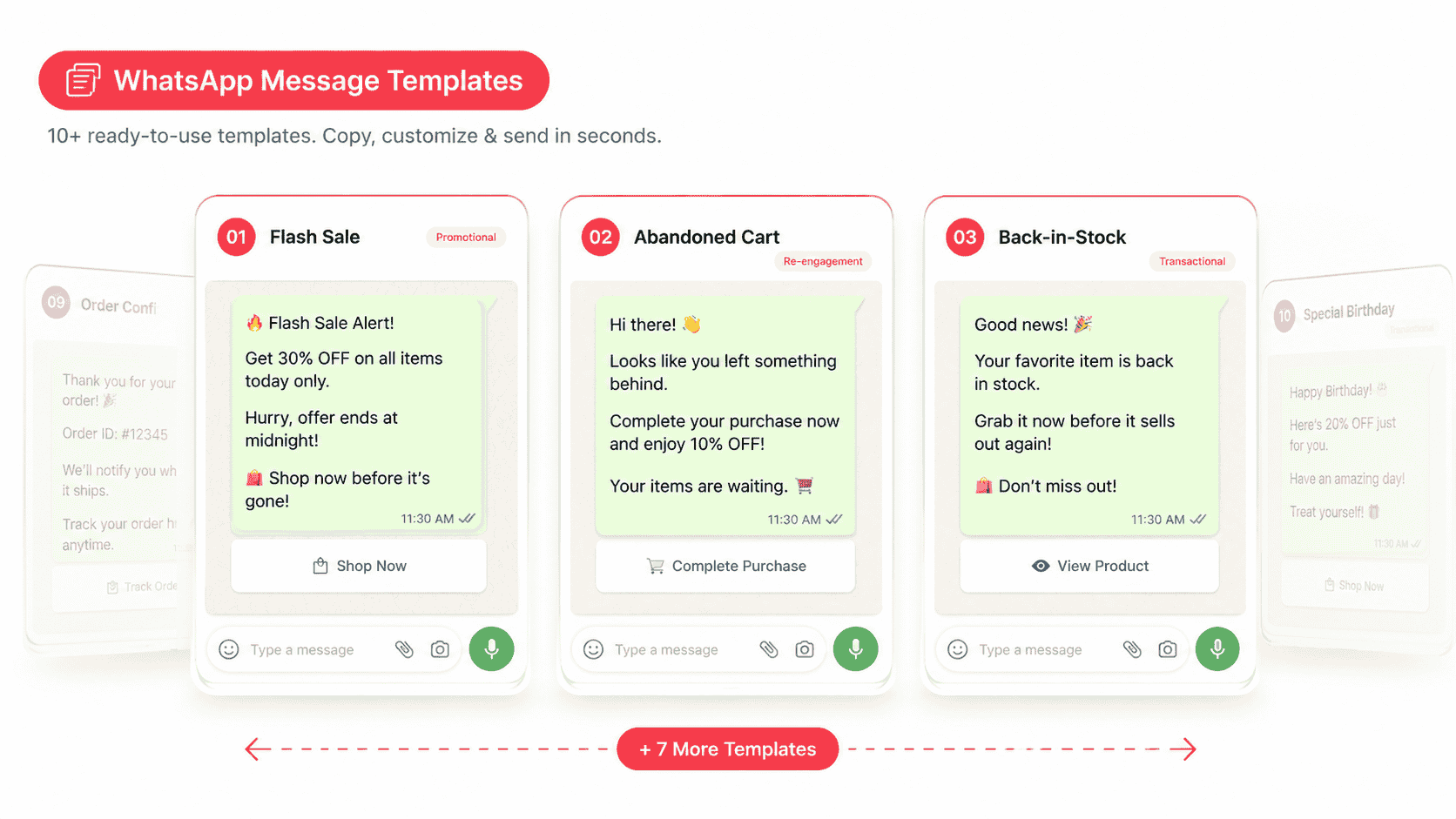
Just swap in the variables ({Name}, {Product}, {Code}, {Link}) and you're set. All templates are short, skimmable, and built for high conversion in 2026.
Template 1: Flash Sale Alert
🔥 24-Hour Flash Sale, {Name}! Get 40% off on your favourites — today only. Use code: FLASH40 👉 Shop now: {Link} Reply STOP to unsubscribe.
When to use: Time-sensitive deals, end-of-month inventory clearance, weekend sales.
Template 2: New Product Launch
Hey {Name} 👋 Our brand-new {Product} just dropped — and you're getting first dibs. ✨ Sneak peek + 15% early-bird discount 🛍️ Tap here: {Link}
When to use: Product launches, collection drops, new feature releases.
Template 3: Abandoned Cart Recovery
Hi {Name}, you left {Product} in your cart 🛒 Good news — it's still available, and we're throwing in free shipping if you check out in the next 3 hours. Complete your order: {Link}
When to use: Cart abandonment recovery — works at 3-5x the rate of email reminders.
Template 4: Festival/Seasonal Offer
🪔 Happy Diwali, {Name}! Celebrate with 25% off everything across our store. Use code: DIWALI25 Valid till midnight Sunday. 🛒 Shop the sale: {Link}
When to use: Diwali, Holi, Christmas, Black Friday, Eid, New Year.
Template 5: VIP Loyalty Reward
Hi {Name}, you're one of our favourites 💛 Enjoy a private 20% loyalty discount on your next order — just for being you. Code: VIP20 (valid till Sunday) Tap to redeem: {Link}
When to use: Top 10-20% of your customers; thank-you campaigns.
Template 6: Win-Back Campaign
Hey {Name}, we've missed you 👀 It's been a while. Here's a little something to welcome you back: ₹500 off on orders above ₹2,000. Use code: COMEBACK500 Expires in 48 hours: {Link}
When to use: Customers inactive for 60-90+ days.
Template 7: Welcome + First-Order Discount
Welcome to the family, {Name}! 🎉 Here's a little gift to start with — 15% off your first order. Use code: WELCOME15 Browse the store: {Link}
When to use: New subscribers right after opt-in or signup.
Template 8: Back-in-Stock Alert
Hey {Name}, good news! ✨ The {Product} you loved is back in stock — and selling fast. Grab yours before it's gone: {Link}
When to use: Restock notifications for out-of-stock items customers showed interest in.
Template 9: Referral Invitation
Hey {Name}, love what we do? 💛 Refer a friend and you both get ₹300 off your next order. Share your code: {ReferralCode} Tap to invite: {Link}
When to use: Loyalty programs, referral campaigns, viral growth pushes.
Template 10: Order Upsell
Hi {Name}, your order of {Product} is on its way 🚚 Pair it with {ComplementaryProduct} at 20% off — exclusive for you, valid 24 hours. Add it now: {Link}
When to use: Right after an order confirmation, to maximize average order value.
What Is a WhatsApp Promotion Message?
Now that you've got your templates, let's quickly cover the basics for those who want to understand what they're sending.
A WhatsApp promotion message is a business-initiated marketing message sent through the WhatsApp Business API (or the free Business App for smaller volumes) to customers who have explicitly opted in. These messages can include text, images, videos, PDFs, and clickable buttons that drive a specific action — a purchase, a booking, a website visit, or an app install.
Think of it as the most intimate marketing channel ever invented. Your message lands in the same inbox where your customer's mom and best friend message them. That's massive trust — but the bar for not being annoying is brutally high.
Promotional vs Transactional: The Critical Difference
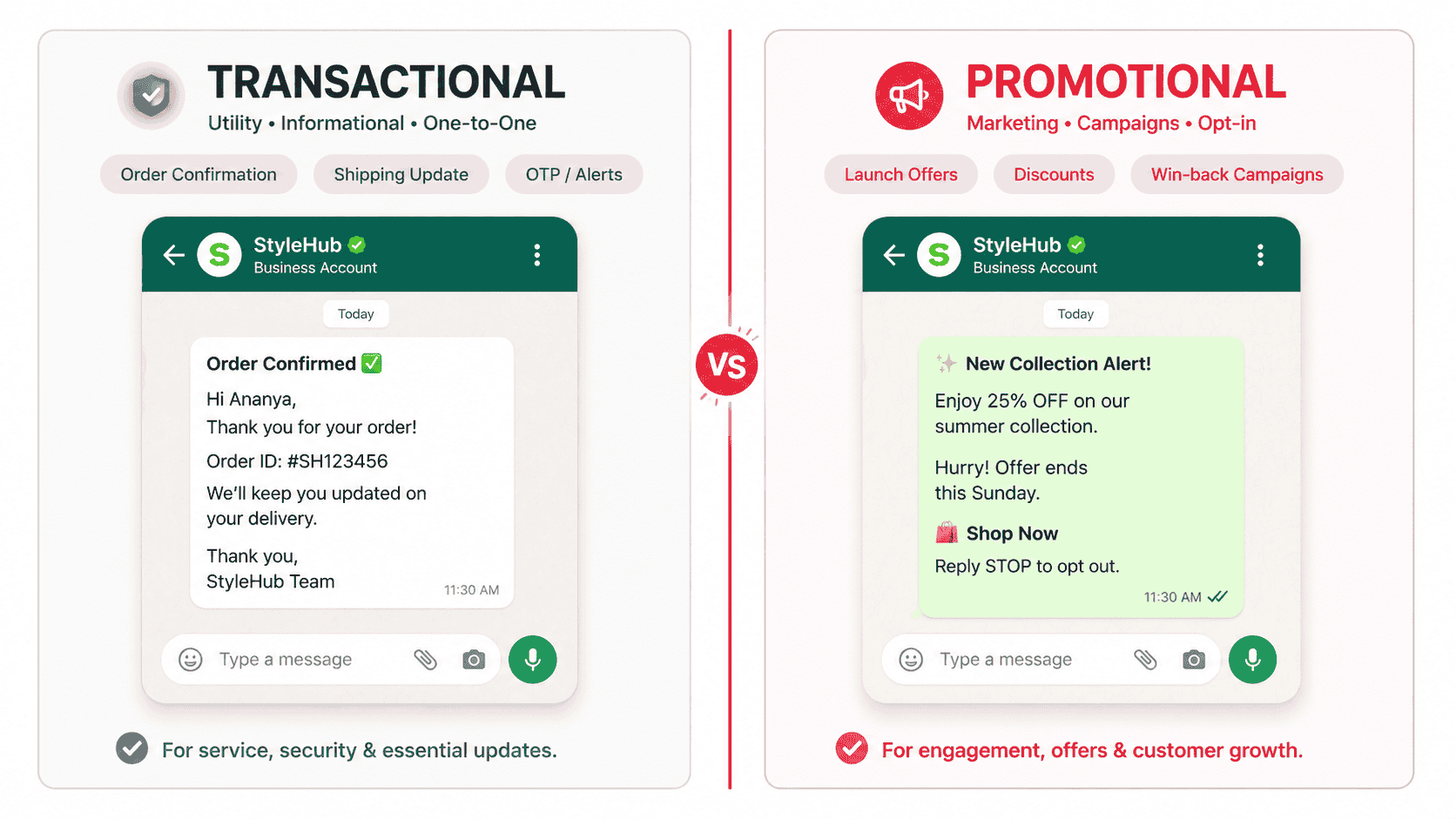
This is where most beginners trip up. WhatsApp splits business messages into two main buckets:
- Transactional messages — order confirmations, shipping updates, OTPs. These are utility-based and customers expect them.
- Promotional messages — Promotional messages — sales, offers, launches, win-back campaigns. These need pre-approved WhatsApp message templates and explicit WhatsApp opt-in.
Mix the two up, and Meta will lower your quality rating faster than you can say "Black Friday."
Why WhatsApp Promotional Messages Crush Email and SMS
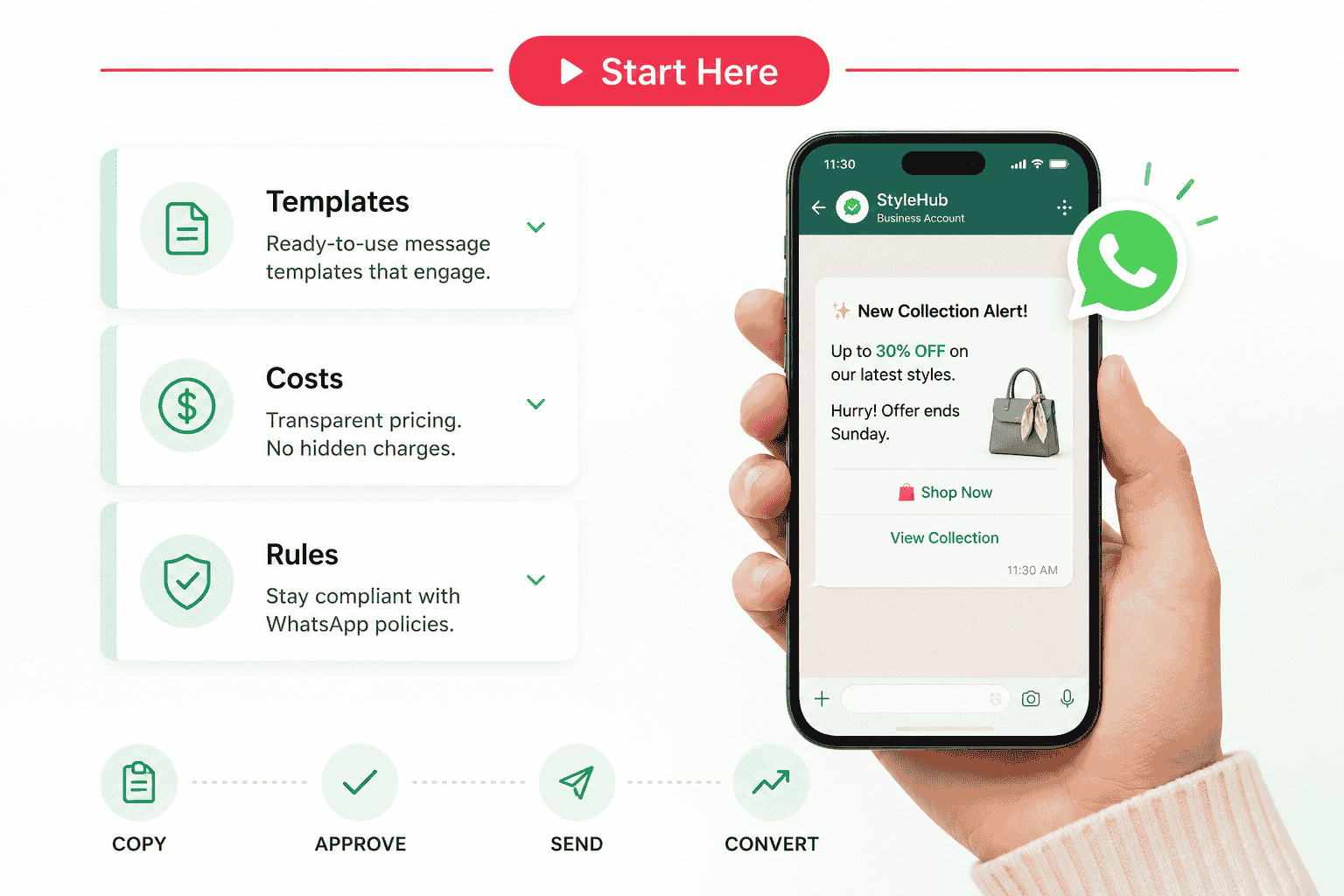
You've probably heard the stats. Let me put real numbers to it. Email open rates today hover around 20%. SMS sits around 30%. WhatsApp? A staggering 90 to 98% open rate, with most messages read within 3 to 5 minutes of delivery. Translation: send a promotion to 10,000 opted-in customers, and roughly 9,500 will actually see it. Try that on Gmail.
People also check WhatsApp 80+ times a day. Email? Maybe twice. The platform you market on should match where attention already lives — and right now, that's WhatsApp. Combine that with reply rates that crush every other channel, and you've got a one-way ticket to higher conversions. Tata CLiQ ran personalized WhatsApp campaigns and reported a 57% click-through rate and a 10x ROI lift. That's not an outlier — that's where the channel sits.
WhatsApp Business App vs API: Which Do You Need?
This is the question that confuses 90% of new users. Let me make it dead simple.
The free WhatsApp Business App is perfect for small businesses with under 256 contacts per broadcast. The catch? Customers must save your number to their phone first to receive broadcasts. For most businesses, that's a deal-breaker.
The WhatsApp Business API is what you need if you want to send to thousands, automate flows, integrate with your CRM, or run scheduled campaigns. You access it through a Business Solution Provider (BSP) like Helo.ai
Quick rule: Under 500 contacts and casual messaging? Use the App. Over 500 contacts and want to scale? Go API.
If you're still deciding which setup fits your business size and campaign volume, read our full comparison of WhatsApp Business App vs WhatsApp Business API.
How to Send Promotion WhatsApp Messages Without Getting Banned
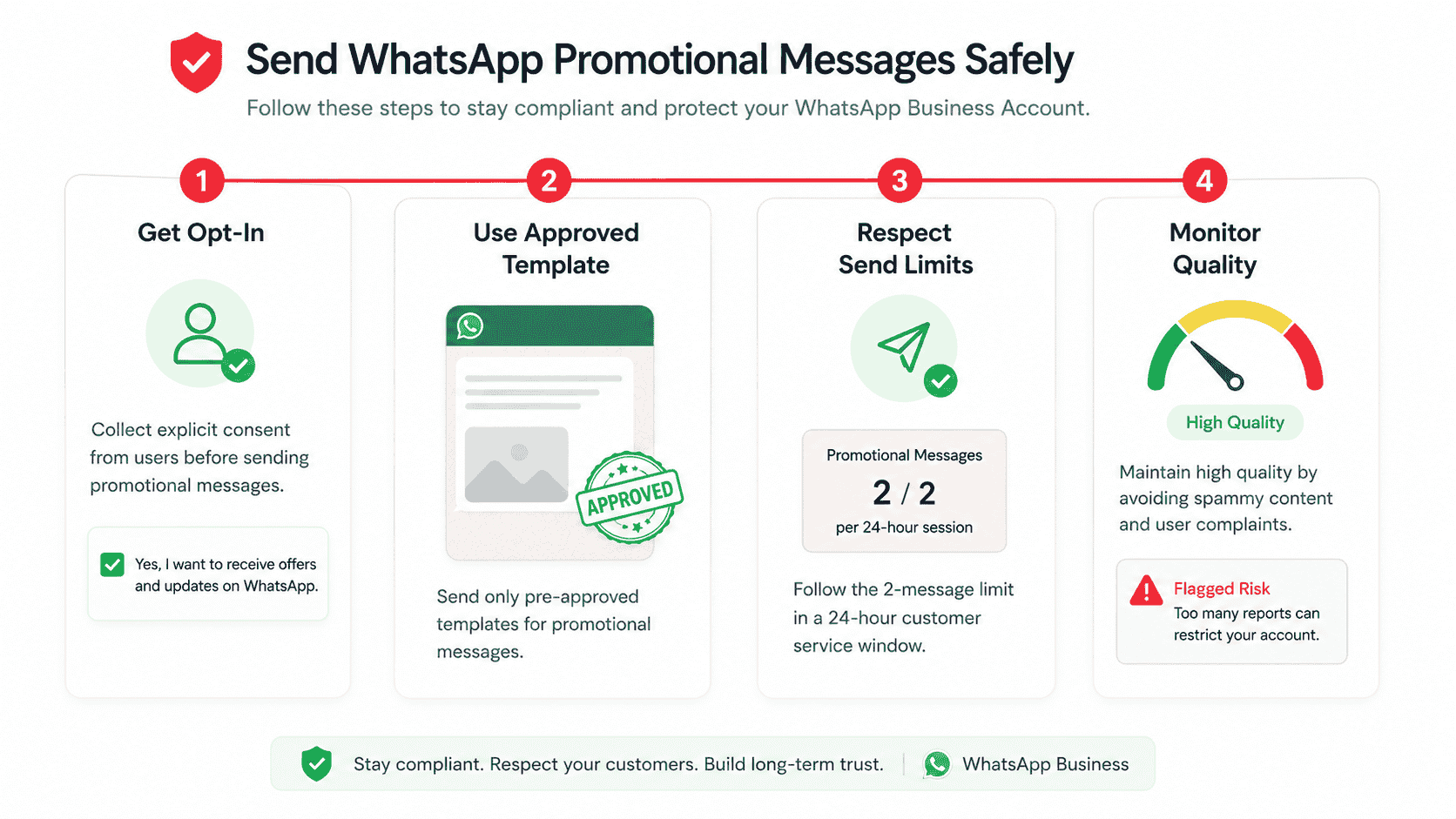
Pay close attention here. Meta banned over 8 million accounts in India alone in 2024 for policy violations. Here's how to stay safe.
The Opt-In Rule (Non-Negotiable)
You CANNOT send a promotional message to anyone who hasn't explicitly opted in. Acceptable opt-in methods include website checkboxes during signup or checkout, click-to-WhatsApp ads, in-store QR codes with consent, post-purchase opt-in flows, and WhatsApp itself when a customer messages you first.
Pro tip: Keep records of when and how each customer opted in. If Meta audits you, this is your insurance.
If you want a step-by-step breakdown of how to collect consent through forms, checkout, ads, QR codes, and support flows, read this guide on WhatsApp opt-in.
Template Pre-Approval Process
Every promotional message must use a pre-approved template. You submit your template through your BSP, Meta reviews it (usually within 24 hours, sometimes minutes), and once approved, you can send it to thousands at a time. Templates that get approved fastest are factual, value-focused, and free of all-caps spammy language.
The 2-Marketing-Message Limit (Error 7032)
Here's a 2026 rule almost nobody talks about. Meta now caps brands at 2 marketing template messages per 24-hour conversation window per user. If a customer doesn't reply, you cannot blast a third promo into their inbox the same day. Try it, and you'll receive error code 7032 — meaning your message was rejected. The fix? Wait until the conversation window closes, then resume in your next campaign cycle.
Quality Rating: Your Hidden Score
Inside Meta Business Manager, every WhatsApp number has a quality rating: HIGH, MEDIUM, LOW, or FLAGGED. This score directly controls your messaging tier — how many unique users you can message in 24 hours. High quality means higher messaging limits. Flagged means a potential ban. What tanks your rating? Customers blocking your number, reports for spam, sending to invalid numbers, high frequency without value, and generic non-personalized blasts. Monitor this rating weekly inside your BSP dashboard.
If you're ready to move from examples to execution, here’s a practical guide on how to send bulk WhatsApp messages safely and at scale.
WhatsApp Promotion Message Cost Breakdown (2026 Pricing)
Meta switched from conversation-based to per-message pricing in 2025. Here's what marketing messages actually cost in 2026:
Region | Cost per Marketing Message | Notes |
|---|---|---|
🇮🇳 India | ₹0.80 – ₹1.10 | Most affordable major market |
🇺🇸 United States | $0.025 – $0.045 | Mid-tier pricing |
🇬🇧 United Kingdom | $0.05 – $0.08 | Higher-cost zone |
🇧🇷 Brazil | $0.06 – $0.09 | Premium tier |
🇦🇪 UAE | $0.03 – $0.05 | Mid-tier pricing |
🇲🇽 Mexico | $0.04 – $0.06 | Mid-tier pricing |
Note: These are Meta's base rates. Your BSP may add a small markup. Service messages (replies within the 24-hour window after a customer messages you) remain free.
For a more detailed breakdown by category, region, and pricing changes, see our full guide to WhatsApp API pricing in 2026.
Real ROI Math: Is It Actually Worth It?
Say you're an Indian D2C brand sending 10,000 promotional messages at ₹1 each. Total spend: ₹10,000. If your conversion rate is just 2% (well below WhatsApp average), that's 200 sales. At an average order value of ₹1,200, you've generated ₹2,40,000 in revenue from a ₹10,000 spend. That's a 24x ROI. Show me an email campaign that does that.
5-Part Formula to Write a Business WhatsApp Promotion Message That Sells
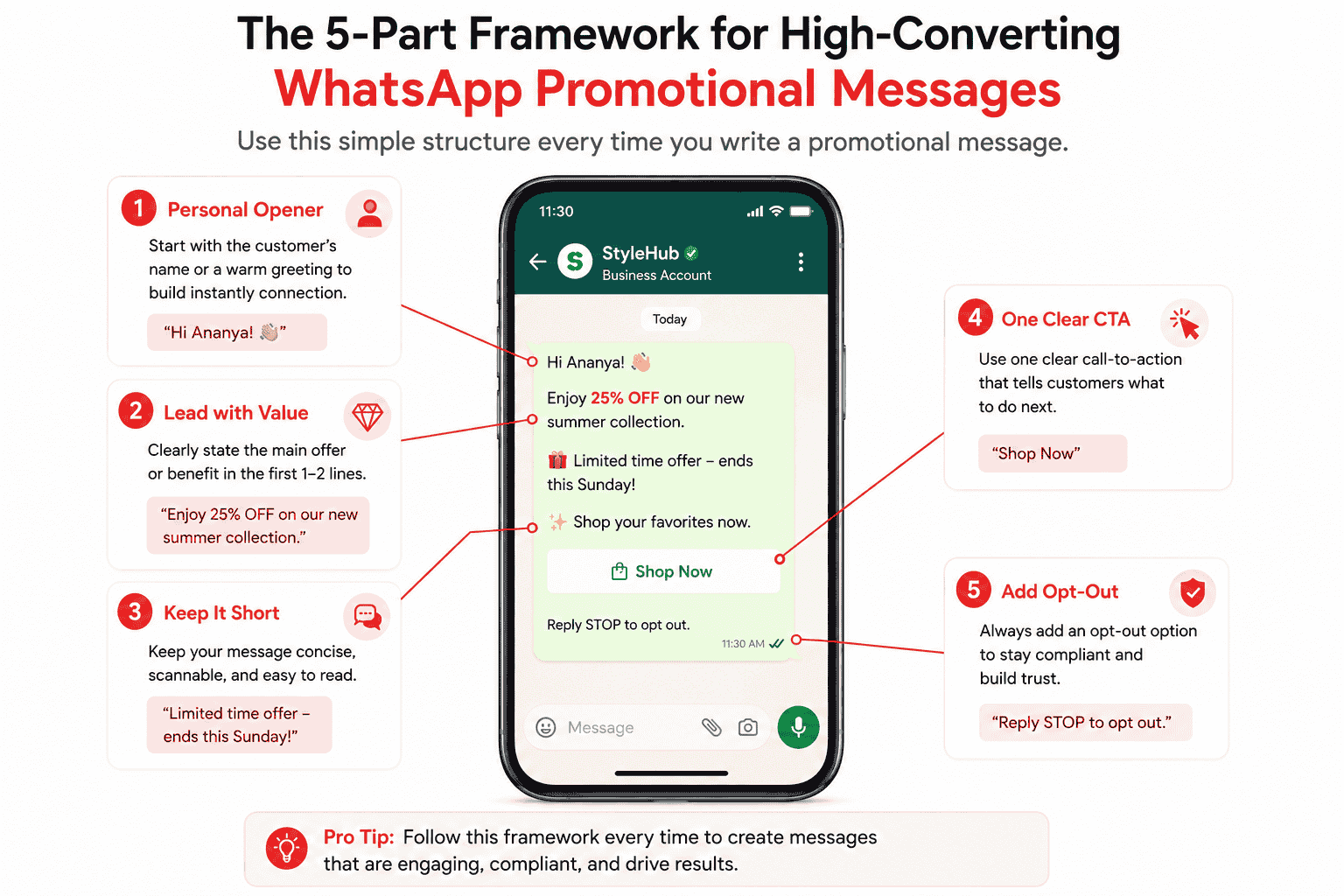
Want to write your own from scratch? Use this formula every time:
- Hook with a personal opener — Use the customer's name and an emoji. "Hey Rahul 👋" beats "Dear Customer" every time.
- Lead with the value, not the brand — Don't open with your company name. Open with what's in it for them.
- Keep it under 160 characters — Skimmable, scannable, snappy. The message's job is to drive the click, not close the sale.
- One CTA only — "Shop Now" OR "Reply YES" OR "Tap to claim." Never two. Split focus kills conversion.
- Always include an opt-out — A simple "Reply STOP to unsubscribe" protects your quality rating and earns trust.
5 Mistakes That Will Tank Your Promotion WhatsApp Campaign
Even experienced marketers slip on these:
- Sending without opt-in — The fastest route to a permanent ban.
- Sending too often — Cap it at 1-2 messages per week.
- All caps or fake urgency — "BUY NOW!!!" gets reported as spam.
- No personalization — A blast that feels like a blast performs like one.
- Ignoring replies — When customers reply, you have a 24-hour free conversation window. Use it for real-time selling.
For businesses running high-volume campaigns, journeys, and scheduled promotions, Helo Broadcast helps manage targeting, automation, compliance controls, and multi-channel delivery from one place.
Conclusion
A well-crafted WhatsApp promotion message isn't just a marketing tactic — it's quietly the highest-ROI channel available to businesses in 2026. But it only works when you respect the rules: get genuine opt-in, write like a human, send with restraint, and personalize everything. Meta's compliance framework isn't there to slow you down — it's there to keep WhatsApp the trusted channel that makes your messages convert in the first place.
So go grab one of the 10 templates above, swap in your variables, run it through your BSP for approval, and send a promotion that feels less like marketing and more like a friend tipping someone off about a great deal. That's the secret. Customers don't want to be sold to — they want to be invited in. Master that, and your WhatsApp promotion strategy won't just work. It'll outperform every other channel you have.
Frequently Asked Questions (FAQs)
1. Is it legal to send promotional WhatsApp messages?
Yes, completely legal — provided you have explicit opt-in consent from each recipient and you send through Meta-approved templates via the WhatsApp Business API. Sending without consent violates Meta's terms and laws like GDPR and India's DPDP Act.
2. What is the best time to send a WhatsApp promotion message?
Tuesday to Thursday between 10 AM-12 PM and 6 PM-9 PM in your customer's local timezone tends to perform best. Avoid late nights, very early mornings, and Sunday evenings.
3. How many WhatsApp promotional messages can I send per day?
Meta uses a tiered system based on your quality rating — starting at 1,000 unique users per 24 hours and scaling up to unlimited as you build trust. Per user, you're capped at 2 marketing template messages per 24-hour conversation window.
4. What's the difference between WhatsApp Business App and API for promotion?
The Business App is free but limited to 256 contacts per broadcast and requires customers to save your number. The API has no contact-saving requirement, supports automation, and scales to millions — but requires a Business Solution Provider and per-message fees.
5. How do I avoid getting banned when sending business WhatsApp promotion messages?
Get explicit opt-in, use only pre-approved templates, personalize every message, cap frequency at 1-2 sends per week, include a clear opt-out, and monitor your quality rating in Meta Business Manager weekly.


.png&w=828&q=75)