

Hiring teams are under constant pressure: fill roles faster, reduce no-shows, keep candidates engaged, and deliver a professional experience all while managing high volumes and multiple stakeholders.
WhatsApp is where many candidates already are. It can make outreach, screening, interview coordination, and onboarding more human and responsive. But used without structure, it can also create compliance risks, data-privacy issues, and chaotic recruiter workflows.
This playbook explains how to use WhatsApp for HR and recruitment in a compliant, scalable way—covering candidate screening, interview scheduling, onboarding, internal HR communication, and integration with your ATS or HRMS.
What Is “WhatsApp for HR and Recruitment”?
“WhatsApp for HR and recruitment” means using WhatsApp as a structured business communication channel for hiring and HR processes. This includes candidate outreach, screening, interview coordination, offer and pre-joining communication, onboarding, and internal employee communication.
It is not simply “chatting with candidates on WhatsApp.” It is about running hiring and HR workflows on a verified business number with shared access, automation, and system integration.
Setup | Typical use | Limitations for HR/recruitment |
|---|---|---|
Personal WhatsApp | Individual recruiter messaging candidates from their own number | No shared visibility, no audit trail, high compliance and handover risk |
WhatsApp Business App | Small business or solo recruiter using a dedicated business number | Limited to one primary device/user, limited automation, no API |
WhatsApp Business API | HR/recruitment teams using a shared business number with automation and integrations | Requires API setup and governance, but supports shared inbox, templates, ATS/HRMS integration, and scale |
If you are evaluating a WhatsApp setup for HR, start by clarifying your use case: WhatsApp Business App for a very small team, or WhatsApp Business API for automation, multi-recruiter access, and ATS/HRMS integration. Helo.ai can help you choose the right number type and API path for your hiring and HR processes.
Where WhatsApp Fits in the Hiring Lifecycle
WhatsApp can add value at multiple points in the candidate and employee journey. Think of it as one channel in a broader hiring stack that includes your career site, ATS/HRMS, email, phone, and video-interview tools.
Hiring stage | WhatsApp role | Example use |
|---|---|---|
Sourcing & outreach | Initial contact, job alerts, event invites | “We received your application for [Role]. Are you open to a quick chat?” |
Screening | Qualification questions, document collection | Chatbot or Flows to collect experience, notice period, expected salary |
Interview coordination | Slot selection, confirmations, reminders, joining links | “Choose your interview slot” + automated reminders |
Offer & pre-joining | Offer letter delivery, document checklist, policy acks | “Your offer is ready. Please review and upload [Documents].” |
Onboarding | Welcome messages, first-day logistics, training schedules | “Welcome to [Company]. Here’s your Day 1 schedule and buddy details.” |
Early employment | Check-ins, pulse surveys, policy updates | “How’s your first month? Any blockers?” |
The goal is not to replace email, phone, or ATS notifications, but to make critical moments faster, clearer, and more human.
Use Case 1: Candidate Outreach and Job Alerts
When to use WhatsApp for outreach
WhatsApp works well for:
- Following up with inbound applicants who have opted in.
- Re-engaging silver-medalist candidates for new roles.
- Sharing job alerts for new openings, walk-in drives, and hiring events.
- Quick pre-screening questions before a call.
Compliant outreach pattern
For outbound messages, start with a clear identity and an opt-in check:
“Hi [Name], this is [Recruiter] from [Company]. You applied to [Job Board] for [Role]. Can I share a quick WhatsApp message about the role?
Reply YES to opt in.”
Use Case 2: Screening and Qualification on WhatsApp
Screening is one of the highest-impact use cases for WhatsApp in recruitment.
Three common patterns
- Template-based screening
Use approved message templates to ask structured questions: - Total experience and relevant experience.
- Current location and preferred location.
- Notice period and availability.
- Expected salary.
- Chatbot screening
A rule-based or AI-assisted chatbot can: - Ask qualification questions.
- Share role details.
- Capture documents (resume, ID, certificates).
- Route qualified candidates to interview scheduling.
- WhatsApp Flows
WhatsApp Flows allow interactive, form-like experiences inside WhatsApp. You can build: - Multi-step screening forms.
- Role-specific questionnaires.
- Document-upload steps with clear instructions.helo
Best practices for screening on WhatsApp
- Keep questions focused on “interview yes/no” criteria.
- Avoid collecting excessive personal data in chat; use secure links for sensitive documents.
- Log screening outcomes and notes in your ATS/HRMS.
- Politely inform non-shortlisted candidates and keep the door open for future roles.
Helo.ai perspective: Screening should feel conversational, not interrogative. Use WhatsApp to collect just enough information to decide “interview yes/no,” and let the ATS/HRMS hold the full candidate record.
For chatbot design patterns, you can adapt ideas from Helo.ai’s guide to AI chatbots for customer onboarding, which covers welcome flows, milestone nudges, and drop-off reduction.
Use Case 3: Interview Scheduling and Reminders
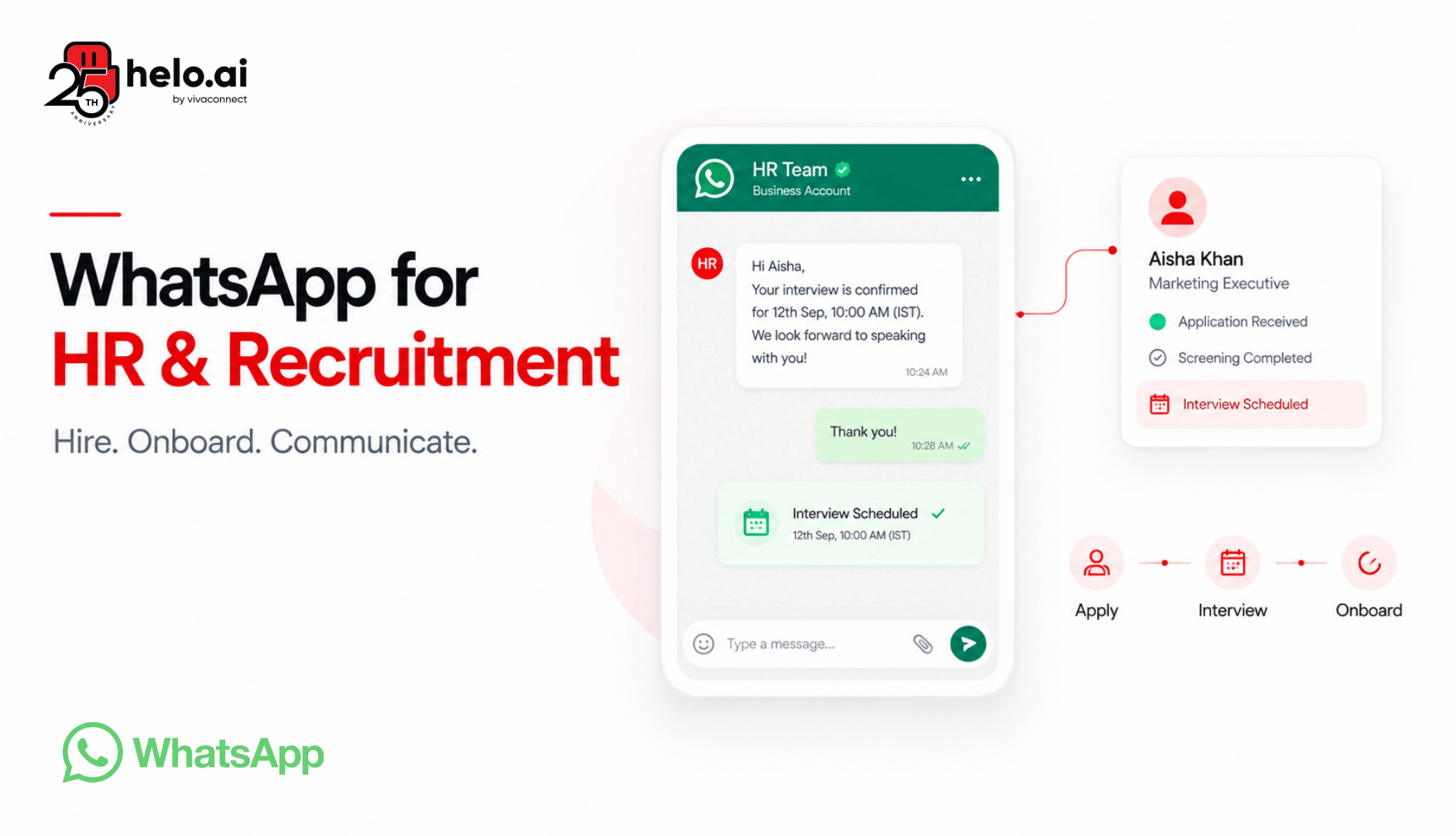
Coordinating interviews is often where WhatsApp creates the most visible impact.
How it works in practice
- Share available interview slots via:
- WhatsApp Flows (interactive slot selection),
- Chatbot with predefined options, or
- A calendar link that opens on the candidate’s phone.
- Candidate selects a slot → calendar invite created (Google Calendar, Outlook, or ATS calendar).
- Automated reminders are sent:
- 24 hours before the interview.
- 2–3 hours before the interview.
- Reminders include:
- Date, time, and timezone.
- Interview format (video/in-person).
- Joining link or address and contact person.
- If the candidate needs to reschedule, they can reply or use a flow, and the system updates the calendar and ATS.
Typical impact
Hiring teams that move interview coordination to WhatsApp often see:
- 20–40% reduction in interview no-shows.
- Faster time-to-schedule (from days to hours).
- Fewer back-and-forth emails and calls.
- Better candidate experience (“they made it easy for me”)
Use Case 4: Offer, Pre-Joining, and Document Collection
Once a candidate is selected, WhatsApp can speed up offer acceptance and pre-joining formalities.
Common use cases
- Offer communication
- Send the offer letter (PDF or secure link).
- Ask for acknowledgement or e-signature via a secure tool.
- Share a contact for queries.
- Pre-joining document checklist
- List required documents (ID, education proofs, address proof, photos, etc.).
- Share secure upload links or HRMS portal instructions.
- Send reminders for pending items.
- Policy acknowledgements
- Share key policies (code of conduct, IT policy, confidentiality).
- Capture acknowledgement via form or HRMS.
- Background verification updates
- Inform candidates about BGV status.
- Request additional information if needed.
- Joining confirmation
- Confirm joining date, time, and location.
- Share first-day agenda and buddy/manager details.
Use secure links for sensitive documents and avoid asking candidates to send highly sensitive data (like bank details or full ID numbers) directly in chat. Log all communication in the ATS/HRMS for auditability.
Use Case 5: Employee Onboarding and Early Engagement
WhatsApp can improve the new-hire experience from “offer accepted” through the first 90 days.
Onboarding workflows
- Pre-joining nudges
- Welcome message from HR or manager.
- “What to expect on Day 1” summary.
- IT setup and access instructions.
- First-day communication
- Office location, maps, and entry process.
- Meeting schedule and training plan.
- Buddy/mentor introduction.
- First-week and first-month check-ins
- Short pulse questions: “How’s your first week?”
- Links to training modules or resources.
- Invitation to ask questions via WhatsApp.
For structured onboarding automation, you can adapt patterns from Helo.ai’s AI chatbot for customer onboarding, which shows how to use milestone-based nudges and clear next steps.
Use Case 6: Internal HR Communication and Engagement
Beyond hiring, WhatsApp can support internal HR communication when used thoughtfully.
Suitable use cases
- Policy updates with acknowledgement links.
- Benefits and leave-policy reminders.
- Internal job postings and referral campaigns.
- Shift schedules and roster updates.
- Pulse surveys and quick feedback forms.
- Emergency or incident communications (with clear escalation paths).
Guardrails
- Use WhatsApp for timely, concise updates, not as a replacement for official policy documents or formal HR systems.
- Provide an opt-out mechanism where appropriate.
- Avoid sharing sensitive employee data in group chats.
WhatsApp Business API for HR and Recruitment
For anything beyond very small-scale hiring, the WhatsApp Business API is the right foundation for HR and recruitment.
Why the Business API, not personal or Business App?
Capability | Personal WhatsApp | WhatsApp Business App | WhatsApp Business API |
|---|---|---|---|
Number ownership | Personal number | Business number on one device | Business-owned number, multi-device, multi-user |
Team access | One user | Primarily one user | Shared inbox for multiple recruiters/HR |
Automation | None | Limited | Chatbots, Flows, webhooks, API integrations |
Templates | No | Limited | Approved templates for structured messaging |
ATS/HRMS integration | No | Very limited | Full API/webhook-based integration |
Governance and audit | Low | Medium | High (access controls, logs, retention policies) |
The Business API lets you:
- Run all hiring communication from a single, business-owned number.
- Give multiple recruiters and HR team members access via a shared inbox.
- Use templates for consistent, approved messaging.
- Build automation for screening, scheduling, and onboarding.
- Integrate with ATS, HRMS, calendars, and forms via APIs and webhooks.
For guidance on choosing a provider, see Helo.ai’s overview of the best WhatsApp API providers, which covers partnership status, pricing, and feature checklists.
Integrations: ATS, HRMS, Calendars, and Forms
The real power of WhatsApp in HR comes when it is connected to your existing systems.
Typical integration patterns
- ATS/HRMS triggers
- Candidate shortlisted in ATS → start WhatsApp screening flow.
- Interview completed → send feedback or next-step message via WhatsApp.
- Offer accepted → trigger onboarding workflow on WhatsApp.
- Calendar integration
- Google Calendar or Outlook for interview slot management.
- Automated creation and updates of interview events.
- Reminder messages tied to calendar events.
- Document and form collection
- Use WhatsApp Flows or secure links to collect resumes, IDs, and other documents.
- Push collected documents to ATS/HRMS or secure storage.
- Status sync
- Update candidate status in ATS based on WhatsApp interactions (e.g., “screening completed,” “interview scheduled,” “offer accepted”).
A simple data-flow view:
Career site/ATS → WhatsApp (screening/scheduling) → ATS/HRMS (status, notes, documents) → Calendar (interviews) → HRMS (onboarding)
For a broader view of how communication platforms fit into enterprise architecture, see Helo.ai’s explainer on CPaaS (Communications Platform as a Service)
Compliance, Consent, and Candidate Experience
This is the most critical section for HR leaders.
Consent and opt-in
- Capture explicit opt-in before sending non-transactional WhatsApp messages.
- Record when, where, and how consent was given (career site, job portal, form, chat).
- Provide a clear opt-out mechanism (e.g., “Reply STOP to opt out”).
- Honor opt-outs immediately and log them in your ATS/HRMS.
Privacy and data protection
- Minimize sensitive data shared in chat; use secure links for documents.
- Align with applicable data-protection laws (e.g., GDPR, India DPDP Act, local employment laws).
- Define retention periods for WhatsApp recruitment conversations and documents.
- Restrict internal access to candidate conversations to authorized HR/recruitment staff.
Professional use and candidate experience
- Message during reasonable hours; avoid late-night or very early messages.
- Keep messages short, clear, and respectful.
- Always identify yourself and your company.
- Avoid spammy, mass-broadcast behavior; segment and personalize where possible.
- Use WhatsApp alongside email and phone, not as the only channel.
Some recruitment platforms explicitly emphasize legal and effective WhatsApp use: short messages, reasonable hours, personalization, and using WhatsApp alongside email and calls. This is a strong signal that compliance and professionalism are table stakes, not optional.
Compliance note: Requirements vary by jurisdiction and company policy. Treat WhatsApp as a business communication channel: capture consent, limit data, and align with your legal and HR policies.
Metrics and ROI: What to Track for WhatsApp Hiring
To justify WhatsApp as a strategic channel, track metrics that matter to HR and business leaders.
Core hiring metrics
- Time-to-first-response for candidates.
- Screening completion rate.
- Interview no-show rate.
- Offer acceptance rate.
- Time-to-hire (end-to-end).
- Candidate drop-off rate by stage.
Experience and efficiency metrics
- Candidate satisfaction (post-process survey or NPS).
- Recruiter time saved per role (fewer calls/emails, faster scheduling).
- Percentage of roles filled using WhatsApp-assisted workflows.
- Internal stakeholder satisfaction (hiring managers).
Frame WhatsApp as a lever to improve these metrics, not a magic bullet. Use before/after comparisons where possible (e.g., no-show rates before and after introducing WhatsApp reminders).
FAQ: WhatsApp for HR and Recruitment
Can we use WhatsApp for recruitment and hiring?
Yes, you can use WhatsApp for recruitment and hiring for candidate outreach, screening, interview scheduling, offer communication, onboarding, and employee engagement. For anything beyond very small-scale hiring, use the WhatsApp Business API with a shared inbox, defined workflows, and ATS/HRMS integration.
Is WhatsApp safe for candidate data and HR communication?
WhatsApp can be used safely for HR communication if you treat it as a governed business channel: use a business-owned number, limit sensitive data in chat, use secure links for documents, and align with your data-protection and HR policies.
Do candidates need to opt in for WhatsApp messages?
Yes, candidates should explicitly opt in before receiving non-transactional WhatsApp messages. Capture consent at application, career site, or during initial contact, record it in your ATS/HRMS, and provide an easy opt-out mechanism.
Can recruiters use personal WhatsApp for candidate communication?
It is strongly recommended to avoid using personal WhatsApp numbers for candidate communication. Personal chats create visibility, handover, and compliance risks. Use a dedicated WhatsApp Business API number with shared access and defined workflows.
How can we use WhatsApp for candidate screening?
You can use template-based questions, chatbots, or WhatsApp Flows to collect key screening information (experience, notice period, location, salary, availability). Log outcomes in your ATS and route qualified candidates to interview scheduling.
How can we schedule interviews on WhatsApp?
Share available interview slots via Flows, chatbot options, or a calendar link. Let candidates pick a slot, automatically create calendar invites, and send reminders 24 hours and a few hours before the interview.
Can WhatsApp integrate with our ATS or HRMS?
Yes, WhatsApp Business API can be integrated with ATS and HRMS systems via APIs and webhooks to sync candidate status, notes, documents, and interview schedules. The exact integration depends on your specific ATS/HRMS.
How can we use WhatsApp for employee onboarding?
Use WhatsApp to send welcome messages, first-day schedules, training plans, IT setup details, and check-in surveys. Automate milestone nudges and provide a clear channel for new hires to ask questions.
Can we use WhatsApp for internal HR communication?
Yes, for policy updates, benefits reminders, internal job postings, shift schedules, pulse surveys, and emergency communications. Use it for timely, concise updates, not as a replacement for official HR systems.
What metrics should we track for WhatsApp in hiring?
Track time-to-first-response, screening completion rate, interview no-show rate, offer acceptance rate, time-to-hire, candidate drop-off rate, and candidate satisfaction. Also track recruiter time saved and percentage of roles filled using WhatsApp-assisted workflows.
How do we avoid spammy or unprofessional WhatsApp messages in recruitment?
Message during reasonable hours, keep messages short and clear, always identify yourself and your company, personalize where possible, and provide an opt-out option. Use templates and approved flows rather than ad-hoc bulk broadcasts.
Can we use WhatsApp chatbots for recruitment screening?
Yes, chatbots can handle initial screening questions, share role details, collect documents, and schedule interviews. Complex or sensitive conversations should be handed over to a human recruiter or HR representative.
Build a Governed WhatsApp Channel for Hiring
WhatsApp can make hiring and HR communication faster, more human, and more responsive. But it should be implemented as a governed business channel with consent, shared access, ATS/HRMS integration, and clear recruiter workflows not as a set of personal chats.
With the right setup, you can improve candidate experience, reduce no-shows and drop-offs, and give your HR and recruitment teams a modern communication layer that works at scale.

.png&w=828&q=75)
.jpeg&w=96&q=75)