.png)


Most businesses think they have a customer support problem. They don’t.
They have a response-time and system problem. Traditional support just isn’t built for how customers behave today.
Customers don’t want to:
- raise tickets
- wait for hours
- repeat the same issue again
They want quick, simple conversations.
That’s why WhatsApp for customer support is becoming the go-to choice. With over 3 billion users, it’s where customers already are and where they expect fast, personal help.
In this guide, you’ll learn how to use WhatsApp to deliver better, faster support.
Why Businesses Use WhatsApp for Customer Support
So why are businesses rapidly shifting to WhatsApp for customer support? It comes down to how customers prefer to communicate today.
- Customers prefer messaging: People are already used to chatting in real time, making support feel natural and effortless.
- Higher open and reply rates: Messages on WhatsApp are far more likely to be seen and answered than emails.
- Convenient: Send a message anytime, reply at your own pace, and keep a record of the conversation.
- Faster responses: Queries get resolved quicker than email or phone support.
- Personal experience: Conversations feel more human with context and tailored replies.
- Global reach: With billions of users worldwide, WhatsApp is a platform your customers already trust and use daily.
Traditional support methods like long call waits or slow email threads often create friction. Messaging apps like WhatsApp remove this by offering a simple, fast, and familiar way to get help.
Traditional Support vs. WhatsApp Support
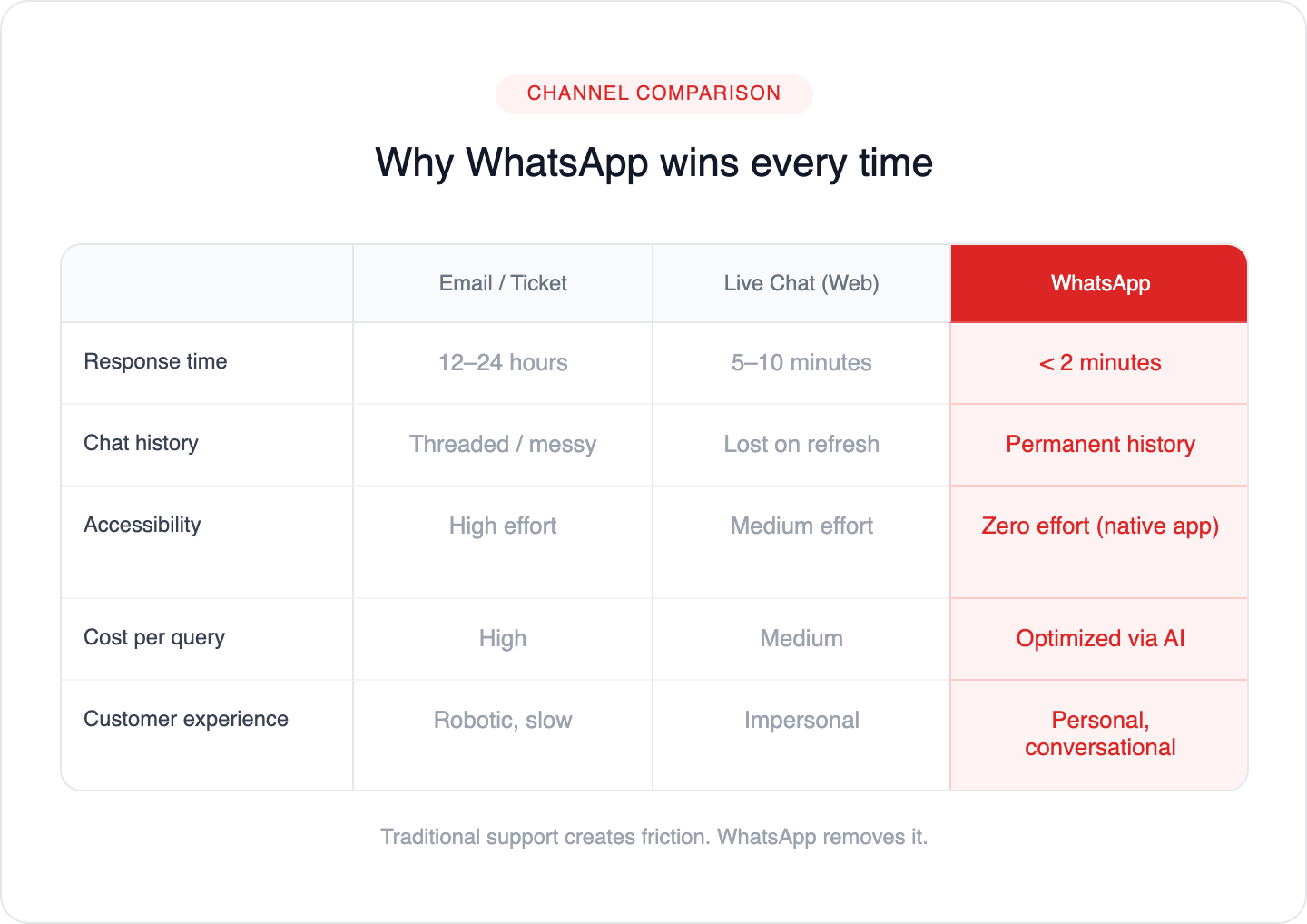
Here’s how WhatsApp compares to traditional support channels:
Feature | Legacy (Email/Ticket) | Live Chat (Web) | WhatsApp (Conversational) |
Response Time | 12–24 Hours | 5–10 Minutes | < 2 Minutes |
Persistence | Threaded/Messy | Lost on Refresh | Permanent History |
Accessibility | High Effort | Medium Effort | Zero Effort (Native App) |
Cost per Query | (High) | (Medium) | (Optimized via AI) |
Why Customer Preferences Are Shifting to WhatsApp
The numbers paint a clear picture. A study by Twilio found that 70% of consumers would prefer to communicate with businesses via messaging apps rather than traditional channels like phone or email. Furthermore, 60% of consumers believe that messaging allows for more efficient problem resolution.
This isn't just about preference; it's about effectiveness. Businesses that embrace messaging-first strategies are seeing tangible results. For instance, when businesses offer WhatsApp as a support channel, they often experience:
- Reduced Support Costs: Automated responses and efficient handling of queries can significantly lower the cost per interaction.
- Increased Customer Satisfaction: Faster resolution times and a more convenient experience lead to happier customers.
- Higher Conversion Rates: For sales-related inquiries, a quick and easy WhatsApp conversation can directly lead to a purchase.
- Improved Agent Efficiency: Agents can handle multiple conversations simultaneously on WhatsApp, increasing their productivity.
The global messaging market is booming, and platforms like WhatsApp are at the forefront. According to Statista, the number of WhatsApp users is projected to continue its upward trajectory, highlighting its enduring popularity. Statista's report on WhatsApp indicates consistent growth, reinforcing its position as a critical communication tool.
Key Features and Benefits of WhatsApp for Customer Support
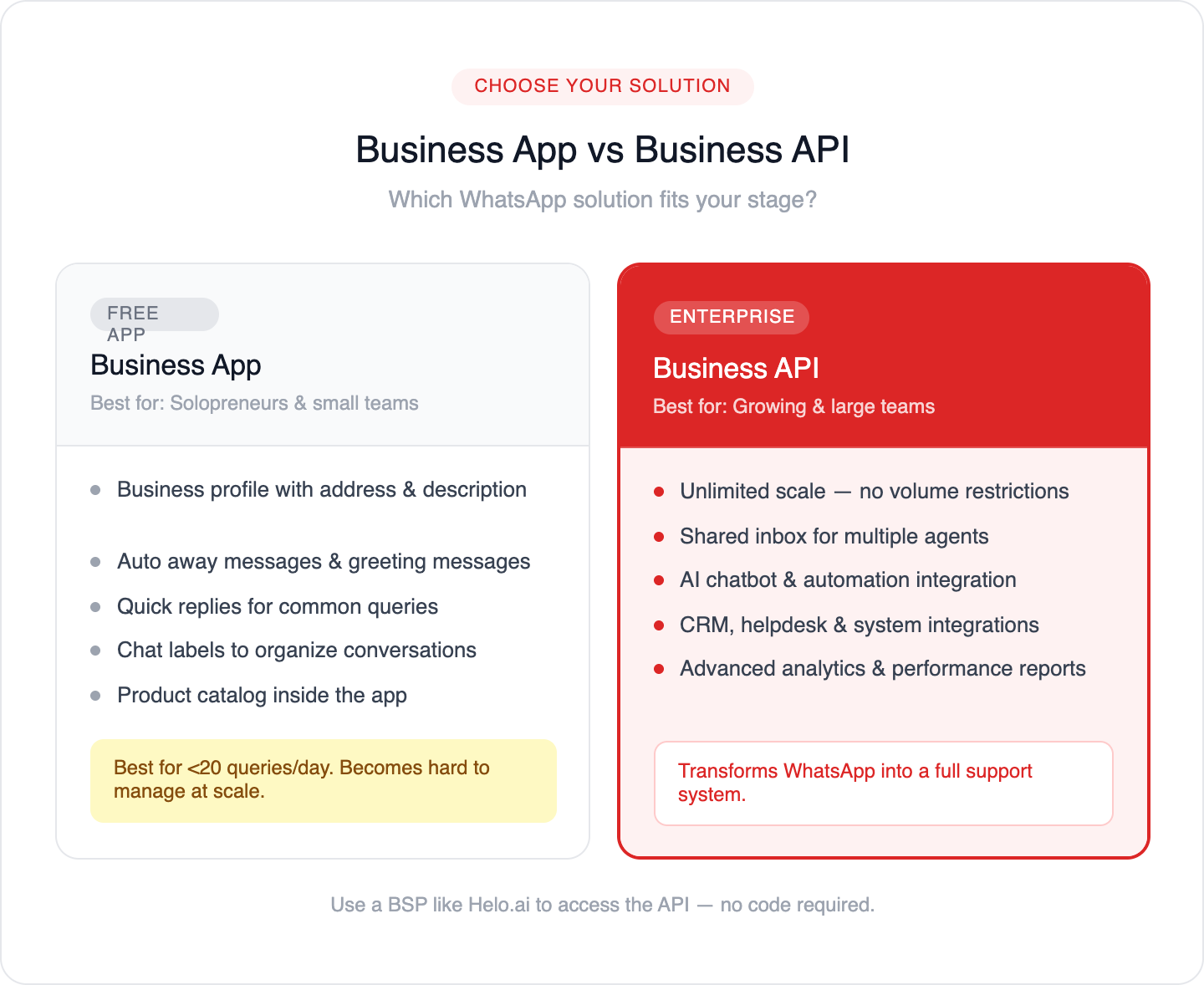
WhatsApp isn't just a consumer messaging app; it's a powerful business tool. The WhatsApp Business App and the WhatsApp Business API offer distinct functionalities tailored to meet the needs of companies of all sizes.
WhatsApp Business App: For Small Businesses
The free WhatsApp Business App is designed for small business owners who want a simple way to communicate with their customers. It offers features like:
- Business Profile: Create a profile with your business address, description, email, and website.
- Messaging Tools: Set up away messages, greeting messages, and quick replies to automate common responses.
- Labels: Organize your contacts and chats with labels like "new customer," "pending payment," or "order complete."
- Catalog: Showcase your products or services directly within the app.
While the Business App is a great starting point, it has limitations for larger businesses or those requiring advanced automation and scalability.
WhatsApp Business API: For Medium to Large Enterprises
The WhatsApp Business API is the enterprise-grade solution. It allows businesses to integrate WhatsApp messaging into their existing customer support systems, CRM, and other platforms. Key benefits of the API include:
- Scalability: Handle a high volume of customer interactions without limitations.
- Automation: Integrate with chatbots and AI to automate responses, answer FAQs, and route queries to the right agents.
- Integration: Connect WhatsApp with your CRM, helpdesk software, and other business tools for a unified customer view.
- Rich Messaging: Send interactive messages, including buttons, lists, and media, to enhance the customer experience.
- Advanced analytics & reporting: Track response time, agent performance, and customer satisfaction to continuously improve support.
With the WhatsApp API, you can send updates, reply instantly, and even handle transactions—all in one chat. It makes support faster and simpler for both you and your customers.
Want to scale this? Get started with the WhatsApp Business API.
📌 Read more: Difference between WhatsApp Business App and WhatsApp Business API
Key Benefits of WhatsApp for Customer Support
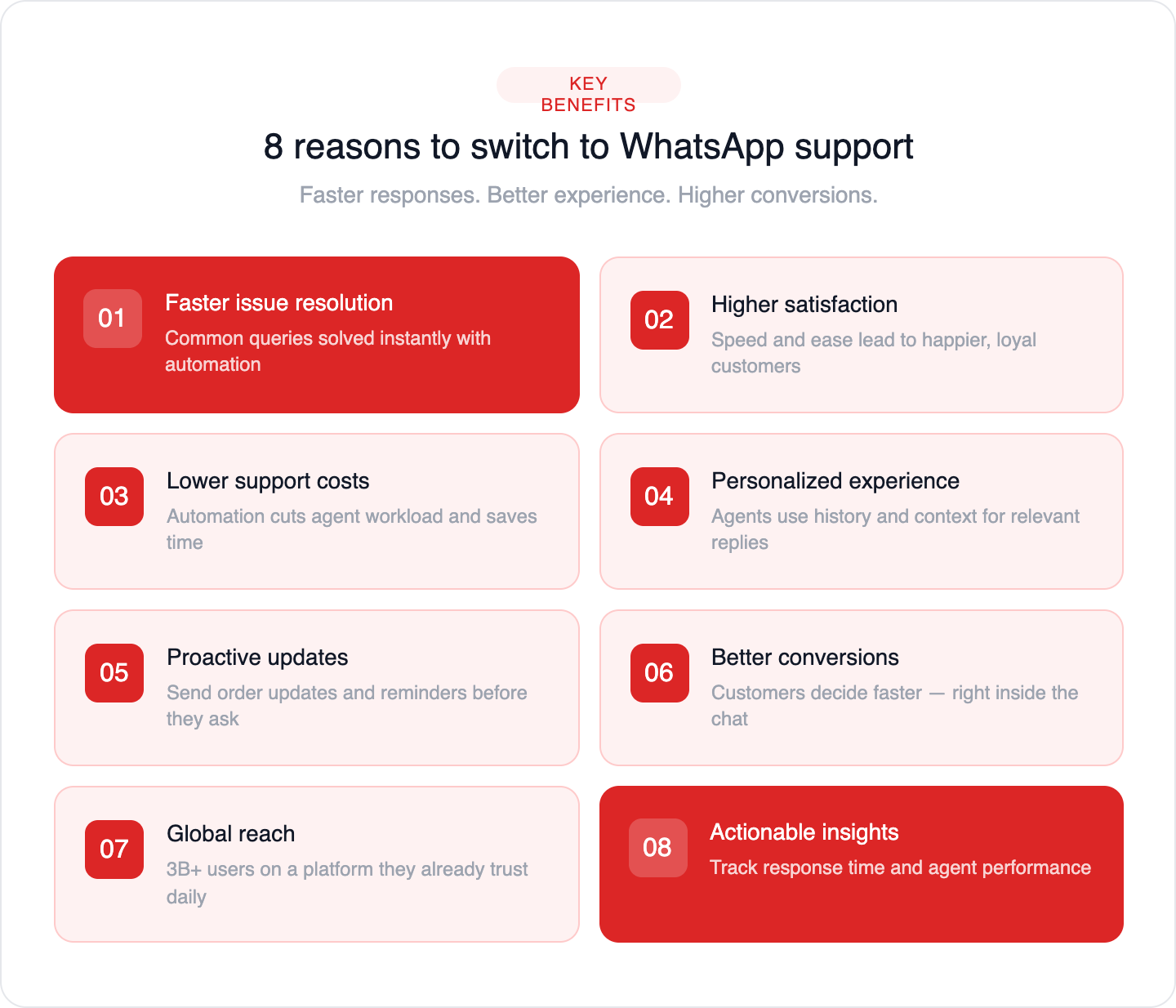
Businesses use WhatsApp for customer support because it improves speed, experience, and efficiency—all in one place.
- More engaging conversations: Support feels natural and personal, not robotic like emails or call scripts.
- Faster issue resolution: Customers get quick replies, and common queries can be solved instantly with automation.
- Higher customer satisfaction: Faster, smoother support leads to happier customers and stronger loyalty.
- Lower support costs: Automating repetitive queries reduces agent workload and saves time.
- Personalized experience: Agents can use chat history and context to give more relevant, human responses.
- Proactive updates: Send order updates, reminders, and offers without waiting for customers to ask.
- Better conversions: Customers can ask questions and make decisions faster—right inside the chat.
- Actionable insights: Track response times, performance, and customer behavior to improve support continuously.
In short, WhatsApp for customer support helps businesses deliver faster responses, better experiences, and higher conversions—all while reducing operational effort.
How to Set Up WhatsApp for Customer Support
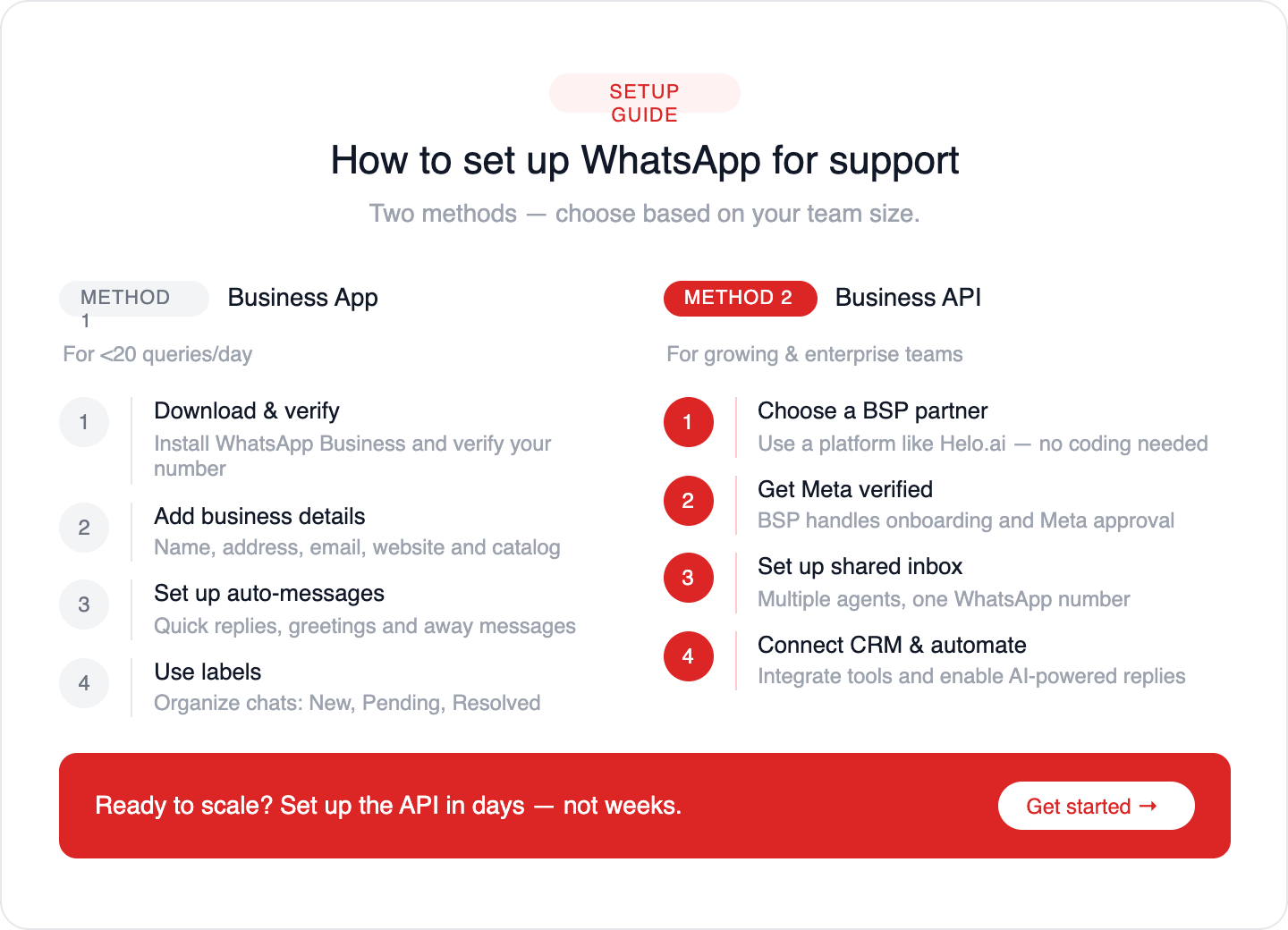
In 2026, there are two primary ways to run your support. One is a simple mobile-based setup, and the other is a scalable system built for growing teams. Let’s break down both so you can choose what fits your business stage.
Method 1: WhatsApp Business App (Basic Support)
Best for: Solopreneurs and teams handling fewer than 20 queries per day.
This is a manual setup where all conversations are handled directly from a phone.
How to Set Up WhatsApp Business App for Customer Support
Step 1: Download the app and verify your business number.
Step 2: Add your business details (name, address, email, catalog).
Step 3: Set up quick replies and auto messages to save time.
Step 4: Use labels to organize chats (New, Pending, Resolved).
This works well for low volumes but becomes difficult to manage as messages grow.
📌 Read more: How to Create WhatsApp Business Account
Method 2: WhatsApp Business API (Scalable Support)
Best for: Growing teams and businesses handling higher support volumes.
The API is not an app, it connects WhatsApp to a professional support system where multiple agents, automation, and integrations work together.
Using a BSP's Platform like Helo.ai
Most businesses use a WhatsApp Business Solution Provider to manage the API without dealing with technical complexity.
Instead of building everything from scratch, platforms like Helo.ai give you a ready-to-use system—handling onboarding, Meta verification, and the entire support infrastructure in one place.
What you get with the API:
- Shared Inbox: Multiple agents manage one WhatsApp number from a single dashboard
- CRM Integration: Agents instantly see customer history, orders, and context
- Automated support replies: Instantly answer FAQs and common queries on WhatsApp, 24/7
- Customer context in one view: See chat history, orders, and details to resolve issues faster
This is what transforms WhatsApp from a simple chat tool into a scalable support system.
With Helo.ai, you can set this up in days, not weeks, without writing a single line of code.
Ready to Set This Up?
If you’re handling growing support volume and want to avoid bottlenecks:
See how Helo.ai helps you build a scalable WhatsApp support system.
Best Practices for WhatsApp Customer Support
Simply having a WhatsApp presence isn't enough. To truly excel, follow these best practices:
- Be Responsive, But Set Expectations: Aim for quick responses, but clearly communicate your support hours. Use away messages to let customers know when they can expect a reply outside of business hours.
- Personalize Interactions: Use customer names and reference past interactions whenever possible. Avoid generic, robotic responses.
- Maintain a Consistent Brand Voice: Ensure the tone and language used on WhatsApp align with your overall brand identity.
- Use Quick Replies and Templates Wisely: Automate common responses, but ensure they sound natural and helpful. WhatsApp message templates are crucial for proactive notifications and must be pre-approved by Meta.
- Leverage Rich Media: Use images, videos, and documents to provide clearer explanations and faster solutions.
- Respect Customer Privacy: Never share customer information without consent. Be transparent about how you use data. Adhere strictly to data privacy regulations like GDPR. You can find more information on data privacy from resources like the U.S. Federal Trade Commission (FTC).
- Offer Opt-Out Options: Allow customers to easily opt out of receiving messages.
- Humanize Your Bots: If using chatbots, design them to be helpful and empathetic, not just functional. Clearly indicate when a customer is interacting with a bot versus a human agent.
- Integrate Seamlessly: Ensure a smooth transition between chatbot and human agents, and between WhatsApp and other support channels.
- Focus on Value: Every message should provide value to the customer, whether it's answering a question, providing an update, or offering a solution.
The Future of WhatsApp Customer Support
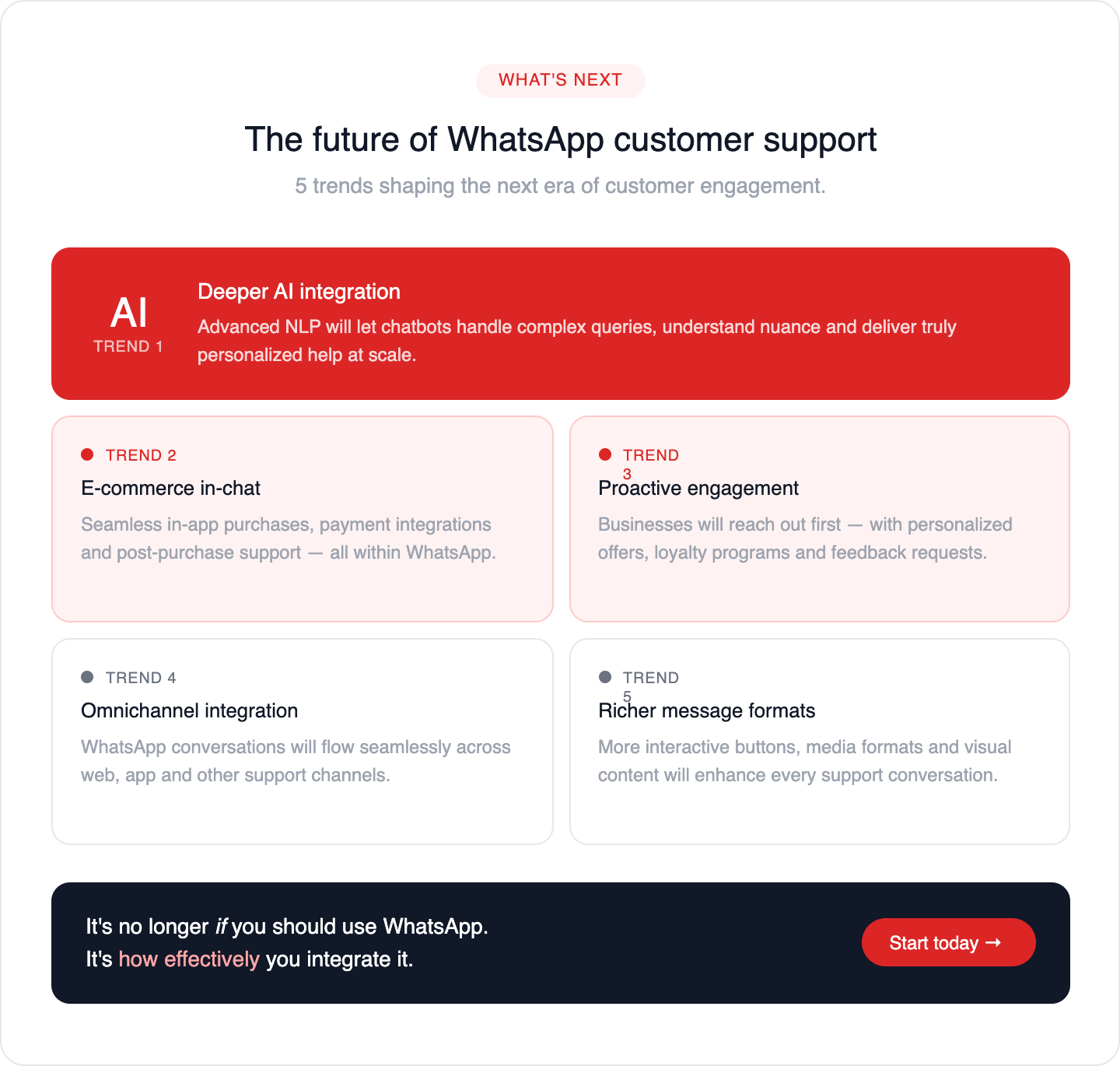
The role of WhatsApp in customer support is only set to grow. We can expect:
- Deeper AI Integration: More sophisticated AI and natural language processing (NLP) will enable chatbots to handle even more complex queries, understand nuance, and provide more personalized assistance.
- Enhanced E-commerce Capabilities: Expect more seamless in-app purchasing experiences, payment integrations, and post-purchase support directly within WhatsApp.
- Proactive Engagement: Businesses will increasingly use WhatsApp for proactive customer engagement, including personalized recommendations, loyalty programs, and feedback collection.
- Omnichannel Integration: WhatsApp will become an even more integral part of a truly omnichannel customer experience strategy, where conversations flow seamlessly across different platforms.
- Rich Media Advancements: Further development in interactive message formats and richer media sharing capabilities will enhance the communication experience.
As messaging becomes the default mode of communication, businesses that embrace WhatsApp for customer support will be best positioned to build stronger customer relationships, drive loyalty, and achieve sustainable growth. It's no longer a question of if you should use WhatsApp for support, but how effectively you can integrate it into your customer engagement strategy. For businesses looking to excel in this space, exploring solutions like those offered by Helo.ai can provide the tools and expertise needed to succeed.
Key Takeaways
- Massive User Base: Over 2 billion people use WhatsApp, making it a prime channel for customer engagement.
- Customer Preference: Consumers increasingly prefer messaging for business communication due to convenience and speed.
- WhatsApp Business Solutions: The free Business App suits small businesses, while the API offers scalability and integration for larger enterprises.
- Key Benefits: Enhanced engagement, faster resolution, improved satisfaction, reduced costs, personalization, proactive communication, and rich media capabilities.
- Implementation Steps: Define goals, choose the right solution, get approved, design journeys, integrate AI, train teams, integrate systems, promote, and optimize.
- Best Practices: Be responsive, personalize, maintain brand voice, use automation wisely, leverage rich media, respect privacy, and focus on value.
- Future Trends: Expect deeper AI integration, enhanced e-commerce features, more proactive engagement, and seamless omnichannel experiences.
Frequently Asked Questions
What is WhatsApp for Customer Support?
WhatsApp for customer support refers to the use of the WhatsApp messaging platform by businesses to communicate with their customers for the purpose of providing assistance, answering queries, resolving issues, and engaging with them. This can range from simple text-based conversations to more complex automated interactions using chatbots, all within the familiar WhatsApp interface.
How can I get started with WhatsApp for customer support?
To get started, you first need to decide whether the free WhatsApp Business App (for small businesses) or the WhatsApp Business API (for medium to large businesses) is suitable for your needs. For the API, you'll need to apply through Meta or partner with a Business Solution Provider (BSP). Once set up, define your customer support goals, design conversational flows, potentially integrate chatbots, train your team, and promote your WhatsApp channel to customers.
Is WhatsApp free for customer support?
The WhatsApp Business App is free to download and use. However, the WhatsApp Business API has associated costs, typically charged by Business Solution Providers (BSPs) based on message volume or features used. While the API itself is free from Meta, the services provided by BSPs to enable API access and management come with fees.
Can I use WhatsApp to send marketing messages?
Yes, but with strict guidelines. WhatsApp has specific policies regarding marketing messages, often requiring opt-in from customers and the use of approved message templates for proactive outreach. Unsolicited marketing messages can lead to your number being blocked. It's best used for targeted promotions, updates, and customer retention efforts, especially for repeat buyers, as seen in strategies to Automate Whatsapp Festive Discounts Repeat Buyers.
How do I ensure a good customer experience on WhatsApp?
Focus on speed, personalization, and convenience. Respond promptly, use the customer's name, offer tailored solutions, and ensure a smooth handover from chatbots to human agents when necessary. Utilize features like quick replies and rich media to enhance clarity and efficiency. Maintaining trust and transparency is key to building a positive experience, aligning with Fintech Customer Support Best Practices Trust.
What are the limitations of using WhatsApp for customer support?
While powerful, WhatsApp has limitations. The API requires technical integration and can incur costs. There are strict rules about message types and user opt-ins to prevent spam. Handling extremely high volumes might require robust infrastructure and well-designed automation. Furthermore, for sensitive data handling, ensuring compliance with regulations like GDPR is crucial, and businesses should consult resources from official bodies like the U.S. Securities and Exchange Commission (SEC) regarding data protection.
What is a WhatsApp Business Solution Provider (BSP)?
A WhatsApp Business Solution Provider (BSP) is a third-party company officially authorized by Meta to help businesses connect to and use the WhatsApp Business API. They offer services such as API access, platform integration, chatbot development, technical support, and guidance on compliance, making it easier for businesses to leverage WhatsApp for communication and support. Finding the Best Whatsapp Api Provider is critical for a smooth and effective implementation.
Conclusion
WhatsApp has evolved from a simple messaging app into a critical tool for modern customer engagement. Its widespread adoption, user-friendly interface, and versatile features make it an unparalleled platform for businesses seeking to enhance their customer support. By embracing WhatsApp, you can meet your customers where they are, offering them the convenience, speed, and personalization they expect.
Whether you leverage the straightforward WhatsApp Business App or the powerful capabilities of the WhatsApp Business API, the potential to transform your customer interactions is immense. From automating responses with intelligent chatbots to providing seamless, human-led support, WhatsApp empowers businesses to build stronger relationships, foster loyalty, and ultimately, drive growth. As digital communication continues to shape the futur