.png)


A restaurant handles a lot of different kinds of customer communication every day.
It needs to receive orders and send delivery updates. Someone has to note reservation requests, answer menu questions, take note of order customisations, collect customer feedback, and send relevant campaigns to customers.
Initially, this may not feel like a lot. Many restaurants assume they will be able to handle it manually without spending too much time on it.
But as orders and customer conversations increase, these repetitive tasks start taking up a significant amount of time inside daily operations. This becomes even more difficult during peak hours when the team is already occupied with kitchen operations and customer service.
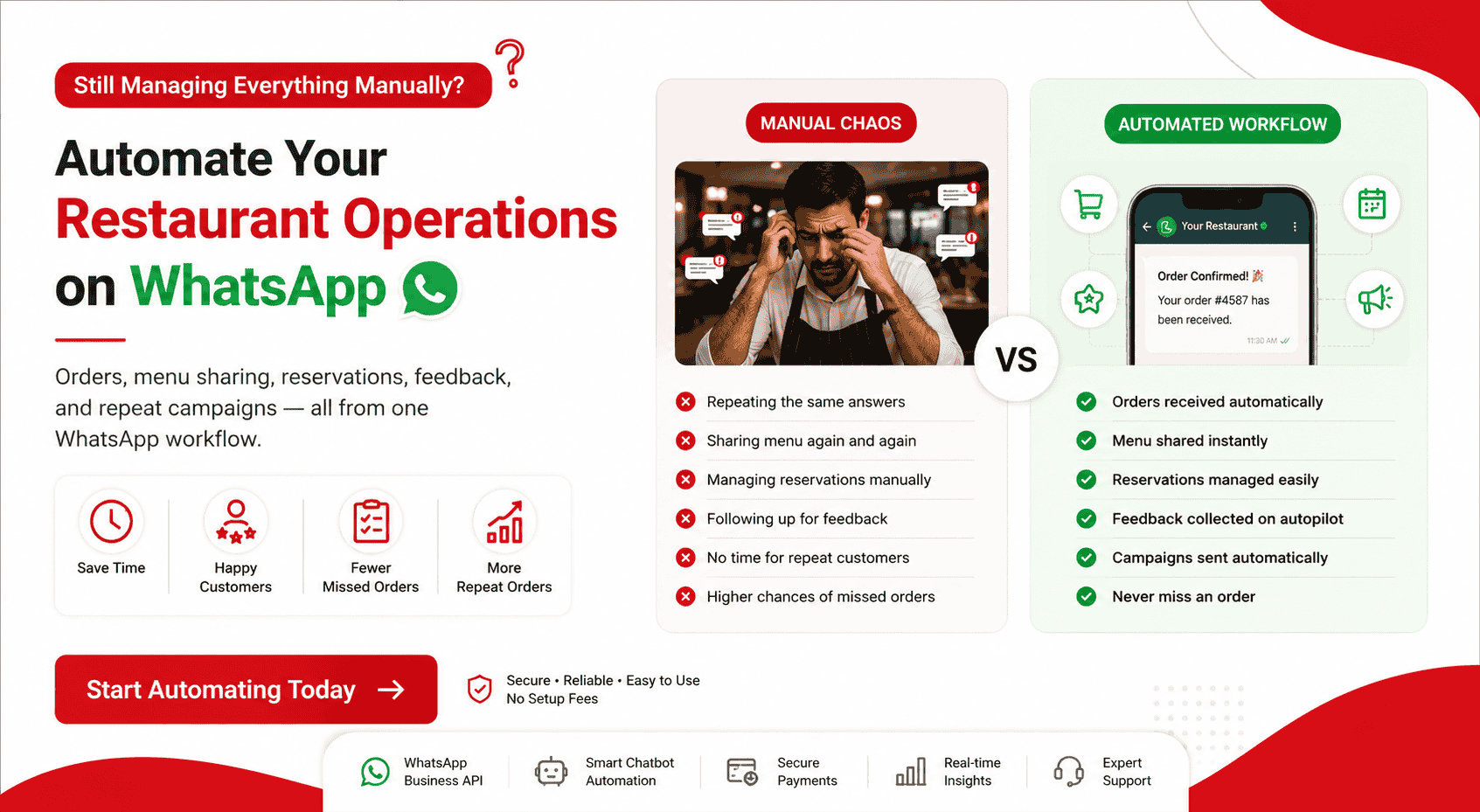
This is where WhatsApp automation for restaurants starts helping. Orders, confirmations, reservations, feedback collection, and repeat customer campaigns can all move into automated workflows while the restaurant focuses on food and customer experience.
Why Restaurants Are Moving Away From Aggregators
Aggregators help restaurants bring orders, but they do not help much with everything happening around the order. Restaurants still have to handle customer questions, delivery updates, menu requests, customisations, reservation enquiries, and feedback separately.
As customer communication increases, managing all of this manually starts becoming difficult, especially during busy hours. This is one reason restaurants are exploring direct ordering and automation systems alongside aggregators.
WhatsApp automation helps move a lot of these repetitive tasks into workflows. Customers can receive confirmations, updates, menus, reservation messages, and feedback requests automatically while the restaurant team focuses on operations.
.png)
What WhatsApp Automation Actually Does for a Restaurant
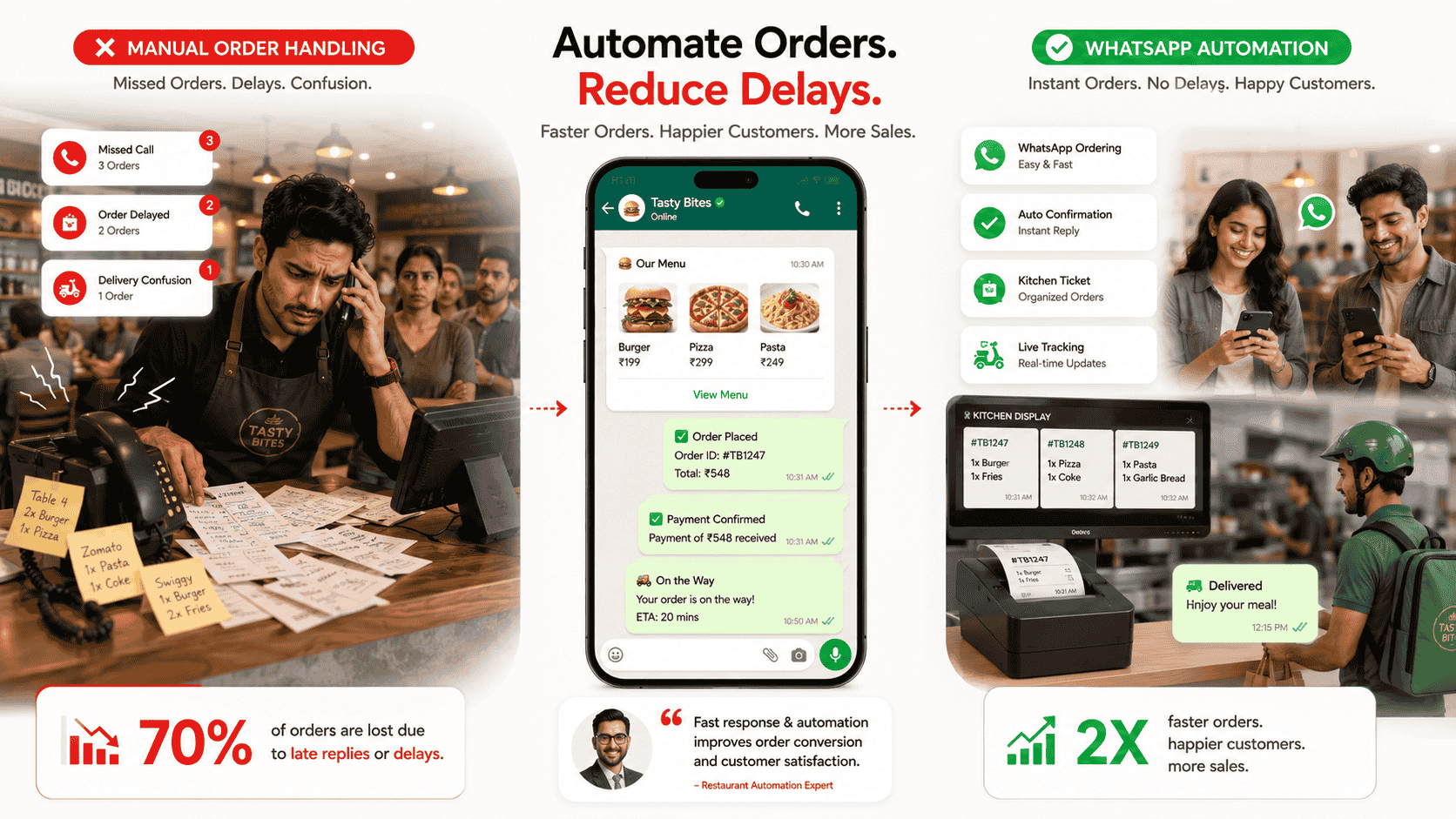
A lot of restaurant communication is repetitive in nature. WhatsApp automation for restaurants helps move these conversations into systems that run automatically, that takes away the pressure to do it manually, saving time and energy that can be used in other, more necessary work throughout the day.
Takes and Confirms Orders Automatically
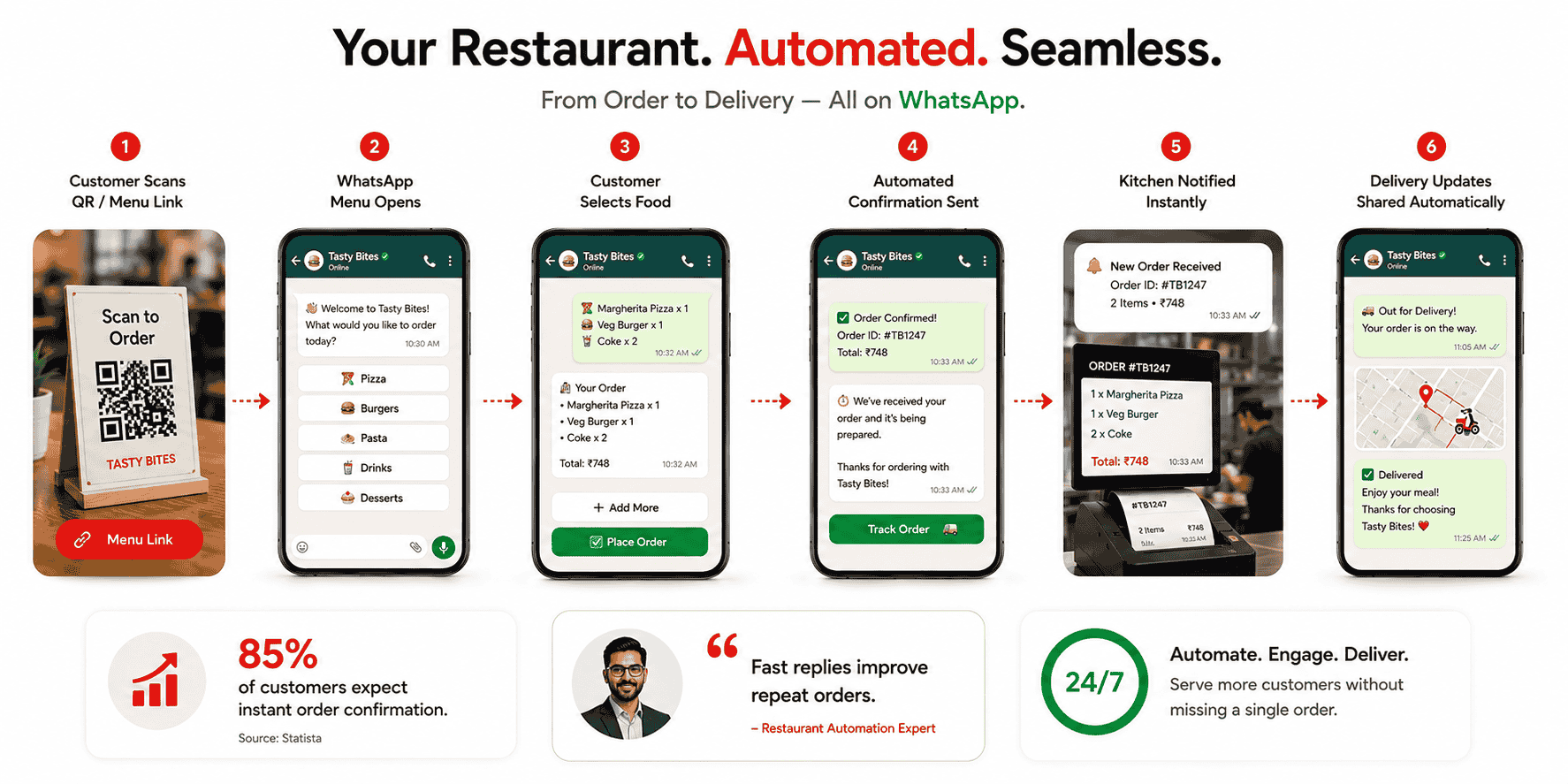
Restaurants can automate order collection and confirmations through WhatsApp. Customers place the order, share customisations, and receive confirmations and updates automatically without the team manually managing every conversation.
Shares the Digital Menu Instantly
Customers often reach out asking for the menu, pricing, or dish availability. Restaurants can automatically share their digital menu on WhatsApp instead of manually sending it every time.
Manages Table Reservations
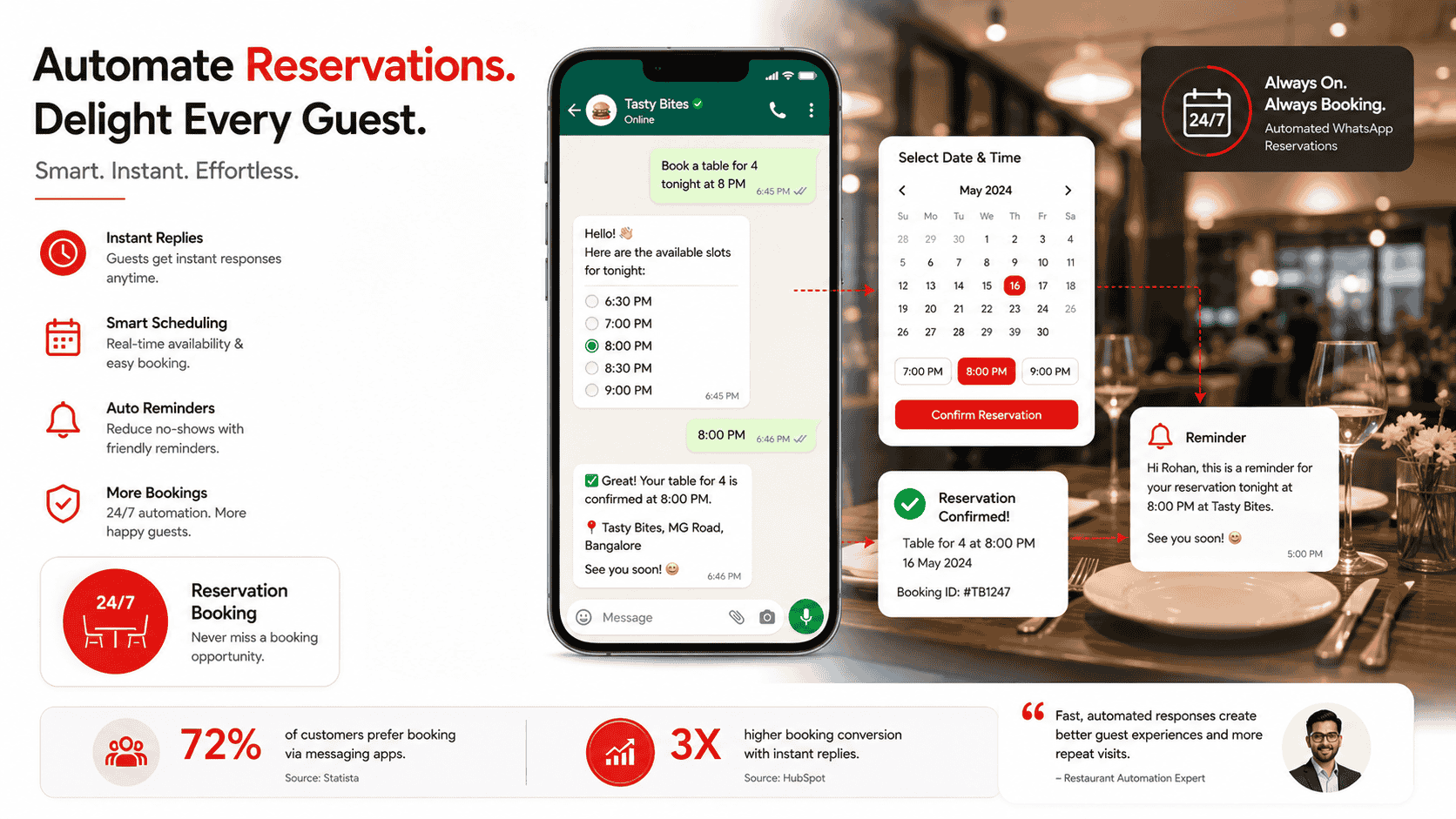
Reservation requests can also move into automation. Customers can send a reservation request, receive booking confirmation, and get reminders before the visit automatically.
Collects Feedback and Reviews
A lot of restaurants want customer feedback but rarely find the time to collect it consistently. Automated feedback requests help restaurants gather reviews and customer opinions without adding more work to the team.
Repeat Customer Campaigns
Birthday offers, festive menus, loyalty rewards, and repeat customer campaigns can all be scheduled and sent automatically to customers.
How to Set Up WhatsApp Order Automation for Your Restaurant
To many restaurants, setting up automation sounds complicated initially. But once customer communication starts increasing and the same tasks keep repeating every day, restaurants usually start looking into automation because manual handling begins taking too much time.
The setup is usually done in a few steps:
1. Connect the WhatsApp Business API through a BSP
Restaurants need a BSP like helo.ai to connect with the WhatsApp Business API. The BSP handles setup, verification, integrations, and automation tools, so the restaurant does not have to manage the technical side itself.
2. Build the menu catalogue
Restaurants can add dishes, descriptions, pricing, and images to the WhatsApp catalogue so customers can browse the menu directly inside the chat.
3. Set up the ordering workflow
A common restaurant WhatsApp order management flow usually looks like this:
Choose dish → Add customisation requests → Confirm order → Complete payment
The entire process can happen inside WhatsApp itself.
4. Add payments and other optional integrations
Restaurants can connect payment gateways and optional POS integrations to automate confirmations, updates, and order handling further.
Digital Menu on WhatsApp
Most customers ordering food usually require the restaurant to send over the menu first. If this is done manually, the task starts becoming repetitive and time consuming because someone from the team keeps sending the same menu throughout the day.
Instead, restaurants can use the catalogue feature on WhatsApp and set up a digital menu.
Restaurants can add the names and descriptions of dishes, their prices, and even images. Customers can then go through the menu inside the WhatsApp chat itself without needing another app.
Another way to open the WhatsApp menu is through QR codes. Customers can scan the code and access the menu directly on WhatsApp.
Automating Table Reservations on WhatsApp
For restaurants that are growing rapidly, a large part of the day goes into handling reservation communication, either beforehand or managing the queue once the rush increases.
In both situations, automation can be extremely useful.
Restaurants can automate this through a WhatsApp table reservation system.
Customers can send the reservation request on WhatsApp itself, select the date and time, and receive confirmation once the booking is done. Restaurants can also set up automated confirmation messages and reminder updates before the reservation.
For restaurants handling a high volume of reservations every day, this saves time and reduces the chances of bookings getting missed during busy hours.
Collecting Customer Feedback and Google Reviews Automatically
For restaurants to be successful in the long run, it is important to keep collecting feedback around food and service and keep making improvements where needed.
However, collecting feedback manually becomes a hectic task. Customers often do not want to spend time giving feedback, and employees manually collecting it end up spending a significant amount of time on it as well.
Restaurants can automate customer feedback collection through WhatsApp. Once the order is delivered or the dining experience is complete, customers can automatically receive a feedback message asking for ratings or reviews.
This is easier for customers too, which increases the chances of the restaurant actually receiving feedback.
WhatsApp Automation for Cloud Kitchens
Cloud kitchens operate on a delivery-first structure. Unlike dine-in restaurants, there is no in-person interaction, and the entire business depends on managing delivery orders efficiently from start to finish.
Because of this setup, automation becomes significantly more important. Most cloud kitchens also work with smaller teams, which makes it difficult to manually handle every stage of customer communication. Order placement, customisation requests, status updates, and feedback collection all require coordination, and doing this repeatedly through manual messaging quickly becomes inefficient.
Instead of doing all of this manually, WhatsApp automation can handle it end to end. Orders come in through chat, confirmations go out automatically, and updates are shared without anyone tracking each message. The same flow continues after delivery, where feedback requests are sent without manual follow-ups.
This just cuts out a lot of the back and forth, and the kitchen can focus on getting orders out and focus on the food quality.
FAQs
Q1: How can restaurants use WhatsApp to take orders and confirmations automatically?
A WhatsApp chatbot can handle the entire order flow. It captures the order, applies customisations, sends a confirmation, and passes it to the kitchen or system without manual replies.
Q2: Can I share my restaurant’s digital menu on WhatsApp without another app?
Yes. The WhatsApp catalogue feature is used for this. Restaurants can upload their menu once, and customers can browse and place orders directly inside WhatsApp. A QR code can also be used to open it instantly.
Q3: How do I automate table reservations on WhatsApp?
Customers send a reservation request through chat. The system checks availability, confirms the booking, and sends reminders before the reservation time. No calls or manual tracking are needed.
Q4: Is WhatsApp ordering better than Swiggy or Zomato for saving on commissions?
It doesn’t replace aggregators completely, but it reduces dependency on them. Repeat customers can order directly on WhatsApp, which removes commission costs for those orders.
Q5: Can I collect feedback or Google reviews automatically through WhatsApp?
Yes. After an order or visit, an automated message can be sent asking for feedback or directing customers to a Google review link. This keeps the process consistent without manual follow-ups.
Q6: What tools are used to set this up?
Restaurants usually use a WhatsApp Business API provider that handles setup, automation flows, menu integration, and messaging without requiring technical work from the team.
Conclusion
WhatsApp automation isn’t about changing how a restaurant runs. It’s about removing the repeat tasks that keep coming up every day.
Orders, confirmations, updates, reservations, feedback, it’s mostly the same work on loop. And during busy hours, this is where things usually start slipping.
With automation, this part doesn’t need to be handled manually anymore. The kitchen still runs the same way. Food is prepared, orders go out, service stays the focus.
The difference is that messages don’t need to be answered one by one. Updates go out on their own, orders move without delay, and customers don’t have to wait for basic responses.
Companies like helo.ai handle this in the background, so the team isn’t stuck managing every message.

.png&w=828&q=75)