

WhatsApp has become the fastest way for people to connect with businesses. But here’s a common problem most people face:
“I want customers to message me on WhatsApp, but no one wants to save the number.”
“I want to send a message to someone but don’t want to save their number.”
That’s exactly where a WhatsApp link comes in.
A WhatsApp link lets anyone start a chat with you instantly no contact saving, no friction. A WhatsApp link is one of the simplest ways to get more inquiries and conversations.
In this guide, you will learn:
- What a WhatsApp link is
- How to create a WhatsApp link for your number
- How to create a WhatsApp link for business
- What a wa.me link is and how it works
- How to create WhatsApp group links
- Real business use cases and best practices
Let’s start with the basics.

What Is a WhatsApp Link?
A WhatsApp link is a clickable URL that opens a WhatsApp chat with a specific phone number or group.
When someone clicks the link:
- WhatsApp opens automatically (mobile or desktop)
- A chat window opens with you or your business
- They can send a message instantly
This works even if the person has not saved your number.
That’s why WhatsApp links are widely used on:
- Websites
- Social media
- Google Business Profiles
- QR Code
- Email signatures
- Ads and landing pages
What is a wa.me link?
A wa.me link is WhatsApp’s official short URL format for chat links.
Basic format:
https://wa.me/<number>
Example:
When someone clicks this link, WhatsApp opens a chat with that number.
How to Create WhatsApp Link for my number (The Manual Way)
You do not need third-party tools or expensive software to do this. WhatsApp officially supports this feature using the wa.me domain.
1. The Basic Format
The core URL structure is: https://wa.me/<number>
2. The Rules
To ensure the link works globally, you must follow specific formatting rules regarding the international format.
- Rule 1: Use the country code (e.g., 91 for India, 1 for USA).
- Rule 2: Do not use any leading zeros, brackets, dashes, or the + sign.
Correct vs. Incorrect Examples
Let's assume your number is 797-796-3469 and you are in India (+91).
Status | Format | Why? |
✅ Correct | Pure digits, including country code. | |
❌ Wrong | Contains + symbol. | |
❌ Wrong | Contains leading 0. |
That’s it.
You’ve created a WhatsApp chat link for your number.
How to Create a WhatsApp Link for Business (In-App Method)
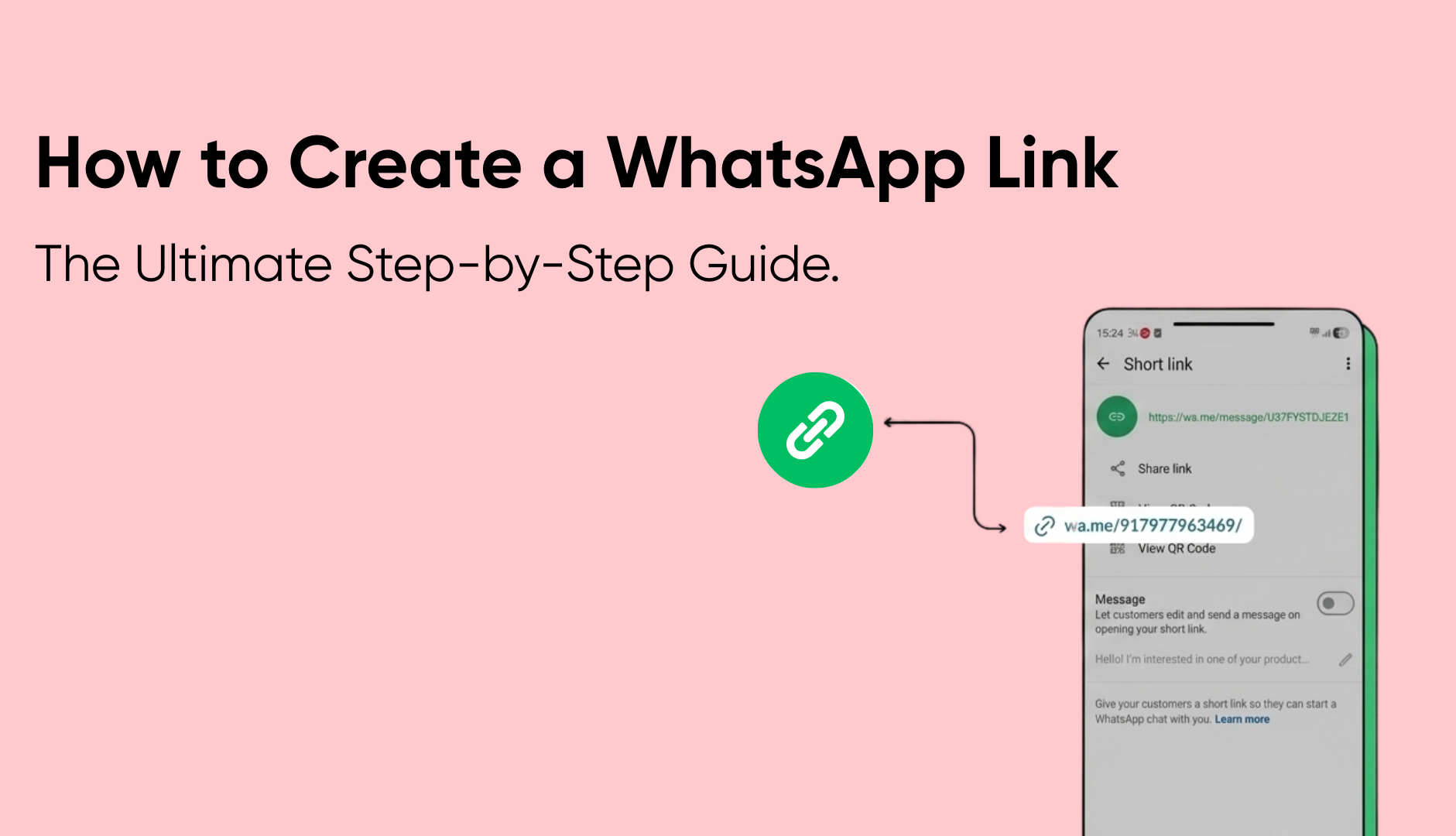
If you are using the WhatsApp Business app, you don't need to type the URL manually. The app generates a short link and QR code for you.
For Android users
1. Open WhatsApp Business.
2. Tap the three vertical dots (More Options) -> Business Tools.
3. Select Short Link.
4. Tap to copy the link.
For iPhone (iOS) users
1. Open WhatsApp Business.
2. Go to Settings -> Business Tools.
3. Tap Short Link.
4. Tap the link to copy it, or tap Share Link.
Feature Note: Inside this menu, you can also toggle "Message" to create your pre-filled text without needing to write code. |
This guide explains how to create WhatsApp Business Account for your business in minutes.
Businesses use WhatsApp links to:
- Capture inbound leads
- Handle customer support
- Drive sales inquiries
- Reduce form drop-offs
Best practices for business WhatsApp links:
- Use a dedicated business number
- Add a clear call-to-action near the link
- Use pre-filled messages to guide conversations
- Place links where users already engage (website, ads, social)
Example CTA:
“Chat with us on WhatsApp for instant support.”
Troubleshooting: Why Is My WhatsApp Link Not Working?
Even experienced marketers make mistakes here. If your link isn't opening the chat, check these common errors:
1. The "Plus" Sign Error: You included "+" before the country code. Remove it.
2. The Leading Zero: You kept the “0” before your mobile number. Remove it.
3. Privacy Settings: The target phone number has privacy settings set to block messages from non-contacts (rare, but possible).
4. Desktop App Not Installed: If clicking on a desktop, the user needs WhatsApp Web or the Desktop App. (Note: The link usually prompts them to open WhatsApp Web automatically.)
How To Create a Whatsapp Link With Message
You add the message at the end of your phone number using the ?text= parameter.
The Formula: https://wa.me/<number>?text=<your-message>
Step-by-Step Instructions:
- Start with your base link: https://wa.me/917977963469
- Add the trigger: Directly after the number, add
?text= - Write your message: Use
%20for every space (e.g.,Hi%20there).
Practical Example: If you want the message to be: "Hi, I want a price quote." The link becomes:
https://wa.me/919876543210?text=Hi%20I%20want%20a%20price%20quote
Troubleshooting: Why is my message not showing?
- Broken Syntax: Ensure you used
?text=and not&text=or justtext=. - Symbols in Text: If you use special characters like
&or#in your message, they must be URL-encoded (e.g., use%26for&). - Spaces: If you leave literal spaces in the URL, the link will break. Always use
%20or a link generator.
How to Share WhatsApp Profile Link
WhatsApp does not provide a separate “profile link.” What people usually mean by this is a chat link to their number.
So when someone asks:
“How to share WhatsApp profile link?”
The correct solution is
- Create a wa.me chat link
- Share it anywhere you want
Where Should Businesses Use WhatsApp Links?
Here’s where WhatsApp links perform best:
1. Website
- “Chat with us” buttons
- Contact pages
- Pricing pages
2. Instagram & Social Media
- Bio link
- Story swipe-ups
- DM automation
3. Ads
- Click-to-WhatsApp ads
- Lead generation campaigns
4. Email & Signatures
- Sales emails
- Support follow-ups
Image not found
Common Mistakes to Avoid
- Using personal numbers for business
- Forgetting the country code
- Using spaces or symbols in wa.me links
- Sending users to groups instead of 1-to-1 chats
- Not setting expectations in the CTA
A WhatsApp link should start a clear conversation, not confusion.
Is a WhatsApp link free to create?
Yes. Creating and using WhatsApp links is completely free.
However, as your business grows, manually managing hundreds of WhatsApp conversations becomes difficult. That’s where structured conversation tools come in.
The Limit of "Free" Links: When to Upgrade?
Creating a WhatsApp link is free and essential. However, as your business grows, relying solely on a direct wa.me link to a single phone number introduces scalability issues:
- No Centralization: If five employees have five different links, you lose data visibility.
- Delayed Responses: A single phone number can only handle one chat at a time efficiently.
- Lack of Analytics: You cannot track how many people clicked versus how many purchased
Image not found
When WhatsApp Links Are No Longer Enough
If you are receiving more than 50 inquiries a day, a simple link is no longer a strategy; it's a bottleneck.
This is where platforms like Helo Conversations bridge the gap. We help businesses turn those entry points into structured workflows by:
Many businesses start with WhatsApp links and quickly realize they need more control as conversations grow.
With Helo Conversations, businesses can:
- Automatically greet users clicking WhatsApp links
- Trigger chats using bots and menus
- Assign conversations to the right teams
- Maintain context across agents
Outcome:
WhatsApp links stop being just entry points and become part of a scalable customer communication system.
Image not found
Frequently Asked Questions
1. Can I create a WhatsApp link without saving the number?
Yes. WhatsApp chat links allow anyone to message you without saving your number. This works on both mobile and desktop devices.
2. Will WhatsApp links work on iPhone and Android?
Yes. WhatsApp links work across Android, iPhone, and desktop browsers as long as WhatsApp is installed.
3. Can I track clicks on WhatsApp links?
WhatsApp itself doesn’t provide click tracking. Businesses usually use website analytics, link shorteners, or WhatsApp automation platforms for better visibility.
4. Is it safe to share my WhatsApp link publicly?
Yes, but for businesses, it’s recommended to use a dedicated number and set clear expectations to avoid spam or irrelevant messages.
5. Can I Create WhatsApp Link Without Whatsapp Business
Yes, absolutely. You do not need WhatsApp Business to create a WhatsApp link. You can do this with your normal WhatsApp number also.
Final Thoughts
Creating a WhatsApp link is one of the easiest ways to start conversations with customers. No apps. No tools. No complexity. But as conversations grow, the real value comes from how you manage them.
Start with a WhatsApp link. Then build a better experience around it.
That’s how businesses turn simple clicks into meaningful conversations.