

Quick Answer
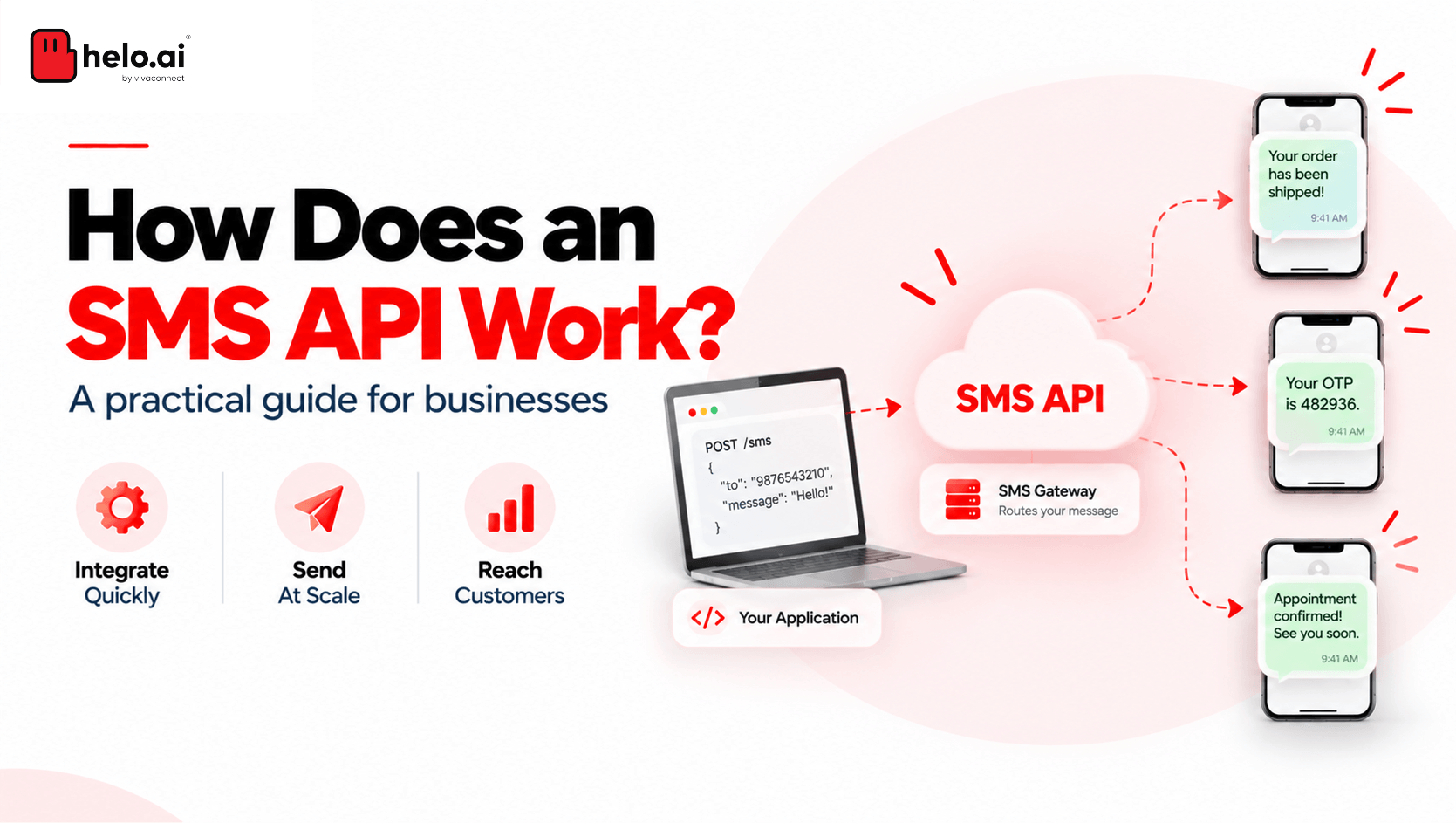
An SMS API takes a request from your application (recipient, message, sender ID and, in India, DLT identifiers) and hands it to a provider's gateway. The gateway validates it, checks compliance and routes it to the mobile operator's SMSC, which delivers it to the handset. A delivery report (DLR) then travels back to your system, usually through a webhook. The call is quick; the delivery loop behind it is where the engineering matters.
You already know what an SMS API is. You've probably integrated one, watched a dashboard fill up with "success" responses, and then fielded a support ticket from a customer who never got their OTP.
So the useful question isn't what it is. It's how does an SMS API work under the hood, and where does it quietly break? Think of the API call as the tip of an iceberg. The request you send is a few hundred bytes. Beneath it sit validation layers, regulatory scrubbing, carrier routing, retry logic and asynchronous reporting, and each one can decide whether your message lands or disappears.
Let's go below the waterline.
How Does an SMS API Work, Step by Step?
Here's the full lifecycle of a single message:
Step | What Happens | Where It Can Fail |
|---|---|---|
1 | Your app sends an HTTPS/SMPP request | Malformed payload, bad credentials |
2 | Provider authenticates and validates | Invalid number, insufficient balance, rate limit |
3 | Compliance checks (DLT scrubbing in India) | Template mismatch, unregistered header |
4 | Routing to the operator's SMSC | Route congestion, operator outage |
5 | Handset delivery and DLR returned | Phone off, DND, validity period expiry |
Step 1: Your Application Fires the Request
A trigger in your system, such as a login, payment or shipment, generates a request. A typical REST payload for Indian traffic looks like this:
{
  "to": "91XXXXXXXXXX",
  "sender": "HELOAI",
  "message": "482913 is your login OTP. Valid for 10 mins. - Helo",
  "pe_id": "1201XXXXXXXXXXXXXX",
  "template_id": "1207XXXXXXXXXXXXXX",
  "callback_url": "https://yourapp.com/webhooks/sms-dlr"
}
Field names vary by provider, but the structure is the same: who, what, from whom, under which registration, and where to report back.
Step 2: Authentication and Validation
The provider checks your API key, account balance and rate limits. It also normalises the number format and checks encoding. Most providers respond synchronously at this point with a message ID. That ID matters more than the HTTP 200 status, because it's how you'll match the delivery report later.
Step 3: Compliance Checks and DLT Scrubbing
In India, this is the step most global explainers skip, and it's the one that causes the most mystery failures. Before a commercial message reaches the network, it's checked against the DLT registry: your entity, your header and your approved template must all match.
How to Send DLT SMS via API
Pass your PE ID and template ID with every request. Make sure the message body matches the registered template exactly, changing only the variable portions. A stray space, a reworded phrase or a variable value longer than its registered limit can get the message blocked during scrubbing. Your API call still showed success, because the block happens further down the chain.
Managing templates across dozens of use cases gets messy quickly, which is why many teams use a service like DLT management instead of handling it themselves. For the full regulatory picture, see our guide to SMS API compliance.
Step 4: Routing to the Operator's SMSC
Next, the gateway picks a route. The best providers have direct operator connections and switch to a backup route when one degrades. The message is then handed to the operator's SMSC (Short Message Service Centre), which handles final delivery. If the handset is unreachable, the SMSC stores the message and retries until its validity period expires.
Step 5: The Delivery Report Travels Back
When the operator confirms the outcome, a DLR flows back through the gateway, which converts carrier-specific codes into standard statuses. These are then pushed to your webhook. This is the step that actually tells you whether the message arrived.
SMPP vs HTTP: Choosing Your SMS API Integration Path
Most teams start with REST over HTTPS. High-volume senders often move some traffic to SMPP. Here's how they compare:
Dimension | HTTP/REST API | SMPP |
|---|---|---|
Connection | Stateless request per message | Persistent TCP bind |
Setup effort | Low (any language, minutes to test) | Higher (bind management, PDU handling) |
Throughput | Good; limited by request overhead | Very high; built for telecom-grade volume |
DLR handling | Webhooks or polling | Pushed over RX/TRX binds |
Best for | Product teams, OTPs, event-driven alerts | Aggregators, banks, very high-volume senders |
SMPP v3.4, the version most commonly used, supports transceiver binds, so a single connection can both send and receive. That efficiency comes with more operational work: keeping binds alive, reconnecting and managing windowing.
So which should you pick? For most product teams, REST is the right starting point. Consider SMPP when throughput limits or per-request latency become a real constraint, not just because it sounds more robust.
Reading an SMS Delivery Report Without Fooling Yourself
The delivery report is where most dashboards give an inaccurate picture. Here's how to read it properly.
"Accepted" Is Not "Delivered"
An HTTP 200 means the provider accepted your request. It doesn't mean the operator delivered it. Teams that measure success at the API layer routinely overstate delivery rates, sometimes by several percentage points. That gap doesn't show up until OTP conversion drops.
Even a "Delivered" status has limits. It confirms the message reached the device or network endpoint. It doesn't confirm anyone read it.
Intermediate vs Final DLRs
Some routes send intermediate statuses, such as "buffered" or "sent to operator," before the final outcome. Build your status handling as a state machine, not a single field you overwrite. Otherwise a late intermediate report can overwrite a final "Delivered" status, and your analytics will be wrong.
Why Is My SMS Sent but Not Delivered?
The usual causes, roughly from most to least common in India:
- A DLT template mismatch or a variable that exceeds its allowed length
- A promotional message sent to a DND-registered number
- The handset being off or out of coverage past the validity period
- An invalid, ported or deactivated number
- Operator-side congestion on a degraded route
If your provider exposes error codes in the DLR payload, log them. Grouping failures by error code is the fastest way to spot a broken template or a failing route.
Engineering Details That Separate Solid SMS API Integrations from Fragile Ones
These are the details that often get missed in the first build.
Segments and Encoding
A single GSM-7 message holds 160 characters. Once a message is split, each part holds 153, because the concatenation header (UDH) takes up space. Unicode, which covers Hindi, Marathi, Tamil and even a single emoji, drops that to 70 characters, or 67 per part. One stray curly quote pasted from a document can switch an English message to Unicode and double its cost. Validate the encoding before you send. It also directly affects your SMS API pricing per message.
Throughput and Throttling
Every account has a TPS (transactions per second) ceiling. Sending a large campaign in one burst creates queues, and queued OTPs arrive late. Late OTPs are effectively failed OTPs. Separate time-critical transactional traffic from bulk sends, ideally on separate queues or even separate accounts.
Idempotency and Retries
Networks time out. If your code automatically retries a request that timed out, you may send the same OTP twice, pay twice, and confuse the user. Use idempotency keys, or your own message reference, so a retry never results in a duplicate message.
Watch for a race condition too: a DLR webhook can arrive before your system has saved the original message ID. Make your webhook handler tolerate reports for messages it hasn't recorded yet.
Two-Way SMS API: Handling Inbound Messages
Inbound (MO) messages, such as STOP replies, keyword responses or customer queries, arrive at a webhook you configure against a long code, short code or virtual number. Treat opt-out keywords as critical: process them immediately and sync them across every channel you send on.
Where the SMS Gateway Fits In
It's easy to use the two terms interchangeably, but they're different parts of the system. The SMS gateway is the infrastructure that validates, queues, converts protocols, routes, retries and reconciles reports. The API is the interface your code uses to talk to that gateway.
This matters when you're evaluating providers. Excellent API documentation tells you very little about the quality of the routes behind it. For a deeper comparison, read our guide on the difference between an SMS API and an SMS gateway.
Build Reliable SMS Flows with helo.ai
helo.ai combines direct operator routes, built-in DLT compliance and real-time template checks with delivery reporting you can act on. For authentication traffic, helo.ai Verify adds intelligent routing and fallback across channels. Explore the helo.ai SMS API.
Book a demo to design messaging built for reliability at scale.
Conclusion
So, how does an SMS API work when you look past the request/response surface? It's a relay: your app, the provider's gateway, the compliance layer, the operator's SMSC, and finally a delivery report back to your system. The API call takes milliseconds. Reliability depends on everything that follows it.
Teams that get this right treat SMS as a distributed system, not a single function call. They track message IDs, model statuses as state transitions, validate templates and encoding before sending, and separate urgent traffic from bulk sends. Do that, and your delivery rate will reflect what's actually happening.
FAQs
What's the difference between an SMS gateway vs SMS API?
The gateway is the infrastructure that routes, retries and reports on messages. The API is the interface your application uses to access it. You integrate the API; the gateway's route quality determines how well messages are actually delivered.
What does an SMS API example request include?
At minimum: the recipient number, the message body and the sender ID. Most requests also include a callback URL for delivery reports. In India, you also pass your DLT PE ID and template ID with every commercial message.
Does an SMS API guarantee delivery?
No. The API confirms that your request was accepted. Actual delivery depends on compliance checks, routing and the handset's availability. Only the final delivery report tells you the outcome.
How long does SMS API integration take?
A basic REST integration can send test messages within hours. Production readiness takes longer: DLT registration, webhook handling, retry logic and status tracking typically take a few days to a couple of weeks of engineering time.
Should OTPs rely on SMS alone?
Not necessarily. Many organisations send OTPs on WhatsApp first and fall back to SMS for universal reach. See our comparison of WhatsApp vs SMS for OTP for when each channel makes sense.