.jpeg)


Missed appointments can leave businesses with empty slots, disrupt schedules and create additional work for staff. A simple reminder sent at the right time gives customers an opportunity to confirm, reschedule or cancel before their appointment.
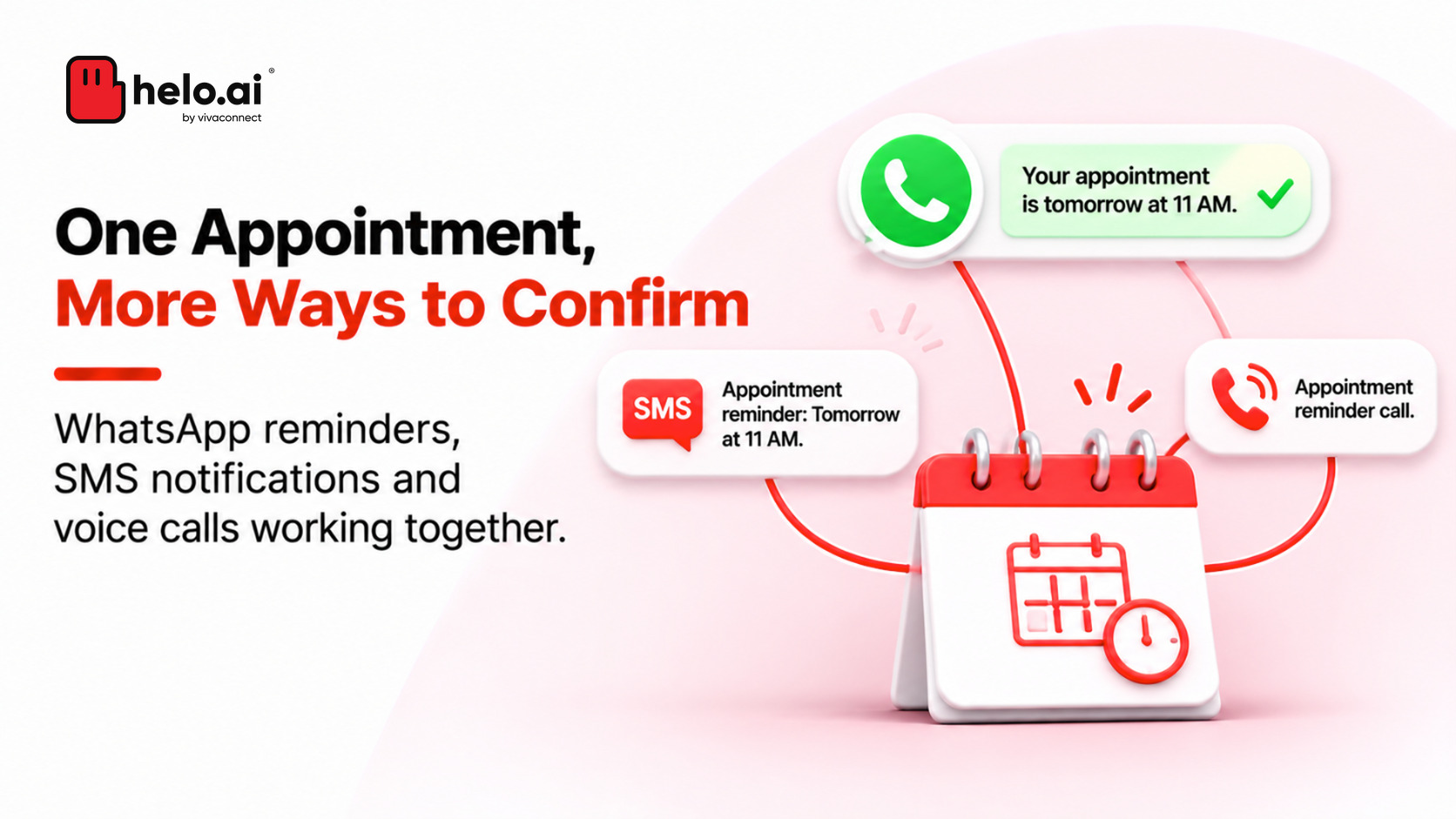
WhatsApp makes this interaction convenient. Businesses can share appointment details, add confirmation buttons and connect customer responses to their booking systems. When a customer does not respond, SMS or a voice reminder call can provide another way to reach them.
This guide includes ready-to-use WhatsApp appointment reminder templates for healthcare, banking, education, travel, e-commerce and service businesses. It also explains how to automate reminders, handle responses and combine WhatsApp with SMS and voice calls.
A WhatsApp appointment reminder is an approved message template that sends booking details with Confirm and Reschedule buttons. This guide gives 15 templates and an automation setup. Use SMS when delivery fails and a voice call when a delivered reminder gets no reply, within Indian telecom rules.
What is a WhatsApp appointment reminder?
A WhatsApp appointment reminder is a message sent to a customer before a scheduled appointment, consultation, visit or service booking.
It typically includes:
- Customer or patient name.
- Appointment date and time.
- Business, clinic or consultant name.
- Location or meeting link.
- A way to confirm, cancel or reschedule.
Businesses can send reminders manually or automate them through the WhatsApp Business Platform using an approved message template.
Common use cases include:
- Doctor and hospital consultations.
- Bank branch visits and financial consultations.
- Education counselling and admission appointments.
- Travel consultations and visa appointments.
- Product demonstrations and installation visits.
- Salon, spa and fitness bookings.
- Home services and scheduled maintenance.
The purpose is straightforward: remind customers about an existing booking and make it easier for them to respond.
WhatsApp appointment reminder templates
A useful reminder should be brief, specific and easy to act on. The customer should not have to search through an earlier conversation to find the appointment time or understand what to do next.
Below are ready-to-adapt examples for different business situations.
1. General appointment reminder
Use case: Consultations, scheduled visits and service appointments.
Hi {{1}}, this is a reminder that your appointment with {{2}} is scheduled for {{3}} at {{4}}.
Please confirm your availability or let us know if you need to reschedule.
Suggested quick-reply buttons:
- Confirm
- Reschedule
2. Doctor appointment reminder
Use case: Hospitals, clinics and individual medical practices.
Hello {{1}}, this is a reminder from {{2}}. Your appointment with Dr. {{3}} is scheduled for {{4}} at {{5}}.
Location: {{6}}
Please confirm your appointment or let us know if you need to reschedule.
Suggested quick-reply buttons:
- Confirm appointment
- Reschedule
- Contact clinic
Example with filled details:
Hello Priya, this is a reminder from CityCare Clinic. Your appointment with Dr. Mehta is scheduled for 15 November at 11:30 AM.
Location: CityCare Clinic, Baner, Pune.
Please confirm your appointment or let us know if you need to reschedule.
Important: Keep healthcare reminders discreet. Avoid including diagnoses, test results, treatment details or other sensitive medical information in routine appointment notifications. Any preparation instructions should be verified by the healthcare provider and specific to the appointment.
3. Dental appointment reminder
Use case: Dental clinics and orthodontic practices.
Hi {{1}}, a quick reminder about your dental appointment at {{2}} on {{3}} at {{4}}.
We look forward to seeing you. Please confirm or let us know if you need another time.
Suggested quick-reply buttons:
- Confirm
- Reschedule
4. Diagnostic test appointment reminder
Use case: Diagnostic centres, pathology labs and imaging centres.
Hello {{1}}, your appointment at {{2}} is scheduled for {{3}} at {{4}}.
Please contact the centre if you have any questions about your appointment.
Suggested quick-reply buttons:
- Confirm
- Reschedule
- Contact centre
Do not insert generic fasting, medication or test-preparation instructions into this template. Send only verified instructions relevant to the specific test.
5. Bank branch appointment reminder
Use case: Banks, financial institutions and insurance providers.
Hello {{1}}, this is a reminder from {{2}}. Your appointment at our {{3}} branch is scheduled for {{4}}.
Please confirm your visit or contact us if you need to change the time.
Suggested quick-reply buttons:
- Confirm visit
- Reschedule
- Contact branch
Keep the reminder limited to appointment details. Do not include account numbers, balances, card details or other confidential financial information.
6. Financial consultation reminder
Use case: Loan consultations, insurance advisory meetings and investment consultations.
Hi {{1}}, your consultation with {{2}} is scheduled for {{3}} at {{4}}.
Our representative will be available to assist you. Please confirm your availability.
Suggested quick-reply buttons:
- Confirm
- Reschedule
7. Education counselling appointment reminder
Use case: Schools, universities, coaching institutes and admission teams.
Hello {{1}}, this is a reminder about your counselling appointment with {{2}} on {{3}} at {{4}}.
We look forward to speaking with you.
Suggested quick-reply buttons:
- Confirm appointment
- Reschedule
8. Online class or tutoring reminder
Use case: Online learning platforms, tutors and training providers.
Hi {{1}}, your {{2}} session with {{3}} is scheduled for {{4}}.
Join the session using this link: {{5}}
Suggested quick-reply buttons:
- I'll attend
- Reschedule
9. Travel consultation reminder
Use case: Travel agencies, visa consultants and holiday-planning services.
Hello {{1}}, this is a reminder about your travel consultation with {{2}} on {{3}} at {{4}}.
Our team will be ready to discuss your requirements. Please confirm your appointment.
Suggested quick-reply buttons:
- Confirm
- Reschedule
- Contact consultant
10. Property site visit reminder
Use case: Real estate agencies and property consultants.
Hi {{1}}, this is a reminder about your scheduled visit to {{2}} on {{3}} at {{4}}.
Your point of contact is {{5}}. Please let us know if you need to change the time.
Suggested quick-reply buttons:
- Confirm visit
- Reschedule
- Contact agent
11. E-commerce product demonstration or installation reminder
Use case: Product demonstrations, scheduled deliveries requiring attendance and installation visits.
Hi {{1}}, your {{2}} appointment with {{3}} is scheduled for {{4}}.
Please confirm that the scheduled time works for you.
Suggested quick-reply buttons:
- Confirm
- Reschedule
- Contact support
12. Salon and spa booking reminder
Use case: Salons, spas and personal care businesses.
Hi {{1}}, your {{2}} appointment at {{3}} is booked for {{4}} with {{5}}.
See you soon!
Suggested quick-reply buttons:
- Confirm
- Reschedule
13. Fitness class or personal training reminder
Use case: Gyms, fitness studios and personal trainers.
Hi {{1}}, a reminder that your {{2}} session with {{3}} is scheduled for {{4}}.
Let us know if you can make it.
Suggested quick-reply buttons:
- I'll attend
- Reschedule
14. Home service or technician visit reminder
Use case: Repair, maintenance and home service businesses.
Hi {{1}}, our technician is scheduled to visit you on {{2}} between {{3}} for {{4}}.
Please confirm that the time works for you.
Suggested quick-reply buttons:
- Confirm
- Reschedule
- Contact support
15. Final appointment reminder
Use case: A short reminder on the day of the appointment, where an additional notification is appropriate.
Hi {{1}}, a quick reminder that your appointment with {{2}} is today at {{3}}.
We look forward to seeing you.
Suggested quick-reply buttons:
- Confirm
- Need help
This should be used selectively. If a customer has already confirmed, there may be no need to send another reminder.
Template variable note: The {{1}}, {{2}} and other placeholders above are illustrative. When submitting a template to Meta, use the required variable syntax and provide sample values in the format supported by the platform. The approved template must match the message sent through the API.
Why use interactive buttons in appointment reminders?
A reminder can ask customers to type a response, or it can provide a direct action they can tap.
For example, a plain text message might say:
Please reply YES to confirm your appointment.
An interactive message can instead provide:
- Confirm appointment
- Reschedule
- Contact us
This makes the next step clearer and reduces the need for customers to type a response.
What happens after a customer taps a button?
| Button | Suggested system action |
|---|---|
| Confirm | Update the appointment status to Confirmed |
| Reschedule | Display available slots or create a rescheduling request |
| Cancel | Record the cancellation and release the slot according to business rules |
| Contact us | Route the customer to the appropriate team |
The buttons do not update the booking system automatically. That requires a connected workflow or integration.
For example, if a patient taps Confirm, the clinic's appointment system should record the response. If the patient requests a new time, the system should check availability before updating the booking.
WhatsApp vs SMS vs voice calls for appointment reminders
Different customers respond to different channels. Some prefer a WhatsApp message, others may respond to an SMS, while some may be more likely to answer a call.
A multi-channel approach gives businesses more than one way to communicate, provided the follow-up is relevant and permitted.
| Channel | Best suited for | Customer response |
|---|---|---|
| Appointment details, confirmation, rescheduling and location sharing | Quick-reply buttons or chat | |
| SMS | Short reminders and alternative notifications | Reply, call or follow a link, depending on setup |
| Voice calls | Important reminders and pending confirmations | Keypad response, IVR or agent conversation |
When should you use each channel?
- WhatsApp: Use it when the customer needs appointment details, location information or an easy way to confirm.
- SMS: Use it when a short notification is sufficient or when WhatsApp delivery has failed and an SMS fallback is appropriate.
- Voice calls: Use them when an appointment requires active confirmation or when another reminder would be more useful as a direct call.
The goal is not to send the same reminder everywhere. It is to choose the appropriate channel based on delivery status, customer response and appointment requirements.
How voice reminder calls can help with appointment confirmations
A WhatsApp reminder may be delivered without receiving a response. That does not necessarily mean the customer has missed it. They may have read it and forgotten to reply, or they may prefer to confirm by phone.
A voice reminder call offers another way to respond.
Sample automated appointment reminder call
Opening:
Hello {{1}}. This is a reminder from {{2}}. Your appointment is scheduled for {{3}} at {{4}}. Will you be able to attend?
If the customer confirms:
Thank you. Your appointment has been marked as confirmed. We look forward to seeing you.
If the customer wants to reschedule:
No problem. We can help you change your appointment. Please stay on the line to speak with our team.
If the customer does not respond:
The system can follow a configured retry or staff follow-up process. It should not keep calling repeatedly without considering the customer's preferences and applicable calling rules.
A practical WhatsApp, SMS and voice reminder sequence
| Timing or event | Channel | Purpose |
|---|---|---|
| Appointment booked | Share booking confirmation and appointment details | |
| Around 24 hours before | Send a reminder and request confirmation | |
| WhatsApp delivery fails | SMS | Send an alternative short notification, where permitted |
| Message delivered but no confirmation | Voice call, if appropriate | Offer another way to confirm |
| Appointment confirmed | No further confirmation reminders | Stop unnecessary follow-ups |
| Appointment rescheduled or cancelled | WhatsApp or SMS | Confirm the updated booking status |
This is an example workflow, not a fixed schedule. The right timing depends on appointment type, booking lead time and customer preferences.
An important distinction: A failed WhatsApp delivery and a delivered message with no response are different events. A fallback SMS may be appropriate after a delivery failure. A voice call may be more appropriate when the message was delivered but the customer has not confirmed. Do not trigger every channel for every unanswered message.
What should businesses check before making automated voice calls?
In India, commercial voice communication is regulated by TRAI. The relevant classification, sender registration, numbering series and access-provider requirements must be checked before deploying automated calls.
The broad numbering distinction is:
| Numbering series | General purpose |
|---|---|
| 140xx | Promotional commercial voice calls |
| 1600xx | Service and transactional calls for specified regulated BFSI entities and government communication, subject to applicable directions |
Newer numbering series: TRAI created a 1601 series on 10 August 2026 for utilities and logistics entities. Check whether your sector qualifies before using any numbering series.
The 1600xx series is not a general-purpose number that every clinic, salon, education provider or service business can use. Businesses should confirm their eligibility and applicable numbering requirements with their access provider.
Similarly, do not assume that every appointment reminder automatically qualifies for the same voice-call category. Classification depends on the communication and applicable instructions.
For automated or recorded calls, also check the relevant requirements for auto-diallers and robocalls. Keep appointment reminders focused on the booking and avoid adding unrelated promotional offers.
How often should you send appointment reminders?
The reminder schedule should give customers enough time to respond without making them feel that the business is repeatedly contacting them.
A practical starting point is:
| Appointment situation | Suggested communication |
|---|---|
| Appointment booked in advance | Confirmation immediately after booking |
| Appointment scheduled for the next day | Reminder around 24 hours before |
| Important appointment awaiting confirmation | Conditional follow-up if no response |
| Appointment taking place shortly | Brief same-day reminder, where useful |
| Customer requests a change | Confirmation of the updated appointment |
For appointments booked several weeks in advance, an additional reminder may be useful. For appointments booked only a few hours before, a long reminder sequence may not be necessary.
Monitor confirmation, rescheduling and cancellation patterns to decide whether your schedule needs adjustment.
How to automate WhatsApp appointment reminders
Automating reminders involves connecting the booking process, messaging channel and appointment management system.
Here is a practical setup process.
Step 1: Set up WhatsApp Business Platform access
Businesses that need automated, system-triggered reminders at scale can use the WhatsApp Business Platform through an eligible provider.
The WhatsApp Business App and Business Platform have different capabilities. Choose the option based on your automation, integration and message-volume requirements.
Step 2: Create and submit message templates
Prepare templates for booking confirmations, appointment reminders and rescheduling notifications.
Messages sent outside the 24-hour customer service window generally require approved templates under the WhatsApp Business Platform rules.
Appointment-specific reminders may qualify as Utility messages when they relate to an existing booking and do not contain promotional content. Meta reviews the message and determines the applicable category.
A message should not be assumed to qualify as Utility simply because it is labelled an appointment reminder.
Recategorisation: Meta says it can recategorise an approved Utility template as Marketing automatically. Since 16 April 2025 this can happen without advance notice, and the template stays approved.
Step 3: Connect the booking system
Connect your scheduling software, CRM, clinic management system or booking database to the messaging platform.
When an appointment is created, the system should capture the relevant details and trigger the correct confirmation.
Step 4: Configure reminder timing
Set up triggers based on the appointment date and time.
For example:
- Send a confirmation when the appointment is booked.
- Send a reminder around 24 hours before the appointment.
- Trigger a follow-up if confirmation is pending.
- Send a final reminder when appropriate.
Step 5: Configure response handling
Decide what should happen when a customer taps Confirm, Reschedule or Cancel.
A confirmation can update the booking record. A reschedule request can display available slots or create a task for the reception team.
Make sure every response is recorded and the customer receives confirmation of any change.
Step 6: Configure consent and communication preferences
Record how the customer agreed to receive appointment-related notifications and which contact details they provided.
The workflow should also:
- Respect applicable customer communication preferences.
- Process opt-out or withdrawal requests where applicable.
- Avoid sending reminders after a customer has cancelled or changed the appointment.
- Keep appointment notifications separate from unrelated promotional messages.
- Maintain an appropriate record of communication permissions and changes.
Do not assume that a customer's phone number alone establishes permission for every kind of communication.
Step 7: Add SMS or voice follow-up where appropriate
Define when the system should use another channel.
For example, an SMS may be triggered if a WhatsApp reminder fails to deliver. A voice reminder may be appropriate if a delivered message has not received confirmation and the appointment warrants a call.
Check delivery status and previous responses before triggering a follow-up to prevent duplicate communication.
Step 8: Test and monitor
Test the complete journey before deploying it.
Check that:
- Appointment details are accurate.
- The correct template is triggered.
- Quick-reply buttons work.
- Responses update the appointment record.
- Rescheduling does not leave the old booking active.
- SMS and voice follow-ups follow the configured rules.
- Customer preferences are respected.
- Reminders stop after confirmation, cancellation or rescheduling.
Automate your appointment reminders
Send approved WhatsApp templates, handle button replies and add SMS or voice follow-up from one messaging platform.
WhatsApp appointment reminder costs
The cost of an appointment reminder depends on the message category, recipient's country, applicable Meta pricing, provider charges and number of messages sent.
For businesses using the WhatsApp Business Platform, appointment-specific messages may qualify as Utility templates when they meet Meta's category requirements.
The final category is determined under Meta's template guidelines. A message that combines an appointment reminder with an offer, discount or unrelated promotion may be classified as Marketing.
Other possible costs include:
- WhatsApp messaging charges.
- Platform or business solution provider fees.
- SMS delivery charges.
- Voice call charges.
- Integration and workflow setup.
- Additional software or booking-system access.
A multi-channel reminder programme should be evaluated against the operational cost of missed appointments, staff follow-up time and unused booking slots.
Check Meta's current WhatsApp Business Platform pricing and your provider's rates before estimating costs. Pricing and category rules can change, so avoid relying on an old per-message rate.
Privacy and compliance considerations for healthcare reminders
Healthcare reminders require care because even a routine appointment notification can reveal personal information.
A safer reminder shares only the information needed to help the patient identify the appointment.
Keep reminder messages discreet
Prefer:
Your appointment with Dr. {{1}} is scheduled for {{2}} at {{3}}.
Avoid including diagnoses, medical history, test results or treatment details unless there is a specific, appropriate and secure reason to communicate them.
Obtain and manage appropriate permissions
Make sure patients understand how their contact information will be used for appointment communication. Follow applicable consent, privacy and record-retention requirements.
Check access and data handling
Review who can access appointment data, how it is transferred to messaging providers and how long it is retained.
Avoid unverified medical instructions
Do not insert fasting, medication or preparation instructions into a general reminder template. Such information should be approved by the relevant healthcare professional and specific to the appointment.
Review applicable privacy requirements
Healthcare organisations in India should assess their obligations under applicable data protection laws, including the Digital Personal Data Protection framework and relevant institutional or professional requirements.
The DPDP Rules, 2025 have staggered commencement provisions. Organisations should check which provisions are in force at the time of processing rather than assuming that every provision has already commenced.
DPDP timing: The SCC Online summary of the DPDP Rules, 2025 says some rules took effect on 14 November 2025. Most obligations apply 18 months after publication. Check current MeitY notices, as shorter timelines have been proposed.
Encryption in a messaging channel does not, by itself, establish that an organisation's entire patient-data workflow is compliant.
Common mistakes to avoid
A reminder system should make appointments easier to manage. These mistakes can undermine that objective.
- Sending only one reminder: A single notification may not reach every customer at the right time. Consider a suitable follow-up for unconfirmed appointments.
- Sending too many reminders: Repeated notifications can frustrate customers. Use a clear schedule and stop reminders once the appointment is confirmed, cancelled or changed.
- Using promotional content in a reminder: Keep appointment notifications focused on the booking. Separate unrelated offers and marketing content.
- Ignoring customer responses: A Confirm or Reschedule button is useful only when the response is recorded and acted upon.
- Not connecting the booking system: Manual updates can lead to duplicate appointments and incorrect reminders.
- Sending sensitive healthcare information: Keep routine reminders discreet and avoid unnecessary medical details.
- Using unverified instructions: Test preparation and medical guidance should be approved by the relevant healthcare professional.
- Ignoring voice-call requirements: Check applicable TRAI requirements, numbering series and customer preferences before automating calls.
- Continuing reminders after cancellation: Make sure booking changes update all scheduled reminders.
- Assuming every template is Utility: Meta reviews message content and assigns the applicable category. Keep the content strictly related to the existing appointment.
- Treating non-response as failed delivery: A delivered reminder that receives no reply needs a different follow-up decision from a message that could not be delivered.
How to measure appointment reminder performance
Sending reminders is only one part of the process. Businesses should also check whether customers are responding and whether the workflow is reducing manual follow-up.
Useful measures include:
| Metric | What it tells you |
|---|---|
| Message delivery rate | How many reminders reached the recipient |
| Confirmation rate | How many customers confirmed their appointments |
| Rescheduling rate | How many appointments were moved to another time |
| Cancellation rate | How many appointments were cancelled |
| No-show rate | How many customers did not attend their appointments |
| Voice call connection rate | How many reminder calls connected |
| Staff follow-up volume | How much manual work was needed to obtain a response |
Compare results over a consistent period and across similar appointment types. A change in reminder timing or channel should be evaluated against the same measurement method.
Do not assume that a higher message delivery rate automatically means fewer missed appointments. The business should measure actual attendance and booking outcomes.
Frequently asked questions
1. How do I send a doctor appointment reminder on WhatsApp?
Use an approved WhatsApp message template that includes the patient's name, clinic or doctor's name, appointment date, time and location. Add quick-reply buttons for confirmation and rescheduling if the connected workflow supports those actions.
2. What should a doctors appointment reminder include?
A doctors appointment reminder should generally include the patient's name, clinic name, doctor's name, appointment date, time and location. Keep it discreet and avoid unnecessary medical details.
3. Can WhatsApp appointment reminders have Confirm and Reschedule buttons?
Yes. WhatsApp Business Platform templates support interactive quick-reply buttons. Their availability and configuration depend on the template format and applicable platform rules. The connected system must also process the responses.
4. Can appointment reminders be sent automatically?
Yes. Businesses can connect the WhatsApp Business Platform to a booking system, CRM or scheduling application. Appointment events can trigger approved message templates automatically.
5. Can I use SMS and voice calls along with WhatsApp reminders?
Yes, where the communication is permitted and applicable requirements are followed. A business may use WhatsApp first, send an SMS when delivery fails and consider a voice reminder when an important appointment remains unconfirmed.
6. When should a business send an appointment reminder?
A confirmation can be sent immediately after booking. A reminder around 24 hours before the appointment is a practical starting point. Additional reminders should depend on the appointment type, booking lead time and customer response.
7. Are WhatsApp appointment reminders Utility messages?
Appointment-specific reminders may qualify as Utility messages when they relate to an existing booking and meet Meta's category requirements. Meta determines the final classification. Adding unrelated promotional content can change the category.
8. Can a patient reschedule an appointment through WhatsApp?
Yes. A Reschedule button can start a workflow that displays available slots or routes the request to clinic staff. The booking system must update the appointment and send confirmation once the change is completed.
9. Can clinics use automated voice calls for appointment reminders?
Clinics can explore automated voice reminders, subject to applicable telecom requirements, calling permissions and provider support. The call should identify the organisation, explain the appointment reminder and offer a clear way to respond or contact the clinic.
10. What is the difference between an appointment reminder and an appointment confirmation?
An appointment confirmation acknowledges that a booking has been made. An appointment reminder is sent later to help the customer remember the scheduled date and time. A reminder can also ask the customer to reconfirm attendance.
11. What should a doctor appointment reminder message say?
A simple doctor appointment reminder can say: Hello {{1}}, this is a reminder from {{2}}. Your appointment with Dr. {{3}} is scheduled for {{4}} at {{5}}. Please confirm your appointment or let us know if you need to reschedule. Keep the message limited to the details the patient needs.
12. Can businesses send appointment reminders outside the 24-hour WhatsApp customer service window?
Yes, through approved message templates that meet WhatsApp's applicable requirements. Businesses should use the correct template category and follow the current platform rules.
Conclusion: Make every appointment easier to keep
A useful appointment reminder does more than announce a date and time. It gives customers a simple way to confirm, ask for a change or get in touch with the business.
WhatsApp makes these interactions convenient through approved templates and quick-reply buttons. SMS can provide an alternative notification, while voice reminder calls can help reach customers who have not responded.
The important part is connecting these channels to the appointment system. When confirmations, cancellations and rescheduling are recorded correctly, businesses can manage their schedules with fewer manual follow-ups and give customers a clearer experience.
Build your reminder workflow
Tell the Helo.ai team how you book appointments today and they can help you plan WhatsApp, SMS and voice reminders.
Note. This article is an editorial guide and general information, not legal or medical advice. Meta rules, TRAI directions and data protection timelines change, so check the current versions. Helo.ai is a CPaaS provider and publishes this guide. Facts were checked on 21 November 2026.