

Key Highlights
- SMS verification works by sending text messages to help confirm a user’s identity when they sign in or use online services. A one-time password (OTP) gets sent to the phone number that the user gives.
- This gives an extra layer of security on top of just using a username and password. It helps protect people from digital threats that are common on the internet.
- SMS authentication lets you confirm a user’s identity without needing a special app or another device. All you need is the phone number.
- A lot of businesses use SMS verification to lower the chance of fraud and make accounts more safe. Social networks, healthcare, and many other online services use this system to protect their users.
- While SMS verification does have some vulnerabilities like sim swapping, using best practices such as rate limiting can improve how well it protects people and their accounts.
In the world now, SMS Verification helps keep online services safe by using your mobile phone. With this method, you get a text message that has a code. You need to enter this code to finish logging in or to do some things in your account. This helps protect your account from hackers and other online dangers.
SMS verification is a simple way for businesses to keep their customers’ information safe. A lot of people like to use it because it is fast and easy. These text messages help most people feel safe without having to do much. Many companies pick this way as their main tool for security.
You may ask, what is sms verification code, and how does it keep your account safe? In this text, we will talk about what sms verification does. We will also say why it is good for both people and businesses who want their accounts to be more secure.
What is SMS verification?
verification helps check a user’s identity. A text message with a one-time verification code, or OTP, is sent to the user’s mobile device. When the person logs in with their credentials, they get an verification code on their smartphone.
They need to enter this verification code on the platform to complete authentication. This process helps keep accounts safe because you must have the right phone number to get in. This kind of verification gives one more layer to help keep accounts safe from people who should not get in. You can use sms verification for things like banking, social networks, e-commerce, and more.
Most people think it is simple and easy to use when you check a user’s identity. But it is not perfect, as there are some vulnerabilities. So, it is smart to use SMS authentication with other best practices or extra ways, like biometric systems, if you want more protection.
How SMS verification works
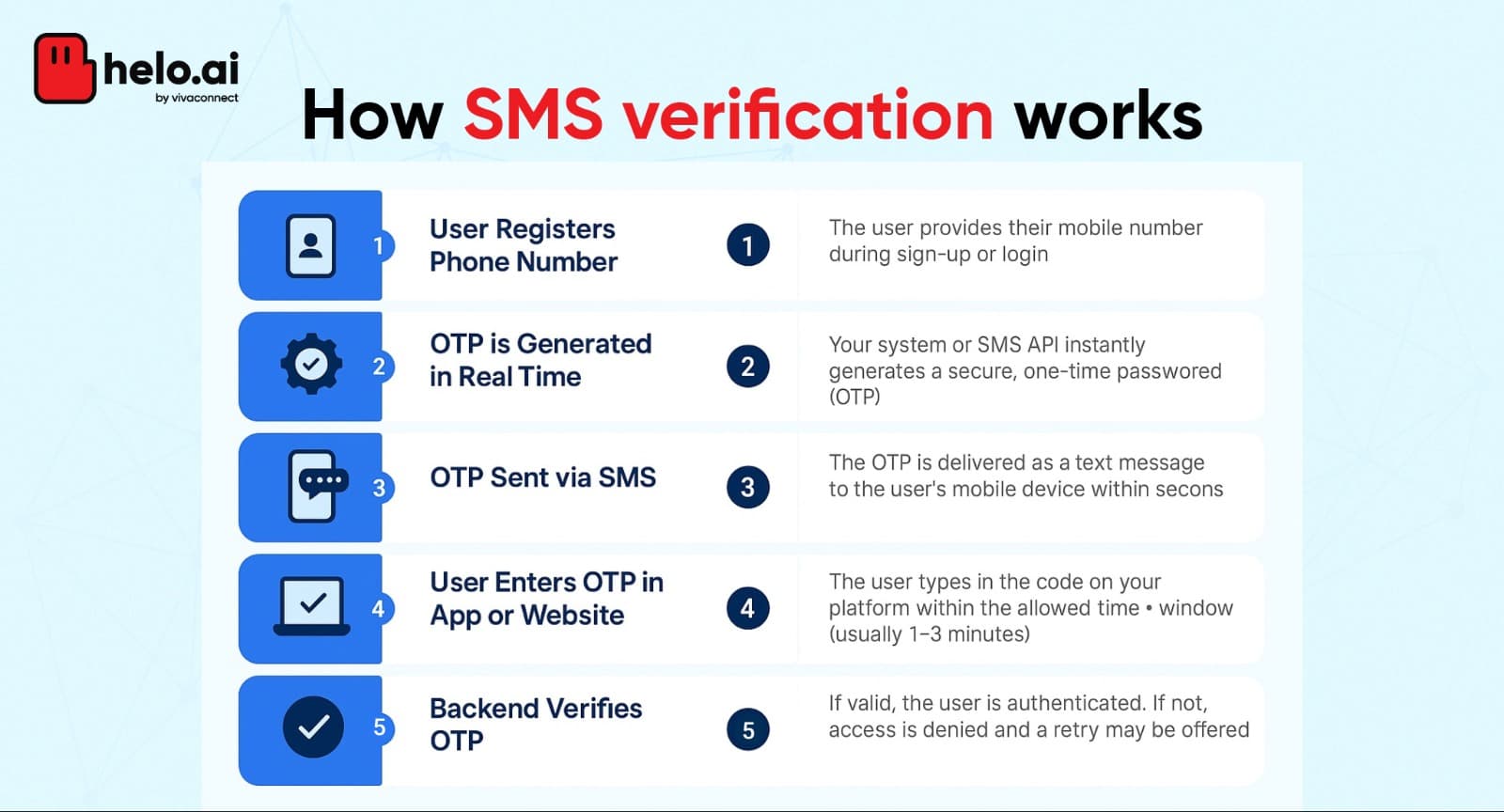
SMS verification is a way to send one-time passwords, or OTPs, to people's phones by using APIs. A business can use an SMS Verification API so this process links directly with their own systems. This helps people have a simple and easy time when they need sms verification.
With this setup, codes get made and sent to the user right away. Most of the time, the sms will show a six-digit code that comes in just a few seconds. The user needs to enter this code soon for verification or confirmation.
This real-time check helps to keep their accounts safe from people who might try to use their credentials. It is a simple and good way to add more safety to authentication for services that use sms verification.
Step-by-Step Breakdown of an SMS Verification Flow
The way to do SMS verification and check if a user is who they say they are is easy. It is one of the best ways to see if the person is real. When you use SMS verification, you send a text to a phone number that the person gives.
The user gets a code in this text message. They need to enter the code in your app or website. If they do this step, it shows they have the phone. So, you can trust that it is them. SMS verification is quick and helps keep your app or website safe. Many people use this way because it works well and is easy to use.
- Register a mobile number: You need to add your phone number when you join or start using an app.
- Send an OTP: When you log in to the app, the system will send you an OTP. This is a one-time password that goes by text message as an SMS to your mobile device.
- Enter the code: Enter the OTP you get from the text message into the website or app.
- System confirmation: The platform then checks this code for verification. It uses this to confirm your identity.
This process uses quick delivery to send an sms and checks if the mobile number is real. The system helps keep your account safe because it makes each code work for only a few minutes. This helps to stop fake sign-ups. People trust this way for sms confirmation and authentication.
Common Use Cases Across Indian Apps and Services
SMS verification is now used by many Indian platforms. A lot of businesses use it to make sure that a mobile number is real. This way, people stay safe. In healthcare, sms authentication is also used a lot.
It helps keep personal talks and medical details safe. With sms verification and authentication, only the right people can see patient data. This is very important for everyone who uses these healthcare services.
Social networks in India use sms authentication. This is done to make sure that people who do not have the account cannot log in. You will see this a lot in messaging apps. Many companies with monthly plans use mobile number verification, too.
This keeps bots away and stops fake accounts from being made. Food delivery apps also use sms authentication these days. This helps keep your address safe and private.
Many people now try to get past passwords, so coders in India work on SMS API for the local market. This work can help people feel safer and be safe from new online risks.
Security Aspects of SMS Verification
.png&w=3840&q=75)
While sms verification and sms authentication help stop many break-ins, there are still some problems. Hackers and fraudsters can get around the protections by using tricks like sim swapping. These people use different ways to get past the security. They can then cause trouble by getting into your accounts.
To keep risks low, a company should not only use sms. It is good to use other ways for authentication with sms verification. When you have more than one way, it helps lower the chances of problems, like if someone gets your otp. There are some downsides, but sms authentication is still important. Sms verification helps keep identities safe for people all over the world.
Best Practices for Secure SMS Verification in India
Securing sms authentication is important for your safety. You need a good plan and take the right steps. Be careful with how you set up the sms authentication. It is best to use trusted ways to protect your sms. This keeps other people from getting in. Take time to check and update the system now and then. This helps you feel better about the safety of your authentication.
- Monitor sim swapping: Always keep an eye out for sim swapping. Use the tools that spot sim swapping when you send an OTP.
- Protect personal data: Show people how to keep their personal information and personal data safe because you use it for verification.
- Limit retries: Set a small limit for how many times someone can ask for an OTP. This can stop people from getting in by trying lots of times.
- Comply with standards: Choose sms verification APIs that follow SOC safety rules for sms.
These ideas help businesses in India to stay safe and be strong as the security world keeps changing. When they focus on both accessibility and stopping problems before they start, a company can build trust with people. Using sms verification and other verification methods can make them do well for a long time. This lets them keep their verification process easy and safe for everyone who needs it.
Benefits of Using SMS Verification
Adding sms verification to online services gives an extra layer of security. It helps to lower the risk of unauthorized access to your personal information. When you sign in, you will get a text message with a one-time password, or OTP, sent to your mobile phone. You then use this password for verification and to finish authentication in real time. This makes people feel good about the process. It can also make it easier for new users to get started, since sms verification shows their personal information will be safe.
With sms text verification, it is not easy for people to try fraud or other digital threats. Only the person with the right code can get in. Using sms verification is a good and simple way to keep your personal information safe when you are on online services. It helps us feel safe and it adds a layer of protection against digital threats.
Enhancing User Trust and Account Safety
When you use sms verification, you make your site safer with an extra layer of security. People feel more at ease and trust the site because of this. The site links the user’s identity to their mobile phone number. This makes it hard for others to get in without the right ok. A phone number and sms verification work with each other to keep both the user and the website safe. It is a good way to use a mobile phone and feel safe on the site for everyone.
People feel better when they get sms messages sent to their phone to check who they are. This step can help cut down on fraud. Today, attackers try to steal your credentials in many ways using digital threats.
That is why sms text verification is so important. It helps give you a safer spot for your personal information. These simple verification methods keep your data safe from people who want to steal it. Using sms and these steps is a good way to protect what matters to us.
Simplifying Onboarding and Reducing Fraud
Using sms verification on your mobile phone makes signing up simple. A verification code is sent by text message when you try to join. You type in this code to show it is really you. This means the platform knows it is not someone else who is trying to get in. It gives an extra layer of security and helps guard you from digital threats.
This also cuts down the risk of unauthorized access. A text message with a verification code makes registration fast and easy. It helps you feel that your experience will be smooth. By using sms verification, companies show they care about your safety in digital interactions. They want people to trust them when using their services.
Limitations and Challenges
SMS verification is used by many, but it is not the best way. A big issue is sim swapping. Attackers can take over your sim. When they do this, they can get your sms verification codes. Later, they might use these codes to get into your account, read your personal data, or steal your OTP. Attackers can also look for other ways to read your personal data.
Another problem is that not every person has a mobile phone or good internet. This makes it hard for some people to use sms verification. Because of these vulnerabilities, it is clear there should be safer ways to do verification. Companies have to protect users’ personal data, but they also need to make their services work for all.
Risks of SIM Swapping and OTP Interception
Sim swapping is a big danger for sms verification. Attackers use sim swapping to take over your mobile phone number. When they do this, fraudsters can get the OTPs sent for your authentication. They can then get into your accounts.
This puts all your private info at risk. A break-in like this shows that sms authentication is not always something you can trust. It makes many people open to new digital threats on their mobile phone. Your phone number, sms verification, and sim safety should feel secure, but with sim swapping, attackers make it risky for us all.
To keep your accounts safe, it is good to use an authenticator app. You can use google authenticator or microsoft authenticator for this. These apps help protect your accounts in a better way. There are some best practices for sms verification, and one is to use an authenticator app instead.
This can keep your phone number more secure. Using sms or an authenticator app adds another step to verification. That means your accounts will be safe when you use authentication methods like sms online.
Accessibility Issues and User Experience Concerns
Some people cannot use sms verification if they do not have a mobile device that works well or a good internet connection. Also, if you are in a place with bad cell service, the verification messages may not come, may show up late, or may not come at all.
These problems can make people feel upset and make it hard to check the user’s identity. Older adults or people who do not know much about a smartphone can have trouble with sms authentication too. This can stop them from using online services that need sms to help keep their accounts safe.
SMS Verification Alternatives
1. Voice Verification
Voice Verification uses a user’s voice to authenticate identity. This is especially useful for:
- Hands-free authentication in secure environments.
- Adding a biometric layer of protection for sensitive actions.
With Voice Verification, businesses can integrate voice-based security to deliver a seamless and futuristic user experience while preventing fraud.
2. Email Verification
Email Verification is simple and effective. It confirms user identities via links or codes sent to their email. This is ideal for:
- Account registration
- Password resets
- Low-risk authentication scenarios
Our Email Verification service ensures reliable, instant delivery and high inbox placement rates, reducing user friction and improving account security.
3. Flash Call Verification
Flash Call Verification is a fast and automated method where users receive a missed call or automated call to confirm their phone number. No manual OTP entry is needed. Benefits include:
- Faster than SMS OTPs
- No internet required
- Ideal for regions where SMS delivery is unreliable
Flash Call Verification allows businesses to instantly verify phone numbers at scale with seamless integration.
How to Identify Legitimate vs. Suspicious SMS Verification Messages
Knowing how to spot real and fake sms verification messages is a good way to keep your personal information safe. A real sms message is sent from a well-known app or service. It often has the company name, so you know who the text message is from. If you get a verification text that asks for your password or mobile phone number, stop and think about it. This text could be trying to get your personal information.
You should check where the text message came from on the official app or website. Do not tap on any links in the sms that you get. This helps to keep your phone number and other information safe from people who try to scam you. A little care with sms verification messages can save you from big trouble later.
Stay up to date with the newest news on digital threats that could put your mobile phone in danger. Use the best practices for verification to keep yourself safe from fraudsters and others who may try to break into your account without you knowing. This lets you keep your information and your mobile phone safe.
SMS Verification and Privacy Risks in India
Privacy concerns with SMS verification in India are serious. There is always a risk that someone else can get to your personal information. Attackers often go after weak points in SMS messages. Many try to steal one-time passwords this way. They can use this to get into your accounts. A mobile phone number is used often for verification. This practice lets digital threats grow. So, your private data can be at risk.
Everyone should understand that there are vulnerabilities in SMS messages and SMS verification. If you do not know about these issues, the steps you take to protect your identity may not work well. It also gets easier for fraud to happen.
That is why it is important for people in India to stay alert about SMS, digital threats, mobile phone numbers, attackers, and the ways your personal information can be at risk. When you know about these dangers, you can use your phone number or mobile phone with more care and help keep your information safe.
Real-life examples of SMS verification
In banking, sms verification is important to keep your money safe. When you send money or pay bills, you get a text message. This text message has a password called an OTP. You use this password for verification and to let the bank know you approve what you are doing. This step helps bring down the risk of unauthorized access to your account.
Social networks use sms text verification to keep your account safe. When you try to log in on a new device, you will get a confirmation sms. This sms helps check that it is really you who wants to enter the account. This keeps fraudsters from getting into your account.
These real-life examples show how sms verification can help keep people safe when they use digital interactions. It helps build trust for the users. Sms verification also makes it hard for someone to get into your accounts unless you let them. With this verification, your accounts stay safer in today’s world.
SMS verification codes in banking
Using SMS verification in banking is a good way to keep your account safe. It gives one more step, so it is not easy for other people to get in. When you want to send money, you get a text message with a code on your mobile device. You have to use this code for that one thing you want to do. Only the person with the mobile device can get the code and do what they want. This is how sms verification helps your bank account stay safe with sms.
This way, banks can help stop things like fraud or someone getting to your personal information. Today, there are a lot of digital threats on the internet, so using only traditional passwords is not always enough. SMS verification adds a new level of safety for your credentials. It helps keep the things you have with your bank safe from these digital threats. Using sms verification protects your personal information better than just passwords alone.
How to choose an SMS Verification Service
Choosing an SMS verification service matters a lot. First, make sure the SMS Verification API you pick has strong safety features. It should use end-to-end encryption, so your sms verification be safe. This can help protect you from sim swapping and other risks. The company needs to handle changes in user numbers well. That way, all people can have a smooth user experience every time they use it.
Check if the sms verification service can be used easily with the main authenticator apps and most phones. The service should work well with what people already use on their phones. You should read what others say about the company.
Take a look at how good their customer support is and if they can help you quickly. A good support team and a strong company name will help fix problems with sms verification. This makes the whole sms verification feel safe and smooth for everyone.
Paying attention to these points helps you pick the best sms verification. This keeps user data safe. It also helps make sure that all things work well for people when they use sms verification.
How Helo.ai Improves SMS Verification
Struggling with OTPs not arriving or verification drop-offs? Helo Verify offers a smarter, more reliable solution:
Key Benefits:
- Multi-Channel OTP Delivery: SMS, WhatsApp, email and voice calls with automatic fallback.
- Lightning-Fast Performance: OTP delivery in under 2 seconds with 99.9% success rate.
- Fraud Protection: SIM binding prevents SIM-swap attacks and unauthorized access.
- Easy Integration: Simple APIs with built-in retry, expiry, and verification logic.
- Compliance Ready: Fully adheres to DLT, TCPA, and GDPR with audit logs.

Conclusion
Adding sms verification to online services gives another layer of safety. It can help people feel more secure and trust the service.
It also helps keep your personal information safe. There are some vulnerabilities, like sim swapping and people stealing the otp, but sms verification can still stop people from getting in without permission. The way we do digital interactions always changes, so we have to think about what is easy for people and what keeps us safe.
Using sms for verification, with other checks sometimes, makes it easier for users and helps protect credentials. This helps protect your data, and all our details, from many digital threats.
Frequently Asked Questions
1.Why haven’t I received my SMS verification code?
There can be a few reasons why you do not get your sms verification code at once. The phone number that you enter may be wrong. There may be a problem in the network or your service provider could be down. If your phone is set to do-not-disturb, it can block notifications and your sms verification code might not show up. You need to check all of these things when you do not get your sms verification code. This will help you find the problem and get the sms verification done.
2.Is SMS verification legal and compliant in India?
SMS verification is allowed in India. It has to follow the rules made by the Telecom Regulatory Authority of India (TRAI). It also must obey the data protection laws that are in the country. Organizations need to ask people for their agreement before they do sms verification. They should use safe ways for sms verification so people feel good about it. This will help the organizations follow all the rules and do what is right for users.
3.Can SMS verification be bypassed or hacked?
SMS verification can have some risks. People can attack it by using sim swapping or phishing. With these tricks, they might steal one-time passwords or fool you into sharing your verification code. That is why it is good for a platform to have more than one level of security. This can help you and your accounts stay safer when you use sms verification.
4.How do businesses set up SMS verification for their users?
To use sms verification, a business needs to pick a good sms service. They have to add the right APIs to their system. The system should be able to make one-time passwords, or OTPs, for each user. Businesses also need to set some rules for new users. It is very important to follow privacy laws to keep all the verification and sms details safe. When you set up sms verification the right way, your business can help keep people’s details safe.
5.What should I do if my phone number changes?
If you have a new phone, you must update your phone number on all accounts that use sms verification. This will help you get back in if you have to. It also keeps you safe. When you have the right contact details, it is good for the safety of your accounts. Always check all changes before you finish updating your phone number for sms verification. This helps keep your information safe.
6.How does SMS verification work?
SMS verification helps to keep your account safe. It works by sending a verification code or one-time password (OTP) to your mobile number. You will get this code as a text message on your phone. After that, you enter the verification code into the app or website. This shows that the phone and mobile number are yours. It helps stop other people from getting into your account. Using sms verification along with a simple password or OTP is a good and easy way to add more protection to your account.
7.Why is SMS verification important?
SMS verification helps keep user accounts safe. It checks to make sure that the person is really who they say they are. This stops others from getting into the accounts and helps prevent scams. People feel more trust in the service when they use sms verification. Today, with there being more digital interactions, using sms verification gives an extra layer of safety. It helps keep people's private details safe.
8.What’s the difference between SMS and email verification?
SMS verification sends a code to your phone as a text message. You get this code and use it for verification. It helps with the authentication of your account. Email verification works in a similar way, but it sends the code to your email instead. SMS tends to be faster, and you get it directly on your phone. Email might be better if you do not have a good phone signal. Both sms verification and email verification are there to help keep people safe and make sure it is really you.
9.How do you bypass SMS verification?
Bypassing sms verification happens when people look for ways to get around security steps. Some may use sim swapping or tricks like phishing to get sms verification codes. But these ways are not right or legal. They can put your privacy and security at risk. It is important to use only safe and proper ways to get into your accounts. Always follow the rules for sms verification and keep your sim safe.
10.What else does Helo.ai SMS Verify solution provide?
Telesign’s SMS Verify is a tool that checks for fraud right when it happens. You can use it to see problems fast. The tool gives you reports. These show how people use the service. It is simple to add this to your own system. It helps your sms verification stay safe and legal. This is a good choice for any business that wants to know who their users are. The sms, verification, and sms verification from Telesign make things easy and keep users safe.
11.What if I haven’t received my SMS verification code?
If you do not get your SMS verification code, make sure there is a good network signal. Check that you put in the right phone number. Sometimes, there may be a lot of traffic, so you may have to wait a bit to get your SMS verification code. If you still do not get it, talk with your service provider. You can ask to get a new SMS verification code. If the problem keeps happening, try another way to do the verification with your phone number or sms.

-2.webp&w=828&q=75)