
.jpeg)
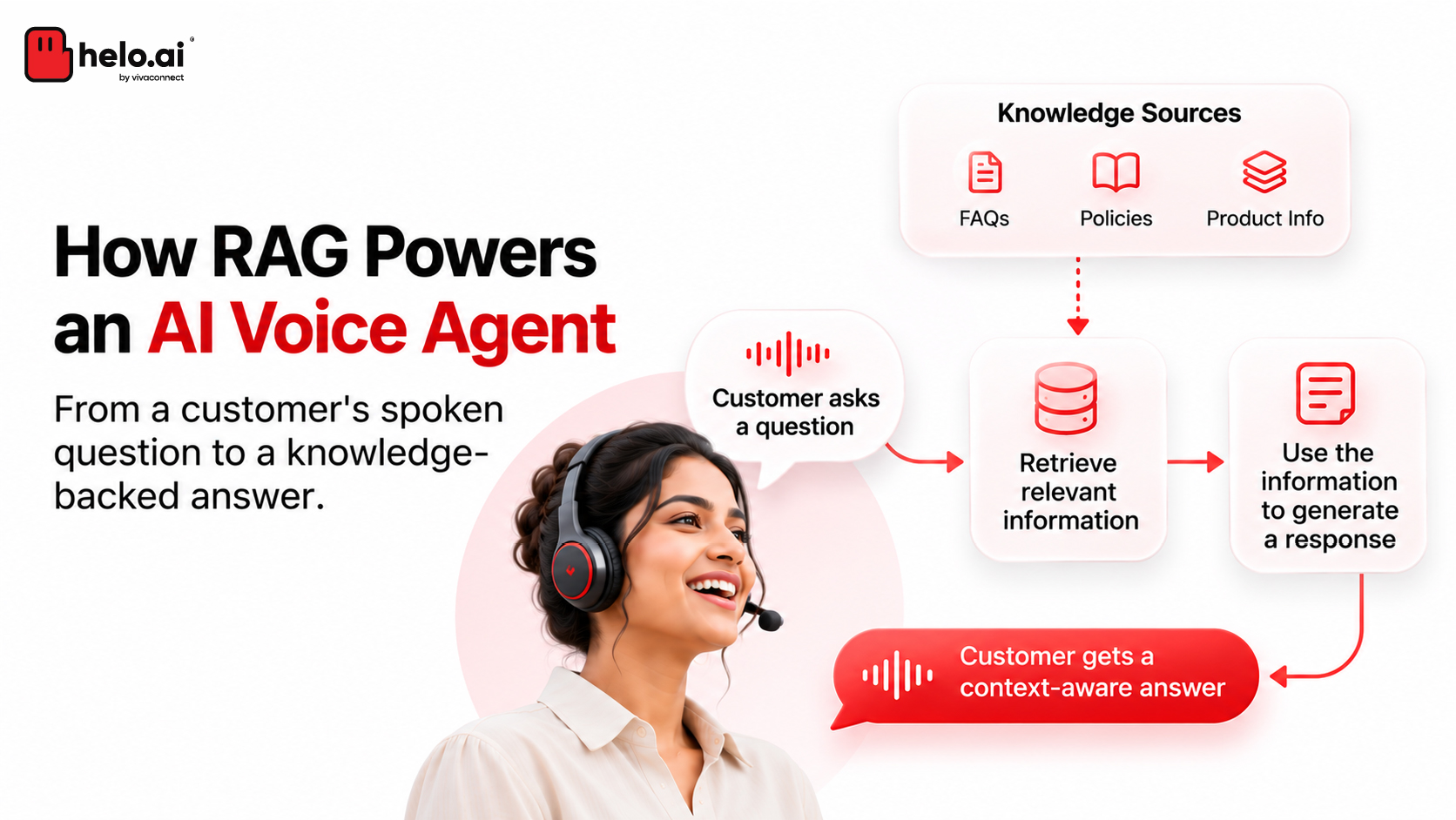


An AI voice agent can recognise a customer's question and respond naturally. But can it answer questions about your actual products, policies and business processes?
Consider a customer calling a bank to ask about personal loan eligibility. A general AI model may understand what a personal loan is, but it may not know the bank's latest eligibility criteria, documentation requirements or processing fees.
This is where a knowledge base becomes important.
By connecting an AI voice agent to approved business information through Retrieval-Augmented Generation (RAG), businesses can help it find relevant information and use that context to answer customer questions during a call.
RAG does not require businesses to train a language model from scratch every time a policy changes. Instead, it gives the agent access to an external information source that can be updated independently.
This guide explains how to prepare a knowledge base, build a RAG workflow, connect it to a voice agent and test the results before deployment.
Train an AI voice agent on your knowledge base with retrieval-augmented generation (RAG). Prepare approved documents, split them into chunks, index them, connect retrieval to the agent, and test retrieval and answers separately. Keep the content current, access-controlled and tested against real customer questions.
What Is RAG in an AI Voice Agent?
Retrieval-Augmented Generation, or RAG, is a technique that allows an AI model to retrieve information from an external knowledge source before generating an answer.
Instead of relying only on its existing training or general instructions, the model searches a connected knowledge base when a customer asks a business-specific question.
For example, imagine a customer asks:
“What documents do I need to apply for a personal loan?”
A RAG-powered voice agent can search the bank's approved loan documentation guide, retrieve the relevant checklist and use it to formulate an answer.
The response is grounded in the bank's own information rather than a general assumption.
How Does RAG Work During a Voice Call?
A typical RAG-powered voice workflow has six stages:
- Customer speaks: The customer asks a question during the call.
- Speech-to-text: The speech recognition system converts the audio into text.
- Query preparation: The system identifies the customer's intent and prepares a search query.
- Knowledge retrieval: The retrieval system searches the indexed knowledge base for relevant information.
- Answer generation: The language model uses the retrieved content to formulate a response.
- Text-to-speech: The response is converted into speech and delivered to the customer.
The process can be represented as:
Customer question → Speech recognition → Query → Knowledge retrieval → AI-generated answer → Voice response
The quality of the final answer depends on every stage. Accurate speech recognition cannot compensate for outdated documents, and a capable language model cannot reliably answer a question if the retrieval system finds the wrong information.
Step 1: Identify What Your Voice Agent Needs to Know
Before uploading documents, define the questions your voice agent is expected to answer.
A knowledge base should reflect the agent's responsibilities rather than simply contain every document available within the organisation.
Start by reviewing call recordings, FAQs, customer support tickets and agent manuals. Identify frequently asked questions and group them by topic.
For example, a banking voice agent may need information about:
- Loan eligibility and application requirements
- Interest rates and repayment terms
- Account services and transaction processes
- Credit card features and charges
- Branch locations and service timings
- Complaint and escalation procedures
An insurance voice agent may need:
- Policy coverage and exclusions
- Premium payment methods
- Claim registration steps
- Required claim documents
- Renewal and cancellation conditions
- Customer support procedures
This exercise helps establish what the agent should answer, what information it needs and when it should transfer a customer to a human representative.
It also prevents unrelated or confidential information from being added unnecessarily.
Step 2: Collect and Prepare Your Knowledge Base Documents
Once you know what the agent needs to answer, collect the relevant business information.
Common sources include:
- Product and service documentation
- Frequently asked questions
- Standard operating procedures (SOPs)
- Policy documents
- Product brochures and pricing information
- Customer support guides
- Internal process manuals
- Approved troubleshooting instructions
However, uploading documents as they are may not produce good retrieval results. Documents written for employees or regulatory purposes are not always structured for quick information retrieval during a conversation.
Prepare them before indexing.
Clean and organise the content
Remove duplicate files, outdated versions, irrelevant sections and unnecessary formatting. Use clear headings that describe the information in each section.
For example, a document titled Customer Support Guide could be organised into:
- Account verification
- Password reset
- Failed transactions
- Refund timelines
- Complaint escalation
Keep tables, conditions and procedural steps together wherever possible. A fee listed in a table should remain connected to its applicable product, conditions and effective date.
Resolve conflicting information
Suppose one document mentions a loan processing fee of ₹2,000, while another lists ₹2,500.
The retrieval system may find either value depending on the customer's question. This can lead to inconsistent answers.
Before indexing documents:
- Identify the latest approved version.
- Remove or archive superseded documents.
- Confirm that prices, dates, eligibility criteria and policy terms are current.
- Assign an owner to important documents.
- Establish a process for reviewing changes.
For BFSI use cases, this is particularly important. Incorrect information about interest rates, charges, eligibility or policy conditions can create customer complaints and compliance concerns.
Step 3: Break Documents into Searchable Chunks
A knowledge base may contain hundreds of pages. Sending entire documents to the language model every time a customer asks a question is inefficient.
RAG systems generally divide documents into smaller sections called chunks. Each chunk can be indexed and retrieved independently.
For example, a 30-page loan policy could contain separate sections for:
- Eligibility criteria
- Required documents
- Interest rates
- Repayment options
- Processing fees
If a customer asks about eligibility, the retrieval system should find the relevant section instead of returning unrelated information about repayment or fees.
How do you choose the right chunk size?
There is no universal chunk size that works for every document or retrieval system.
Consider these factors:
- Document structure: Keep related paragraphs, headings and conditions together.
- Question type: Specific questions may benefit from smaller, focused chunks.
- Context requirements: Policy explanations and procedures may need larger sections to preserve important conditions.
- Model limits: Make sure chunks fit within the input limits of the embedding and language models being used.
What is chunk overlap?
Chunk overlap means carrying a small portion of text from one chunk into the next.
Imagine a document divided into two chunks:
- Chunk 1 explains the eligibility requirements for a loan.
- Chunk 2 begins with additional conditions that apply to those requirements.
Without overlap or appropriate heading context, the second chunk may lose the connection to the first.
A small overlap can preserve continuity across chunk boundaries. However, excessive overlap creates duplicate content and can make retrieval less efficient.
Test different chunk sizes and overlap settings against real customer questions. Microsoft's document chunking guidance explains how document structure, query type and overlap influence chunking decisions.
Starting point: Microsoft suggests starting with chunks of about 512 tokens and 25% overlap, then adjusting for your document type and the questions you test. It warns that an overlap set too large can backfire.
Step 4: Generate Embeddings and Index the Content
After preparing and splitting documents, the system needs a way to search them efficiently.
This is where embeddings and indexing come in.
What are embeddings?
Embeddings are numerical representations of text that capture aspects of its meaning. An embedding model converts a sentence or document chunk into a vector, which can be compared with other vectors to identify semantically related content.
For example, these questions use different words but express a similar intent:
- “What documents are required for a loan?”
- “Which papers should I submit for a personal loan?”
- “What do I need to apply?”
A semantic retrieval system can recognise that these questions are related even when the wording is different.
What is a vector database?
A vector database or vector search index stores these numerical representations alongside the original text and associated metadata.
When a customer asks a question:
- The question is converted into an embedding.
- The system compares it with stored document embeddings.
- It identifies chunks with similar meaning.
- It returns the most relevant content to the language model.
The model then uses the retrieved passages to generate a response.
An important point: embeddings help find related information, but they do not verify whether the retrieved information is correct or current. Document quality and version control still matter.
Step 5: Choose the Right Retrieval Method
Not every business question should be handled by the same search method.
RAG systems can use different retrieval approaches depending on the type of information being searched.
| Retrieval method | How it works | Useful for |
|---|---|---|
| Keyword search | Finds exact words or terms in documents | Policy numbers, product codes and exact terminology |
| Semantic search | Finds content based on meaning rather than exact wording | Natural-language customer questions |
| Vector search | Compares embeddings to identify semantically similar content | Questions phrased differently from the source document |
| Hybrid search | Combines keyword and vector search | Business questions containing both specific terms and broader intent |
For example, a customer asking about a particular policy code may need exact keyword matching. A customer asking, “Can I cancel my policy and get my money back?” may benefit from semantic retrieval.
Hybrid search combines both approaches, helping the system find relevant passages when a query includes exact identifiers as well as natural-language intent.
Microsoft's RAG and Azure AI Search overview explains how keyword and vector search can work together.
Add metadata to improve retrieval
Metadata is additional information attached to documents or chunks. It helps the retrieval system narrow down which content is relevant.
Useful metadata fields may include:
- Document category
- Product name
- Department
- Language
- Region or business unit
- Document version
- Effective date
- Approval status
- Customer segment
For example, a bank operating across multiple regions may have different charges or procedures for different customer segments.
Metadata filters can help restrict retrieval to the correct product, region or approved document version.
For sensitive business information, metadata should also support permission checks. The retrieval system must not return documents simply because they are semantically relevant; the agent must be authorised to access them.
Step 6: Connect the Knowledge Base to Your Voice Agent
Once the documents are prepared and indexed, connect the retrieval system to the AI voice agent.
There are two common approaches.
Option 1: Use a built-in knowledge base
Some voice-agent platforms provide built-in document upload and retrieval capabilities.
A typical setup involves:
- Uploading the prepared documents.
- Allowing the platform to process and index them.
- Creating or configuring a knowledge base.
- Connecting it to the relevant assistant.
- Adding instructions about when the assistant should search the knowledge base.
- Testing the assistant before publishing.
For example, Vapi documents a workflow in which users upload files, configure a knowledge base and attach a query tool to an assistant. The assistant's instructions must specify when to use that query tool.
See Vapi's Knowledge Base documentation and Query Tool guide for its implementation process.
Vapi detail: Vapi's query tool guide says the knowledge base description alone is not enough for the assistant to know when to search, so the system prompt must name the tool. It recommends keeping files under 300KB. Check its documentation for the retrieval providers and models currently supported.
Option 2: Connect an external retrieval system
Businesses with more complex requirements may build or connect their own retrieval infrastructure.
A typical architecture includes:
- Document processing pipeline
- Embedding model
- Vector database or search index
- Retrieval API
- Voice-agent orchestration layer
- Language model and speech services
When a customer asks a question, the voice agent sends the query to the retrieval service. The service searches the indexed content and returns relevant passages. The language model uses those passages to formulate a spoken answer.
This approach offers more control over retrieval logic, metadata filtering, access permissions and integrations with existing business systems.
The right approach depends on the size of the knowledge base, complexity of the use case, technical resources and data governance requirements.
Explore Helo Voice
See how Helo Voice handles inbound and outbound calls with live handoff to your team.
Step 7: Give the Agent Clear Instructions
Connecting a knowledge base does not automatically ensure that the voice agent will use it correctly.
The agent needs clear instructions about when to retrieve information, how to use the retrieved content and what to do when an answer is unavailable.
For example, its instructions could specify:
- Search the approved knowledge base for business-specific questions.
- Use retrieved information as the source for product and policy answers.
- Do not invent prices, timelines, eligibility conditions or policy terms.
- Do not treat an unverified or outdated document as current information.
- Ask a follow-up question when the customer's request is unclear.
- If the available information does not answer the question, say so.
- Escalate sensitive or unresolved requests to a human agent.
Example: A grounded response
Suppose a customer asks:
“Can I apply for a personal loan without salary slips?”
The retrieval system finds an approved document stating that salaried applicants must provide recent salary slips, while alternative income documentation may be accepted in specified circumstances.
A suitable response would explain the requirement and mention the approved alternative, without promising that every applicant qualifies.
If the retrieved document does not explain the customer's specific situation, the agent should ask for clarification or transfer the call rather than assume an answer.
A knowledge base provides information. It does not automatically give the agent access to live customer records or permission to perform business actions. Those capabilities require separate system integrations and access controls.
Step 8: Test the Agent Before Going Live
A knowledge base should be tested with real customer questions before the voice agent is deployed.
Do not limit testing to questions that closely match the wording in your documents. Customers may ask the same thing in different ways, use regional expressions or switch languages during a conversation.
For example:
- “What papers do I need for a personal loan?”
- “Which documents should I submit?”
- “Can I apply without salary slips?”
- “Is Aadhaar enough for the application?”
These questions relate to loan documentation, but the wording and intent differ.
Build a representative test set
Create a list of questions based on actual customer conversations. Include:
- Direct questions with clear answers
- Questions with multiple conditions
- Questions using different wording
- Follow-up questions
- Ambiguous questions
- Questions the knowledge base cannot answer
- Questions in regional languages and code-mixed speech
Evaluate retrieval and answer generation separately
A common mistake is to judge the complete voice response without checking where an error occurred.
Consider two situations:
- Retrieval failure: The system retrieves an outdated fee document. The language model may produce a fluent response, but the source is wrong.
- Answer-generation failure: The system retrieves the correct fee document, but the model adds a condition that does not appear in the source.
These are different problems and require different fixes.
Use the following evaluation framework:
| Evaluation area | What to measure | What a good result looks like |
|---|---|---|
| Retrieval relevance | Whether the retrieved chunks address the question | Relevant and current sections are retrieved |
| Retrieval coverage | Whether the important source information is found | No critical condition or exception is missed |
| Groundedness | Whether the answer stays within retrieved information | No unsupported facts are added |
| Answer relevance | Whether the answer directly addresses the question | The response answers what the customer asked |
| Completeness | Whether important details are included | Necessary conditions and exceptions are not omitted |
| Language handling | Whether the agent understands and responds appropriately | Meaning is retained across supported languages |
| Fallback handling | Whether the agent recognises missing information | It admits uncertainty or escalates appropriately |
| Response time | Time taken across the complete voice workflow | The conversation remains comfortable and responsive |
Microsoft's RAG evaluation guidance distinguishes retrieval quality from groundedness, relevance and response completeness. These checks can help identify whether the issue lies in search or answer generation.
Scoring detail: Microsoft's evaluators for retrieval, groundedness, relevance and response completeness score each answer from 1 to 5, with a default pass threshold of 3.
Track performance over time
Testing should continue after deployment.
Monitor:
- Questions the agent could not answer
- Frequently retrieved documents
- Incorrect or incomplete responses
- Human handoffs
- Retrieval failures
- Response latency
- Customer feedback
Use these findings to improve documents, retrieval settings and agent instructions.
Step 9: Prepare for Multilingual and Code-Mixed Conversations
Indian customers may switch between languages during a call. A customer might begin in Hindi, use English product terminology and finish the question in Marathi or another regional language.
For example:
“Mujhe personal loan ke liye kaunse documents submit karne honge?”
A multilingual voice agent needs to recognise the question, retrieve the correct information and respond in a language the customer understands.
Consider these practices:
- Include approved content in the languages your agent is expected to support.
- Maintain consistent product names, technical terms and translations.
- Test regional phrasing, accents and code-mixed questions.
- Add important product names and terminology as speech-recognition hints where supported.
- Check whether the speech recognition and retrieval components support the required languages.
- Test whether the agent can maintain the customer's preferred language across follow-up questions.
A multilingual speech model does not automatically guarantee accurate multilingual retrieval. Speech recognition, retrieval and response generation are separate parts of the workflow, and each needs testing.
Step 10: Secure and Maintain Your Knowledge Base
Training a RAG-powered voice agent is not a one-time activity. The knowledge base needs regular maintenance as the business changes.
For enterprise and BFSI use cases, it also needs clear security and access controls.
Protect sensitive information
Not every document should be accessible to every voice agent.
For example, a general customer support agent may need access to product FAQs and service procedures, but it should not automatically have access to internal investigation reports or confidential customer records.
Establish controls such as:
- Role-based access: Restrict documents and retrieval tools according to the agent's approved responsibilities.
- Document permissions: Apply access rules before content is returned to the language model.
- Data minimisation: Avoid uploading personal or confidential information unless the use case requires it.
- PII protection: Identify and protect sensitive customer information in documents, transcripts and logs.
- Retention controls: Define how long source documents, retrieved content and call records are retained.
- Audit logs: Maintain records of document changes, access and relevant retrieval activity.
- Vendor review: Understand how external providers process, store and access documents and customer data.
For BFSI organisations, the security review should also consider applicable regulatory requirements, contractual obligations and the organisation's data classification policies.
Establish a document maintenance process
A practical maintenance process should include:
- Document ownership: Assign teams to maintain specific categories of information.
- Version control: Track document versions and effective dates.
- Approval checks: Publish only reviewed and authorised content.
- Scheduled reviews: Review high-impact documents at defined intervals.
- Change-based updates: Re-index documents whenever important information changes.
- Call analysis: Review unanswered questions and repeated customer queries.
- Access reviews: Periodically check whether agents still need access to each knowledge source.
A knowledge base that is accurate today may become outdated after a product, policy or process changes. Regular maintenance is essential to keep answers reliable.
Common Mistakes to Avoid When Training a Voice Agent on a Knowledge Base
Even a well-configured RAG system can produce poor results if the underlying information and retrieval process are not maintained.
Uploading every document without reviewing it
More documents do not necessarily mean better answers. Outdated, duplicated or conflicting information can reduce retrieval quality.
Using poorly structured documents
Large blocks of unorganised text make it harder to retrieve precise information. Use clear headings, logical sections and meaningful chunks.
Ignoring metadata and permissions
Without suitable filters, the system may retrieve information from the wrong product, region or document version. Missing access controls can also expose information to an agent that should not receive it.
Expecting RAG to provide live customer information
A knowledge base can explain a process or policy. It cannot independently fetch a customer's current balance, application status or payment history unless connected to the relevant business system.
Skipping negative testing
Test questions that the knowledge base cannot answer. The agent should recognise its limits instead of making up a response.
Forgetting to update the knowledge base
Business policies, prices, product details and procedures change. Establish a review and re-indexing process so the agent does not continue using outdated information.
Measuring only the final answer
A fluent response can still be wrong if the retrieval system found the wrong source. Evaluate retrieval and answer generation separately.
FAQs
What is RAG in an AI voice agent?
RAG, or Retrieval-Augmented Generation, allows an AI voice agent to search an external knowledge base for relevant information before generating a spoken response. It helps the agent answer business-specific questions using approved documents and content.
How do I train an AI voice agent on my company's documents?
Collect and review approved documents such as FAQs, product guides and SOPs. Organise the content, divide it into searchable chunks, generate embeddings, index the documents and connect the retrieval system to your voice agent. Configure the agent's instructions and test it with real customer questions before deployment.
What is the difference between RAG and fine-tuning?
RAG gives a language model access to external information at query time. Fine-tuning changes a model's behaviour by training it further on selected examples. RAG is often more suitable when the goal is to keep business information updated without retraining the model every time a document changes.
What is a vector database in RAG?
A vector database or vector search index stores embeddings of document content. When a customer asks a question, the system can compare the question's embedding with stored document embeddings to find semantically related information.
Can an AI voice agent answer questions in Indian languages?
Yes, provided the speech recognition, retrieval and response-generation components support the required languages. Businesses should test regional languages, accents, code-mixed speech and translated business terminology before deploying the agent.
Can a RAG-based voice agent access live customer data?
Only when it is connected to the relevant business systems through authorised integrations. A static knowledge base can explain policies and processes, but live information such as account balances, application status or payment records requires a separate data connection.
How often should an AI voice agent's knowledge base be updated?
Update it whenever important business information changes. This may include product terms, pricing, policies, procedures and eligibility criteria. Regular reviews and version control help prevent the agent from retrieving outdated information.
Does RAG guarantee that an AI voice agent will not hallucinate?
No. RAG can help ground responses in approved information, but it does not guarantee accuracy. The system can still retrieve irrelevant content or generate unsupported statements. Retrieval testing, clear instructions, fallback handling and ongoing evaluation are necessary.
Final Takeaway
A useful AI voice agent needs more than a natural-sounding voice. It needs access to the right business information and a reliable way to use it during a conversation.
RAG helps bridge that gap by connecting the agent to an organisation's approved knowledge base. But the quality of the experience depends on how well that knowledge is prepared, organised, retrieved, secured, tested and maintained.
For businesses handling high volumes of customer calls, getting these foundations right can make voice automation more useful, consistent and dependable.
If you are exploring AI voice agents for inbound or outbound customer conversations, learn more about Helo Voice and speak with our team about your requirements.
Plan your voice agent knowledge base
Talk to the Helo.ai team about your documents, languages and calling workflows.
Note. Helo.ai makes Helo Voice, mentioned above. Microsoft and Vapi documentation was checked on 21 November 2026, and these products change often.