.jpeg)
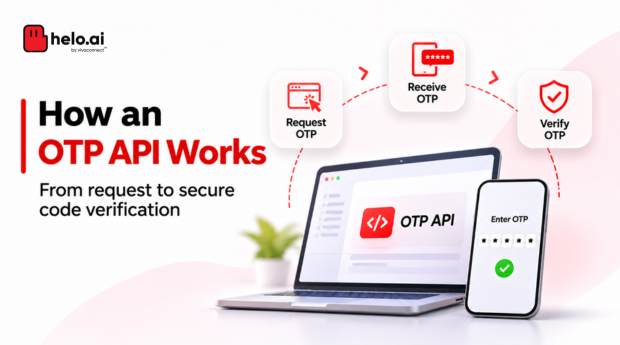


An OTP API helps an application verify whether a user can access a particular phone number or verification channel. It connects the application’s backend to an OTP service that generates or manages a one-time code, delivers it and checks whether the submitted code is valid.
But sending a code is only one part of the process. A reliable OTP implementation must also manage expiry, retries, verification attempts, duplicate requests and abuse.
Understanding these moving parts helps product and engineering teams build verification flows that are easier to integrate, monitor and secure.
An OTP API lets an application request, deliver and verify a one-time code through a provider. The backend asks the service to send a code, the user submits it, and the service checks that it is correct, unexpired, unused and within attempt limits. Expiry, resend rules and rate limits protect the flow.
Published by Helo.ai, which sells verification and messaging products. Code samples are illustrative, standards are cited from the sources at the end of this guide, and a disclaimer follows the article.
What is an OTP API?
An OTP API is an interface that allows an application to request, deliver and verify a one-time password.
For example, when a customer signs in using a mobile number, the application can call an OTP API to initiate verification. The customer receives a code, enters it into the application, and the backend checks whether it matches the active verification request.
An OTP API generally supports some or all of these operations:
- Generate: Create a one-time code.
- Send: Deliver the code through a supported channel.
- Verify: Check the code submitted by the user.
- Resend: Initiate another delivery when permitted.
- Track: Return request identifiers or status information, depending on the provider.
The exact workflow depends on the API provider and how the application is designed.
How does an OTP API work? Understanding the architecture
A typical OTP verification flow involves the application, its backend, an OTP service and a delivery channel.
The basic architecture:
Customer → Website or mobile app → Business backend → OTP service → Delivery channel → Customer
The verification response then travels back through the application backend.
Here is what happens at each stage.
1. The application requests verification
The user enters a phone number or another supported identifier and selects an action such as sign-in, registration or password recovery.
The application sends a request to its backend. The backend validates the input, checks whether the request is permitted and initiates verification through the OTP API.
2. The OTP is generated
The code can be generated and managed by the OTP provider or by the business application.
There are two common approaches:
Provider-managed OTP
The provider generates the code, manages its validity and checks the code submitted by the user. The application receives a request identifier and uses it in subsequent verification or resend operations, depending on the API.
This approach reduces the amount of OTP-generation and verification logic the business needs to maintain.
Application-managed OTP
The business backend generates the code and manages its storage, expiry, verification and attempt limits. The delivery provider is used to send the code to the customer.
This approach gives the business more control, but it also makes the application responsible for implementing and securing the verification logic.
The choice should be based on the required level of control, security responsibilities and available API capabilities.
| Model | Who generates and checks the code | What the business owns |
|---|---|---|
| Provider-managed OTP | The provider generates the code, manages its validity and checks the submitted value | Request identifiers, calling the API correctly and handling the responses |
| Application-managed OTP | The business backend generates the code and handles storage, expiry, verification and attempt limits | The full verification logic and its security; a delivery provider only sends the message |
3. The code is delivered
The OTP service sends the code through a supported delivery channel.
| Channel | How it is used |
|---|---|
| SMS | Sends a verification code to the user's mobile number. |
| Delivers the code through an approved WhatsApp business messaging flow, where supported. | |
| Voice | Reads out a verification code through a voice call, where supported. |
| Sends a code or verification link to an email address. |
Channel availability, approval requirements, delivery behaviour and fallback options depend on the provider and implementation.
One important distinction: email verification can be useful for confirming control of an email address, but it should not be described as NIST-compliant out-of-band authentication. NIST SP 800-63B-4 does not permit email for that authentication purpose.
NIST states that "Email SHALL NOT be used for out-of-band authentication". Its prohibition does not cover email codes used to confirm that someone controls an address, which is the use the paragraph above describes. For WhatsApp, template rules are set by Meta, so check the current Meta authentication template documentation. Helo.ai has product pages for SMS, WhatsApp, email and voice.
4. The user submits the code
The customer enters the received code in the application.
The application sends the submitted code and the relevant verification reference to its backend. The backend then passes the required information to the OTP service or checks the code itself, depending on which architecture is being used.
5. The OTP is verified
The OTP service or application checks whether the code:
- Belongs to the correct verification request.
- Matches the expected value.
- Has not expired.
- Has not already been used.
- Has not exceeded the permitted number of attempts.
If the checks pass, the application can continue the requested action. If they fail, the application should return an appropriate response without exposing sensitive verification details.
What does an OTP API request look like?
The exact API format varies by provider. The following is a simplified, illustrative example of a provider-managed OTP workflow. It is not a Helo Verify API specification or a copy of any provider's actual endpoint.
Step 1: Request an OTP
POST /verification/otp/send
Authorization: Bearer <API_TOKEN>
Content-Type: application/json

{
  "phone_number": "+91XXXXXXXXXX",
  "purpose": "login"
}A successful response might look like this:
{
  "request_id": "verification_12345",
  "status": "accepted"
}The request ID links the initial send operation to later verification or resend operations. The actual response fields and status meanings depend on the provider.
Step 2: Submit the OTP for verification
POST /verification/otp/verify
Authorization: Bearer <API_TOKEN>
Content-Type: application/json

{
  "request_id": "verification_12345",
  "code": "123456"
}The service might return a result such as:
{
  "status": "verified"
}A production integration must follow the provider's documented authentication method, endpoint, payload, error codes and response format. API credentials should remain on the server and must never be exposed in browser or mobile application code.
How to read the possible outcomes
Providers differ, so treat the table below as a generic pattern to adapt to your provider's documented status codes.
| Outcome | What happened | Suggested application response |
|---|---|---|
| Verified | The code matched an active request | Continue the action and invalidate the code |
| Wrong code | The submitted value did not match | Allow another try within the attempt limit, with a generic message |
| Expired | The validity period ended | Ask the user to request a new code |
| Attempts exceeded | The failure limit was reached | Stop verification for that request and apply a cooldown |
| Rate limited | A request limit was exceeded, often an HTTP 429 | Show a wait message and avoid rapid automatic retries |
| Send timed out | It is unclear whether the request was accepted | Check the request status or reuse the reference before sending again |
OTP expiry: Why does a verification code stop working?
An OTP is designed for temporary use. Its expiry time defines how long the customer has to complete verification.
For example, a business might choose a validity period of a few minutes for a particular login flow. The appropriate duration depends on the risk, delivery channel, user experience and applicable security requirements.
Expiry helps limit the time in which an intercepted or exposed code could be reused.
A sound implementation should:
- Set an expiry when the OTP is created.
- Reject codes after their validity period.
- Invalidate a code after successful verification.
- Prevent an expired code from becoming valid again.
- Define what happens to an earlier code when a new one is issued.
NIST SP 800-63B-4 sets a maximum validity period of 10 minutes for the relevant out-of-band authentication secrets. This is a requirement within NIST's digital identity guidance, not a universal expiry rule for every OTP use case.
"In all cases, the authentication SHALL be considered invalid unless completed within 10 minutes."
For help choosing a validity window and code length, see Helo.ai's guide to 4-digit vs 6-digit OTP length, expiry and security.
OTP retries and resend requests: What should businesses control?
Customers may not receive a code immediately. They may have network issues, enter an incorrect number or accidentally close the verification screen.
A resend option helps, but unrestricted retries can create security and operational problems.
A well-designed OTP flow should distinguish between two actions:
- Resend: Request another delivery of the code.
- Retry verification: Submit a code again after an unsuccessful verification attempt.
These operations should have separate controls.
Consider the following practices:
- Apply a cooldown before allowing another send request.
- Set a maximum number of resend requests within a defined period.
- Limit incorrect verification attempts.
- Decide whether a newly generated code invalidates the previous code.
- Prevent repeated requests from bypassing verification limits.
- Display clear messages when a user must wait before trying again.
The application should also handle duplicate requests safely. If a network timeout occurs after a send request, the backend should not blindly create multiple verification sessions when the original request may already have been accepted.
"Generating a new authentication secret SHALL NOT reset the failed authentication count."
OTP rate limits: Protecting the verification flow from abuse
Rate limiting controls how frequently an application or user can request or attempt verification.
Without it, attackers may repeatedly trigger OTP messages, attempt to guess codes or generate unnecessary delivery costs.
Rate limits should be considered at multiple levels:
| Control | What it helps prevent |
|---|---|
| Phone number | Repeated OTP requests to one number. |
| Account or user ID | Excessive verification activity against one account. |
| IP address | High-volume requests from a single network address. |
| Device or session | Repeated requests from the same application session or device. |
| Verification attempts | Repeated guessing of an active OTP. |
The limits should be designed around the business's traffic patterns and risk level. A legitimate customer should not be blocked simply because a shared network has generated requests from other users.
Rate limits should also apply to verification attempts, not only to code generation. Otherwise, an attacker may continue guessing against an already-issued OTP.
Some providers return an HTTP 429 response when a configured rate limit is exceeded. The exact status codes, limits and retry behaviour are provider-specific.
RFC 6585 defines the 429 Too Many Requests status code and how servers can signal when to retry.
Add verification without building every control yourself
Explore how Helo Verify delivers OTPs over SMS, WhatsApp and email, then talk to Helo.ai about the retry and rate-limit controls your flow needs.
Security practices every OTP API integration should consider
An OTP API is only one part of the application's security design. The surrounding implementation matters just as much.
Use secure code generation. Generate OTPs using a cryptographically secure random number generator. Avoid predictable sequences or values derived from easily guessed information.
Make codes single-use. Once verification succeeds, invalidate the code. Do not allow a successful OTP to authenticate another request.
Protect OTP storage. Avoid storing OTPs in plaintext for longer than necessary. Use appropriate protection for stored verification data. Remember that a short numeric OTP has limited entropy, so hashing alone does not make it resistant to offline guessing.
Keep credentials private. Store API keys and secrets securely on the server. Do not expose them in front-end code, mobile applications or client-side logs.
Avoid logging OTP values. Application logs should capture useful operational information without recording the actual verification code.
Prevent replay and duplicate processing. Bind each code to its verification request and intended purpose. Reject expired, consumed or unrelated codes.
Monitor suspicious activity. Watch for unusual request volumes, repeated failures, abnormal resend patterns and spikes in delivery costs.
Understand the limits of OTP. OTP is useful as a verification factor, but manually entered codes are not phishing-resistant. Higher-risk applications may need stronger authentication methods in addition to OTP.
These practices align with recommendations in the OWASP Multifactor Authentication Cheat Sheet and the current NIST Digital Identity Guidelines.
OWASP's Multifactor Authentication Cheat Sheet lists short time-to-live, single-use codes and strict attempt limits among its OTP minimums, and notes that SMS and OTP codes can be phished.
OTP API integration checklist before go-live
Use this list to review an integration before it handles real customers.
- Which model are you using, provider-managed or application-managed, and who owns each security control?
- Are API credentials stored only on the server?
- Is the expiry period set and tested against real delivery times?
- Do resend requests and verification retries have separate limits?
- Is a new code prevented from resetting the failed-attempt count?
- Are limits applied per phone number, account, IP address and device or session?
- Are duplicate and timed-out requests handled without creating several verification sessions?
- Are OTP values kept out of logs, analytics and support tools?
- Do error responses avoid exposing sensitive verification detail?
- Are request volumes, failures and delivery costs monitored?
- Is a stronger method available for high-risk actions?
For SMS OTPs in India, headers and message templates must be registered under the DLT framework before delivery, so include template approval in your go-live plan. Helo.ai offers DLT management support. To track delivery once you are live, read Helo.ai's guides to SMS API analytics and transactional SMS, or start with what SMS verification is.
How Helo Verify fits into an OTP verification workflow
Helo Verify is Helo.ai's verification product. Its public product information describes verification through SMS, WhatsApp and email, alongside SIM-binding security and real-time verification capabilities.
For businesses evaluating an OTP solution, the relevant considerations include supported channels, integration requirements, verification workflow, security controls and operational visibility.
Specific API operations, voice OTP, automatic channel failover, configurable expiry and retry controls, webhook support and native fraud controls should be confirmed against the current Helo Verify documentation before being treated as available product capabilities.
Explore Helo Verify or contact Helo.ai to discuss your verification requirements.
Frequently asked questions
What is the difference between an OTP API and an SMS API?
An SMS API sends messages. An OTP API supports a verification workflow that may include generating or managing a code, sending it, checking the submitted value and controlling its validity. An OTP API may use SMS as its delivery channel, but the two are not the same thing.
Who generates the OTP: the business or the provider?
Either approach is possible. In a provider-managed model, the provider generates and verifies the code. In an application-managed model, the business backend handles generation, storage, expiry and verification, while a delivery provider sends the code.
What happens when an OTP expires?
The expired code should be rejected. The customer must initiate a new verification request or use the permitted resend flow. An expired code should never become valid again.
Why should OTP APIs have rate limits?
Rate limits help prevent OTP guessing, excessive message requests, automated abuse and unnecessary delivery costs. They should cover both OTP generation and verification attempts.
Is OTP enough to secure an account?
Not in every situation. OTP can help verify access to a phone number or another channel, but it is not phishing-resistant. Applications handling sensitive accounts or transactions should assess whether additional authentication controls are needed.
Should an application call an OTP API from the browser or mobile app?
No. API credentials should stay on the server. The front end should talk to your own backend, which calls the OTP API, so keys and secrets are never exposed in browser or mobile application code.
What should the backend do if a send request times out?
Treat the original request as possibly accepted. Check its status or reuse the existing verification reference where the API allows it, rather than creating several verification sessions for one attempt. The exact behaviour depends on the provider's documentation.
Can email be used for out-of-band authentication under NIST?
No. NIST SP 800-63B-4 states that email shall not be used for out-of-band authentication. Email codes can still help confirm control of an email address, which that prohibition does not cover.
Final takeaway
An OTP API is more than a mechanism for sending verification codes. Its reliability depends on how the application handles code generation, delivery, expiry, retries, verification and abuse prevention.
For engineering teams, the goal is to build a flow that is straightforward for genuine users while making repeated, expired or unauthorised attempts difficult to exploit. The right architecture and security controls should be defined before the OTP integration goes live.
Plan your OTP integration with Helo.ai
Share your use case, volumes and channels and the Helo.ai team can walk through verification options for your application.
Sources and further reading
Disclaimer. This article is general information, not legal, regulatory, compliance or security advice. Code samples are simplified illustrations, not the API specification of Helo Verify or any other provider, so follow your provider's documentation. Standards change and apply differently by industry and country, so check current sources and consult qualified advisers for your own flow. Helo.ai is the publisher and offers verification and messaging products. Sources were last checked in November 2026.