.jpeg)
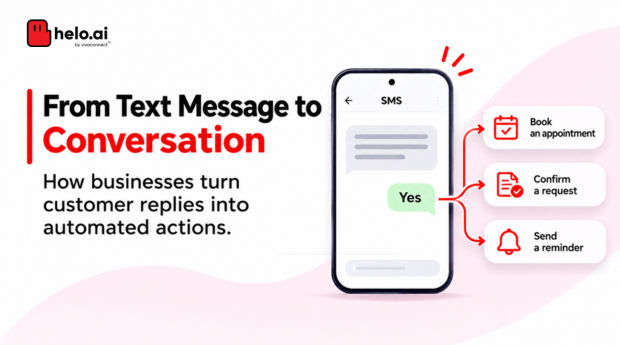


Most business SMS messages deliver information. A conversational SMS takes the next step: it gives customers a way to respond and lets the business act on that response.
A customer receives a message asking them to confirm an appointment. They reply YES. The system recognises the response and sends a confirmation. Another customer replies NO, and the system offers an alternative date.
No app download. No website form. Just a conversation through text messages.
This is how an SMS chatbot works. It turns ordinary SMS into a two-way communication channel where customers can reply, make choices, share information and complete simple tasks.
In this guide, we'll look at how conversational SMS works, explore practical SMS chatbot examples, understand the automation behind it and see what businesses should consider before implementing one.
An SMS chatbot is automation that reads a customer's text reply, decides what should happen next and sends the next message or triggers an action. The business sends a question, the customer replies, the provider passes the reply to the bot through a webhook or API, and the bot responds.
What Is Conversational SMS?
Conversational SMS is a messaging approach that allows businesses and customers to exchange text messages rather than relying only on one-way notifications.
Instead of sending a message and ending the interaction, the business invites a response. That reply can trigger an automated answer, update a record, start another step in a workflow or route the interaction to the appropriate team.
For example:
The customer has completed an action through a simple text exchange.
Conversational SMS can be powered by predefined rules, keyword-based automation, decision trees or more advanced chatbot logic.
What Is an SMS Chatbot?
An SMS chatbot is an automated system that communicates with customers through text messages. It receives incoming SMS replies, interprets them and sends responses based on predefined rules, conversation flows or configured AI capabilities.
A chatbot can do more than send automatic replies. Depending on how it is built and connected to business systems, it can:
- Answer common questions.
- Present choices and collect responses.
- Qualify leads.
- Confirm appointments or registrations.
- Collect feedback.
- Share relevant links.
- Retrieve information from connected systems.
- Trigger actions based on customer responses.
For example, a customer interested in a financial product could receive an SMS asking about the amount they need. Their response can determine which question the bot asks next.
The important distinction is that an SMS chatbot does not simply send a fixed reply. It uses the customer's response to decide what should happen next. You may also see this type of solution described as an SMS bot or SMSbot.
Conversational SMS vs Two-Way SMS vs SMS Chatbots
These terms are related, but they do not mean exactly the same thing.
Two-way SMS provides the communication capability. Conversational SMS describes the interaction. An SMS chatbot provides the automation that can manage that interaction.
A business can use two-way SMS without a chatbot. For example, it may receive replies that are manually reviewed by a team. A chatbot makes it possible to handle suitable interactions automatically.
Inbound messages are often called MO SMS (mobile originated SMS), and they are what makes SMS two-way.
How Does an SMS Chatbot Work?
An SMS chatbot connects the messaging channel with a conversation engine and, where required, the business systems that provide information or perform actions.
A typical workflow has six steps.
The business sends an SMS
The interaction starts with an outgoing message.
For example:
Your vehicle service is due this week. Reply 1 to book an appointment or 2 to receive a callback.
The message gives the customer a clear reason to respond and simple options to choose from.
The customer replies
The customer sends a response to a number or messaging route that supports inbound SMS.
For example:
1
The messaging provider receives the incoming message and identifies the relevant sender, recipient and message content.
The reply reaches the chatbot
The incoming message is passed to the chatbot through an inbound messaging integration.
This may happen through a webhook, API or another supported routing method.
The chatbot uses the incoming message and available conversation context to determine what the customer means.
The chatbot interprets the response
The bot checks the reply against its configured logic.
For a simple workflow:
- Reply 1 means the customer wants to book.
- Reply 2 means the customer wants a callback.
- An unrecognised reply triggers a clarification message.
More advanced bots can interpret natural-language responses, provided the selected chatbot technology supports that capability.
The chatbot triggers the next action
The bot may send another question, retrieve information or update a connected system.
For example, when a customer chooses to book an appointment, the bot can check available slots through an integration and present the available options.
The exact action depends on the systems and permissions connected to the chatbot.
The customer receives the next message
The conversation continues until the customer completes the intended task, exits the flow or needs assistance from a person.
SMS Chatbot Examples: 7 Ways Businesses Can Use Automated SMS Conversations
The most useful SMS chatbot examples are built around tasks customers can complete through a short exchange.
Here are seven practical applications across industries.
Appointment Confirmation and Scheduling
Industry: Healthcare, automotive, professional services
What the chatbot automates: Confirmation responses; rescheduling preferences; appointment status updates; booking requests through connected scheduling systems.
Lead Qualification
Industry: Banking, insurance, real estate, education
What the chatbot automates: Initial lead qualification; collection of basic preferences; lead categorisation; transfer of responses to a connected CRM or sales workflow.
Note: The bot should avoid collecting sensitive financial information through ordinary SMS. Eligibility checks and financial decisions should happen through appropriately secured systems.
For onboarding-style journeys, see Helo.ai's guide to an AI chatbot for customer onboarding.
Customer Feedback and Surveys
Industry: Retail, hospitality, e-commerce
What the chatbot automates: Feedback collection; rating categorisation; survey responses; triggering follow-up workflows based on the response.
Order and Delivery Updates
Industry: E-commerce, retail, logistics
What the chatbot automates: Order-status requests; delivery information; tracking-link sharing; retrieval of order details from connected systems.
Event Registration and Reminders
Industry: Events, education, professional associations
What the chatbot automates: Registration responses; attendance confirmation; reminder preferences; sharing event information.
Payment and Renewal Reminders
Industry: Banking, insurance, utilities, subscriptions
What the chatbot automates: Customer responses to reminders; payment-link requests; renewal-interest capture; routing of requests to the relevant workflow.
Note: Payment links should lead to secure payment experiences. Do not ask customers to share card details, passwords or OTPs in an SMS conversation.
Product and Service Enquiries
Industry: Retail, telecom, utilities, education
What the chatbot automates: Frequently asked questions; menu-based navigation; information sharing; enquiry categorisation.
Types of SMS Chatbots
Not every business needs a chatbot that understands open-ended questions. The right approach depends on the complexity of the interaction.
A business can combine these approaches. For example, a menu-based chatbot may handle the first few steps and use an integration to retrieve the relevant information.
The goal is not to make every interaction more complicated. It is to automate the steps that are predictable and useful to customers.
How to Build an SMS Chatbot
Building an SMS chatbot starts with the customer task, not the technology.
Before choosing a platform, define what the bot should help customers accomplish.
Step 1: Choose one clear use case
Start with a task that has a predictable process.
Examples include appointment confirmation, lead qualification, event registration or order-status requests.
Avoid starting with a chatbot that is expected to handle every possible customer query.
Step 2: Map the conversation
Write down the messages the customer will receive and the responses the bot should recognise.
For example:
- Initial question.
- Customer's available responses.
- Follow-up questions.
- Actions triggered by each response.
- Fallback for unrecognised replies.
- Completion or exit message.
Map the entire journey before building it.
Step 3: Set up inbound and outbound SMS
The business needs an SMS setup that supports both sending messages and receiving replies.
This requires an appropriate inbound-capable number or route, depending on the country, operator and messaging provider.
Not every sender ID or SMS route supports incoming messages. Confirm inbound capability before designing a two-way workflow.
Check in India: An alphanumeric sender header is normally one-way. Replies need a real number, such as a long code or short code, so confirm which senders can receive replies. Bot replies are still outbound messages, so they follow the same sender, template and consent rules.
TRAI's advice to senders explains registration, headers and templates. Helo.ai's DLT management service supports sender registration and template mapping.
Step 4: Connect the messaging channel to the bot
The SMS provider must be able to pass incoming messages to the chatbot and deliver its responses back to the customer.
This can be handled through supported APIs, webhooks or platform integrations.
Step 5: Configure the bot's logic
Define how the chatbot should interpret responses and what it should do next.
For a simple bot, this may involve matching keywords or numbered choices. More advanced implementations may use natural-language interpretation and connected business data.
Step 6: Connect business systems
If the bot needs to check a booking, retrieve an order status or create a lead, connect it to the relevant system.
Make sure the bot only accesses the information and performs the actions it is authorised to handle.
Step 7: Test the full conversation
Test more than the ideal response.
Check:
- Expected replies.
- Unexpected or unclear replies.
- Empty messages.
- Repeated responses.
- Incorrect or outdated information.
- API failures.
- Duplicate messages.
- Opt-out requests.
- Handover to a person, where supported.
A chatbot should provide a useful fallback rather than leave customers stuck when it cannot understand a response.
Plan your first conversational SMS journey
Talk to the Helo.ai team about your use case, inbound routes and the channels that suit it.
What Developers Need to Know: SMS Chatbot APIs and Webhooks
For developers, an SMS chatbot is an integration between a messaging provider, a conversation engine and the business application.
A typical implementation looks like this:
Customer → SMS network → Messaging provider → Webhook/API → Chatbot logic → Business system → Outbound SMS
The main components include:
Incoming replies and delivery receipts are different events. Both should be handled separately.
A simple developer example
Suppose a customer receives an appointment confirmation request and replies YES.
The application could follow this logic:
In production, developers should also consider:
- Secure webhook authentication.
- Input validation and sanitisation.
- Idempotency to prevent duplicate actions.
- Retry handling and failure queues.
- Separate processing for inbound messages and delivery receipts.
- Conversation timeouts.
- Data retention and access controls.
- Rate limits and abuse prevention.
- Logging and monitoring.
For input validation, see the OWASP Input Validation Cheat Sheet. For the sending side, Helo.ai's guide explains what an SMS gateway is.
SMS Chatbot Best Practices
A chatbot should make a customer's task easier, not create another obstacle.
Keep questions short
Ask one question at a time. Long messages with several instructions can be difficult to follow on a mobile screen.
Offer clear response options
When possible, provide simple choices such as YES/NO or numbered options. This makes it easier for customers to respond and for the bot to interpret the reply.
Give customers a way out
Customers should be able to exit a conversation or stop receiving eligible messages. Configure opt-out handling in accordance with applicable rules and provider requirements.
Make fallback responses useful
If the bot does not understand a reply, it should explain what the customer can do next.
For example:
Sorry, we couldn't understand that response. Reply 1 to confirm or 2 to reschedule.
Know when automation should stop
Not every request should be handled by a bot. Complex, sensitive or unresolved interactions may need a human team or another secure channel.
Protect customer information
SMS is not an appropriate place to collect passwords, OTPs, card details or other sensitive credentials. Use secure and authorised channels for such information.
Measure completed tasks
Track whether customers actually complete the intended action. Message delivery and reply volume alone do not tell you whether the chatbot is useful.
What to Look for in an SMS Chatbot Platform
The platform you choose determines how easily you can create, manage and improve automated SMS conversations.
Use this checklist when evaluating providers.
A platform should be evaluated on the entire workflow, not just the number of messages it can send.
SMS Chatbots and WhatsApp Chatbots: Can Businesses Use the Same Bot Builder?
Businesses often use SMS and WhatsApp for different customer communication needs. SMS can reach customers through standard text messaging, while WhatsApp offers a richer messaging experience with features such as interactive message formats, subject to the applicable platform rules and capabilities.
For example, a business could create an appointment-booking journey that follows the same basic steps across SMS and WhatsApp:
- Ask the customer what they need.
- Present the available options.
- Collect the required response.
- Check the relevant business system.
- Confirm the result.
This matters because the two channels do not work in exactly the same way. SMS relies on text replies and has tighter message constraints. WhatsApp supports additional interaction formats, depending on the business setup.
For the WhatsApp side, see Helo.ai's comparison of the best WhatsApp chatbots and its guide to WhatsApp automation.
How Helo.ai Fits into Conversational SMS Automation
Businesses looking to automate customer conversations need more than a messaging connection. They need a way to design the interaction, manage its logic and connect it to the systems that complete the task.
Helo.ai covers parts of this journey. Helo Convo is a no-code AI agent for WhatsApp, Web and App, with human handoff and CRM integrations, and its page says SMS conversations can be connected to the same inbox. Helo Inbound is described as handling incoming SMS messages.
Teams that want one journey on both SMS and WhatsApp should check how the conversation logic is shared rather than assume one builder covers both. Confirm which inbound routes, bot flows and integrations fit your setup with the Helo.ai team.
Outbound sending is covered on the SMS API page.
Want to automate customer conversations?
Speak with Helo.ai about conversational workflows and which channels fit your use case.
Frequently Asked Questions
What is an SMS chatbot?
An SMS chatbot is an automated system that communicates with customers through text messages. It receives replies, interprets them using configured rules or AI capabilities and sends the next response or triggers an action.
What are some SMS chatbot examples?
Common examples include appointment confirmations, lead qualification, customer feedback surveys, order tracking, event registrations, payment reminders and product enquiries.
How does a two-way SMS chatbot work?
A business sends an SMS, the customer replies, and the messaging provider passes that response to the chatbot. The bot interprets the reply, triggers the relevant action and sends another SMS.
What is the difference between two-way SMS and an SMS chatbot?
Two-way SMS allows customers to send and receive text messages. An SMS chatbot uses that capability to automate the conversation and decide what response or action should follow.
Can an SMS chatbot understand natural-language replies?
Some chatbots can interpret natural-language responses using AI or language-processing capabilities. Others rely on predefined keywords and numbered options. The supported behaviour depends on the platform and how the bot is configured.
Can an SMS chatbot connect to a CRM?
Yes, if the messaging and chatbot platform supports the required API or integration. This can allow the bot to create leads, update records or retrieve relevant information from the CRM.
Do SMS chatbots require an internet connection?
Customers generally do not need mobile data or an app to send and receive standard SMS. However, the business's chatbot platform and connected systems require internet connectivity to process incoming messages and send responses.
Can the same chatbot work on SMS and WhatsApp?
A shared bot builder can support reusable conversation logic across SMS and WhatsApp when the platform supports both channels. The messages and interaction formats may need to be adapted to each channel.
Can businesses use SMS chatbots in India?
Businesses can use SMS automation in India, subject to applicable telecom regulations, sender and template requirements, customer preferences and the availability of an inbound-capable messaging route. Commercial outbound SMS compliance and inbound SMS technical availability are related but separate considerations. Businesses should confirm the specific route, sender configuration and applicable requirements with their messaging provider before launching.
What is an SMSbot?
An SMSbot is another term for an SMS chatbot. It is an automated system that receives text-message replies and responds or triggers actions based on configured conversation logic.
Can an alphanumeric sender ID receive replies?
Usually not. An alphanumeric sender header is normally one-way, so two-way SMS needs a real number such as a long code or short code. Confirm the options and sender setup with your messaging provider.
What happens if a chatbot webhook is delivered twice?
If the endpoint does not respond successfully, the provider may retry. The chatbot should check the message ID so a retried reply does not trigger the same action twice.
Final Takeaway
An SMS chatbot turns a simple text message into an interaction. Customers can confirm, choose, enquire, register or request information without moving to another channel for every small task.
For businesses, the value lies in automating predictable conversations, connecting replies to useful actions and reducing the effort involved in completing routine tasks.
Start with one clear customer need, build a simple conversation around it and measure whether customers are completing the task. Once that works, the same approach can be extended to more use cases and supported messaging channels.
Disclaimer. This article is general information, not legal, regulatory, security or compliance advice. TRAI, DLT and operator requirements change and vary by sender, route and template, so confirm them with your compliance advisers and messaging provider. Examples are illustrative, not approved templates. Helo.ai is the publisher and offers messaging and conversational products, and capabilities depend on the setup you choose. Sources were last checked in November 2026.