.jpeg)
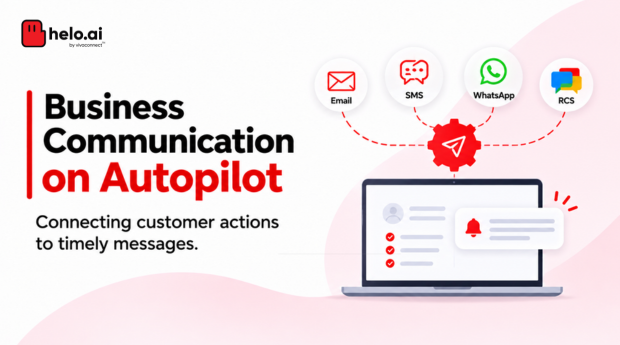


Businesses communicate with customers at several points in their journey, from account registration and order confirmation to payment reminders and service updates.
Managing every message manually becomes difficult when hundreds or thousands of interactions happen every day. Automated text messages help businesses handle these communications without requiring someone to send each message individually.
With SMS automation, businesses can schedule messages, trigger notifications based on customer actions and automatically respond to incoming enquiries.
Let's understand how it works, where businesses use it and how to set it up.
Automated text messages are SMS sent automatically when a trigger, schedule or condition is met, such as an order or a payment due date. In India, each message still needs a registered header, a matching DLT template, correct classification and tagged variables. Connect through a dashboard or API, then test and monitor.
What Are Automated Text Messages?
Automated text messages are SMS messages sent automatically when a predefined event, schedule or condition is met.
Instead of manually sending every message, businesses use an SMS platform or API integration to manage communication.
For example:
- A customer places an order and receives an automatic confirmation.
- A payment becomes overdue and triggers a reminder.
- A customer books an appointment and receives a confirmation.
- A customer sends an enquiry and receives an automatic acknowledgement.
These messages can include personalised details such as customer names, order numbers, dates and transaction references.
The purpose is simple: send relevant information at the right time without depending on manual follow-ups.
How Does SMS Automation Work?
SMS automation connects a messaging platform with business systems such as CRM software, websites, mobile applications and payment systems.
A typical workflow involves four steps:
For example, when an e-commerce customer places an order, the order management system can trigger a confirmation SMS. A separate trigger can send a dispatch notification when the order is shipped.
How Can Businesses Automate SMS?
Businesses generally have two options:
- SMS dashboard: Suitable for marketing and operations teams managing campaigns, scheduled messages and available automation rules.
- SMS API: Allows developers to connect messaging directly with websites, applications, CRMs and internal systems.
A dashboard works well for planned campaigns, while APIs are useful for real-time notifications connected to business events.
To see what the sending layer involves, read Helo.ai's guide to what an SMS gateway is.
Types of Automated SMS Messages
SMS automation can support different communication requirements depending on what triggers the message.
A. Scheduled SMS
Messages sent at a predetermined date and time.
Examples: Appointment reminders, payment due-date notifications and event announcements.
B. Trigger-Based SMS
Messages sent automatically when a specific event occurs in a connected system.
Examples: Registration confirmations, order updates and payment notifications.
C. Transactional and Service SMS
Messages related to customer accounts, transactions or services.
Examples: OTPs, payment confirmations, account alerts and service updates.
D. Bulk SMS Campaigns
Messages sent to a large number of recipients through a messaging platform.
Examples: Promotional campaigns, product announcements and customer notifications.
Bulk SMS refers to the scale of sending, whereas automation refers to how messages are triggered. Businesses can use both together.
E. Two-Way SMS and Autoresponders
Two-way SMS allows customers to respond to business messages. An SMS autoresponder automatically replies to incoming messages using predefined keywords, rules or integrations.
For example, when a customer texts 'STATUS', the system can recognise the keyword and send instructions for checking an order.
Common autoresponder applications include:
- Enquiry acknowledgements.
- Business-hour information.
- Keyword-based responses.
- Basic customer support.
- Automated order-related replies.
Check the number type first: A reply route needs a number your provider can receive messages on. Sender headers used for one-way alerts generally cannot receive replies, so confirm with your provider which number or code supports keyword replies before you design the flow.
Some platforms also trigger a text after a missed call or outside business hours. Check whether your provider supports these before planning them, and register the reply text like any other template.
Common Business Use Cases for Automated SMS
Different teams can use SMS automation to manage repetitive customer communication.
Banking
Use caseTransaction alertsEXAMPLEYour account has been debited by ₹2,500.
E-commerce
Use caseOrder updatesEXAMPLEYour order #12345 has been confirmed.
Healthcare
Use caseAppointment remindersEXAMPLEYour appointment is scheduled for tomorrow.
Education
Use caseFee remindersEXAMPLEYour fee payment is due on 15 November.
Utilities
Use caseBill notificationsEXAMPLEYour electricity bill is ready for payment.
Insurance
Use caseRenewal remindersEXAMPLEYour policy renewal is due in 7 days.
Retail
Use casePromotional updatesEXAMPLEYour selected collection is now on sale.
Beyond notifications, SMS automation can also support sales and customer support.
For example, when someone submits a website enquiry, the system can send an acknowledgement while notifying the assigned sales representative. Similarly, a support system can automatically share a ticket reference when a customer raises a request.
The message is connected to an actual business event, making communication more relevant and timely.
Automation does not change the category: A payment confirmation sent within 30 minutes of a customer-initiated transaction may qualify as transactional, while a dispatch update may fall under service messages. A reminder that pushes a purchase, such as an abandoned-cart nudge, should be treated as promotional unless your compliance team confirms otherwise. Keep promotional content out of operational templates.
The category rules are set out in Helo.ai's promotional SMS guide.
SMS Autoresponders vs WhatsApp Auto-Reply
Both channels support automated customer communication, but their interaction capabilities differ.
SMS autoresponder
WhatsApp auto-reply
For example, a bank may use SMS for transaction alerts and WhatsApp for helping customers navigate a service enquiry.
Businesses can use both channels together depending on the communication requirement.
Read our related guide: WhatsApp Business Auto-Reply. For notification use cases, see WhatsApp vs SMS notifications.
SMS Autoresponder Keywords: Examples You Can Adapt
An autoresponder is only as good as its rules. List the keywords customers are likely to send, write one reply for each, and decide what happens when a text matches none of them.
Keyword: STATUS
Points the customer to order tracking.
SAMPLE REPLY[Brand Name]: Reply with your order number or track it here: [Approved URL].
Keyword: HOURS
Shares business hours and an urgent route.
SAMPLE REPLY[Brand Name]: Our team is available [Days], [Time]. For urgent help, contact [Official Support].
Keyword: HELP
Gives a support route.
SAMPLE REPLY[Brand Name]: For help, contact [Official Support] or visit [Approved URL].
Keyword: STOP
Confirms an opt-out. STOP is a widely used example, so use the opt-out instruction specified for your registration.
SAMPLE REPLY[Brand Name]: You have been unsubscribed and will no longer receive promotional messages from us.
Anything else
A fallback reply that offers the valid keywords and a person.
SAMPLE REPLY[Brand Name]: Sorry, we did not understand that. Reply STATUS, HOURS or HELP, or contact [Official Support].
Good keyword rules cover capital letters and common spelling variants, send one reply per inbound text, limit repeat replies, hand complex requests to a person and log every inbound message.
Illustrative only: These replies are examples, not approved DLT templates. Check with your provider how replies sent in response to an inbound message are registered and classified before launch.
How to Set Up Automated SMS for Your Business
A well-planned SMS automation workflow starts with identifying what needs to be communicated and when.
Step 1: Identify the requirement
Choose repetitive communication that would benefit from automation, such as order updates or payment reminders.
Step 2: Define the trigger
Decide whether the message should be sent at a scheduled time, after a customer action or when a system condition is met.
Step 3: Prepare message templates
Write clear messages and include relevant dynamic information such as names, dates and transaction references.
Step 4: Choose your integration method
Use a dashboard for campaign management or an API for communication connected to business applications.
Step 5: Test and monitor
Check message triggers, recipient details, duplicate requests and delivery reports before deploying the workflow at scale.
What developers should build in
For API-based workflows, a few habits prevent most production problems. The exact fields depend on your provider, so confirm them in its documentation.
- Unique request IDs: Give every trigger an ID so a retry does not send the same SMS twice.
- Template mapping: Store the approved template ID and header against each workflow.
- Status callbacks: Use delivery-status webhooks where your provider offers them, and record failure reasons.
- Suppression checks: Check opt-outs and resolved events before every send, for example skip an overdue reminder once payment is confirmed.
- Careful retries: Check status before retrying and cap the number of attempts.
- Variable validation: Validate values against their tags before submission, for example digits only in a numeric field.
Pre-launch checklist
- Does the trigger fire once per event?
- Does the message reach the right recipient?
- Does the text match the registered template?
- Are duplicate requests blocked?
- Is the delivery report captured?
- Is an opt-out honoured where it applies?
What to Look for in an SMS Automation Platform?
Before choosing an SMS automation platform, evaluate whether it supports your business requirements.
Important capabilities include:
For API-based implementations, also review documentation, authentication, error handling and webhook support.
Helo.ai's guide to SMS API pricing in India covers cost questions, and SMS API analytics explains which delivery metrics to trust.
See how SMS automation fits your workflows
Review scheduling, triggers, delivery tracking and DLT support on the Helo.ai SMS page.
How to Measure Automated SMS
Judge an automated workflow by whether messages arrive and whether the business outcome follows, not by how many were sent.
Report each metric per workflow, not as one blended number, so a failing reminder does not hide behind a healthy OTP flow.
SMS Automation in India: Understanding DLT Compliance
Businesses sending regulated commercial SMS in India must comply with the Telecom Commercial Communications Customer Preference Regulations (TCCCPR), 2018, and applicable TRAI directions.
Important requirements include:
- Principal Entity registration: Businesses must complete the applicable sender registration process with an access provider.
- Header registration: Applicable commercial messages must use registered sender headers.
- Content template registration: Message templates must be registered with the access provider and comply with the approved format.
- Consent management: Businesses must follow applicable consent requirements and customer communication preferences.
- Correct message classification: Messages must be classified according to their actual purpose and applicable regulatory categories.
TRAI lists these steps for senders in its advice to senders. Helo.ai's DLT management service supports registration and template mapping.
Pre-tagging of Variable Fields
TRAI issued a direction on 18 November 2025 requiring pre-tagging of variable components in commercial SMS templates.
These can include URLs, app links and callback numbers. Businesses must identify and tag applicable variable fields during template registration so that inserted values can be validated.
"Each variable field in every SMS content template shall be pre-tagged with descriptive labels."
The direction lists six tags. Each states what a value must look like before the message is delivered.
This is particularly important for automated messaging, where customer-specific information and dynamic links are frequently added to templates.
Check where your templates stand: TRAI's direction gives timelines but no calendar date for rejection to start. Ask your access provider which of your templates are tagged and validated, because an order ID sent as letters and numbers will not pass a digits-only field.
Automation does not exempt businesses from DLT requirements. Businesses should review the latest TRAI directions and coordinate with their access provider before launching commercial SMS workflows.
For wider context, see TRAI's press release on the direction and its regulations page. For campaign-side rules, read Helo.ai's guide to SMS marketing in India.
How Helo.ai Supports Enterprise SMS Communication
Businesses managing large volumes of customer communication need messaging solutions that can work alongside their existing systems.
Helo.ai provides enterprise messaging capabilities across SMS, WhatsApp and RCS.
Businesses can explore Helo.ai for bulk and transactional SMS requirements, along with messaging integrations that support connected customer communication workflows.
This is particularly relevant for banking, financial services, insurance, retail, e-commerce and utility businesses.
Helo.ai's SMS page lists scheduling, behaviour and time-zone triggers, delivery tracking, and DLT registration support with template checks. See also the order tracking chatbot guide for post-purchase queries.
Looking to streamline business SMS communication?
Explore Helo.ai's enterprise messaging solutions or speak with our team about your bulk SMS, transactional messaging and integration requirements.
Frequently Asked Questions
What is an automated text message?
An automated text message is an SMS sent automatically when a predefined event, schedule or condition is met. Businesses use it for reminders, confirmations, alerts and customer notifications.
How can I automate SMS messages for my business?
You can use an SMS dashboard or API. Define the trigger, prepare the message template, connect the relevant system and test the workflow before launch.
What is an autoresponder for text messages?
An SMS autoresponder automatically replies when a business receives an incoming SMS or a predefined interaction occurs. It can use keywords or connected systems to generate responses.
Can I set up automatic text message replies without coding?
Yes. Some SMS platforms provide dashboard-based tools for configuring basic autoresponders and messaging rules. More complex integrations may require developer assistance.
What is the difference between bulk SMS and automated SMS?
Bulk SMS refers to sending messages to a large audience. Automated SMS refers to messages sent according to a schedule, event or condition. Both can be used together.
Can automated SMS messages be personalised?
Yes. Platforms can use dynamic fields to insert customer names, order references, dates and transaction information, subject to applicable template and compliance requirements.
Can SMS automation work with a CRM?
Yes. An SMS API or supported integration can connect messaging with a CRM to trigger communication based on customer records and workflow events.
Is DLT registration required for automated SMS in India?
Applicable commercial SMS communication must comply with TRAI requirements, including relevant sender, header and template registration and consent requirements. Automation does not remove these obligations.
Can customers reply to an automated text message in India?
Only if the message is sent from a number that can receive replies. Sender headers used for one-way alerts generally cannot, so ask your provider which number or code supports two-way SMS and keyword autoresponders.
What are pre-tagged variables in SMS templates?
Pre-tagging labels each variable field in a registered template with its type, such as #number#, #alphanumeric#, #url#, #urlott#, #cbn# or #email#, so the value inserted at send time can be validated. TRAI set this out in its 18 November 2025 direction.
How do I stop duplicate automated SMS?
Give each trigger a unique request ID, check delivery status before retrying and suppress messages once the event is resolved, for example after a payment is confirmed.
Which metrics show whether SMS automation is working?
Track delivery rate and failure reasons, delivery time, keyword match rate for autoresponders, opt-out rate, duplicate sends and the business outcome the message was meant to drive, such as payments or confirmed appointments.
What is the difference between an SMS autoresponder and a chatbot?
An autoresponder sends fixed replies to keywords or events. A chatbot interprets free text and holds a longer conversation, usually on richer channels such as WhatsApp.
Final Takeaway
Automated SMS helps businesses connect customer communication to everyday business activities.
Whether it is a payment reminder, order confirmation, service notification or automatic reply, the objective is to deliver the right information without relying on manual follow-ups.
Start with repetitive communication, define the right triggers and connect messaging to the systems that manage your business operations. With the right setup, SMS automation becomes a practical part of a consistent customer communication strategy.
Disclaimer. This article is general information, not legal, regulatory or compliance advice. The SMS examples are illustrative, not approved DLT templates. TRAI rules and directions change and vary by message category, so check current requirements with your access provider and compliance advisers. Helo.ai is the publisher and offers SMS and other messaging products. Sources were last checked in November 2026.