.jpeg)


When customers contact a business on WhatsApp, they may need to choose from multiple options before getting the information or assistance they need. Asking them to type a response every time can make the conversation slower and harder to manage.
WhatsApp List Messages solve this by presenting customers with a menu of options they can select directly from the chat.
Businesses can use them to simplify customer support, route enquiries, help customers find services, and guide them through automated conversations.
In this guide, we will explain what WhatsApp List Messages are, how they work, their technical limits, examples, use cases, pricing and how businesses can implement them.
WhatsApp List Messages show customers a menu of up to 10 options, grouped into sections. When a customer taps one, WhatsApp returns the selection so automation can act on it. Lists work inside the 24-hour customer service window and do not replace approved templates.
What Are WhatsApp List Messages?
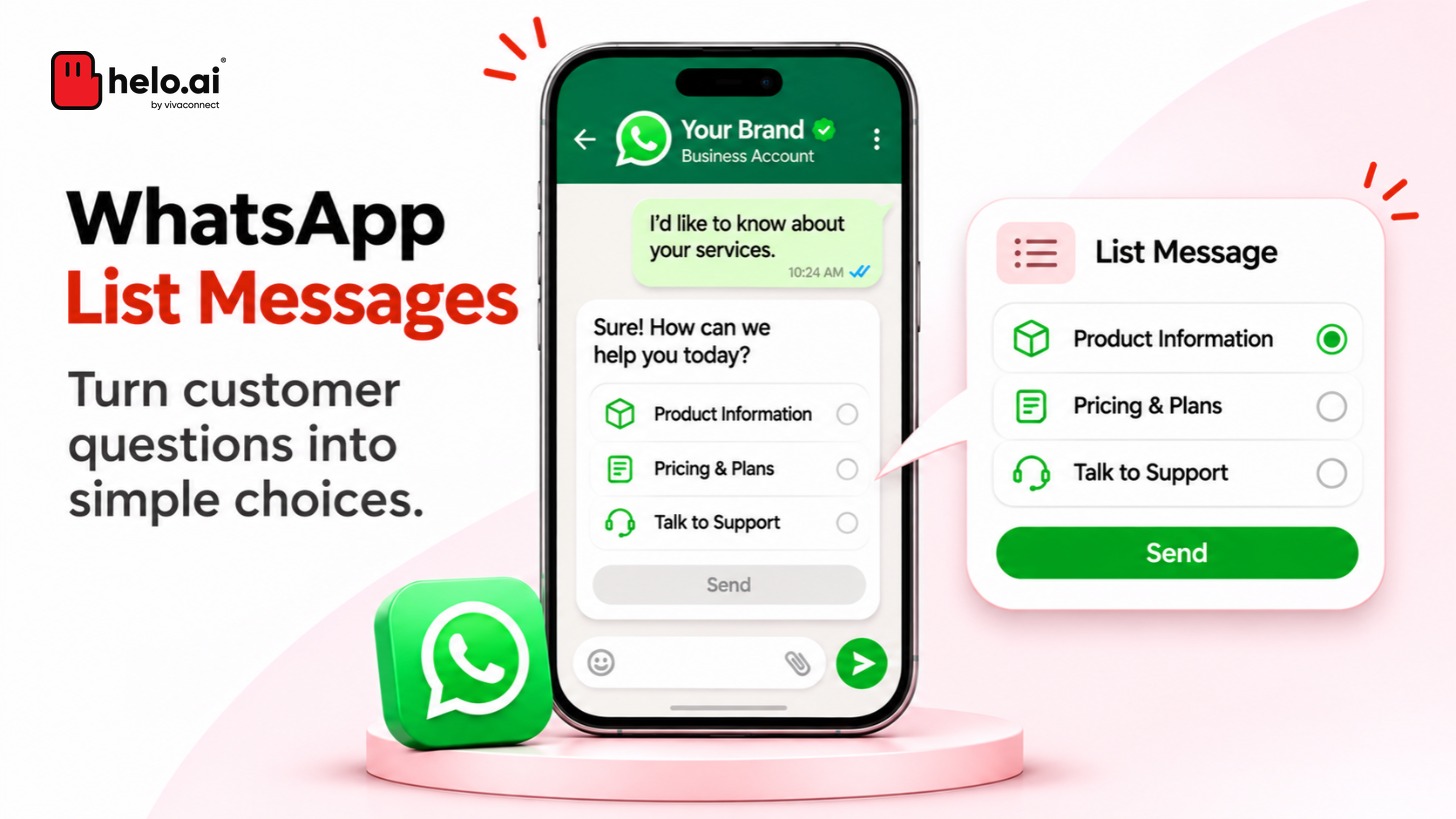
WhatsApp List Messages are interactive messages that allow businesses to display multiple selectable options within a WhatsApp conversation. Customers tap a button to open a list and select the option they want instead of typing their response.
A list can contain up to 10 selectable options, grouped into sections where needed.
For example, a business can send a customer the following message:
How can we help you today?
- Track my order
- Return a product
- Payment issue
- Product enquiry
- Talk to support
The customer taps the menu button, views the options and selects one. Their selection is then sent back to the business, allowing the chatbot or automation workflow to respond accordingly.
List Messages are part of WhatsApp's interactive messaging capabilities and are commonly used for customer support, service selection, enquiry routing and other structured conversations.
How Do WhatsApp List Messages Work?
WhatsApp List Messages make it easier for customers to navigate a conversation without having to type out their requirements.
Here's how the interaction works:
Step 1: The business sends a list
A business sends a WhatsApp message with a short prompt and a button that opens the available options.
For example:
Choose the service you need help with.
The customer sees a button such as View Services.
Step 2: The customer opens the list
When the customer taps the button, a menu appears with the available options. The options may be organised into sections to make them easier to navigate.
Step 3: The customer selects an option
The customer taps the option that best matches their requirement.
Step 4: WhatsApp sends the selection back
The selected option is returned to the business through the message response and webhook event.
Step 5: The business triggers the next action
The chatbot or backend system uses the selected option to decide what happens next.
For example:
- Selecting Track my order can trigger an order-status lookup.
- Selecting Payment issue can start a payment-support workflow.
- Selecting Talk to support can connect the customer to a human agent.
This is what makes List Messages useful beyond simple menus. They can act as entry points into automated customer journeys.
WhatsApp List Message Example
Imagine an e-commerce business receiving hundreds of customer enquiries every day about orders, returns and payments.
Instead of asking customers to explain their issue from scratch, it can send a structured list.
Example WhatsApp conversation:
Business
Hi! Welcome to our support chat. What would you like help with today?
View Options
When the customer taps the button, they see:
Customer Support
- Track my order
- Return a product
- Payment issue
- Product enquiry
- Cancel my order
- Talk to support
Once the customer selects an option, the business can send the appropriate response or route the conversation to the relevant workflow.
This reduces unnecessary back-and-forth and makes it easier for customers to reach the right service.
WhatsApp List Messages vs Reply Buttons
Both List Messages and Reply Buttons are interactive WhatsApp message formats. However, they serve different purposes.
| Feature | List Messages | Reply Buttons |
|---|---|---|
| Number of choices | Up to 10 options total | Up to 3 buttons |
| Layout | Options displayed in an expandable list | Buttons displayed directly in chat |
| Option descriptions | Supported | Not supported in standard reply buttons |
| Best suited for | Menus, services, categories | Short decisions or quick responses |
| Customer interaction | Opens a list and selects an option | Taps a button directly |
| Example | Choose a department | Yes / No / Speak to us |
Source check: Meta’s reply buttons documentation says a message can have up to three buttons with titles of up to 20 characters, and documents no description field. A tap arrives in the messages webhook as a button_reply object.
When should you use Reply Buttons?
Reply Buttons work best when the customer needs to make a quick decision.
For example:
- Confirm appointment
- Cancel appointment
- Speak to an agent
When should you use List Messages?
List Messages work better when a customer needs to choose from a larger set of options.
For example:
- Selecting a product category
- Choosing a banking service
- Selecting a support department
- Finding a store or service location
If your conversation requires more than three choices, List Messages can provide a more organised experience.
You can also read our guide on WhatsApp Interactive Messages to understand the different interactive formats available.
WhatsApp List Message Limits & Technical Specifications
WhatsApp List Messages follow specific formatting limits. Businesses must follow these when creating interactive messages through the WhatsApp Business Platform API or a provider platform.
| Element | Limit |
|---|---|
| Maximum sections | 10 |
| Maximum rows across all sections | 10 total |
| Minimum rows | At least 1 row per section |
| List button text | 20 characters |
| Section title | 24 characters |
| Row title | 24 characters |
| Row description | 72 characters |
| Row ID | 200 characters |
| Header | Optional, text only, up to 60 characters |
| Footer | Optional, up to 60 characters |
| Message body | Follow the current API/provider limit; 1,024 characters is a conservative working limit |
Source check: Meta’s list message documentation lists 1 to 10 sections, 10 rows in total, 20 characters for the button, 24 for section and row titles, 72 for row descriptions, 200 for row IDs and 60 for the header and footer. It lists the body limit as 4,096 characters, so 1,024 is a cautious working limit, not Meta’s maximum. Meta’s reply button limit for the body is 1,024. The page requires at least one row but does not state a per-section minimum.
A List Message can contain multiple sections, but the total number of selectable rows across all sections cannot exceed 10.
For example, a menu with two sections can have:
Account Services
- Account balance
- Statements
- Update details
Card Services
- Block my card
- Replace card
- Card enquiry
This creates a more organised menu without exceeding the overall option limit.
What is a Row ID in WhatsApp List Messages?
Every row must have an ID. Unlike the row title or description, this ID is not displayed to the customer. It is used by the business's system to identify which option the customer selected.
For example:
| Customer-facing option | Row ID |
|---|---|
| Track my order | order_tracking |
| Return a product | product_return |
| Payment issue | payment_support |
| Talk to support | human_agent |
When the customer selects an option, the row ID is returned in the message response/webhook.
The system can use this ID to trigger the relevant action without having to interpret the customer's response manually.
Row IDs should be unique within the message and meaningful to the backend workflow. This makes the automation easier to manage, test and maintain.
Source check: Meta says a list selection arrives in the messages webhook as a list_reply object with the selected row’s id, title and description. See Meta’s list message documentation.
Can WhatsApp List Messages be sent outside the 24-hour window?
List Messages are generally non-template interactive messages and can be sent within the active 24-hour customer service window, which begins when the customer messages the business.
If the customer service window has expired, businesses generally need to use an approved message template to initiate or re-engage the conversation, depending on the message type and applicable WhatsApp rules.
List Messages are not a substitute for approved templates when a business needs to initiate messaging outside the permitted window.
Always check the latest Meta messaging policies and your BSP's implementation documentation before deployment.
Source check: Meta’s service messages page says a 24-hour customer service window opens when a user messages or calls you, that interactive buttons and lists can be sent as free-form service messages inside it, and that after it closes only approved template messages can be sent.
Best Use Cases for WhatsApp List Messages
List Messages are most useful when businesses need to guide customers through a structured conversation.
Customer Support and Issue Routing
Customer support teams receive enquiries about different issues, often through the same WhatsApp number.
List Messages can help customers identify the issue before the conversation reaches an agent.
Example:
What do you need help with?
- Order status
- Payment problem
- Return or refund
- Product issue
- Other enquiry
The system can direct each response to the relevant support workflow or department.
Banking and Financial Services
Banks and financial institutions can use List Messages to make common services easier to access over WhatsApp.
For example:
Select a banking service
- Account information
- Credit card services
- Loan enquiries
- Branch information
- Report an issue
This can help customers navigate services without having to remember commands or type lengthy requests.
Appointment Booking
Businesses that accept appointments can use List Messages to help customers choose a service before proceeding with booking.
For example:
Which service would you like to book?
- Consultation
- Routine check-up
- Follow-up appointment
- Diagnostic service
The next step can ask for a preferred date or time, depending on the booking workflow.
E-commerce Product Discovery
Online stores can use List Messages to help customers navigate product categories.
For example:
What are you looking for?
- Electronics
- Fashion
- Home products
- Accessories
- Best sellers
Once a category is selected, the chatbot can share relevant products, catalogues or recommendations.
Lead Qualification
Businesses can use List Messages to understand a customer's requirement before sending the enquiry to sales.
For example:
What are you interested in?
- Product demo
- Pricing
- Enterprise solution
- Partnership
- Other
The customer's selection can help the sales team prioritise enquiries and provide more relevant responses.
Service Selection and Complaint Management
Businesses that offer multiple services can use List Messages to identify what a customer needs.
For example, a telecom company could provide options such as:
- Broadband issue
- Mobile recharge
- Network problem
- New connection
- Billing enquiry
The customer's selection can trigger the relevant support flow or ticket creation process.
Planning WhatsApp automation?
Explore Helo.ai’s WhatsApp product for business messaging and automation.
How to Create WhatsApp List Messages
Businesses can create WhatsApp List Messages using the WhatsApp Business Platform API or through a WhatsApp Business Solution Provider (BSP) or automation platform that supports interactive messages.
Step 1: Define the customer requirement
Decide what the customer needs to select.
Avoid combining unrelated choices in a single menu. The options should serve one clear purpose.
Step 2: Create the list structure
Organise the options into sections if required.
Keep the section titles simple and the rows easy to understand.
Step 3: Write the message
The message should explain what the customer needs to do.
For example:
Select an option below so we can help you with your enquiry.
Step 4: Add the list button
Choose a short button label that tells the customer what happens next.
Examples:
- View Services
- Select Option
- Choose Category
- Explore Menu
Step 5: Configure row titles, descriptions and IDs
Create customer-facing titles and optional descriptions. Assign a unique ID to every option so the system can identify the selection and route the conversation correctly.
Step 6: Connect the automation
Map each selection to the next action.
This could include:
- Sending relevant information
- Fetching data from a CRM or backend
- Creating a support ticket
- Collecting additional details
- Connecting the customer to an agent
Step 7: Test the complete journey
Before deployment, test every option.
Confirm that the right response is triggered, the row IDs are mapped correctly, and customers can reach a human agent when needed.
Businesses using platforms such as Wati can configure WhatsApp automation through a platform interface, depending on the features available in their plan. API-based implementations can also be configured directly or through a BSP.
Source check: Wati’s support guide says its chatbot builder can create list messages with up to 10 options and reply button messages with up to 3 buttons. It states no plan requirement.
Best Practices for WhatsApp List Messages
Creating a List Message is straightforward. Designing one that customers can use easily requires more thought.
Keep the options clear
Use short, familiar labels. Customers should understand what an option means without needing additional explanation.
Avoid vague choices such as "Other services" when more specific options are available.
Keep the list focused
Do not add every possible service to one menu. A list should help customers make a decision, not overwhelm them.
If the conversation requires several decisions, create a sequence of smaller menus.
Use descriptions where necessary
Descriptions can provide additional context when two options may appear similar.
For example:
- Loan Enquiry Check available loan products and eligibility.
- Loan Repayment Get help with an existing loan payment.
Make the next step useful
The customer should receive a meaningful response after selecting an option.
A menu that simply collects selections without taking the conversation forward creates friction rather than reducing it.
Provide a human support option
Automated journeys should always account for customers who need assistance beyond the available options.
Include a route to a support agent wherever appropriate.
Test on real devices
Test the message on mobile devices and the WhatsApp interface your customers are likely to use. Check the layout, labels, descriptions, routing and response flow.
WhatsApp List Messages vs Carousel Messages
List Messages and Carousel Messages are both used to display multiple choices or items on WhatsApp, but they are designed for different experiences.
| Feature | List Messages | Carousel Messages |
|---|---|---|
| Layout | Expandable menu | Swipeable cards |
| Best suited for | Service choices and navigation | Product discovery and visual browsing |
| Content | Text options with descriptions | Cards with visual and supporting content |
| Customer action | Select an option | Browse cards and interact |
| Typical use | Support, services, categories | Products, offers, collections |
List Messages are better when the customer needs to select a service or find the right path.
Carousels are more useful when the business wants to present multiple products, offers or options visually.
If you're exploring carousel formats, read our guide on WhatsApp Carousel Templates, Quick Reply Buttons and Interactive Experiences.
Source check: Meta’s carousel template documentation says carousel cards are only available for marketing template messages, with 2 to 10 cards that each need an image or video header and can have up to two buttons. A carousel template needs approval before it is sent, unlike a list message sent inside the service window.
WhatsApp List Message Pricing in India
WhatsApp List Messages do not have a separate pricing category. The applicable WhatsApp Business Platform messaging charges depend on the message category, recipient market and current pricing rules.
For Indian recipients, the Meta rate card effective October 1, 2026, lists the following rates:
| Message category | India rate per delivered message |
|---|---|
| Marketing | ₹0.8631 |
| Utility | ₹0.115 |
| Authentication | ₹0.115 |
| Service | ₹0.115 after the applicable free allowance |
These are Meta messaging rates and do not include provider fees or applicable taxes. Service messages also have a monthly free allowance per business phone number under the current rules.
The message category is determined by the purpose and applicable policy rules—not simply by whether the business uses a List Message, Reply Button or another interactive format.
Businesses should check the latest official rate card and provider charges before estimating campaign or automation costs.
Source check: Meta’s pricing page says rates are published in downloadable rate cards for each market, that the current cards take effect on 1 October 2026, and that each business number gets 1,000 free delivered service messages a month. The page does not print India amounts, so check the figures above against the downloadable INR rate card before budgeting.
How Helo.ai Helps Businesses Build WhatsApp Customer Journeys
WhatsApp List Messages work best when they are connected to the next step in a customer's journey.
For enterprises, that could mean identifying a customer's requirement, retrieving information from connected systems, automating a response, updating a workflow or transferring the conversation to a support team.
Helo.ai helps businesses manage customer communication and automation across channels, including WhatsApp, SMS, RCS and voice.
With connected conversational workflows, businesses can move beyond menu-based interactions to automate customer journeys while maintaining the ability to involve human agents when required.
For businesses managing high-volume communication, infrastructure, monitoring, reliability, integration capabilities and support arrangements are important considerations alongside the customer-facing experience.
Helo.ai supports enterprise communication at scale, handling 200M+ messages per month, with enterprise-grade infrastructure and operational support.
Source check: Helo.ai’s newsroom post reports more than 238 million WhatsApp messages in a month, from May 2025. Confirm the current figure before relying on “200M+ messages per month”.
If your business is looking to build WhatsApp automation for customer support, sales, service enquiries or customer engagement, the right workflow should be designed around the customer's requirement and the action that needs to happen next.
Talk to the Helo.ai team
Talk to an expert to explore WhatsApp automation for your business.
Frequently Asked Questions
What is a WhatsApp List Message?
A WhatsApp List Message is an interactive message that allows a business to present customers with a menu of options. Customers open the list and select an option instead of typing a response.
How many options can a WhatsApp List Message have?
A List Message can contain up to 10 rows in total, organised into a maximum of 10 sections. The total number of rows across all sections cannot exceed 10.
Can WhatsApp List Messages have descriptions?
Yes. Each row can include an optional description of up to 72 characters, helping customers understand the option before selecting it.
Are WhatsApp List Messages free?
List Messages do not have a separate message charge. The applicable WhatsApp charges depend on the message category, current pricing rules and the provider's fees.
Can WhatsApp List Messages be automated?
Yes. When a customer selects an option, the selection is returned to the business through the response/webhook. A chatbot or backend system can use it to trigger the next action, such as sending information, retrieving data or routing the customer to an agent.
Can I send WhatsApp List Messages outside the 24-hour window?
List Messages generally fall under interactive non-template messaging and are subject to the customer service window. Outside that window, businesses need to follow WhatsApp's applicable template and messaging rules.
What is the difference between WhatsApp List Messages and Reply Buttons?
Reply Buttons provide up to three quick choices directly in the chat. List Messages can display up to 10 options through an expandable menu, making them better suited for service menus, categories and structured navigation.
Do WhatsApp List Messages work with chatbots?
Yes. List Messages can be connected to chatbot workflows. The customer's selection can determine what the chatbot sends next, which information it collects or whether the conversation is transferred to a human agent.
Final Takeaway
WhatsApp List Messages are a simple way to make customer conversations more structured. Instead of asking customers to type their requirements, businesses can present clear options and guide them towards the next step.
The real value comes from what happens after the customer selects an option. When List Messages are connected to automation, backend systems and support workflows, they can make customer interactions easier to navigate and help businesses manage enquiries more efficiently.
For businesses looking to automate WhatsApp conversations, the goal should not be to add more menus. It should be to make every interaction easier for the customer and more useful for the business.
Related Resources
- What Are WhatsApp Interactive Messages?
- WhatsApp Carousel Templates, Quick Reply Buttons and Interactive Experiences
Note. Helo.ai offers WhatsApp messaging products and published this guide. Meta pages were checked on 24 November 2026. Limits, rates and policies change often, so confirm them before building.